Why SaaS is The Best Option for Enterprise Businesses?

In today’s evolving technological landscape, enterprise businesses are presented with an array of options to streamline their operations and drive growth. One solution that has gained remarkable traction in recent years is Software-as-a-Service (SaaS).

This innovative model has transformed the way organizations approach software deployment, offering a wide array of benefits that are particularly well-suited for enterprise-level operations.

In this blog, we’ll delve into the world of SaaS, explore its characteristics, advantages, and dispel common myths, ultimately highlighting why it’s the best option for modern enterprise businesses.

Understanding SaaS:
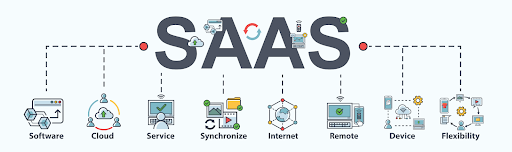
Understanding SaaS

(Image source: https://www.saasacademy.com/)

It is a cloud computing model in which software applications are hosted and provided to users over the internet on a subscription basis.

Unlike traditional software that needs to be installed and maintained on individual computers or servers, SaaS applications are centrally managed in the cloud, accessible from any device with an internet connection.

This convenience and flexibility have made it a game-changer for businesses of all sizes, but particularly for enterprises with complex needs.

Examples of Popular SaaS Application

Examples of Popular SaaS Application

(Image source: https://otakoyi.software/)

Customer Relationship Management (CRM):

  • Salesforce:
    A highly customizable CRM platform that helps businesses manage leads, contacts, opportunities, and customer interactions.
  • WakeUpSales:
    A user-friendly CRM system that offers contact management, email tracking, and sales automation features.

Project Management and Collaboration:

  • Orangescrum:
    A project management tool known for its visual task boards and team collaboration features, making it easy to track projects and tasks.
  • Monday.com:
    A work operating system that provides a centralized platform for planning, tracking, and managing work across teams.

Human Resources Management (HRM):

  • Workday:
    A cloud-based HRM system that covers HR, payroll, and talent management, designed to streamline workforce management.
  • BambooHR:
    An HR software that focuses on employee data management, onboarding, and performance tracking.

Enterprise Resource Planning (ERP):

  • Oracle NetSuite:
    A comprehensive cloud-based ERP solution that integrates financial management, CRM, and e-commerce functionalities.
  • SAP Business ByDesign:
    A scalable ERP system that covers various business processes like finance, supply chain, and project management.

Communication and Team Collaboration:

  • Microsoft Teams:
    A hub for teamwork in Microsoft 365, combining chat, video conferencing, file sharing, and app integration.
  • Slack: A messaging and collaboration platform that enhances communication and teamwork with channels, integrations, and file sharing.

Marketing Automation:

  • HubSpot Marketing Hub:
    An all-in-one marketing automation platform that includes tools for email marketing, social media, and analytics.
  • Marketo:
    A powerful marketing automation solution that focuses on lead generation, nurturing, and personalized campaigns.

Financial Management:

  • QuickBooks Online:
    A popular cloud-based accounting software that helps small businesses manage invoicing, expenses, and financial reports.
  • Xero:
    Another cloud-based accounting platform known for its ease of use and features like bank reconciliation and expense tracking.

E-commerce Platforms:

  • Shopify:
    A widely-used e-commerce platform that enables businesses to set up online stores, manage products, and process payments.
  • WooCommerce:
    A plugin for WordPress that turns a website into an e-commerce store, offering customization and integration options.

Customer Support and Helpdesk:

  • Zendesk:
    A customer service platform that provides ticketing, live chat, and self-service support solutions to enhance customer experience.
  • Freshdesk:
    A cloud-based helpdesk software that offers omnichannel support, ticket management, and automation features.

Document Collaboration and Storage:

  • Google Workspace (formerly G Suite):
    A suite of cloud-based productivity tools including Google Docs, Sheets, and Drive for collaboration and storage.
  • Microsoft 365 (formerly Office 365):
    A collection of applications including Word, Excel, and OneDrive for document collaboration and storage.

Video Conferencing and Communication:

  • Zoom:
    A widely-used video conferencing platform that offers online meetings, webinars, and collaboration features.
  • Microsoft Teams:
    Apart from collaboration, it also serves as a platform for video conferencing, making it a versatile choice.

A Brief History of SaaS Applications

The concept dates back to the 1960s, but it gained significant momentum in the 1990s with the advent of the internet.

Salesforce’s launch in 1999 marked a pivotal moment, showcasing the viability of delivering software as a service.

Are you looking for a SaaS developer

Contact Us

Since then, it has evolved to cover a wide range of applications and industries, disrupting traditional software deployment models.

What are the Characteristics and Benefits of SaaS Applications?
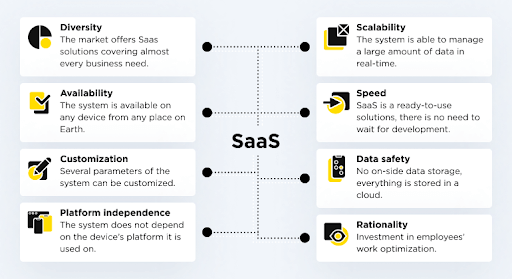

What are the Characteristics and Benefits of SaaS Applications
(Image source: https://otakoyi.software/)

Scalability and Flexibility:

  • Easily Scales:
    Applications can scale up or down seamlessly, adapting to changing user demands or business growth without requiring significant infrastructure adjustments.
  • No Hardware Upgrades:
    Eliminates the need for costly hardware upgrades or expansions, as the cloud infrastructure handles the scaling process.
  • Rapid Deployment:
    New users or features can be added quickly, allowing businesses to respond to market opportunities or changes without delay.
  • Pay-as-You-Grow:
    You pay for what you use, making it ideal for startups or enterprises looking to control costs while maintaining the ability to expand operations.
  • Resource Efficiency:
    It avoids overprovisioning and underutilization of resources, optimizing cost-effectiveness.

Cost-Efficiency and Predictable Pricing:

  • Subscription Model:
    It operates on a subscription basis, replacing upfront licensing costs with regular, predictable payments.
  • Reduced Capital Expenses:
    No need for significant upfront investments in software licenses or hardware, freeing up capital for other business priorities.
  • Lower Total Cost of Ownership (TCO):
    Maintenance, updates, and support are often included in the subscription, reducing the total cost of owning and managing software.
  • Scalability Savings:
    As your business grows, you avoid the expense of purchasing and maintaining additional hardware and software licenses.
  • Budget Predictability:
    Fixed subscription fees allow for better budgeting and financial planning, minimizing financial surprises.

Accessibility and Collaboration:

  • Anytime, Anywhere Access:
    SaaS applications are accessible via the internet, enabling users to work from anywhere and on any device.
  • Remote and Hybrid Work:
    Supports the rise of remote work, allowing teams to collaborate effectively regardless of geographical locations.
  • Real-Time Collaboration:
    Multiple users can work simultaneously on shared documents, projects, or data, enhancing teamwork and productivity.
  • Reduced Communication Barriers:
    Instant messaging, file sharing, and collaborative features facilitate smooth communication and information exchange.
  • Global Workforce Enablement:
    It breaks down geographic barriers, allowing businesses to tap into talent from around the world.

Automatic Updates and Maintenance:

  • Seamless Updates:
    Application service providers handle updates and maintenance, ensuring that your software is continuously updated with the latest features and security enhancements.
  • Reduced IT Burden:
    IT teams are relieved of routine maintenance tasks, allowing them to focus on strategic initiatives and innovation.
  • Improved Security:
    Regular updates include security patches, reducing vulnerabilities and enhancing protection against cyber threats.
  • Minimized Downtime:
    Updates are often performed without disrupting users, minimizing downtime and ensuring continuous operation.
  • Access to Innovation:
    Automatic updates provide access to new functionalities and capabilities without the need for manual installations.

Integration and Interoperability:

  • Built-in Integrations:
    Many applications offer Application Programming Interfaces (APIs) and integrations with other popular software and services.
  • Unified Data Flow:
    Integrations facilitate data sharing and synchronization across different systems, reducing data silos and improving data accuracy.
  • Streamlined Workflows:
    Automated data transfer between applications reduces manual data entry and improves efficiency.
  • Enhanced Decision-Making:
    Unified data and insights from integrated systems enable better-informed decisions across departments.
  • Customized Ecosystem:
    Organizations can create tailored ecosystems by combining applications that suit their specific needs, ensuring a cohesive software environment.

What is the Difference Between SaaS (Software-as-a-Service) vs. On-Premise Applications
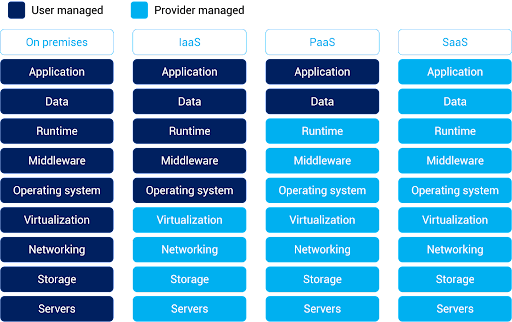
What is the Difference Between SaaS (Software-as-a-Service) vs. On-Premise Applications

(Image source: https://www.alibabacloud.com/knowledge/what-is-saas)


SaaS (Software-as-a-Service)

On-Premise Application

Definition

SaaS applications are cloud-based software solutions delivered over the internet on a subscription basis. Users access the software remotely through web browsers without needing to install or maintain it locally.

On-premise applications are traditional software solutions that are installed and run on local servers or computers within an organization’s physical infrastructure. These applications are managed, maintained, and updated by the organization’s IT department.

Deployment

Deployed on the provider’s servers and accessed remotely via the internet. No installation is required on users’ devices.

Installed and maintained on the organization’s own servers, requiring manual installations and updates on each user’s device.

Cost Structure

Follows a subscription-based pricing model, with predictable recurring costs that cover software access, maintenance, updates, and support. Involves upfront costs for software licenses and hardware, with potential additional costs for ongoing maintenance, updates, and support.

Accessibility

Accessible from anywhere with an internet connection, fostering collaboration among distributed teams and enabling remote work.

Accessible only within the organization’s network, limiting remote access and collaboration.

Scalability

Scales easily to accommodate increased users, data, or transactions, with the provider managing the underlying infrastructure

Requires manual adjustments and potential hardware upgrades to scale, often leading to higher costs and longer implementation times.

Maintenance and Updates

Providers handle maintenance, updates, and security, ensuring that users always have access to the latest features and security patches.

Organizations are responsible for maintaining, updating, and patching the software, which can be time-consuming and resource-intensive.

Customization

Customization options can be limited, as the software is standardized to cater to a broader user base.

Offers greater customization possibilities, allowing organizations to tailor the software to their specific needs.

Data Security

Data security relies on the provider’s measures. Organizations must trust the provider’s security practices and compliance with data protection regulations.

Provides more control over data security, but requires organizations to implement and maintain their own security measures.

Integration

Offers built-in APIs and integrations with other software, facilitating seamless data flow across systems.

Integrations often require manual development and maintenance, potentially leading to longer integration times.

Vendor Control

Organizations rely on the SaaS provider for software management, updates, and security, which can lead to concerns about vendor dependency.

Organizations have full control over software management, updates, and security, but this also requires dedicated IT resources.

Debunking Common Software-As-A-Service Myths

  1. Myth: SaaS is Less Secure than On-Premise Software:

Reality: Security is a top priority for providers. Reputable providers invest heavily in advanced security measures, encryption, data backup, and compliance with industry standards. These platforms often offer robust security features that match or even surpass those of on-premise solutions.

  1. Myth: It Is Only for Small Businesses:

Reality: It is suitable for businesses of all sizes, from startups to large enterprises. In fact, many enterprises leverage software-as-a-service to streamline operations, reduce IT complexity, and stay agile in a rapidly changing business landscape.

  1. Myth: Software-As-A-Service Applications Lack Customization:

Reality: While these applications are standardized to cater to a broader user base, many providers offer customization options. Businesses can often configure settings, integrate with other tools, and adapt workflows to align the software with their specific needs.

  1. Myth: Applications Always Have Hidden Costs:

Reality: While subscriptions involve ongoing costs, they typically include maintenance, updates, and support. Compared to on-premise solutions, where hidden costs like hardware upgrades and maintenance can accumulate, It provides greater transparency and predictability in total costs.

  1. Myth: You Lose Control Over Your Data:

Reality: Software service providers prioritize data security and compliance. While data is stored off-site, reputable providers implement strict access controls, encryption, and adhere to data protection regulations. Businesses retain ownership of their data and can access, export, and delete it as needed.

What Future Holds For SaaS Application?
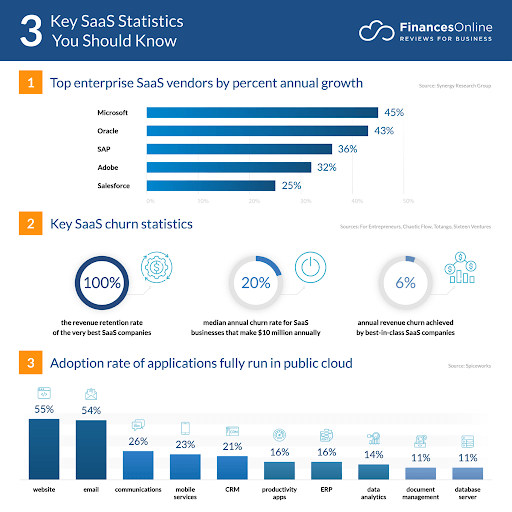
What Future Holds For SaaS Application

(Image source: https://financesonline.com/)

  • SaaS is a cloud-based application platform; according to statistics the global market for cloud related software services will surpass $520 Billion in 2023.
  • According to a recent study, nearly 1/3rd of the companies invested in cloud computing.
  • In the year 2022 the hybrid cloud market was $54.34 Billion which is expected to reach $ 201 Billion in 2032.
  • Nearly 90% of the active companies around the world have adopted cloud technology.
  • Amazon cloud service or AWS is the leading SaaS solution provider. It owns 32% of shares around the world.

Conclusion

Software-as-a-Service has revolutionized the way enterprises approach software adoption and usage.

Its accessibility, scalability, and cost-efficiency make it the best option for modern enterprise businesses.

By harnessing the power of SaaS, enterprises can drive innovation, enhance collaboration, and stay agile in an ever-changing business landscape.

FAQs

Q1 – Who Owns SaaS Product Data?

Answer – The ownership of data in a SaaS product typically rests with the customer or the organization that subscribes to the service. Software service providers act as custodians of the data and are responsible for its storage and security. It’s important to review the terms of service and data usage policies provided by the vendor to understand the specifics of data ownership and usage rights.

Q2 – What If My Software-As-a-Service Provider Goes Out Of Business?

Answer – If your software service provider goes out of business, it can create challenges for your organization. It’s crucial to have a contingency plan in place. Ideally, before subscribing to their service, ensure that the contract includes provisions for data retrieval and transition in case the vendor becomes non-operational. Backup your data regularly and maintain awareness of the financial stability and reputation of the software-as-a-service developers.

Q3 – Can Applications be Customized to Fit Enterprise-Specific Needs?

Answer – Yes, many software service applications offer customization options. While these solutions are standardized to cater to a broad audience, they often provide configuration settings, integration capabilities, and extensions that allow businesses to adapt the software to their specific needs. However, the extent of customization may vary depending on the provider and the nature of the application.

Q4 – Is It Secure For Enterprise-Level Data?

Answer – Reputable software service providers prioritize data security and invest in robust measures to protect enterprise-level data. These measures can include encryption, access controls, regular security audits, compliance with industry regulations, and data backup strategies. While security concerns are valid, many applications provide a high level of security that can often match or surpass on-premise solutions, provided you choose a reliable and trusted vendor.


10 Best Tools For ReactJS Development In 2023

In the world of modern web app development, ReactJS has emerged as a dominant force, powering some of the most dynamic and responsive applications. However, to truly harness the power of React, developers need a toolkit of ReactJS development tools that streamline the process and ensure optimal performance.

With its component-based architecture and virtual DOM, ReactJS app development facilitates high-performance user interfaces.

In this blog, we’ll explore the top 10 ReactJS development tools in 2023 that can help you build high-performance applications with ease.

What are React Development Tools?

They are a set of utilities, extensions, and libraries that enhance the development experience and enable developers to create efficient and well-structured applications.

These tools aid in debugging, code formatting, state management, and more, ultimately contributing to the performance and quality of React applications.

How to Install React Development Tools?

Getting started with development tools is a straightforward process. Most of these tools are available as browser extensions or packages that can be added to your project. Let’s take a look at how to set up and utilise these tools effectively:

Steps to add React Extensions:

  • Open your preferred browser (commonly Chrome or Firefox).
  • Search for the desired React development tool extension.
  • Install the extension by following the browser’s installation process.

Steps to use React Extensions:

  • Open your React application in a browser tab.
  • Access the developer tools panel (usually by pressing F12 or right-clicking and selecting “Inspect”).
  • Navigate to the Components tab in the developer tools panel.

 Top 10 ReactJS Development Tools in 2023:

Redux DevTools:

A must-have for projects utilizing Redux for state management. It enables ReactJS developers to monitor and debug Redux actions, states, and time-travel through state changes.

  • State Inspection:
    Redux DevTools allow developers to inspect the state and action history of a Redux store. This feature is invaluable for debugging and understanding how data flows through the application.
  • Time Travel:
    You can “time travel” through state changes, enabling you to rewind and replay actions to understand how the application’s state evolves over time.
  • Action Playback:
    Developers can replay actions and state changes to identify issues, understand user interactions, and reproduce bugs effectively.
  • State Comparison:
    It provides a side-by-side comparison of state changes, making it easy to spot differences and identify potential problems.

Storybook:

An invaluable tool for creating and testing UI components in isolation. Storybook aids in building a well-documented and reusable component library.

  • Component Isolation:
    Storybook allows developers to build and view UI components in isolation, which aids in rapid development, testing, and identifying component-specific issues.
  • Interactive Documentation:
    It generates interactive documentation for components, making it easier for both developers and designers to understand how components should be used.
  • Visual Testing:
    The extension enables visual testing by showcasing components with various states and props, allowing developers to identify visual glitches and inconsistencies.
  • Collaboration:
    The interactive documentation provided by Storybook aids collaboration between designers, developers, and other stakeholders, ensuring a shared understanding of UI components.
  • Addon Ecosystem:
    Storybook offers a rich ecosystem of add-ons that provide additional features like accessibility testing, design token management, and more, enhancing the development workflow.

ESLint:

Ensures code quality and consistency by analyzing your code for errors and enforcing coding standards. ESLint rules can be configured to cater specifically to React development.

  • Code Consistency:
    ESLint enforces coding standards, leading to a more consistent and readable codebase across the team.
  • Error Prevention:
    It detects and highlights syntax errors, potential bugs, and common programming mistakes, helping developers catch issues early in the development process.
  • Customizable Rules:
    Developers can configure ESLint rules to match their preferred coding style and best practices, tailoring the tool to the project’s requirements.
  • Integration with IDEs:
    it seamlessly integrates with popular integrated development environments (IDEs) and code editors, providing real-time feedback and suggestions as you write code.
  • Maintainability:
    By identifying and addressing coding issues, ESLint contributes to code quality, making maintenance and collaboration easier in the long run.

Prettier:

An opinionated code formatter that automatically enforces consistent code formatting, making your codebase neat and readable.

  • Consistent Formatting:
    Prettier enforces a consistent code formatting style across the entire codebase, reducing debates about formatting choices and enhancing code readability.
  • Automatic Formatting:
    It automatically formats code as you save or commit, reducing the need for manual formatting and saving developers time.
  • Configuration-Free:
    The extension comes with sensible defaults and minimal configuration, making it easy to integrate into projects without spending significant time on setup.
  • Language Support:
    Prettier supports various programming languages beyond JavaScript, such as HTML, CSS, and Markdown, ensuring consistent formatting throughout the project.
  • Avoiding Bike-Shedding:
    It eliminates discussions about code formatting within the team, allowing developers to focus on more critical aspects of development.

Webpack:

A powerful bundler that handles asset management, code splitting, and more. It’s essential for optimizing the performance of React applications.

  • Module Bundling:
    Webpack bundles modules and assets into optimized bundles, reducing the number of HTTP requests and improving page load times.
  • Code Splitting:
    It supports code splitting, allowing developers to split the code into smaller chunks that are loaded only when needed, optimizing performance.
  • Hot Module Replacement:
    The extension enables hot module replacement, allowing developers to see changes in the codebase without needing to manually refresh the browser.
  • Asset Handling:
    The development tool can handle a wide range of assets like images, fonts, and styles, optimizing and serving them efficiently.
  • Extensible and Customizable:
    Webpack’s modular architecture and extensive plugin system make it highly customizable, allowing developers to tailor the build process to their project’s requirements.

Babel:

A JavaScript compiler that enables developers to use the latest ECMAScript features by transpiling them into compatible code for various browsers.

  • JavaScript Modernization:
    Babel enables developers to use the latest ECMAScript features, even if not all browsers support them, by transpiling modern syntax into compatible code.
  • Customization:
    Its configuration options allow developers to control how their code is transformed, ensuring a balance between compatibility and the use of cutting-edge features.
  • Plugin Ecosystem:
    The extension offers a wide range of plugins that cater to specific needs, making it possible to customize the transpilation process and integrate with other tools.
  • Polyfill Integration:
    The tool can automatically add polyfills for missing features in older browsers, ensuring that your application works consistently across different environments.
  • Future-Proofing:
    By transpiling code to older JavaScript versions, Babel helps future-proof your applications, making them compatible with a broader range of devices and browsers.

Parcel:

A zero-config bundler that simplifies the build process. It’s especially useful for small to medium-sized projects.

  • Zero Configuration:
    Parcel requires minimal configuration, making it an excellent choice for quickly setting up projects without the need for complex setup processes.
  • Built-in Features:
    It comes with built-in features like automatic asset resolution, hot module replacement, and code splitting, simplifying the development process.
  • Performance:
    The extension optimizes assets automatically, resulting in faster builds and improved application performance.
  • Extensibility:
    Although it comes with sensible defaults, Parcel can be extended using plugins and custom configurations to tailor the build process to your specific needs.
  • Beginner-Friendly:
    The straightforward setup and minimal configuration make Parcel a beginner-friendly choice, ideal for developers who are new to build tools.

React Router:

A popular routing library that enables navigation and routing within a React application, ensuring seamless user experiences.

  • Declarative Routing:
    React Router provides a declarative way to handle routing in React applications, allowing developers to define routes using components.
  • Nested Routes:
    It supports nested routes, enabling developers to structure complex applications with hierarchical routing structures.
  • Route Parameters:
    Developers can define dynamic segments within routes, making it easy to handle route parameters and create dynamic, data-driven UIs.
  • History Management:
    The extension handles browser history seamlessly, allowing for smooth navigation and maintaining a consistent user experience.
  • Location Management:
    The tool provides hooks and components to manage the application’s location, making it straightforward to create navigation and links.

Reactide:

An integrated development environment specifically designed for React development, providing features like live previews and component hierarchies.

  • Integrated Development Environment (IDE):
    Reactide is an IDE specifically designed for React development, providing features like live previews, component hierarchies, and more.
  • Rapid Prototyping:
    The tool’s live preview feature allows developers to see changes in real-time, aiding in rapid prototyping and experimentation.
  • Component Hierarchies:
    Developers can visualize and understand the component hierarchy within the application, enhancing the understanding of complex UI structures.
  • Simplified Setup:
    The extension streamlines the setup process by bundling essential tools and components required for React development into a single package.

Evergreen: A UI component library designed by Segment that offers a collection of high-quality, customizable components to enhance the user interface.

  • High-Quality UI Components: Evergreen provides a collection of high-quality UI components that are customizable and well-designed, enabling developers to create polished interfaces.
  • Consistency: The tool components follow consistent design patterns, contributing to a cohesive and unified user experience across the application.
  • Accessibility: The extension places emphasis on accessibility, ensuring that the components are usable and navigable for users with disabilities.
  • Customizability: While Evergreen components come with predefined styles, they are also highly customizable, allowing developers to match the design to their brand’s identity.
  • React Integration: The components are designed to work seamlessly with React, enabling developers to incorporate them into their applications without compatibility issues.

Top 9 Websites Developed Using ReactJS:

  1. Facebook:

    The world’s largest social media platform connecting people and facilitating online social interactions.

  2. Instagram:

    A popular photo and video-sharing platform, enabling users to share and discover visual content.

  3. Airbnb:

    An online marketplace for lodging, allowing users to rent or list accommodations around the world.

  4. Netflix:

    A leading streaming service offering a wide range of movies, TV shows, and original content.

  5. WhatsApp Web:

    An extension of the WhatsApp messaging app that allows users to send and receive messages from their computers.

  6. Dropbox:
    A cloud storage service enabling users to store, share, and access files from anywhere.
  7. PayPal:

    An online payment platform that facilitates secure transactions and money transfers electronically.

  8. Uber:

    A ride-sharing and food delivery platform that connects users with drivers and restaurants.

  9. Reddit:

    A social news aggregation and discussion website where users can share and discuss various topics.

 What are the Benefits of ReactJS?

  • Virtual DOM for Enhanced Performance:
    React introduces a Virtual DOM, a lightweight representation of the actual DOM. This allows for efficient updates to the user interface by minimizing direct manipulations, resulting in faster rendering and improved application performance.
  • Component-Based Architecture:
    React follows a component-based approach, where UI elements are broken down into reusable and self-contained components. This modularity simplifies development, testing, and maintenance, making codebases more organized and readable.
  • Reusability:
    With components that can be easily reused across the application, development becomes more efficient. Components encapsulate their behavior and presentation, enabling React developers to build complex interfaces by assembling simple building blocks.
  • Unidirectional Data Flow:
    React enforces a unidirectional data flow, making it easier to track changes and understand how data is being passed between components. This architecture enhances predictability and maintainability of the code.
  • Developer Tools and Debugging:
    React offers powerful developer tools, including browser extensions and integrated debugging capabilities. ReactJS Developers can inspect component hierarchies, monitor state changes, and track props, making troubleshooting more efficient.
  • Server-Side Rendering (SSR):
    React supports server-side rendering, which pre-renders components on the server and sends HTML to the client. This improves search engine optimization (SEO) and initial load times, enhancing user experience.
  • Community and Ecosystem:
    React has a vast and active community, contributing to a rich ecosystem of third-party libraries, tools, and resources. This community support accelerates development and problem-solving.
  • JSX (JavaScript XML):
    React uses JSX, a syntax extension for JavaScript that enables React programmers to write HTML-like code within JavaScript. This approach simplifies UI rendering, making it more intuitive and easy to read.
  • Strong Backing by Facebook:
    React was developed by Facebook and is widely used within the company. This strong backing ensures ongoing development, support, and updates, keeping the framework current and reliable.
  • Mobile App Development:
    With React Native, a framework derived from React, developers can build native mobile applications for iOS and Android using a single codebase. This reusability significantly reduces development effort and costs.

Why Should Business Owners Choose ReactJS for the Next Web App Project?

  1. Speed:

It is renowned for its fast rendering capabilities, primarily due to its implementation of the Virtual DOM.

This lightweight abstraction of the real DOM enables React to efficiently update only the necessary components, resulting in quicker rendering and a smoother user experience.

Are you looking for a ReactJS developer

Contact Us

Business owners value React’s speed as it contributes to lower bounce rates, increased user engagement, and ultimately, better conversion rates.

  1. Flexibility:

Business requirements can evolve rapidly, demanding the ability to pivot and adapt quickly. ReactJS’s modular and component-based architecture lends itself well to flexibility.

ReactJS Developers can create reusable components that can be easily integrated into different parts of an application.

This modular approach empowers businesses to make changes, additions, or modifications efficiently, reducing development time and costs.

  1. Performance:

Performance is a non-negotiable aspect of web applications.

ReactJS’s efficient rendering process, coupled with its emphasis on optimizing for performance, ensures that applications remain responsive even as they grow in complexity.

The use of virtual DOM minimizes unnecessary updates, resulting in smoother interactions and better overall performance.

  1. SEO-Friendly:

Search engine optimization (SEO) is critical for ensuring a web application’s discoverability.

ReactJS supports server-side rendering (SSR), allowing the initial rendering of pages on the server before they are sent to the client’s browser.

This SSR capability ensures that search engines can crawl and index the content effectively, leading to improved search engine rankings and increased organic traffic.

  1. Usability:

ReactJS’s declarative syntax makes it easy for developers to express the user interface in a straightforward and intuitive manner.

This readability and ease of use contribute to better collaboration between developers, designers, and stakeholders.

Business owners appreciate React’s usability as it accelerates the development process, reduces learning curves, and enhances overall project efficiency.

  1. Reusable Components:

One of ReactJS’s defining features is its focus on reusable components. React programmers can create encapsulated components that manage their state and interactions independently.

This reusability streamlines development, reduces code duplication, and ensures consistency across the application.

Business owners benefit from faster development cycles and easier maintenance as a result of these reusable components.

Top ReactJS Development Companies in 2023:

  1. Andolasoft

Andolasoft is a ReactJS development company that excels in ReactJS web and mobile app development, offering tailored solutions that cater to diverse business needs. They leverage React’s capabilities to build dynamic and interactive web and mobile apps.

Andolasoft offers a comprehensive range of ReactJS development services:

  • ReactJS front-end development services
  • Custom web and enterprise application services
  • ReactJS product development services
  • ReactJS website migration services
  • ReactJS integration services
  • ReactJS UI/UX development services
  • ReactJS plugin development services
  • React Native app development services
  • ReactJS support & maintenance services

Top Projects Developed by Andolasoft Using ReactJS

Highly Secure Digital Payment Application

Industry: Fintech and Financial Services

Technologies: ReactJS, NodeJS, AngularJS, HTML, CSS, MongoDB, AWS, Bootstrap, REST

Andolaosft developed the Fintech application according to the customer requirement. The developers use the latest technologies like AngularJS, NodeJS, ReactJS, MongoDB, AWS, Bootstrap to develop the highly secure Fintech app which enables features such as payment, funds transfer, funds acceptance, remittance and more.

Traffic and User Behaviour Tracking Application

Industry: Computer Software

Technologies: ReactJS, NodeJS, AngularJS, HTML, CSS, MongoDB, AWS, Bootstrap, REST

Andolaosft developed this user behavior tracking tool to track how users engage with the business website. It keeps track of the user and traffic behavior and generates insights on customer journey, engagement, event reports, heat maps, sales funnels etc in a single platform.

  1. Thoughtbot

Thoughtbot is a renowned design and development consultancy that specializes in crafting exceptional digital experiences with ReactJS. They bring together design thinking and technical expertise to create innovative solutions.

  1. Geniusee

Geniusee is a technology company that harnesses ReactJS to build cutting-edge web applications. With a focus on innovation and user-centered design, they deliver solutions that resonate with clients and end-users.

  1. Neoteric

Neoteric is a forward-thinking software development partner that uses ReactJS to build modern, scalable, and performant applications. They emphasize agile methodologies and collaborative approaches to deliver successful projects.

  1. Visuality

Visuality is a digital product agency that specializes in creating visually appealing and user-friendly applications using ReactJS. They infuse creativity into every project to craft memorable digital experiences.

Top Things to Consider Before Hiring ReactJS Development Company

  • Expertise and Experience:
    Look for a company with a proven track record in ReactJS development. Check their portfolio, case studies, and client reviews to assess their experience and skills.
  • Technology:
    Ensure the React development company is well-versed not only in ReactJS but also in related technologies like Redux, GraphQL, and other tools commonly used in React development.
  • Portfolio:
    Review the company’s portfolio to see if they have worked on projects similar to yours. This demonstrates their ability to understand your industry and project requirements.
  • Communication:
    Effective communication is crucial. Assess their responsiveness, clarity in communication, and whether they understand your vision and goals.
  • Development Process:
    Inquire about their development methodology—whether they follow agile practices, offer regular updates, and involve you in decision-making.
  • Code Quality:
    Ask about their coding standards, testing practices, and code review processes to ensure the final product will be of high quality and maintainable.
  • Client References:
    Reach out to their previous clients to get insights into their experience working with the company. This can provide valuable insights into their professionalism and work ethic.
  • Support and Maintenance:
    Enquire about post-launch support and maintenance services. A professional reactJS development company should be ready to provide assistance in case of issues or updates.

Conclusion:

In the dynamic world of ReactJS web development, having the right set of development tools is essential for creating high-performance applications.

From managing app objects to optimizing code, these tools empower developers to build user-friendly, efficient, and visually appealing web applications.

As technology continues to evolve, staying up-to-date with the latest ReactJS development tools will be pivotal in delivering outstanding digital experiences.

FAQs

What considerations should developers keep in mind when choosing the right React development tools for their specific project requirements?

 Answer: Developers should consider factors such as the project’s complexity, team expertise, and specific needs when selecting the most suitable React development tools.

How do these React development tools align with the broader goal of building high-performance applications that provide optimal user experiences?

 Answer: These React development tools collectively contribute to faster development, efficient debugging, optimized assets, and clean code, all of which are essential for creating high-performance applications that deliver exceptional user experiences.

Can I integrate ReactJS into an existing application built with a different technology stack?

 Answer: Yes, ReactJS can be integrated into existing applications. You can start by adding React components to specific parts of the application and gradually transition to a fully React-powered frontend.

How can I optimize the performance of my ReactJS app to ensure fast loading times and smooth interactions?

 Answer: You can optimize performance by minimizing render cycles, lazy loading components, code splitting, optimizing assets, and using tools like React DevTools to identify bottlenecks.

How to Develop a Highly Engaging Ecommerce Store Using CakePHP

The world of eCommerce business is evolving at a rapid pace. Business owners can choose from various technologies to develop their online store.

However, with the availability of open source technology, CakePHP eCommerce development is on the rise.

With its robust features and flexibility, CakePHP stands out as a reliable framework for developing dynamic and efficient eCommerce websites.

In this guide, we’ll take you through the step-by-step process of developing eCommerce web apps using CakePHP framework.

“CakePHP offers a well-structured and organized framework that streamlines development. It’s impressive how it balances ease of use with powerful features.”

                    Matt Mullenweg, Founder of WordPress

Why Developers Choose CakePHP for eCommerce Development?

Choosing the right framework for developing an eCommerce app is crucial for ensuring efficiency, scalability, and maintainability.

CakePHP is one of the best frameworks for eCommerce app development due to its numerous advantages and little disadvantages.

Here are the top 10 reasons to consider CakePHP for your eCommerce app:

  1. Rapid Development:

CakePHP follows the convention over configuration (CoC) principle, reducing the need for manual setup.

This accelerates development by providing pre-defined conventions and tools, enabling developers to focus on building features rather than writing boilerplate code.

  1. MVC Architecture:

CakePHP development facilitates Model-View-Controller (MVC) architecture which promotes a clear separation of concerns.

This allows CakePHP developers to work on different aspects of the app independently, enhancing code organization and maintainability.

  1. Code Reusability:

CakePHP emphasizes reusable components and plugins.

This is invaluable in eCommerce development, where features like shopping carts, payment gateways, and user authentication can be developed once and integrated across the app.

  1. Security Features:

CakePHP integrates security practices by default, helping to mitigate common vulnerabilities like SQL injection and cross-site scripting (XSS).

It also provides tools for handling input validation and form tampering protection.

  1. ORM and Database Abstraction:

CakePHP’s Object-Relational Mapping (ORM) system simplifies database interactions.

Developers work with PHP objects instead of SQL queries, reducing the risk of errors and improving code readability.

  1. Built-in Validation:

CakePHP application development facilitates built-in validation methods, making it easier to enforce data integrity and validate user inputs.

This is crucial for maintaining accurate product information and ensuring a smooth checkout process in an eCommerce app.

  1. Community and Documentation:

The framework boasts an active and supportive community.

The official documentation is comprehensive, making it easier to learn the framework, troubleshoot issues, and stay up-to-date with best practices.

  1. Plugin Ecosystem:

The CakePHP plugin ecosystem offers a wide range of ready-made solutions for common eCommerce functionalities.

This saves development time and effort by allowing you to integrate existing plugins for features like user management, payment gateways, and SEO optimization.

  1. Flexible Theming:

eCommerce apps require appealing and responsive designs.

CakePHP’s theming capabilities allow you to separate design and logic, making it easy to create visually engaging and user-friendly storefronts.

  1. Scalability and Performance:

Its well-structured architecture and caching mechanisms contribute to improved performance and scalability.

As your eCommerce app grows, CakePHP programmers help maintain a high level of performance without sacrificing user experience.

 “CakePHP has played a significant role in shaping modern PHP frameworks. Its conventions and code generation tools have been an inspiration for frameworks like Laravel.”

                                                                                                               Taylor Otwell, Creator of Laravel

Why Do Business Owners Choose CakePHP for eCommerce Development?

  1. Cost-Effective:

eCommerce Business owners appreciate CakePHP for its cost-effectiveness.

The framework’s open-source nature means that there are no licensing fees, making it a suitable choice for startups and small to medium-sized businesses.

Additionally, the rapid development capabilities enable CakePHP developers with shorter development cycles, reducing overall development costs.

  1. Providing Customized User Experience:

It empowers business owners to create a tailored user experience for their customers.

The framework’s flexibility allows developers to build customized features and functionalities that align with the business’s unique needs and latest ecommerce trends.

Whether it’s a dynamic product catalog, personalized recommendations, or interactive user interfaces, CakePHP programmers make it possible to craft a user-centric experience.

  1. Strong Security:

Security is paramount in today’s digital landscape, especially for businesses handling sensitive customer data.

CakePHP’s built-in security features, including input validation, data sanitization, and protection against common vulnerabilities like SQL injection and cross-site scripting (XSS), provide a strong foundation for developing secure eCommerce applications.

  1. Community Support:

The CakePHP community is vibrant and active, offering a wealth of resources and support to business owners and developers alike.

With an extensive documentation repository, forums, tutorials, and user-contributed plugins, business owners can tap into a network of expertise to troubleshoot issues, share insights, and continuously improve their applications.

  1. Analytics:

Business owners understand the importance of data-driven decision-making.

CakePHP’s integration capabilities with analytics tools enable businesses to gather valuable insights into user behavior, sales trends, and other key metrics.

By leveraging analytics, business owners can refine their strategies and optimize their web applications for better performance.

“CakePHP’s architecture promotes scalability and maintainability. It’s reassuring to see a framework that values clean code and sensible defaults.”

                                                                             Jeffrey Zeldman, Web Designer and Entrepreneur

What are the Modules to Include While Developing an eCommerce Store?

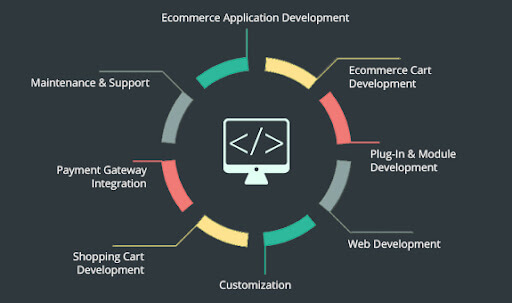
What are the modules to include while developing an eCommerce Store

(Image source: www.webmynesystems.com)

Let’s delve deeper into each of the modules to include in a CakePHP eCommerce development:

  1. Admin Panel:

The admin panel is the command center of your eCommerce site, where administrators and store managers control various aspects of the store’s operations.

Using CakePHP, you can create an admin panel that allows authorized users to perform tasks like managing products, orders, customers, and more.

Implement authentication and authorization to ensure only authorized personnel access the admin functionalities.

  1. Product Management:

Product management is essential for adding, editing, and updating the products available in your store’s inventory.

With CakePHP web app development, you can create a user-friendly interface in the admin panel that allows administrators to add new products, edit existing ones, set prices, add images, and manage product descriptions.

  1. Categories Management:

Categories help organize products and make navigation easier for customers. Using CakePHP, you can design a module that lets administrators create, edit, and delete product categories.

Each category can have a name, description, and possibly an image to visually represent it.

  1. Product Attributes:

Product attributes define specific characteristics of a product, such as size, colour, and material.

In CakePHP ecommerce development, you can develop a system where administrators can define attributes and values for each product, enhancing the customization options for customers.

  1. Retailers:

If your eCommerce store involves partnerships with retailers, you can develop a module to manage retailer information.

This could include retailer profiles, contact details, product distribution, and orders associated with specific retailers.

  1. Orders Management:

This module handles the processing of customer orders. Administrators can view, update, and fulfil orders using the admin panel.

CakePHP can help you create an intuitive order management system that provides real-time order tracking and communication with customers regarding their orders.

  1. Coupon Codes Facility:

Creating and managing coupon codes is a great way to offer discounts and promotions to customers.

Using CakePHP, you can build a coupon code management module that allows administrators to generate, set conditions for, and track the usage of coupon codes.

  1. Shipping Modules for Delivery Rates:

Developing a shipping module involves integrating with shipping carriers to calculate accurate shipping rates based on factors like destination, weight, and shipping method.

In CakePHP development, you can implement a shipping module that fetches real-time shipping rates from carriers’ APIs and presents them to customers during checkout.

  1. Customers Management:

This module deals with customer profiles and information.

Administrators can manage customer accounts, view their order history, update contact details, and address any customer inquiries or issues.

  1. General Enquiries Module:

For customer inquiries that don’t necessarily fall under orders or products, you can develop a module to handle general enquiries.

Customers can submit questions or concerns, and administrators can respond and manage these inquiries from the admin panel.

  1. User Management:

Apart from customers, your site might have different user roles like administrators, store managers, and customer support.

CakePHP development features authentication and authorization capabilities which allow developers to manage user roles and access permissions effectively.

  1. Front Store:

The front store is the public-facing part of your website where customers browse and shop for products.

Using CakePHP, you can create a visually appealing and user-friendly interface that showcases products, categories, and special offers.

  1. Products Display:

This module displays products on the front store, allowing customers to browse and search through the product catalog.

Implement pagination and filtering options to enhance the shopping experience.

  1. Product Detail Page:

When a customer selects a product, they’re directed to the product detail page.

This page provides in-depth information about the product, including images, descriptions, prices, attributes, and customer reviews.

  1. Shopping Cart Management:

The shopping cart module keeps track of the items customers have added for purchase.

With CakePHP, you can create a dynamic shopping cart that allows customers to add, remove, and update quantities of products before proceeding to checkout.

  1. Checkout:

The checkout module guides customers through the final steps of purchasing.

It collects shipping and billing information, offers shipping options, and presents the order summary before payment.

  1. Payment via PayPal:

CakePHP enables you to integrate payment gateways like PayPal.

The PayPal integration module handles secure payment processing, ensuring customer payment information is handled safely and transactions are completed seamlessly.

  1. Order Management:

On the customer side, order management lets users view their order history, track order statuses, and possibly request returns or refunds.

On the admin side, this module enables administrators to process orders, update statuses, and communicate with customers regarding their orders.


“As a developer, CakePHP has been a reliable tool for building robust applications quickly. The framework’s commitment to following best practices sets a high standard for PHP development.”

Rachel Andrew, Web Developer and Co-Founder of Perch CMS

What are the Challenges of Using CakePHP for eCommerce?

  1. Steep Learning Curve:

CakePHP development has a structured and convention-based approach, which can result in a steeper learning curve for developers who are new to the framework.

Learning and adhering to CakePHP’s conventions might take time initially, especially if developers are accustomed to different coding patterns.

  1. Limited Flexibility for Complex Customizations:

While CakePHP’s conventions can speed up development, they may limit flexibility when dealing with highly complex customizations.

In scenarios where unique and unconventional features are required, working within the framework’s conventions might become challenging.

  1. Performance Overhead:

While CakePHP offers caching mechanisms and performance optimization tools, some applications may experience performance overhead, especially under heavy loads.

Fine-tuning the application’s performance might require additional effort.

  1. Smaller Community Compared to Other Frameworks:

While the CakePHP community is active and supportive, it may not be as extensive as some other popular PHP frameworks.

This could mean that finding solutions to less common issues might take more time or rely more on self-guided exploration.

  1. Dependency on Updates:

Keeping the framework up-to-date is important for security and performance reasons.

However, updates to CakePHP might require adjustments to your application, particularly if it relies on certain features or plugins that have undergone changes.

What are the Steps to Develop eCommerce using CakePHP?

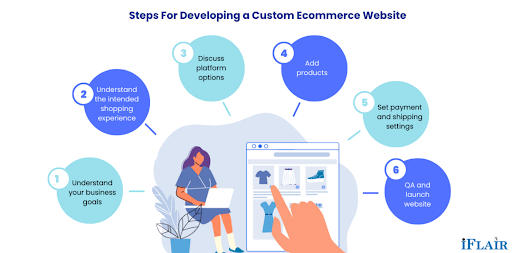
What are the Steps to Develop eCommerce using CakePHP

(Image source: www.iflair.com)

Step 1: Setting the Foundation

Environment Setup:
Ensure you have PHP and a web server (like Apache) installed on your machine. Additionally, download and install Composer, a PHP dependency manager, to easily integrate libraries and plugins.

CakePHP Installation:
Use Composer to install CakePHP by running the command composer create-project –prefer-dist cakephp/app my_store.

Step 2: Database Configuration

Database Creation:
Create a new database for your eCommerce store using tools like phpMyAdmin or the command line.

Configuration:
Configure your database settings in config/app.php under the ‘Datasources‘ array.

Creating Tables:
Use CakePHP’s powerful schema generation tools to create your database tables. Run the command bin/cake bake migration CreateProducts to create a migration file.
Modify the migration file to define your product fields, then run bin/cake migrations to apply the changes to the database.

Step 3: Designing Your Store

Layouts and Views:
CakePHP uses a template system that separates logic from presentation. Create layout templates and views for your store’s pages, like the homepage, product listing, and product details.

Adding Styles and Assets:
Integrate CSS frameworks like Bootstrap to enhance the visual appeal of your store. Utilize CakePHP’s asset management to efficiently load CSS, JavaScript, and image files.

Step 4: Implementing eCommerce Features

Adding Products:
Create a controller and views to handle product management. Use CakePHP’s FormHelper for creating forms to add new products.

Product Listing:
Display products dynamically using CakePHP’s query builder to retrieve data from the database. Implement pagination to manage large product catalogs.

Shopping Cart:
Build a shopping cart system using sessions or database storage to keep track of selected products. Allow users to add, remove, and adjust quantities of items in their cart.

Checkout Process:
Design a multi-step checkout process. Implement form validation and user authentication for a seamless purchasing experience.

Payment Integration:
Integrate payment gateways like PayPal or Stripe to securely process payments. Leverage CakePHP’s plugin ecosystem to simplify the integration process.

Step 5: User Management

User Registration and Login:
Create user authentication using CakePHP’s built-in tools or third-party plugins. Allow users to register accounts and log in securely.

Step 6: Security and Performance

Data Validation:
Utilize CakePHP’s validation features to ensure data integrity and prevent malicious input.

Security Measures:
Implement security best practices like CSRF protection, input sanitation, and secure authentication to safeguard user data.

Step 7: Testing and Deployment

Unit Testing:
CakePHP comes with testing tools. Write unit tests to ensure the functionality of your application.

Deployment:
Choose a reliable hosting provider and deploy your application. Configure your server to meet CakePHP’s requirements.

Cal Evans, PHP Community Advocate:

“CakePHP’s influence on the PHP community has been undeniable. It’s contributed to the advancement of PHP frameworks and has helped developers produce quality code.”

Top Things to Consider when Hiring CakePHP Developers for eCommerce Development

Expertise and Experience:

Look for a CakePHP development company with expertise in the framework particularly for eCommerce projects.

Review their portfolio to assess the complexity and quality of their previous work. Experience in creating custom eCommerce solutions is essential to ensure that your specific needs are met.

eCommerce Domain Knowledge:

An understanding of eCommerce nuances is vital.

Ensure that the CakePHP development agency is familiar with eCommerce processes such as product management, cart functionality, payment gateways, shipping, and order processing.

Their experience in developing user-friendly and conversion-focused eCommerce experiences is crucial.

Technical Proficiency:

Verify the company’s technical expertise in CakePHP, as well as other related technologies like HTML, CSS, JavaScript, and database management.

Their ability to integrate third-party APIs and tools, such as payment gateways and analytics, is also important.

Customization Capabilities:

eCommerce websites often require unique features. Assess the company’s ability to customize CakePHP applications according to your business requirements.

They should be able to strike a balance between using CakePHP’s conventions and implementing tailor-made solutions.

Security Practices:

Given that eCommerce sites handle sensitive customer data, security is paramount.

Inquire about the company’s approach to security, including measures to prevent vulnerabilities, protect customer information, and ensure compliance with data protection regulations.

Quality Assurance and Testing:

A reputable development company should have a rigorous quality assurance process in place.

Ask about their testing methodologies, including unit testing, integration testing, and user acceptance testing, to ensure a bug-free and reliable eCommerce application.

Communication and Collaboration:

Effective communication is key to a successful project.

Ensure that the company maintains open lines of communication and is responsive to your queries.

Look for their ability to collaborate with your team, share progress updates, and discuss project milestones.

Scalability and Performance:

As your eCommerce business grows, your website needs to scale efficiently.

Discuss the company’s approach to ensuring optimal performance, handling increased traffic, and maintaining a seamless user experience as your store expands.

Project Management and Timeline:

A well-organized project management approach is crucial for meeting deadlines.

Understand how the CakePHP development company plans and manages projects, including how they handle milestones, iterations, and client feedback.

Post-Launch Support and Maintenance:

A reliable CakePHP development company should provide ongoing support after the project’s launch.

Inquire about their post-launch services, including bug fixes, updates, and technical support.

Client References and Testimonials:

Request references from previous clients and read testimonials to gain insights into the company’s work ethics, communication, and the overall client experience.

Cost and Budget Alignment:

While cost should not be the sole factor, ensure that the company’s pricing aligns with your budget.

Discuss the project scope, pricing structure, and any potential additional costs.

Phil Sturgeon, API Design Expert and Developer Advocate:

“CakePHP has continuously evolved to meet the demands of modern web development. Its focus on conventions and reusability has made it a favorite among developers.”

Who are the top 5 CakePHP Development Companies in the World?

Andolasoft:

Andolasoft Logo

Andolasoft is a software development company known for its expertise in CakePHP eCommerce development.

Apart from CakePHP the company offers web, mobile and cloud development services using a wide range of technologies.

The company has technology expertise on PHP, Python, Laravel, NodeJS, Ruby on Rails, VueJS, ReactJS, AngularJS, JavaScript etc.

With a focus on innovation and client satisfaction, Andolasoft has delivered solutions across various industries, helping businesses achieve their digital goals.

Top CakePHP Development Services Offered by Andolasoft

  • CakePHP eCommerce development services
  • CakePHP template design services
  • CakePHP CMS development services
  • CakePHP migration services
  • CakePHP plugin development services
  • CakePHP custom website development services
  • CakePHP maintenance and support services

Top 3 CakePHP Projects Developed by Andolasoft

  • D&B Auto Rental

D&B Auto Rental

Technologies used – PHP 5.6, Apache, jQuery, jQuery UI, AWS, Bootstrap

The web app is developed to provide reliable car rental services. It is designed with a focus on customer experience, intuitive interface and easy data handling.

  • In4Mng

In4Mng

Technologies used – PHP, jQuery, jQuery UI, Bootstrap

Are you looking for a CakePHP developer

Contact Us

In4Mng is an entertainment application which is based in Nigeria. The app aggregates content from both print and electronic media into a single platform. The app adds additional content such as giveaways, games and puzzles to make information engaging and interesting to consume.

Orangescrum Logo

Technologies used – CakePHP, jQuery, jQuery UI, DataTables, Bootstrap

Orangescrum is a versatile project management software designed to streamline project planning, execution, and collaboration for individuals and teams. It offers a comprehensive set of tools and features to help businesses manage tasks, track progress, and achieve project goals efficiently.

  • Orases:

Orases is a full-service digital agency that specializes in CakePHP development.

They provide end-to-end solutions, including web and mobile app development, UI/UX design, and digital marketing.

With a commitment to delivering exceptional user experiences and innovative solutions, Orases has established a reputation for helping businesses thrive in the digital landscape.

Hyperlink InfoSystem:

Hyperlink InfoSystem

Hyperlink InfoSystem is a global technology solutions provider offering CakePHP development among its array of services.

They have a vast portfolio of successful projects spanning web and mobile apps, blockchain, IoT, and more.

With a global clientele, Hyperlink InfoSystem is recognized for its technical expertise and dedication to delivering cutting-edge solutions.

DotSquares:

DotSquares

DotSquares is a technology company that offers a comprehensive suite of services, including CakePHP development.

With a focus on delivering tailored solutions to meet client objectives, they have worked on diverse projects ranging from eCommerce platforms to business applications.

DotSquares has a global presence and a track record of delivering high-quality software solutions.

illuminz:

illuminz

illuminz is a software development agency with a strong focus on CakePHP development.

They provide end-to-end solutions including web and mobile app development, UI/UX design, and digital marketing services.

With a commitment to delivering scalable and innovative solutions, illuminz collaborates with businesses to bring their visions to life in the digital realm.

What are top questions to ask a CakePHP development company before hiring?

  1. What is your experience with CakePHP development?

Ask about the company’s experience specifically with CakePHP projects. Inquire about their past projects, complexities they’ve handled, and the size of the eCommerce platforms they’ve developed.

  1. Can you provide references or case studies from previous CakePHP projects?

Request references or case studies from clients who have hired the company for CakePHP development. This can give you insights into their work quality, reliability, and client satisfaction.

  1. How do you approach security in CakePHP development for eCommerce applications?

Security is critical in eCommerce. Ask about their practices for securing sensitive customer data, implementing encryption, preventing SQL injection, and handling payment information securely.

  1. What testing procedures do you follow to ensure the quality of CakePHP projects?

Testing is crucial to deliver a bug-free application. Ask about their testing practices, including unit testing, integration testing, and user acceptance testing, to ensure the final product meets your expectations.

  1. How do you handle post-launch support and maintenance?

An eCommerce site requires ongoing support to address issues, implement updates, and ensure smooth operations. Discuss their approach to post-launch support and the availability of maintenance services.

  1. What happens in case of scope changes or unexpected challenges during development?

Projects can encounter changes or challenges. Ask how they handle scope changes and unexpected issues, and how they communicate such matters to you.

  1. What differentiates you from other CakePHP development companies?

This question can help you understand the company’s unique strengths, values, and offerings that set them apart in the market.

Conclusion

eCommerce business owners choose CakePHP for its cost-effectiveness, ability to provide customized user experiences, strong security features, community support, and integration capabilities with analytics tools.

This framework empowers business owners to develop eCommerce applications that not only meet their specific needs but also provide a competitive edge in the digital market.

By harnessing the benefits of CakePHP, businesses can create scalable, secure, and engaging eCommerce apps that resonate with their target audience and drive success.

FAQs

Q1: How can you implement personalized shopping experiences using CakePHP?

Utilize CakePHP’s session management and user authentication to track customer behavior and preferences.

Based on this data, one can implement personalized product recommendations, wish lists, and targeted promotions, enhancing the overall shopping experience.

Q3: What are some strategies for integrating popular payment gateways into a CakePHP eCommerce application?

Integrating payment gateways like PayPal, Stripe, or Square involves utilizing their APIs within the CakePHP eCommerce application.

You can create dedicated components or plugins to handle payment processing, ensuring that sensitive financial information is securely transmitted and stored.

Q4: What are the key features of CakePHP that make it suitable for eCommerce development?

CakePHP offers features like MVC architecture, ORM (Object-Relational Mapping), built-in security features, CRUD (Create, Read, Update, Delete) operations, scaffolding, and data validation. These features streamline eCommerce development by providing a solid foundation and reducing manual coding efforts.

Everything You Need To Know About WordPress Firewall Security

Website security basically refers to the measures taken to protect a website from potential security threats, such as hacking, data theft, or malware infections. Website security is crucial for protecting sensitive information and ensuring that a website remains accessible to users. The goal of website security is to ensure the confidentiality, integrity, and availability of the website and its data.

Some common security measures of a WordPress website are,

  • Using strong passwords and implementing two-factor authentication
  • Keeping the website and its components (e.g., themes, plugins) up to date
  • Using a reputable web host with built-in security features
  • Implementing an SSL/TLS certificate for encryption
  • Installing a security plugin, such as a firewall or antivirus software
  • Regularly backing up the website’s data
  • Monitoring the website for suspicious activity
  • Educating users on safe browsing practices.

A firewall is a security tool that monitors and controls incoming and outgoing network traffic based on predetermined security rules. In the context of WordPress website security, a WordPress firewall acts as a barrier between your website and potential security threats, such as hacking attempts, malware infections, or data theft.

Never miss an update from us. Join 10,000+ marketers and leaders.

Here are some of the benefits of using a WordPress firewall for your website security:

  • Protects against hacking attempts: Firewall helps to prevent unauthorized access to your website by blocking malicious traffic & suspicious IP addresses.
  • Prevents malware infections: A WordPress firewall can detect and block malware-infected requests before they reach your website.
  • Increases website speed: By blocking malicious traffic, a WordPress firewall can improve the overall speed and performance of your website.
  • Enhances security: A WordPress firewall provides an additional layer of security to complement other security measures, such as SSL certificates, anti-virus software, and regular backups.
  • Simplifies security management: Many WordPress firewalls come with user-friendly interfaces that make it easy for non-technical users to manage security settings.

What is WordPress Firewalls?

A WordPress firewall is a security tool that helps protect a WordPress website from various online threats, such as hacking attempts, malware, and malicious traffic. It acts as a barrier between the website and the internet, analyzing incoming traffic and blocking any requests that may be harmful to the site.

The firewall helps to prevent unauthorized access, data theft, and other security breaches, making the site more secure and reliable. Some popular WordPress firewalls include Sucuri, Wordfence, and All In One WP Security and Firewall.

Why use WordPress Firewall

Using a WordPress firewall in a website provides several benefits, like;

  • Improved security: A firewall helps to protect the website from various online security threats, such as hacking attempts, malware, and malicious traffic. It acts as an extra layer of security, filtering out harmful traffic and blocking potential attacks before they can cause damage.
  • Protection against attacks: A firewall helps to prevent unauthorized access, data theft, and other security breaches, making the site more secure and reliable.
  • Real-time monitoring: A firewall provides real-time monitoring of incoming traffic and alerts administrators if any suspicious activity is detected.
  • Enhanced website performance: By blocking malicious traffic and reducing the load on the server, a firewall can help improve the overall performance and speed of the website.
  • Easy to install and use: Many WordPress firewall plugins are easy to install and configure, making it simple for website owners to implement this extra layer of security without needing technical expertise.

Therefore, using firewall is a smart and effective way to secure a WordPress website and protect it from potential security threats.

Best WordPress Firewalls

There are many options available for WordPress firewalls, and the best one for a specific website will depend on its unique needs. Here are some popular and well-regarded WordPress firewalls below,

  • Sucuri: A comprehensive security solution that offers a firewall, malware scanning, and website monitoring.
  • Wordfence: A security plugin that includes a firewall, malware scanning, and real-time traffic monitoring.
  • All In One WP Security and Firewall: A security plugin that provides a range of security features, including a firewall, malware scanning, and website optimization.
  • Jetpack Security: A security solution that offers a firewall, automatic backups, and real-time security scanning.
  • IThemes Security: A security plugin that provides a firewall, two-factor authentication, and malware scanning.

These are just a few examples of the many WordPress firewalls available. It’s important to research and compare different options to find the one that best fits your site’s needs and budget.

How to Install a WordPress Firewall on Website

Installing a WordPress firewall on a website typically involves the following steps:

Choose a firewall plugin:

Choose a WordPress firewall plugin that fits the needs of your website. Some popular options include Sucuri, Wordfence, and All in One WP Security and Firewall.

Install the plugin:

Login to the WordPress admin dashboard and go to the “Plugins” section. Click “Add New” and search for the firewall plugin you’ve chosen. Install and activate the plugin.

Configure the plugin:

Once the plugin is installed and activated, navigate to its settings page to configure it according to your preferences. Some plugins may offer default settings that you can use or adjust as needed.

Test the firewall:

After configuring the firewall, test it to make sure it’s working correctly. You can do this by visiting your website and checking for any errors or issues.

Regularly update the plugin:

To ensure the firewall remains effective, it’s important to regularly update the plugin to the latest version. This will help to address any known security vulnerabilities and improve the overall security of your website.

Are you looking for a WordPress Developer

Contact Us

These are the general steps for installing a WordPress firewall. However, the exact steps may vary depending on the specific plugin you choose, so it’s recommended to consult the plugin’s documentation for detailed instructions.

Conclusion

WordPress firewall security is a crucial aspect of maintaining the security of your website. By using a combination of security plugins, server-side security measures, and best practices for website management, you can significantly reduce the risk of your site being hacked or compromised.

Regularly updating your WordPress software, plugins, and themes, and backing up your website regularly can also help ensure that your site remains secure and protected from potential threats.

Security must be taken seriously: a breached website can lead to sensitive data loss, reputational harm, and costly losses.

Angular 14: All the Important Features and Updates

Angular is a typescript-based web application framework and is Google’s brilliant creation. It has released its latest version which is Angular 14. It has arrived with stand-alone components, promising to streamline application development by reducing the need for angular modules.

It is believed to be the most systematic pre-planned upgrade by Angular. It has released new features which include CLI auto-completion, typed reactive forms, stand-alone components, directives, pipes, and enhanced template diagnostics.

Stand-alone Components:

The standalone component is a new feature that lets you create your components and use them anywhere in the app. The biggest advantage of standalone components is that they are easier to customize than other types of components.

You can create these kinds of components using the @Component annotation, which tells angular how to build this kind of component when you include it in the app. Here’s an example:

[code language=”css”]
import {Component} from ‘@angular/core’;
import {AppComponent} from ‘./app.component’;
@Component({ selector: demo-app’, template: `<h1>Hello World!</h1>`}) export class AppComponent {}
[/code]

Strictly Typed Forms:

In Angular 14, you can now use TypeScript to enforce a strict form of types on the forms. This means that each field will be checked against its type when it is submitted or validated, which makes it easier to make sure that the forms are not invalid.

The strictly typed forms have been improved as follows:

  • More responsive look and feel
  • The form is now easier to use and less confusing to the users
  • Form validation errors are displayed at once on the screen instead of having them displayed as pop-ups after submitting data

Never miss an update from us. Join 10,000+ marketers and leaders.

Angular CLI Auto-Completion

Angular CLI auto-completion is a new feature that provides auto-completion for the angular command line interface (CLI) commands. The completion feature is based on the TypeScript definition files and uses the IntelliJ IDEA plugin.

It can be enabled by adding @types/angular to the list of types you want to use in the app. In addition, you can select which kinds of completion you want such as TypeScript or ECMAScript features related to angular.

The auto-completion feature in the Angular CLI gives the ability to type < and then press Tab or Shift+Tab to complete the selection. You can also use Ctrl+Space or Command+Space to make the selections by typing words in the console.

In addition, it will turn on the tab completion automatically when you are in an editor window or running an application. This makes it easier for developers who don’t have a lot of experience with Angular to get started with it quickly.

Improved Template Diagnostics

The ng template debug method is removed from the new release of the framework. To ensure that you have time to migrate the new way of debugging template syntax errors in Angular 14. We are introducing a new diagnostic method called ng-template-error. This diagnostic will print the offending code within an error message when the app throws an error during the runtime.

It can enable this new diagnostic by including the following @Output decorator on all of the components:

[code language=”css”]
import { NgModule } from ‘@angular/core’;
import { BrowserModule } from ‘@angular/platform browser;
import { DemoApp } from `./app`; import { AppComponent } from `./app.component`;
@NgModule({ imports: [ BrowserModule ], declarations: [ AppComponent ], bootstrap: [ AppComponent ] }) export class AppModule {}
[/code]

Streamlined Page Title Accessibility

The page title is the most visible piece of information on a web page. It is what users see when they open a new tab or window and it is what search engines used to index the content.

You can customize the title tag of your pages directly from within the <head> of your style sheet. You can now leverage the power of the HTML to provide additional context for the title tag.

In the previous release, Angular had to assume that the title property of

elements was accessible. However, this assumption was not always accurate and could lead to unexpected behavior.

Now, Angular can assume that the title property is accessible when it needs to be. This means that you will see fewer exceptions when using

elements with a title attribute in the application.

You can also opt-in to using this new feature by configuring the app with @angular/platform-server@2.0.0-beta.18 or higher and adding the following element in the component’s template:

[code language=”css”]
<%= raw `<ng-content></ng-content>` %>
[/code]

In Angular 14, the page title is accessible via a simple API. If you have a component with a template and a pipe that returns an object, you can use the title property on the returned object to access the page title.

[code language=”css”]
import { Component } from ‘@angular/core’;
import { RouterLink } from ‘@angular/router’;
import { NavController } from ‘@angular/common;
import { AppComponent } from ‘./app.component’;
@Component({ selector: ‘app-root’, styleUrls: [‘./app.component.css’], template: `<router-outlet></router-outlet>; ` }) export class AppComponent {}
export function getTitle(): any;
export const router = new RouterLink({ path: ‘/’, title: getTitle() });
[/code]

Latest Primitives in the Angular CDK

The Angular CDK (Compiler-Dependent JavaScript) is a library that provides a set of primitives for building components, services, and many other types of applications.

The latest version of the CDK is now available in an alpha release with several new features:

  • Angular Elements: A new way to build HTML elements, which can be placed inside the other components or used standalone as an <div> element. The new elements are inspired by the ShadowDOM APIs in V8 and Web Components.
  • New FormBuilder: An Angular form builder that allows you to create forms with ease using simple declarative expressions and properties instead of creating a separate controller for each form field.

There are a bunch of new primitives in the Angular CDK, including:

  • @Output () decorator: It allows you to write template code directly into your component class.
  • @Injectable () decorator: This allows you to inject any other component or service into your component class.
  • @Link () decorator: This allows you to create link tags that can be used in templates and directives.

I’ve worked with the team at Andolasoft on multiple websites. They are professional, responsive, & easy to work with. I’ve had great experiences & would recommend their services to anyone.

Ruthie Miller, Sr. Mktg. Specialist

Salesforce, Houston, Texas

LEARN MORE

Conclusion

Angular 14 is finally released with some amazing new features and updates. This version will have a major impact on the development community as a whole.

The Angular developer community strives to make sure that web developers get better versions of the framework allowing them to stay updated with the rest of the online ecosystem and users’ needs.

Service Oriented Architecture in NodeJS

What is Service-oriented Architecture in NodeJS?

Service-oriented architecture is a way to build backend applications consisting of multiple independent services. A service can be any business logic that completes an action and provides a specified result to the endpoint user.

Each service in SOA is a complete business function in itself.

For an Example

Let’s discuss this at a grocery store.

The owner adds the product details to the inventory. The owner searches to find data about a unique product. And the backend application database query should be inside the service section by leveraging the data access layer. Then it securely fetches data and gives the response to the owner.

Layers in Service-oriented Architecture

  1. Router layer
  2. Service layer
  3. Data access layer

How SOA Works

  • Here first when the API call, in the node app first it faces the router section where all the authentication and validation occur through the middleware function. Then control moves toward the controller section which work is collect the incoming data related to API requests. Here all the business logic to access data is combined inside a service. So the controller invokes that service and service leverage data access layer to connect with database and calculation. Then services return the data to the controller. After that controller gives the response to the endpoint user.
  • The most important benefit of SOA is as all the services are independent and small chunks so whenever we want to change our programing language it should be very fast and easy in the development process.

Flow chart diagram:

SOA Flow Daigram

SOA Advantages

  • Reliable– Even though service-oriented architecture has small and independent services, it becomes easier to debug code as it checks small chunks instead of checking a large codebase
  • Independent of location– Services can be accessed through URL therefore change in location doesn’t affect customer experience
  • Scalable– Service-oriented architecture can run on multiple platforms and can operate various servers within the given environment
  • Reusability– The SOA uses its services in multiple applications independently without disturbing other services
  • Easy maintenance– SOA is an independent unit therefore updating becomes easy as it is a single entity
  • Agile– Due to reusable components and services, it helps developers to integrate and build applications quickly according to requirements and consequently increases the agility of service-oriented architecture.

Now the question is why we shouldn’t do this directly inside the controller.

As the router is built with express so it is combined with req and res objects. So when we put our business logic inside the controller then at the testing we have to write a mock for the test with a response mock.

The problem is when we try to only test our business logic we can’t do that but when we combined that inside service we can test that service without req, res object.

Code Example:

In this example, we create a service that resists a user in the database for sign-up API.

In user.js controller receive all the requested data and call the user service

[code language=”css”]
// controllers/user.js
const UserService = require( "../services/UserService" );
const UserServicesec = new UserService();

async function makeUser ( req, res ) {
try {
let bodyData = req.body;
const makeUser = await UserServicesec.create( bodyData );
return res.send( makeUser );
} catch ( err ) {
res.
status( 500 ).
send( err );
}
}

module.exports = { makeUser };
[/code]

Then in the user service folder import the data access layer and database model then service used that data access layer and executes the query in the database

[code language=”css”]
// services/UserService.js
// Data Access Layer
const MongooseService = require( "./MongooseService" );
const userModel = require( "../models/user" );
class UserService {
constructor () {
this.MongooseService = new MongooseService( userModel );
}
async create ( createUser ) {
try {
const result = await this.MongooseService.create( createUser );
return { success: true, body: result };
} catch ( err ) {
return { success: false, error: err };
}
}
}
module.exports = UserService;
[/code]

Conclusion:

The main aim of service-oriented architecture is to allow users to mix large chunks of functionalities into one in order to build an application and services by combining services. This architectural design of node backend application is considered a best practice in industrial labels.