The Ultimate Way to Optimize Enterprise Cloud Infrastructure Management

TL;DR —  Key Takeways

  • Enterprise cloud infrastructure management is essential for SMEs and enterprises. It helps them scale securely and cost-efficiently in 2026.
  • Poor governance and idle resources waste up to 30% of cloud budgets. Therefore, no business can afford to ignore this problem.
  • Intelligent automation, FinOps, and multi-cloud architecture are the three highest-impact strategies. Together, they deliver the best optimization results.
  • Application modernization using microservices and containers reduces infrastructure costs by up to 60%. Moreover, it triples deployment speed.
  • Real-time data analytics and AI-driven optimization are transforming IT teams. As a result, reactive teams become proactive, self-optimizing operations.
  • Partnering with a specialist like Andolasoft accelerates cloud optimization outcomes. Furthermore, it reduces implementation risk and total cost significantly.

Managing enterprise cloud infrastructure in 2026 is no longer optional. It is mission-critical for every business. The ability to optimize enterprise cloud infrastructure management determines who thrives and who falls behind. Therefore, organizations must act now to stay competitive in a rapidly changing market.

According to Gartner, global cloud spending will surpass $1 trillion by 2027. However, nearly 30% of cloud budgets are wasted. Poor governance and idle resources are the main causes. For SMEs and enterprises alike, this is a margin no one can afford to lose.

Furthermore, optimizing cloud infrastructure goes beyond simply moving workloads. It means building a resilient, secure, and cost-efficient environment. This environment must support rapid innovation and sustainable growth. From intelligent automation to real-time analytics, cloud optimization demands a holistic strategy.

In this guide, we explore the ultimate ways to optimize enterprise cloud infrastructure management. We cover governance, automation, FinOps, and security strategies. These proven methods help IT teams achieve peak performance and measurable business outcomes in 2026.

What Is Enterprise Cloud Infrastructure Management?

Enterprise cloud infrastructure management is the integrated set of processes, tools, and governance frameworks. It oversees and optimizes an organization’s cloud resources. Specifically, this covers compute, storage, networking, security, and application layers.

Unlike basic cloud hosting, enterprise cloud management requires a structured operational model. First, it needs continuous performance monitoring and capacity planning. Second, it demands automated resource provisioning and deprovisioning. Third, it requires cloud cost optimization and FinOps governance. Additionally, it includes security compliance management across all environments.

For large organizations and scaling SMEs, enterprise cloud management becomes the operational backbone. It ensures uptime, security, and cost control. Therefore, companies that invest in professional cloud and infrastructure services consistently report significant improvements in application performance.

Moreover, effective cloud management requires a clear digital strategy and transformation roadmap. This roadmap aligns every technical decision with long-term business goals. As a result, cloud investments deliver strategic value rather than just operational capability.

6 Key Challenges in Enterprise Cloud Infrastructure Management

Managing cloud infrastructure at enterprise scale comes with significant complexities. Therefore, understanding these pain points is the first step. Here are the six critical challenges every enterprise must address in 2026:

  • Uncontrolled Cloud Sprawl: Multiple teams provisioning resources without centralized digital governance leads to shadow IT and budget overruns. Consequently, visibility deteriorates rapidly across distributed environments, and cost control becomes nearly impossible.
  • Security and Compliance Gaps: Maintaining consistent security policies across multi-cloud deployments is increasingly difficult. This is especially true in regulated industries like BFSI and healthcare. As a result, misconfigured storage and weak identity controls remain top breach vectors in 2026.
  • Performance Bottlenecks: Without proper monitoring and capacity planning, cloud environments suffer from latency spikes. Furthermore, degraded response times directly impact revenue and customer satisfaction. Therefore, proactive performance optimization is a critical business priority.
  • High Operational Costs: Poor resource utilization and idle compute instances drive cloud bills beyond projections. Moreover, a lack of FinOps discipline creates significant financial risk. Consequently, both SMEs and large enterprises face unpredictable monthly infrastructure spending.
  • Skills Gap and Talent Shortage: Cloud optimization requires deep expertise in networking, DevOps, security, and data analytics. However, this combination of skills remains in critically short supply globally. As a result, many organizations struggle to build effective in-house cloud optimization teams.
  • Vendor Lock-In Risks: Over-reliance on a single cloud provider limits negotiating leverage. Additionally, it stifles innovation when pricing changes become strategically problematic. Therefore, a multi-cloud strategy is essential for every enterprise seeking long-term flexibility and resilience.

The Ultimate Ways to Optimize Enterprise Cloud Infrastructure Management

1. Implement a Cloud Governance Framework First

Before optimizing resources, you need a strong governance foundation. A robust cloud governance framework defines policies, roles, and access controls. Furthermore, it establishes financial accountability for every aspect of your cloud environment. Organizations using structured digital governance solutions consistently outperform peers in cost control.

Key elements include cost management policies and resource tagging standards. Furthermore, identity and access management frameworks are essential. Compliance guardrails aligned to SOC 2, ISO 27001, and GDPR are equally critical. In short, governance is the architecture of trust that allows cloud infrastructure to scale safely.

2. Embrace Intelligent Automation for Cloud Operations

Manual cloud operations are error-prone, slow, and expensive. Therefore, automating repetitive tasks is the single most impactful optimization available today. This includes auto-scaling policies, automated patch management, and intelligent alerting. Moreover, self-healing infrastructure patterns detect and remediate incidents before users experience any downtime.

Consequently, Andolasoft’s intelligent automation capabilities enable IT teams to focus on strategic work. According to Google Cloud DevOps research, automation platforms reduce operational overhead by up to 40%. As a result, teams can focus on innovation rather than reactive fire-fighting.

3. Adopt Multi-Cloud and Hybrid Architecture Strategically

Single-cloud dependency is a strategic risk. Therefore, resilient enterprises distribute workloads across multiple providers. They combine the strengths of AWS, Azure, and Google Cloud. Additionally, they integrate on-premises infrastructure where data sovereignty requires it.

As a result, a well-designed multi-cloud architecture delivers measurable improvements in disaster recovery, business continuity, and regulatory compliance. Working with specialists in cloud and infrastructure services ensures your strategy is architecturally sound. Furthermore, robust enterprise integration eliminates data silos across cloud and on-premises systems.

4. Modernize Legacy Applications for Cloud-Native Performance

Legacy applications are the Achilles heel of enterprise cloud performance. Built for on-premises environments, they consume disproportionate cloud resources. Consequently, lifting and shifting them without modification produces poor performance at a very high cost.

Application modernization re-architects applications using microservices, containers, and serverless patterns. These patterns are cloud-native by design. As a result, companies report up to 60% reduction in infrastructure costs. Moreover, deployment frequency improves by three times after modernization is complete.

Furthermore, our Python development and ReactJS development teams build cloud-native applications from the ground up. These applications are optimized for performance, scalability, and cost efficiency from day one of deployment.

5. Leverage Real-Time Data Analytics for Infrastructure Decisions

You cannot optimize what you cannot measure. Therefore, real-time data analytics provides the observability layer needed for intelligent infrastructure decisions. These decisions range from rightsizing compute instances to detecting anomalous spending patterns early.

For example, modern cloud analytics platforms powered by Apache Superset enable teams to build powerful dashboards. These dashboards surface key metrics such as CPU utilization, storage IOPS, network throughput, and cost per workload. As a result, every infrastructure decision is based on data rather than guesswork.

Consequently, Andolasoft’s Superset BI services and data analytics give enterprises the visibility they need. Additionally, our specialized data analytics for BFSI delivers regulatory-grade observability for financial services organizations.

6. Strengthen Cloud Security as a Continuous Practice

Cloud security is not a one-time configuration. Instead, it is a continuous discipline that must evolve constantly. In 2026, enterprise cloud environments face credential theft, API vulnerabilities, and supply chain attacks. Therefore, a robust, evolving security posture is non-negotiable for every enterprise.

The optimal security posture integrates zero-trust architecture across all cloud layers. Additionally, it requires continuous compliance scanning and automated threat detection. Moreover, security-aware DevSecOps pipelines embed security into every deployment step. As a result, Andolasoft’s enterprise IT security services provide end-to-end protection across cloud environments.

Furthermore, rigorous software quality assurance validates that security controls perform correctly under production conditions. Consequently, your enterprise stays protected and compliant at all times.

7. Implement FinOps for Financial Accountability

Cloud FinOps brings financial accountability to the variable spend model of cloud computing. Specifically, the FinOps Foundation’s three-phase model — Inform, Optimize, and Operate — eliminates waste and maximizes cloud ROI. Furthermore, it makes business units financially accountable for their cloud consumption.

For example, purchasing reserved instances reduces costs for predictable baseline workloads. Additionally, leveraging spot instances for batch jobs significantly lowers compute expenses. Moreover, rightsizing underutilized resources and implementing chargeback models drive further savings across the organization.

As a result, organizations that mature their FinOps practice reduce cloud waste by 25 to 35 percent within the first year. This is confirmed by the FinOps Foundation. Consequently, the return on investment pays for itself rapidly across most enterprise environments.

8. Deploy AI-Driven Workload Optimization

AI and machine learning frameworks are transforming enterprise cloud management. For instance, predictive models can forecast traffic spikes and optimize resource allocation in real time. Additionally, they recommend architecture changes based on observed usage patterns. Therefore, IT teams can operate proactively rather than reactively.

As a result, Andolasoft’s AI framework services and autonomous AI assistants enable organizations to build self-optimizing cloud environments. These environments adapt dynamically to changing business demands without constant manual intervention from your IT team.

Best Tools for Enterprise Cloud Infrastructure Optimization

Choosing the right toolset is critical for sustained cloud optimization success. Therefore, the right tools give your teams the visibility, control, and automation they need. First, Cloud Management Platforms like CloudHealth and AWS Cost Explorer provide unified visibility into cloud spending. Second, Infrastructure as Code tools like Terraform and Pulumi enable repeatable, auditable deployments.

Third, Container Orchestration via Kubernetes provides scalable, self-healing workload management. Additionally, monitoring platforms like Datadog, New Relic, and Grafana deliver real-time telemetry. Moreover, FinOps platforms like Spot.io and Azure Cost Management automate cost allocation and rightsizing. As a result, these tools together form a complete cloud optimization ecosystem.

Furthermore, integrating these tools with Andolasoft’s innovation and product R&D capabilities ensures your cloud toolchain evolves with emerging trends. Moreover, strong software quality assurance processes validate that all tools perform reliably under production conditions.

Real-World Use Cases: Cloud Optimization in Action

BFSI Sector: Reducing Latency While Meeting Compliance

A mid-sized bank partnered with Andolasoft to implement hybrid cloud architecture. Additionally, they deployed real-time analytics dashboards for full observability. As a result, they achieved a 45% reduction in transaction processing latency. Furthermore, they met full RBI regulatory compliance requirements throughout the project.

By leveraging data analytics for BFSI, the bank maintained strict data sovereignty controls. Consequently, the bank gained complete visibility across distributed cloud workloads and achieved a significant competitive advantage in their market.

NBFC Sector: Cutting Infrastructure Costs by 38%

A fast-growing non-banking financial company modernized their legacy loan origination system. They used containerization and automated scaling policies to achieve this transformation. Consequently, monthly infrastructure costs reduced by 38%. Furthermore, application availability improved from 99.5% to 99.99% SLA in just six months.

Structured enterprise project management ensured on-time delivery within the agreed budget. As a result, the company achieved a full return on investment within eight months of completion.

SaaS Company: $2 Million Annual Cloud Savings

A high-growth SaaS platform reduced its annual cloud bill by $2 million. First, the team rightsized compute resources and adopted spot instances for background processing jobs. Additionally, they implemented automated shutdown policies for non-production environments. As a result, the entire optimization was achieved within just six months of the engagement start.

How Andolasoft Accelerates Enterprise Cloud Optimization

Andolasoft brings deep expertise in cloud architecture, AI automation, and enterprise transformation. We serve SMEs, enterprises, and SaaS companies worldwide. Furthermore, our end-to-end cloud optimization approach combines digital strategy and transformation consulting with proven cloud frameworks.

First, we deliver cloud readiness assessments that identify quick wins and long-term opportunities. Second, our architecture design services create resilient multi-cloud and hybrid environments. Third, managed cloud operations with 24/7 monitoring keep your infrastructure running at peak performance. Additionally, comprehensive security audits aligned to ISO 27001 and SOC 2 protect your data at all times.

Moreover, FinOps implementation programs drive sustainable cost discipline across your organization. Our expertise spans the full cloud optimization lifecycle. This includes geo-spatial engineering and enterprise security hardening for highly regulated industries.

Conclusion

Optimizing enterprise cloud infrastructure management is a continuous journey. It requires the right strategy, toolset, and expert partnership. Furthermore, by implementing robust governance frameworks and embracing intelligent automation, enterprises unlock the full potential of their cloud investments.

Moreover, adopting multi-cloud architecture, leveraging real-time analytics, and maintaining a continuous security posture are equally critical for long-term success. Therefore, organizations that treat cloud infrastructure as a strategic asset — not a cost center — will thrive in 2026 and beyond.

The ultimate way to optimize your enterprise cloud infrastructure starts with one decisive step. Partner with experts who understand both the technology and the business imperatives driving your transformation. As a result, your cloud environment will become a true engine of innovation, agility, and competitive advantage.

Frequently Asked Questions

What is enterprise cloud infrastructure management?

Enterprise cloud infrastructure management is the set of processes, tools, and governance frameworks for overseeing cloud resources. Specifically, it covers compute, storage, networking, security, and application layers. The goal is to achieve peak performance, security, and cost efficiency simultaneously.

How can enterprises reduce cloud costs effectively in 2026?

Enterprises can reduce cloud costs by implementing FinOps practices and rightsizing underutilized resources. Furthermore, purchasing reserved instances for predictable workloads and using spot instances for fault-tolerant jobs are highly effective. Additionally, establishing governance policies to eliminate cloud sprawl and leveraging AI-driven optimization tools continuously identifies new savings opportunities.

What is the best cloud optimization strategy for SMEs in 2026?

For SMEs in 2026, the most effective strategy combines cloud governance with intelligent automation for operational efficiency. Furthermore, multi-cloud architecture provides resilience, and real-time analytics delivers visibility and control. As a result, partnering with a specialist provider like Andolasoft accelerates time-to-value while reducing implementation risk significantly.

Why is multi-cloud important for enterprise cloud management?

Multi-cloud strategies eliminate single-vendor dependency and improve disaster recovery posture significantly. Moreover, they enable workload placement optimization and increase negotiating leverage with cloud vendors. Consequently, these factors are critical for enterprise cloud resilience, cost management, and long-term strategic flexibility in 2026 and beyond.

How To Scale SaaS Applications Without Performance Bottlenecks

Introduction: Why SaaS Scaling Is More Critical Than Ever

Every SaaS company dreams of rapid growth. But when thousands of new users flood your platform overnight, can your application keep up? Scaling SaaS applications without performance bottlenecks is no longer optional — it is the difference between retaining customers and losing them forever.

In 2025, the global SaaS market crossed $317 billion, and competition is fierce. Users expect sub-second load times, 99.99% uptime, and seamless experiences across devices. One slow API response or a database timeout can cost you thousands in churned subscriptions.

The good news? Bottlenecks are preventable. With the right cloud infrastructure strategy and architecture decisions, your SaaS platform can scale smoothly — from 100 users to 10 million.

This guide covers proven, battle-tested techniques to help startups, SMEs, and SaaS companies eliminate performance problems before they happen. Let’s dive in.

SaaS Scaling Without Bottlenecks (2026)

  • SaaS growth demands high performance, uptime, and seamless user experience
  • Bottlenecks often originate from databases, monolithic systems, and inefficient APIs
  • Auto-scaling and load balancing handle unpredictable traffic spikes
  • Database optimization, caching, and async processing improve performance significantly
  • Monitoring and CI/CD pipelines ensure continuous performance improvements
  • AI-driven automation enhances scalability and reduces downtime

What Are SaaS Performance Bottlenecks?

A performance bottleneck is any point in your system that slows down the entire application when load increases. Think of it like a traffic jam on a highway — a single lane restriction can back up miles of traffic.

Common SaaS bottlenecks include overloaded databases struggling with concurrent queries, monolithic codebases that can’t scale individual features independently, insufficient server resources during traffic spikes, inefficient API endpoints making redundant calls, no caching layer forcing every request to hit the database, and poorly optimized front-end assets slowing page loads.

Identifying these early is the first step. Our application modernization services help businesses diagnose legacy bottlenecks and re-architect systems for scale.

1. Adopt a Microservices Architecture

The single biggest architectural decision that enables SaaS scalability is moving from a monolith to microservices. In a monolithic application, every feature runs in a single codebase. When one service gets overwhelmed, the entire application slows down.

Microservices break your application into small, independently deployable services. Your billing module, user authentication, notification engine, and analytics dashboard can each scale independently — without impacting each other.

Real-World Example

A fast-growing HR SaaS company we worked with at Andolasoft processed payroll for 500 clients. During payroll run day, their monolith crashed repeatedly. After migrating to microservices using our AI framework services, their payroll service scaled to 10x load independently — without affecting other modules.

Key benefits of microservices for SaaS include independent scaling of high-demand modules, faster deployment cycles, improved fault isolation, and better team autonomy for engineering squads. Combine this with our intelligent automation solutions to auto-deploy and manage microservices efficiently.

2. Implement Auto-Scaling and Load Balancing

Auto-scaling is the ability of your infrastructure to automatically spin up new server instances when traffic spikes and remove them when load drops. Load balancing distributes incoming requests evenly across these instances.

Together, they ensure your SaaS application never gets overwhelmed — even during viral growth moments or marketing campaigns that bring unexpected surges.

Horizontal scaling adds more servers to handle load. This is preferred for SaaS because it avoids single points of failure. Vertical scaling upgrades existing servers — useful for databases but has a ceiling.

Use cloud-native auto-scaling tools like AWS Auto Scaling Groups, Google Cloud Autoscaler, or Azure VMSS. Configure scale-out triggers based on CPU usage, memory, and request count thresholds. Our cloud and infrastructure services team designs auto-scaling policies tailored for SaaS workloads.

3. Optimize Your Database for High-Traffic SaaS

The database is the most common performance bottleneck in SaaS applications. As your user base grows, poorly structured queries and missing indexes can bring your entire platform to its knees.

Read replicas distribute read queries across multiple database instances, freeing your primary database for writes. This alone can reduce database load by 60–70% for read-heavy SaaS apps. Database sharding partitions data horizontally across multiple instances for dramatically improved query performance at scale.

Connection pooling with tools like PgBouncer prevents connection exhaustion under high concurrency. Query optimization — regularly run EXPLAIN ANALYZE on slow queries, add composite indexes for frequent query patterns, and avoid N+1 query problems with eager loading in your ORM.

Our data and analytics experts help SaaS teams redesign data models for massive scale. We specialize in NBFC data analytics and BFSI analytics platforms that handle millions of transactions daily.

4. Use Caching Aggressively at Every Layer

Caching is one of the most powerful tools to eliminate performance bottlenecks. Instead of recomputing the same result on every request, you store and return pre-computed results instantly.

Application-level caching using Redis or Memcached stores session data and frequently accessed objects in memory — dropping response times from hundreds of milliseconds to under 5ms. Database query caching stores the results of expensive queries so repeated requests don’t hit the database. CDN caching for static assets serves files from edge nodes closest to the user, reducing Time to First Byte (TTFB) by up to 80%.

A well-designed caching strategy, implemented alongside our application modernization process, reduces infrastructure costs while boosting performance significantly.

5. Build for Asynchronous Processing

Not every task needs to happen in real time. Sending welcome emails, generating PDF invoices, processing video uploads — these can all happen asynchronously without blocking the user experience.

Use message queues like RabbitMQ, Apache Kafka, or AWS SQS to offload background jobs. Your main application handles user requests instantly and pushes heavy tasks to background workers.

Our enterprise integration services team builds robust queue-based architectures that handle millions of background tasks without impacting front-end performance.

Use Case: SaaS Reporting Engine

An Andolasoft client’s analytics SaaS was timing out when users requested large reports. We implemented async report generation with Kafka queues. Users now receive an email with their report link — generated in the background. Zero timeouts. Zero frustrated users.

6. Optimize Your React and Python Backends

Your front-end and back-end code directly impacts SaaS performance. Poorly written React components re-render unnecessarily. Python endpoints without async support block under concurrency.

For React performance, use React.memo() and useMemo() to prevent unnecessary re-renders, implement code splitting and lazy loading for large components, virtualize long lists with react-window, and optimize bundle size with tree shaking. Our React.js development team specializes in building high-performance SaaS front-ends that score 90+ on Core Web Vitals.

For Python backend optimization, use FastAPI over Flask for async-native APIs, implement connection pooling with SQLAlchemy async sessions, profile with cProfile and py-spy to find CPU bottlenecks, and use Celery for distributed task processing. Our Python development experts build scalable, async-first backends that handle thousands of concurrent users efficiently.

7. Set Up Monitoring, Observability and Alerting

You can’t fix what you can’t see. Comprehensive monitoring is the foundation of a scalable SaaS architecture. Without it, bottlenecks hide in plain sight until they cause outages.

APM (Application Performance Monitoring) tools like Datadog, New Relic, or Dynatrace give end-to-end visibility into every transaction — showing exactly which database query, API call, or service is causing slowdowns. Distributed tracing with OpenTelemetry tracks a single user request across all microservices. Real User Monitoring (RUM) captures performance data from actual users’ browsers, identifying geographic performance issues and JavaScript errors in production.

Our enterprise IT security team integrates monitoring with security alerting, detecting both performance issues and threats simultaneously. Combine this with our software quality assurance processes for continuous performance testing in CI/CD pipelines.

8. Implement a Robust CI/CD Pipeline

Slow, manual deployments create bottlenecks in your engineering workflow — and risky big-bang releases cause performance regressions. A CI/CD pipeline automates testing, building, and deployment so your team ships fast and safe.

Key practices for SaaS CI/CD: run automated load tests on every PR using k6 or Locust, use blue-green deployments for zero-downtime shipping, implement feature flags for gradual rollouts, and containerize with Docker and Kubernetes for consistent scaling. Our innovation and product R&D team builds CI/CD pipelines that reduce deployment risk while accelerating release velocity.

9. Leverage AI and Intelligent Automation

Modern SaaS scaling goes beyond infrastructure. AI-driven autoscaling predicts traffic spikes before they happen. Intelligent automation handles repetitive operational tasks — freeing your team to focus on growth.

Our autonomous AI assistants monitor your SaaS platform, automatically trigger scaling events, and generate incident reports without human intervention — dramatically reducing Mean Time To Recovery (MTTR).

Our digital strategy and transformation services help SaaS companies build AI-first scaling strategies aligned with long-term business goals.

How Andolasoft Helps You Scale SaaS Without Limits

Andolasoft has been helping startups and SMEs build and scale SaaS platforms for over 15 years. Our full-stack expertise spans cloud infrastructure, application modernization, AI automation, and data analytics — everything you need to grow without bottlenecks.

Whether you need to re-architect a legacy monolith, set up auto-scaling infrastructure, or optimize a slow database, our team has done it before — for clients in BFSI, NBFC, healthcare, HR tech, and e-commerce. Explore our core SaaS scaling capabilities:

Conclusion: Scale Smart, Scale Fast

Scaling SaaS applications without performance bottlenecks is a systematic effort — not a one-time fix. It requires the right architecture, smart infrastructure choices, proactive monitoring, and continuous optimization.

Start with the highest-impact changes: move to microservices, implement auto-scaling, add a caching layer, and set up APM monitoring. Then layer in async processing, CI/CD automation, and AI-driven operations as you grow.

The companies that win in SaaS are the ones that treat scalability as a core product feature — not an afterthought. Andolasoft is here to help you build that foundation. Explore our blog for more SaaS engineering best practices, or speak to our digital governance team to audit your current architecture..

Frequently Asked Questions

1.  How do I identify performance bottlenecks in my SaaS application?

Use APM tools like Datadog or New Relic to trace slow transactions. Enable slow query logging in your database. Run load tests with k6 or Locust to simulate high traffic and identify breaking points before they affect real users.

2. When should a SaaS company move to microservices?

Move to microservices when your monolith’s deployment cycles slow your team down, specific modules experience uneven load, or different parts of your app need independent scaling. For early-stage startups, a well-structured monolith is still fine.

3. What is the best database for high-scale SaaS?

PostgreSQL with read replicas works for most SaaS applications. For extremely high-read workloads, add Redis for caching. For massive write throughput, explore distributed databases like CockroachDB or Amazon Aurora.

4. How much does it cost to scale a SaaS application?

Costs vary widely. Proper auto-scaling can reduce costs by 30–50% compared to over-provisioned static infrastructure. The key is right-sizing your resources with intelligent auto-scaling policies.

5. What is horizontal vs. vertical scaling for SaaS?

Horizontal scaling adds more servers to handle load — preferred for SaaS as it avoids single points of failure. Vertical scaling upgrades a single server’s resources — simpler but limited by hardware constraints and single points of failure.

Why SaaS is The Best Option for Enterprise Businesses?

In today’s evolving technological landscape, enterprise businesses are presented with an array of options to streamline their operations and drive growth. One solution that has gained remarkable traction in recent years is Software-as-a-Service (SaaS).

This innovative model has transformed the way organizations approach software deployment, offering a wide array of benefits that are particularly well-suited for enterprise-level operations.

In this blog, we’ll delve into the world of SaaS, explore its characteristics, advantages, and dispel common myths, ultimately highlighting why it’s the best option for modern enterprise businesses.

Understanding SaaS:

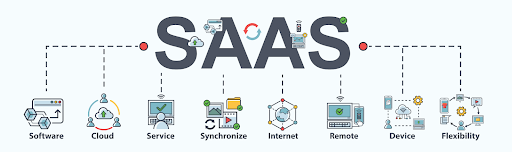
Understanding SaaS

(Image source: https://www.saasacademy.com/)

It is a cloud computing model in which software applications are hosted and provided to users over the internet on a subscription basis.

Unlike traditional software that needs to be installed and maintained on individual computers or servers, SaaS applications are centrally managed in the cloud, accessible from any device with an internet connection.

This convenience and flexibility have made it a game-changer for businesses of all sizes, but particularly for enterprises with complex needs.

Examples of Popular SaaS Application

Examples of Popular SaaS Application

(Image source: https://otakoyi.software/)

Customer Relationship Management (CRM):

  • Salesforce:
    A highly customizable CRM platform that helps businesses manage leads, contacts, opportunities, and customer interactions.
  • WakeUpSales:
    A user-friendly CRM system that offers contact management, email tracking, and sales automation features.

Project Management and Collaboration:

  • Orangescrum:
    A project management tool known for its visual task boards and team collaboration features, making it easy to track projects and tasks.
  • Monday.com:
    A work operating system that provides a centralized platform for planning, tracking, and managing work across teams.

Human Resources Management (HRM):

  • Workday:
    A cloud-based HRM system that covers HR, payroll, and talent management, designed to streamline workforce management.
  • BambooHR:
    An HR software that focuses on employee data management, onboarding, and performance tracking.

Enterprise Resource Planning (ERP):

  • Oracle NetSuite:
    A comprehensive cloud-based ERP solution that integrates financial management, CRM, and e-commerce functionalities.
  • SAP Business ByDesign:
    A scalable ERP system that covers various business processes like finance, supply chain, and project management.

Communication and Team Collaboration:

  • Microsoft Teams:
    A hub for teamwork in Microsoft 365, combining chat, video conferencing, file sharing, and app integration.
  • Slack: A messaging and collaboration platform that enhances communication and teamwork with channels, integrations, and file sharing.

Marketing Automation:

  • HubSpot Marketing Hub:
    An all-in-one marketing automation platform that includes tools for email marketing, social media, and analytics.
  • Marketo:
    A powerful marketing automation solution that focuses on lead generation, nurturing, and personalized campaigns.

Financial Management:

  • QuickBooks Online:
    A popular cloud-based accounting software that helps small businesses manage invoicing, expenses, and financial reports.
  • Xero:
    Another cloud-based accounting platform known for its ease of use and features like bank reconciliation and expense tracking.

E-commerce Platforms:

  • Shopify:
    A widely-used e-commerce platform that enables businesses to set up online stores, manage products, and process payments.
  • WooCommerce:
    A plugin for WordPress that turns a website into an e-commerce store, offering customization and integration options.

Customer Support and Helpdesk:

  • Zendesk:
    A customer service platform that provides ticketing, live chat, and self-service support solutions to enhance customer experience.
  • Freshdesk:
    A cloud-based helpdesk software that offers omnichannel support, ticket management, and automation features.

Document Collaboration and Storage:

  • Google Workspace (formerly G Suite):
    A suite of cloud-based productivity tools including Google Docs, Sheets, and Drive for collaboration and storage.
  • Microsoft 365 (formerly Office 365):
    A collection of applications including Word, Excel, and OneDrive for document collaboration and storage.

Video Conferencing and Communication:

  • Zoom:
    A widely-used video conferencing platform that offers online meetings, webinars, and collaboration features.
  • Microsoft Teams:
    Apart from collaboration, it also serves as a platform for video conferencing, making it a versatile choice.

A Brief History of SaaS Applications

The concept dates back to the 1960s, but it gained significant momentum in the 1990s with the advent of the internet.

Salesforce’s launch in 1999 marked a pivotal moment, showcasing the viability of delivering software as a service.

Are you looking for a SaaS developer

Contact Us

Since then, it has evolved to cover a wide range of applications and industries, disrupting traditional software deployment models.

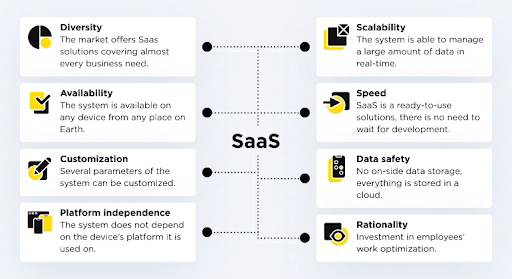
What are the Characteristics and Benefits of SaaS Applications?


What are the Characteristics and Benefits of SaaS Applications
(Image source: https://otakoyi.software/)

Scalability and Flexibility:

  • Easily Scales:
    Applications can scale up or down seamlessly, adapting to changing user demands or business growth without requiring significant infrastructure adjustments.
  • No Hardware Upgrades:
    Eliminates the need for costly hardware upgrades or expansions, as the cloud infrastructure handles the scaling process.
  • Rapid Deployment:
    New users or features can be added quickly, allowing businesses to respond to market opportunities or changes without delay.
  • Pay-as-You-Grow:
    You pay for what you use, making it ideal for startups or enterprises looking to control costs while maintaining the ability to expand operations.
  • Resource Efficiency:
    It avoids overprovisioning and underutilization of resources, optimizing cost-effectiveness.

Cost-Efficiency and Predictable Pricing:

  • Subscription Model:
    It operates on a subscription basis, replacing upfront licensing costs with regular, predictable payments.
  • Reduced Capital Expenses:
    No need for significant upfront investments in software licenses or hardware, freeing up capital for other business priorities.
  • Lower Total Cost of Ownership (TCO):
    Maintenance, updates, and support are often included in the subscription, reducing the total cost of owning and managing software.
  • Scalability Savings:
    As your business grows, you avoid the expense of purchasing and maintaining additional hardware and software licenses.
  • Budget Predictability:
    Fixed subscription fees allow for better budgeting and financial planning, minimizing financial surprises.

Accessibility and Collaboration:

  • Anytime, Anywhere Access:
    SaaS applications are accessible via the internet, enabling users to work from anywhere and on any device.
  • Remote and Hybrid Work:
    Supports the rise of remote work, allowing teams to collaborate effectively regardless of geographical locations.
  • Real-Time Collaboration:
    Multiple users can work simultaneously on shared documents, projects, or data, enhancing teamwork and productivity.
  • Reduced Communication Barriers:
    Instant messaging, file sharing, and collaborative features facilitate smooth communication and information exchange.
  • Global Workforce Enablement:
    It breaks down geographic barriers, allowing businesses to tap into talent from around the world.

Automatic Updates and Maintenance:

  • Seamless Updates:
    Application service providers handle updates and maintenance, ensuring that your software is continuously updated with the latest features and security enhancements.
  • Reduced IT Burden:
    IT teams are relieved of routine maintenance tasks, allowing them to focus on strategic initiatives and innovation.
  • Improved Security:
    Regular updates include security patches, reducing vulnerabilities and enhancing protection against cyber threats.
  • Minimized Downtime:
    Updates are often performed without disrupting users, minimizing downtime and ensuring continuous operation.
  • Access to Innovation:
    Automatic updates provide access to new functionalities and capabilities without the need for manual installations.

Integration and Interoperability:

  • Built-in Integrations:
    Many applications offer Application Programming Interfaces (APIs) and integrations with other popular software and services.
  • Unified Data Flow:
    Integrations facilitate data sharing and synchronization across different systems, reducing data silos and improving data accuracy.
  • Streamlined Workflows:
    Automated data transfer between applications reduces manual data entry and improves efficiency.
  • Enhanced Decision-Making:
    Unified data and insights from integrated systems enable better-informed decisions across departments.
  • Customized Ecosystem:
    Organizations can create tailored ecosystems by combining applications that suit their specific needs, ensuring a cohesive software environment.

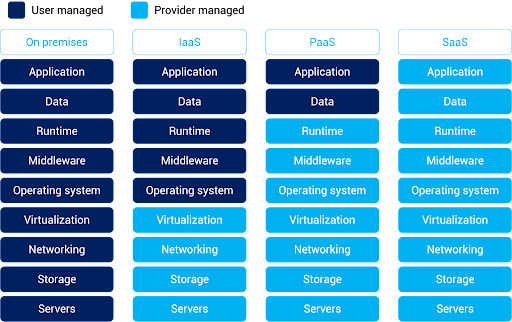
What is the Difference Between SaaS (Software-as-a-Service) vs. On-Premise Applications

What is the Difference Between SaaS (Software-as-a-Service) vs. On-Premise Applications

(Image source: https://www.alibabacloud.com/knowledge/what-is-saas)


SaaS (Software-as-a-Service)

On-Premise Application

Definition

SaaS applications are cloud-based software solutions delivered over the internet on a subscription basis. Users access the software remotely through web browsers without needing to install or maintain it locally.

On-premise applications are traditional software solutions that are installed and run on local servers or computers within an organization’s physical infrastructure. These applications are managed, maintained, and updated by the organization’s IT department.

Deployment

Deployed on the provider’s servers and accessed remotely via the internet. No installation is required on users’ devices.

Installed and maintained on the organization’s own servers, requiring manual installations and updates on each user’s device.

Cost Structure

Follows a subscription-based pricing model, with predictable recurring costs that cover software access, maintenance, updates, and support. Involves upfront costs for software licenses and hardware, with potential additional costs for ongoing maintenance, updates, and support.

Accessibility

Accessible from anywhere with an internet connection, fostering collaboration among distributed teams and enabling remote work.

Accessible only within the organization’s network, limiting remote access and collaboration.

Scalability

Scales easily to accommodate increased users, data, or transactions, with the provider managing the underlying infrastructure

Requires manual adjustments and potential hardware upgrades to scale, often leading to higher costs and longer implementation times.

Maintenance and Updates

Providers handle maintenance, updates, and security, ensuring that users always have access to the latest features and security patches.

Organizations are responsible for maintaining, updating, and patching the software, which can be time-consuming and resource-intensive.

Customization

Customization options can be limited, as the software is standardized to cater to a broader user base.

Offers greater customization possibilities, allowing organizations to tailor the software to their specific needs.

Data Security

Data security relies on the provider’s measures. Organizations must trust the provider’s security practices and compliance with data protection regulations.

Provides more control over data security, but requires organizations to implement and maintain their own security measures.

Integration

Offers built-in APIs and integrations with other software, facilitating seamless data flow across systems.

Integrations often require manual development and maintenance, potentially leading to longer integration times.

Vendor Control

Organizations rely on the SaaS provider for software management, updates, and security, which can lead to concerns about vendor dependency.

Organizations have full control over software management, updates, and security, but this also requires dedicated IT resources.

Debunking Common Software-As-A-Service Myths

  1. Myth: SaaS is Less Secure than On-Premise Software:

Reality: Security is a top priority for providers. Reputable providers invest heavily in advanced security measures, encryption, data backup, and compliance with industry standards. These platforms often offer robust security features that match or even surpass those of on-premise solutions.

  1. Myth: It Is Only for Small Businesses:

Reality: It is suitable for businesses of all sizes, from startups to large enterprises. In fact, many enterprises leverage software-as-a-service to streamline operations, reduce IT complexity, and stay agile in a rapidly changing business landscape.

  1. Myth: Software-As-A-Service Applications Lack Customization:

Reality: While these applications are standardized to cater to a broader user base, many providers offer customization options. Businesses can often configure settings, integrate with other tools, and adapt workflows to align the software with their specific needs.

  1. Myth: Applications Always Have Hidden Costs:

Reality: While subscriptions involve ongoing costs, they typically include maintenance, updates, and support. Compared to on-premise solutions, where hidden costs like hardware upgrades and maintenance can accumulate, It provides greater transparency and predictability in total costs.

  1. Myth: You Lose Control Over Your Data:

Reality: Software service providers prioritize data security and compliance. While data is stored off-site, reputable providers implement strict access controls, encryption, and adhere to data protection regulations. Businesses retain ownership of their data and can access, export, and delete it as needed.

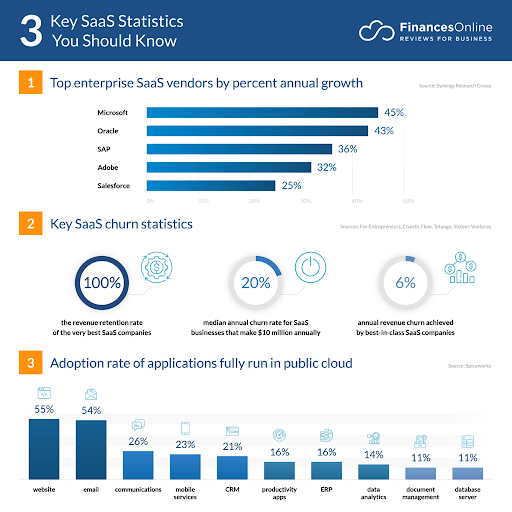
What Future Holds For SaaS Application?

What Future Holds For SaaS Application

(Image source: https://financesonline.com/)

  • SaaS is a cloud-based application platform; according to statistics the global market for cloud related software services will surpass $520 Billion in 2023.
  • According to a recent study, nearly 1/3rd of the companies invested in cloud computing.
  • In the year 2022 the hybrid cloud market was $54.34 Billion which is expected to reach $ 201 Billion in 2032.
  • Nearly 90% of the active companies around the world have adopted cloud technology.
  • Amazon cloud service or AWS is the leading SaaS solution provider. It owns 32% of shares around the world.

Conclusion

Software-as-a-Service has revolutionized the way enterprises approach software adoption and usage.

Its accessibility, scalability, and cost-efficiency make it the best option for modern enterprise businesses.

By harnessing the power of SaaS, enterprises can drive innovation, enhance collaboration, and stay agile in an ever-changing business landscape.

FAQs

Q1 – Who Owns SaaS Product Data?

Answer – The ownership of data in a SaaS product typically rests with the customer or the organization that subscribes to the service. Software service providers act as custodians of the data and are responsible for its storage and security. It’s important to review the terms of service and data usage policies provided by the vendor to understand the specifics of data ownership and usage rights.

Q2 – What If My Software-As-a-Service Provider Goes Out Of Business?

Answer – If your software service provider goes out of business, it can create challenges for your organization. It’s crucial to have a contingency plan in place. Ideally, before subscribing to their service, ensure that the contract includes provisions for data retrieval and transition in case the vendor becomes non-operational. Backup your data regularly and maintain awareness of the financial stability and reputation of the software-as-a-service developers.

Q3 – Can Applications be Customized to Fit Enterprise-Specific Needs?

Answer – Yes, many software service applications offer customization options. While these solutions are standardized to cater to a broad audience, they often provide configuration settings, integration capabilities, and extensions that allow businesses to adapt the software to their specific needs. However, the extent of customization may vary depending on the provider and the nature of the application.

Q4 – Is It Secure For Enterprise-Level Data?

Answer – Reputable software service providers prioritize data security and invest in robust measures to protect enterprise-level data. These measures can include encryption, access controls, regular security audits, compliance with industry regulations, and data backup strategies. While security concerns are valid, many applications provide a high level of security that can often match or surpass on-premise solutions, provided you choose a reliable and trusted vendor.