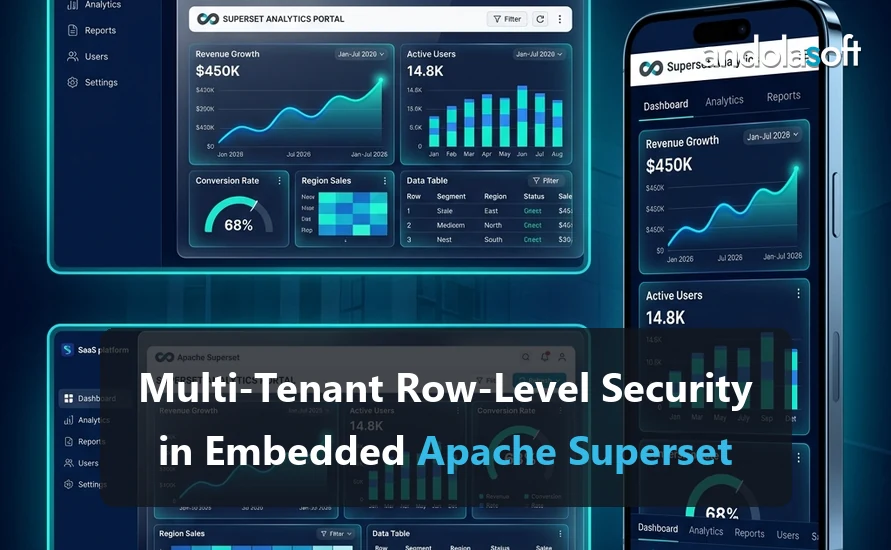
Multi-Tenant Row-Level Security in Embedded Superset: Three Patterns and When Each Fails

Embedding a Superset dashboard in your product is a few hours of work. Making sure that dashboard shows tenant A only tenant A’s rows, for every chart, every filter, every drill-down and every cached result, is the part that decides whether embedded analytics is a feature or an incident.Superset supports three distinct approaches. Teams often pick one because it was the first that worked, without knowing what it does not protect against. This post describes each, shows the configuration, and is specific about where it breaks. It ends with a test plan, because tenant isolation is one of the few things in analytics that you should prove rather than assume.

The setting

A typical embedded setup: your application authenticates its users, then asks Superset for a short-lived guest token scoped to a dashboard. The browser loads the dashboard in an iframe through the Embedded SDK, presenting that token. Superset runs the dashboard’s queries as a guest user with a fixed role and returns the results.

The tenant boundary can be enforced in three places along that path:

  • In the guest token, as RLS clauses your backend attaches when it mints the token.
  • In Superset’s RLS rules, attached to the guest role and parameterised with Jinja from the token’s user attributes.
  • In the data layer, by giving each tenant its own schema or database so that no single query can span tenants.

They are not mutually exclusive. The strongest deployments combine 1 or 2 with 3.

Pattern 1: RLS clauses in the guest token

When your backend requests a guest token, it can include rls clauses. Superset appends each clause to the WHERE of every query the dashboard runs, optionally restricted to one dataset.

json
POST /api/v1/security/guest_token/
{
  "user": { "username": "tenant-acme-user-42", "first_name": "Acme", "last_name": "User" },
  "resources": [{ "type": "dashboard", "id": "c1a4e2d7-...-dashboard-uuid" }],
  "rls": [
    { "dataset": 17, "clause": "tenant_id = 'acme'" },
    { "dataset": 23, "clause": "account_id IN (SELECT id FROM accounts WHERE tenant = 'acme')" }
  ]
}

The clause is SQL. Superset wraps it in parentheses and ANDs it with whatever the chart’s own filters produce.

Why teams like it: all tenant logic lives in your backend, next to the code that already knows who the user is. No Superset configuration per tenant. Adding a tenant is nothing.

Where it fails:

  • You are building SQL from application state. If tenant_id comes from anywhere the user can influence, or is interpolated without care, this is a SQL injection surface inside your security boundary. Derive the tenant identifier from your own authenticated session, never from a request parameter, and use a strict allow-list format (an integer, a UUID) rather than free text.
  • Clauses without a `dataset` apply to every dataset on the dashboard. If one dataset has no tenant_id column, that chart errors. Worse, if a dataset has a column by that name with a different meaning, the filter silently does the wrong thing. Always scope clauses to dataset IDs, and treat a new dataset on the dashboard as a change that needs a matching clause.
  • Virtual datasets. For a dataset defined by a SQL query, the RLS clause is applied to the outer query, not inside the subquery. If the inner SQL pre-aggregates across tenants, the outer filter cannot un-aggregate it. Virtual datasets used in embedded dashboards must keep tenant identifiers at their output grain.
  • Chart-level SQL escape hatches. Custom SQL in ad-hoc metrics or filters still runs inside the same query and is still wrapped by the RLS clause, so this is safe. But SQL Lab and the chart data API used outside the dashboard are not covered by a dashboard-scoped token. Make sure the guest role cannot reach them.
  • Token lifetime. Guest tokens default to a five-minute expiry. A token minted for tenant A and leaked is valid for tenant A’s data for that long. Keep the expiry short and mint tokens on demand, not in advance.

Pattern 2: Superset RLS rules with Jinja

Superset has its own row-level security feature under Settings, Row Level Security. A rule attaches a SQL clause to one or more datasets for one or more roles. The clause can use Jinja, and in an embedded context the interesting variables are the guest user’s attributes:

sql
tenant_id = (
  SELECT tenant_id FROM app_users WHERE username = '{{ current_username() }}'
)

Assign the rule to the guest role (GUEST_ROLE_NAME in superset_config.py), and every query the guest user runs against that dataset is filtered. Your backend puts the tenant-bearing username into the token and does nothing else. Requires ENABLE_TEMPLATE_PROCESSING = True.

Why teams like it: the tenant logic is declared once, in Superset, alongside the datasets it protects. Auditors can read it. A new dashboard on an existing dataset is protected automatically.

Where it fails:

  • The guest role is one role. Every embedded user shares it, so RLS rules cannot distinguish tenants by role. All the discrimination has to come through Jinja and the username, which means the username format is now part of your security model. Document it and validate it when minting tokens.
  • Jinja is a template, not a parameter. current_username() is interpolated into SQL. Superset’s built-in functions are safe, but a rule that interpolates anything user-controlled, such as url_param, is not. Never use url_param or dashboard filter values in an RLS rule; they are user input.
  • Every dataset needs a rule. A dataset added to an embedded dashboard without a rule is fully exposed. There is no default-deny. Put a check in your release process, or a script that lists embedded dashboards’ datasets without RLS rules.
  • Performance. The subquery runs inside every chart query. Index app_users.username, or precompute a mapping table, or the “secure” version of the dashboard is the slow one.
  • The lookup table is inside the analytics database. Your tenant mapping now has to be replicated into the warehouse and kept current. A stale mapping is either an outage or a leak, depending on the direction of the staleness.

Picked a pattern? Now stress-test the failure mode

Each RLS pattern above fails differently at real tenant counts and under caching. A Superset Embedding Feasibility Review pressure-tests your chosen pattern against your actual tenant model before it ships.

Request an Embedding Feasibility Review

Pattern 3: Physical isolation per tenant

Give each tenant its own schema (or database) and point tenant-specific datasets at them. Superset then cannot write a cross-tenant query because no single table contains two tenants.

Two ways to make this work with one set of dashboards:

  • Schema-per-tenant with dataset templating. Superset datasets and SQL templates can use Jinja for the schema name, but the guest token cannot switch schemas on its own. In practice this means one dashboard copy per tenant, generated by script from a template dashboard, each pointing at tenant datasets. The export and import API makes this manageable up to a few hundred tenants.
  • Database-per-tenant with connection-level identity. A separate Superset database connection per tenant, with credentials that can only see that tenant’s data. Combine with the dashboard-per-tenant approach above.

Why teams like it: the boundary is enforced by the database’s own permissions, not by SQL rewriting. A bug in Superset, a missed rule or a bad clause cannot cross it. Compliance conversations are shorter.

Where it fails:

  • Operational load. Hundreds of schemas, database connections and dashboard copies are a real maintenance burden. Dashboard changes must be re-propagated. Metadata database size grows with tenant count.
  • Cross-tenant features are impossible by construction. Benchmarking a tenant against an anonymised peer group, a common premium feature, cannot be done inside the isolated model. You end up building a separate aggregated dataset anyway, with Pattern 1 or 2 protecting it.
  • Provisioning is code you must write and maintain. New tenant means new schema, new connection, new dashboard import, all automated, all tested.

Choosing

Situation Recommendation
Tens to thousands of tenants, shared tables, moderate sensitivity Pattern 1 (token RLS), scoped to dataset IDs, with tenant IDs taken only from the server-side session
Dashboards change often, several teams add datasets Pattern 2 (Superset RLS) for default coverage, plus a release check that every embedded dataset has a rule
Regulated data, contractual isolation requirements, tenant count in the tens Pattern 3 (schema or database per tenant), with Pattern 1 as a second layer
Premium cross-tenant benchmarking Pattern 3 for tenant data, Pattern 1 on a separate pre-aggregated, anonymised dataset

Whichever you choose, apply two rules universally. First, the guest role has the minimum permissions: read on the specific dashboards, nothing on SQL Lab, nothing on the chart or dataset list endpoints. Second, dashboard-level native filters and URL parameters are user experience, never security; a filter can be removed by the user, an RLS clause cannot.

Caching

Superset caches chart data. If two tenants’ queries produce the same cache key, tenant B receives tenant A’s cached rows. Superset includes the query object, which contains the RLS clauses and the guest user context, in the cache key, so the standard patterns above are safe by design. Two things can still go wrong:

  • A custom cache key function or a plugin that builds its own cache key and omits the RLS context.
  • A caching layer outside Superset (a CDN, a reverse proxy cache) in front of the chart data endpoint.

Include a caching test in the plan below rather than reasoning about it.

The test plan

Isolation is testable. Run this before launch and on every change to dashboards, datasets, RLS rules or the token-minting code.

  • Two tenants, known data. Seed tenant A and tenant B with distinctive values you can search for in responses.
  • Positive test. Mint a token for A, load the dashboard, capture every chart data response, assert every row belongs to A.
  • Cross-tenant attempt. Using A’s token, call the chart data endpoint directly with a modified form data payload that removes or alters the tenant filter. Assert the response still contains only A’s rows.
  • Dataset coverage. List every dataset referenced by every embedded dashboard. Assert each has an RLS clause in the token or an RLS rule in Superset.
  • Cache test. Load the dashboard as A, then immediately as B, with identical filters. Assert B’s responses contain none of A’s distinctive values.
  • Expiry. Use an expired token and assert a 401, not stale data.
  • Role scope. Using a guest token, call the SQL Lab, dataset list and chart list APIs. Assert 403 on all of them.

Automate it. A guest token, a couple of HTTP calls and a few assertions fit in any CI pipeline.

Frequently Asked Questions

What is the safest way to isolate tenants in embedded Superset?

Physical isolation, a separate database or schema per tenant, is the strongest guarantee because a mistake in a filter cannot cross a boundary that does not exist. It is also the most expensive to operate. Guest-token RLS clauses are the usual choice for SaaS at scale, and they are safe when the token is minted server-side from the authenticated session and never accepts a tenant id from the browser.

Can one Superset instance safely serve many customers?

Yes, and most embedded deployments do. The conditions are that the tenant identifier comes from your own session rather than from the client, that every dataset in the embedded dashboard carries the isolating clause, and that the test plan below is run on every release. A single dataset without the clause is all it takes for the guarantee to fail.

Does query caching leak data between tenants?

It will if the cache key does not include the tenant. Superset caches on the query and its parameters, so two tenants issuing the same logical query can share a cache entry unless the RLS clause is part of the key. This is the single most commonly missed step in a multi-tenant embed and it does not show up in functional testing.

Do we need a separate database per tenant?

Usually not. A shared database with a tenant column and enforced RLS is adequate for most SaaS products and far cheaper to run. Separate databases earn their cost when a contract, a regulator or a data-residency requirement demands it, or when tenant data volumes differ enough that they need separate tuning.

Build It With Andolasoft

Tenant isolation is one part of an embedded implementation, alongside theming, the token service, SDK integration and event wiring. Our embedded analytics implementation package delivers all of it as a fixed scope, and it starts with a feasibility review in which the tenancy model is the first thing we look at. If your dashboards are already embedded and you want the isolation checked, the Architecture Review covers RLS and role design. The broader controls are in our post on governance and security for Superset deployments.

If you are embedding Superset into a product and want the tenancy model checked before it ships, talk to us. We will review your token service, datasets and cache configuration against the failure modes above, and give you a written plan to close any gaps.

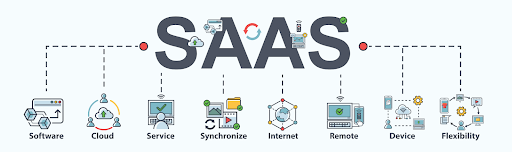
Why SaaS is The Best Option for Enterprise Businesses?

In today’s evolving technological landscape, enterprise businesses are presented with an array of options to streamline their operations and drive growth. One solution that has gained remarkable traction in recent years is Software-as-a-Service (SaaS).

This innovative model has transformed the way organizations approach software deployment, offering a wide array of benefits that are particularly well-suited for enterprise-level operations.

In this blog, we’ll delve into the world of SaaS, explore its characteristics, advantages, and dispel common myths, ultimately highlighting why it’s the best option for modern enterprise businesses.

Understanding SaaS:

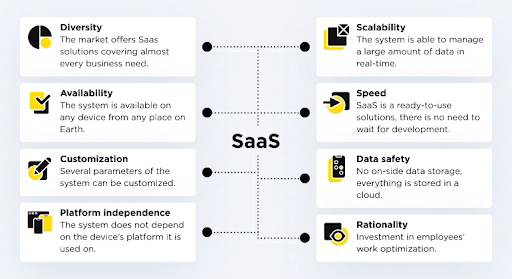
Understanding SaaS

(Image source: https://www.saasacademy.com/)

It is a cloud computing model in which software applications are hosted and provided to users over the internet on a subscription basis.

Unlike traditional software that needs to be installed and maintained on individual computers or servers, SaaS applications are centrally managed in the cloud, accessible from any device with an internet connection.

This convenience and flexibility have made it a game-changer for businesses of all sizes, but particularly for enterprises with complex needs.

Examples of Popular SaaS Application

Examples of Popular SaaS Application

(Image source: https://otakoyi.software/)

Customer Relationship Management (CRM):

  • Salesforce:
    A highly customizable CRM platform that helps businesses manage leads, contacts, opportunities, and customer interactions.
  • WakeUpSales:
    A user-friendly CRM system that offers contact management, email tracking, and sales automation features.

Project Management and Collaboration:

  • Orangescrum:
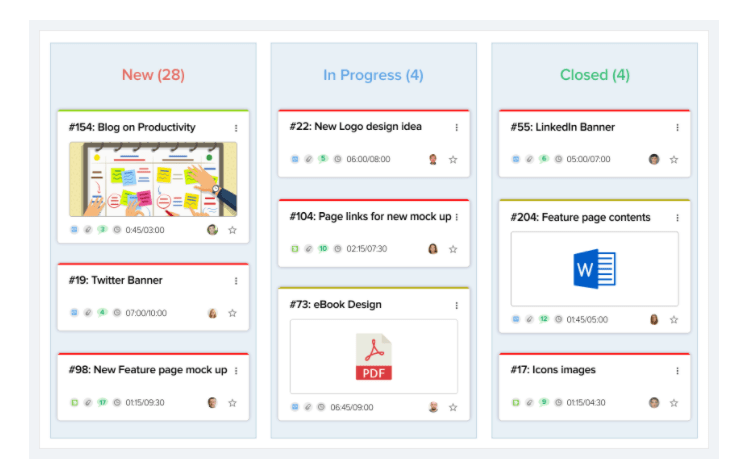
    A project management tool known for its visual task boards and team collaboration features, making it easy to track projects and tasks.
  • Monday.com:
    A work operating system that provides a centralized platform for planning, tracking, and managing work across teams.

Human Resources Management (HRM):

  • Workday:
    A cloud-based HRM system that covers HR, payroll, and talent management, designed to streamline workforce management.
  • BambooHR:
    An HR software that focuses on employee data management, onboarding, and performance tracking.

Enterprise Resource Planning (ERP):

  • Oracle NetSuite:
    A comprehensive cloud-based ERP solution that integrates financial management, CRM, and e-commerce functionalities.
  • SAP Business ByDesign:
    A scalable ERP system that covers various business processes like finance, supply chain, and project management.

Communication and Team Collaboration:

  • Microsoft Teams:
    A hub for teamwork in Microsoft 365, combining chat, video conferencing, file sharing, and app integration.
  • Slack: A messaging and collaboration platform that enhances communication and teamwork with channels, integrations, and file sharing.

Marketing Automation:

  • HubSpot Marketing Hub:
    An all-in-one marketing automation platform that includes tools for email marketing, social media, and analytics.
  • Marketo:
    A powerful marketing automation solution that focuses on lead generation, nurturing, and personalized campaigns.

Financial Management:

  • QuickBooks Online:
    A popular cloud-based accounting software that helps small businesses manage invoicing, expenses, and financial reports.
  • Xero:
    Another cloud-based accounting platform known for its ease of use and features like bank reconciliation and expense tracking.

E-commerce Platforms:

  • Shopify:
    A widely-used e-commerce platform that enables businesses to set up online stores, manage products, and process payments.
  • WooCommerce:
    A plugin for WordPress that turns a website into an e-commerce store, offering customization and integration options.

Customer Support and Helpdesk:

  • Zendesk:
    A customer service platform that provides ticketing, live chat, and self-service support solutions to enhance customer experience.
  • Freshdesk:
    A cloud-based helpdesk software that offers omnichannel support, ticket management, and automation features.

Document Collaboration and Storage:

  • Google Workspace (formerly G Suite):
    A suite of cloud-based productivity tools including Google Docs, Sheets, and Drive for collaboration and storage.
  • Microsoft 365 (formerly Office 365):
    A collection of applications including Word, Excel, and OneDrive for document collaboration and storage.

Video Conferencing and Communication:

  • Zoom:
    A widely-used video conferencing platform that offers online meetings, webinars, and collaboration features.
  • Microsoft Teams:
    Apart from collaboration, it also serves as a platform for video conferencing, making it a versatile choice.

A Brief History of SaaS Applications

The concept dates back to the 1960s, but it gained significant momentum in the 1990s with the advent of the internet.

Salesforce’s launch in 1999 marked a pivotal moment, showcasing the viability of delivering software as a service.

Are you looking for a SaaS developer

Contact Us

Since then, it has evolved to cover a wide range of applications and industries, disrupting traditional software deployment models.

What are the Characteristics and Benefits of SaaS Applications?


What are the Characteristics and Benefits of SaaS Applications
(Image source: https://otakoyi.software/)

Scalability and Flexibility:

  • Easily Scales:
    Applications can scale up or down seamlessly, adapting to changing user demands or business growth without requiring significant infrastructure adjustments.
  • No Hardware Upgrades:
    Eliminates the need for costly hardware upgrades or expansions, as the cloud infrastructure handles the scaling process.
  • Rapid Deployment:
    New users or features can be added quickly, allowing businesses to respond to market opportunities or changes without delay.
  • Pay-as-You-Grow:
    You pay for what you use, making it ideal for startups or enterprises looking to control costs while maintaining the ability to expand operations.
  • Resource Efficiency:
    It avoids overprovisioning and underutilization of resources, optimizing cost-effectiveness.

Cost-Efficiency and Predictable Pricing:

  • Subscription Model:
    It operates on a subscription basis, replacing upfront licensing costs with regular, predictable payments.
  • Reduced Capital Expenses:
    No need for significant upfront investments in software licenses or hardware, freeing up capital for other business priorities.
  • Lower Total Cost of Ownership (TCO):
    Maintenance, updates, and support are often included in the subscription, reducing the total cost of owning and managing software.
  • Scalability Savings:
    As your business grows, you avoid the expense of purchasing and maintaining additional hardware and software licenses.
  • Budget Predictability:
    Fixed subscription fees allow for better budgeting and financial planning, minimizing financial surprises.

Accessibility and Collaboration:

  • Anytime, Anywhere Access:
    SaaS applications are accessible via the internet, enabling users to work from anywhere and on any device.
  • Remote and Hybrid Work:
    Supports the rise of remote work, allowing teams to collaborate effectively regardless of geographical locations.
  • Real-Time Collaboration:
    Multiple users can work simultaneously on shared documents, projects, or data, enhancing teamwork and productivity.
  • Reduced Communication Barriers:
    Instant messaging, file sharing, and collaborative features facilitate smooth communication and information exchange.
  • Global Workforce Enablement:
    It breaks down geographic barriers, allowing businesses to tap into talent from around the world.

Automatic Updates and Maintenance:

  • Seamless Updates:
    Application service providers handle updates and maintenance, ensuring that your software is continuously updated with the latest features and security enhancements.
  • Reduced IT Burden:
    IT teams are relieved of routine maintenance tasks, allowing them to focus on strategic initiatives and innovation.
  • Improved Security:
    Regular updates include security patches, reducing vulnerabilities and enhancing protection against cyber threats.
  • Minimized Downtime:
    Updates are often performed without disrupting users, minimizing downtime and ensuring continuous operation.
  • Access to Innovation:
    Automatic updates provide access to new functionalities and capabilities without the need for manual installations.

Integration and Interoperability:

  • Built-in Integrations:
    Many applications offer Application Programming Interfaces (APIs) and integrations with other popular software and services.
  • Unified Data Flow:
    Integrations facilitate data sharing and synchronization across different systems, reducing data silos and improving data accuracy.
  • Streamlined Workflows:
    Automated data transfer between applications reduces manual data entry and improves efficiency.
  • Enhanced Decision-Making:
    Unified data and insights from integrated systems enable better-informed decisions across departments.
  • Customized Ecosystem:
    Organizations can create tailored ecosystems by combining applications that suit their specific needs, ensuring a cohesive software environment.

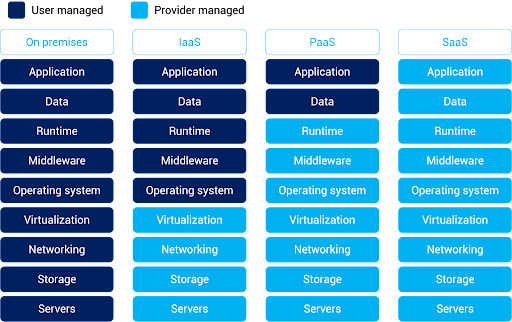
What is the Difference Between SaaS (Software-as-a-Service) vs. On-Premise Applications

What is the Difference Between SaaS (Software-as-a-Service) vs. On-Premise Applications

(Image source: https://www.alibabacloud.com/knowledge/what-is-saas)


SaaS (Software-as-a-Service)

On-Premise Application

Definition

SaaS applications are cloud-based software solutions delivered over the internet on a subscription basis. Users access the software remotely through web browsers without needing to install or maintain it locally.

On-premise applications are traditional software solutions that are installed and run on local servers or computers within an organization’s physical infrastructure. These applications are managed, maintained, and updated by the organization’s IT department.

Deployment

Deployed on the provider’s servers and accessed remotely via the internet. No installation is required on users’ devices.

Installed and maintained on the organization’s own servers, requiring manual installations and updates on each user’s device.

Cost Structure

Follows a subscription-based pricing model, with predictable recurring costs that cover software access, maintenance, updates, and support. Involves upfront costs for software licenses and hardware, with potential additional costs for ongoing maintenance, updates, and support.

Accessibility

Accessible from anywhere with an internet connection, fostering collaboration among distributed teams and enabling remote work.

Accessible only within the organization’s network, limiting remote access and collaboration.

Scalability

Scales easily to accommodate increased users, data, or transactions, with the provider managing the underlying infrastructure

Requires manual adjustments and potential hardware upgrades to scale, often leading to higher costs and longer implementation times.

Maintenance and Updates

Providers handle maintenance, updates, and security, ensuring that users always have access to the latest features and security patches.

Organizations are responsible for maintaining, updating, and patching the software, which can be time-consuming and resource-intensive.

Customization

Customization options can be limited, as the software is standardized to cater to a broader user base.

Offers greater customization possibilities, allowing organizations to tailor the software to their specific needs.

Data Security

Data security relies on the provider’s measures. Organizations must trust the provider’s security practices and compliance with data protection regulations.

Provides more control over data security, but requires organizations to implement and maintain their own security measures.

Integration

Offers built-in APIs and integrations with other software, facilitating seamless data flow across systems.

Integrations often require manual development and maintenance, potentially leading to longer integration times.

Vendor Control

Organizations rely on the SaaS provider for software management, updates, and security, which can lead to concerns about vendor dependency.

Organizations have full control over software management, updates, and security, but this also requires dedicated IT resources.

Debunking Common Software-As-A-Service Myths

  1. Myth: SaaS is Less Secure than On-Premise Software:

Reality: Security is a top priority for providers. Reputable providers invest heavily in advanced security measures, encryption, data backup, and compliance with industry standards. These platforms often offer robust security features that match or even surpass those of on-premise solutions.

  1. Myth: It Is Only for Small Businesses:

Reality: It is suitable for businesses of all sizes, from startups to large enterprises. In fact, many enterprises leverage software-as-a-service to streamline operations, reduce IT complexity, and stay agile in a rapidly changing business landscape.

  1. Myth: Software-As-A-Service Applications Lack Customization:

Reality: While these applications are standardized to cater to a broader user base, many providers offer customization options. Businesses can often configure settings, integrate with other tools, and adapt workflows to align the software with their specific needs.

  1. Myth: Applications Always Have Hidden Costs:

Reality: While subscriptions involve ongoing costs, they typically include maintenance, updates, and support. Compared to on-premise solutions, where hidden costs like hardware upgrades and maintenance can accumulate, It provides greater transparency and predictability in total costs.

  1. Myth: You Lose Control Over Your Data:

Reality: Software service providers prioritize data security and compliance. While data is stored off-site, reputable providers implement strict access controls, encryption, and adhere to data protection regulations. Businesses retain ownership of their data and can access, export, and delete it as needed.

What Future Holds For SaaS Application?

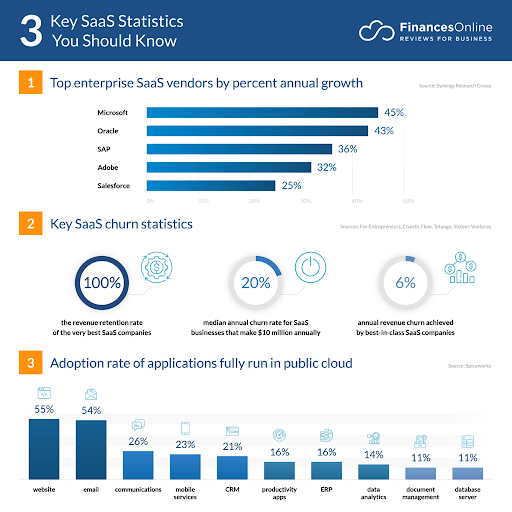
What Future Holds For SaaS Application

(Image source: https://financesonline.com/)

  • SaaS is a cloud-based application platform; according to statistics the global market for cloud related software services will surpass $520 Billion in 2023.
  • According to a recent study, nearly 1/3rd of the companies invested in cloud computing.
  • In the year 2022 the hybrid cloud market was $54.34 Billion which is expected to reach $ 201 Billion in 2032.
  • Nearly 90% of the active companies around the world have adopted cloud technology.
  • Amazon cloud service or AWS is the leading SaaS solution provider. It owns 32% of shares around the world.

Conclusion

Software-as-a-Service has revolutionized the way enterprises approach software adoption and usage.

Its accessibility, scalability, and cost-efficiency make it the best option for modern enterprise businesses.

By harnessing the power of SaaS, enterprises can drive innovation, enhance collaboration, and stay agile in an ever-changing business landscape.

FAQs

Q1 – Who Owns SaaS Product Data?

Answer – The ownership of data in a SaaS product typically rests with the customer or the organization that subscribes to the service. Software service providers act as custodians of the data and are responsible for its storage and security. It’s important to review the terms of service and data usage policies provided by the vendor to understand the specifics of data ownership and usage rights.

Q2 – What If My Software-As-a-Service Provider Goes Out Of Business?

Answer – If your software service provider goes out of business, it can create challenges for your organization. It’s crucial to have a contingency plan in place. Ideally, before subscribing to their service, ensure that the contract includes provisions for data retrieval and transition in case the vendor becomes non-operational. Backup your data regularly and maintain awareness of the financial stability and reputation of the software-as-a-service developers.

Q3 – Can Applications be Customized to Fit Enterprise-Specific Needs?

Answer – Yes, many software service applications offer customization options. While these solutions are standardized to cater to a broad audience, they often provide configuration settings, integration capabilities, and extensions that allow businesses to adapt the software to their specific needs. However, the extent of customization may vary depending on the provider and the nature of the application.

Q4 – Is It Secure For Enterprise-Level Data?

Answer – Reputable software service providers prioritize data security and invest in robust measures to protect enterprise-level data. These measures can include encryption, access controls, regular security audits, compliance with industry regulations, and data backup strategies. While security concerns are valid, many applications provide a high level of security that can often match or surpass on-premise solutions, provided you choose a reliable and trusted vendor.

Rise Of Technology Usage In The Response To Post COVID19 Crisis

The Covid-19 pandemic is a really difficult time for all. It has triggered a panic button all over the world as a medical emergency, disrupting the global economy and hitting businesses hard in the area of operation and survival.

The consequences such as social distancing, lockdowns, low production/demand, lack of labor, and a high degree of uncertainty, have questioned their continuity.

But digital technology has helped pandemic hit businesses to keep up and running like least affected.

Thankfully, many tech companies are promptly offering next-level digital technology to keep their businesses operational even amidst the crisis.

As the need for digital infrastructure has grown for businesses during this emergency, solutions like custom app development and cloud computing have proven beyond useful.

A Reality Check for Businesses

From retail, healthcare, and finance industries to grocery, apparel, and salon, every industry has to quickly adapt to the new situation; to serve their customers safely and fast.

They have to consider options of virtual contacts, eCommerce tools, and technologies to respond to this crisis-ridden situation in a better way. These drastic changes in business sectors are long-term.

Pandemic and Contribution of Tech Stacks

Businesses are left with no option but to digitize all or some part of their activities to protect customers and employees put under travel restrictions due to the pandemic.

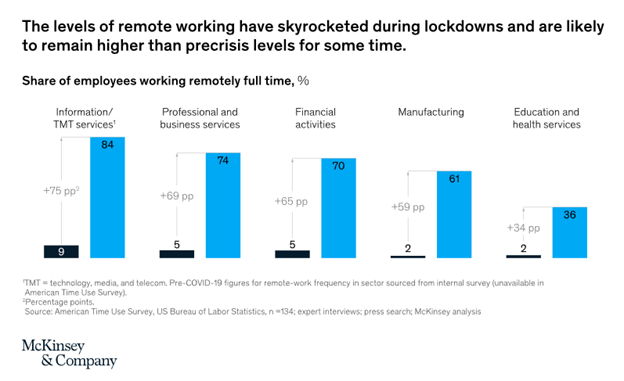
Some of the tech stacks have already confirmed that they are getting a record number of requests for the implementation of remote work and digital services across multiple domains.

Again, shopper behaviors and ways of interactions have changed considerably, and the demand for digital technology is likely to continue in the future.

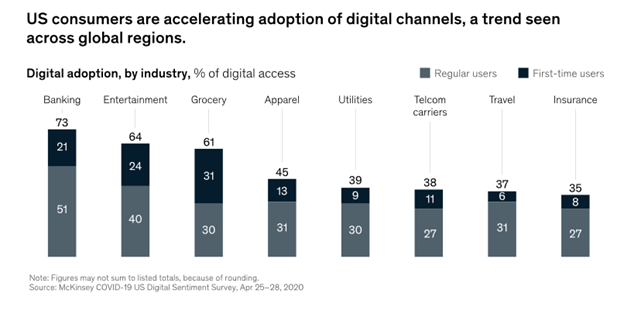
Nearly around 75% of shoppers are using digital platforms for the first time.

Web and mobile app development companies have to make sure that the approaching businesses are digital-ready and don’t miss a single customer in this unstable condition.

Recent data from McKinsey (Source: Covid-19 US Digital Sentiment Survey) shows the accelerated rate of digital adoption among US businesses and customers in different industries.

Web application development

mobile application development

(Source – mckinsey.com)

Challenges and Digital Adoption in the Press

The Covid-19 pandemic has thrown many challenges at businesses – the most important being the company management and financial stability, thus making business resiliency and continuity their ultimate priority.

There are a few other areas where businesses are facing challenges such as reducing operation costs, maintaining data security, etc.

Digital technology helps pandemics have a low impact on businesses by taking their eCommerce development to the cloud platform and automating the whole business from supply chain to sales management.

Digital Transformation to Address Pain Points

Digital technology is a savior for businesses in the pre-Covid19 and post Covid19 era. It is not just a good to have a feature – but a necessity for companies to weather the effects of the pandemic.

And as businesses now come to consult with tech companies more and more, they are seen struggling in the following areas:

  • Deploying remote staff
  • Reaching out to customers virtually
  • Remote access to business activities and details
  • Adding to agility and competence
  • Stay safe against new cybersecurity related issues
  • Cutting down operational costs and improving supply chain activity

While businesses are undergoing organizational, cultural, and social change, tech companies have been providing the required support to help them cope up with it gradually.

Restructured Traditional Business Model

Empowering businesses digitally is not all about facilitating remote access; they will have to be available 24/7 online taking/processing orders and addressing issues that employees are facing on the personal/professional front.

Digital technology has successfully removed in-person client meetings and customers are no doubt experiencing an increased speed of response in the digital framework.

Companies are now able to build excellent virtual customer contacts that could be easily shifted to core business activity post-crisis.

The insecurity triggered by the Covid-19 crisis is encouraging businesses to review their IT infrastructure and make sure that they work on the limitations there to work remotely.

Businesses are now more versatile in the area of decision making and seen enjoying new customer engagements and conversations than before.

Effect of Digital Transformation

Digital transformation is the key to overcoming the pandemic and helping businesses get robust and resilient for the future.

To start with, many companies have sped up the adoption of digital technology and tools that will quickly connect with their workers, clients, and partners safely, without making huge investments.

New-age digital solutions like SaaS, Cloud, Data Security, and Automation have come together to make businesses pandemic-proof.

Digital Implementation in Full Glory

With work from home now becoming a standard, the importance of cloud service has grown more.

And so far, you may have seen many businesses move to comprehensive WFH mode without any disturbance – thanks in real life to SaaS and cloud solutions providers, which are offering cost-effective packages.

Hundreds of custom app developments have been carried out to connect home bound businesses to collaborative/management tools for their continuity.

Similarly, web and mobile app development companies continue working remotely and writing codes in cloud-based secure environments.

Some of them even include built-in and cloud-managed features such as AI-backed applications for greater functionality during this pandemic.

BCP is no longer a tick-in-the-box habit, rather has become a strategic strength for businesses. When facing supply chain issues during lockdowns, they have started to gain the ability to find raw supply chain data in real-time.

Businesses now use AI and other advanced technologies like IoT, blockchain, 5G coverage, and edge computing to finely balance operating costs, creating a solid supply chain worldwide and turning unimaginable into the projected.

They have reached the goal of building better, smarter supply chains by integrating both data and technology.

It helps them to escape the current pandemic effect as well as unexpected events in the future.

Conclusion

Distributed staff, virtual contact facilities, Artificial Intelligence, and machine learning, data, and analytics: 

  • all of them are part of the coveted digital world
  • already exploited by the businesses in different ways
  • and to variable degrees during this pandemic.

In the post-crisis phase, they are likely to expand faster.

Are you feeling the heat of the Covid-19 pandemic and looking to overcome it with technology? Let’s discuss! 

I am sure our tech experts and full stack developers can guide you in the right path.

What Is The Saas Life Cycle-Application And Development

A SaaS Project Management & Team Communication tool, the enterprises that purchase the services of SaaS providers will always come out on top with efficient operations and organized teams – said by Basecamp.

The Saas Life Cycle is a term used in the software industry to describe the process of creating a new software product. It’s a generic way of understanding the different phases that a software project goes through from the moment you start developing a new application to the moment you release it for users.

If you’re new to the Saas Life Cycle, you might be wondering what exactly it means. Or you might be wondering how you can take your new project through this process to make it more successful. Either way, you’ll learn more about the Saas Life Cycle and how it can help your new software project succeed with this article.

SaaS Development

From the view of experts, SaaS development is unique. It requires a specific skill-set and an open-minded approach.

Never miss an update from us. Join 10,000+ marketers and leaders.

Here are some benefits of using a SaaS:

  • Lower costs. Since SaaS is a “cloud” solution the prices customers are required to pay are much lower than on-premise solutions.
  • Scalability. SaaS is an already developed solution, customers do not need to do much planning, as SaaS are highly scalable.
  • Upgrades. SaaS provides all the upgrades themselves, which is highly convenient for the users.
  • Integration. SaaS are perfect platforms for integration with other services
  • User Experience. SaaS solutions always try to make their UX enjoyable. Which lets their customers spend less time learning how to use the software.

The SaaS Development Life Cycle Must Begin With A Vision

You need to conduct a lot of research if you are willing to develop a great tool. Beginning with, identifying the needs of an organization is a crucial part to fulfill.

Gathering the ideas and evaluating the market will give you an idea of a product that is going to be useful and successful.

The Planning Stage

You can’t develop a SaaS Application much without having a great plan. You and your developing authority must understand how are you going to develop your SaaS, how much it will cost, when will you be able to launch it, and how is the marketing strategy going to look.

Software Development Strategies for your SaaS solution may help with answering those questions.

The Subscription Stage

After all decisions regarding cost and architecture have been finalized comes the time to choose your cloud provider. While there are many decisions to be made regarding a SaaS platform, the cloud provider selection is, probably, the most important one.

Subscription

The Development Stage

The Development stage is a complex stage. There are many decisions to make regarding the project’s architecture.

Actually, there is no point in developing a SaaS application unless it is suitable for all targeted users and has the potential to scale.

Below I have listed some of the essential requirements for a SaaS development to meet to be considered valuable for users and profitable for developers as well:

  • User Experience. The software must be easy to use and user-friendly.
  • Security. SaaS must to provide a high level of security, and its customers must believe in the exceptional security of their data.
  • Customer Support. The Built-in support processes, 24-hour access, and frequent, non-disruptive updates must all take place in a SaaS Application.

By keeping these basic practices in mind, the SaaS development process will mean the following:

Selection Af A Development Methodology

There is a large amount of methodologies available and that are known as the “Software Development Lifecycle”. Let’s break down some of the most common ones below:

  • Rapid – quickly to put together and speed-up the development, and then tested.
  • Spiral – here development divided into cycles, each of which is evaluated to then later influence the next cycle and better the methodology.
  • Agile – development methodology where each iteration gets evaluated after it ends, so that positive change and adaptation of plans can take place before the next iteration begins.

Agile Methodology

SaaS Will Mean HTML5

New products mean using the HTML5 technology. It is one of the most suitable for today’s environment. This technology provides rich Internet applications so, do not need the legacy plugins.

“When back in 2014 Microsoft announced that they will be discontinuing the support of Windows XP, Microsoft platforms that could not support HTML5 slowly began to die off.”

But there still may be some glitch issues with the use of HTML5 on mobile devices, but there are less and less of those each day. If there are any issues, then a native mobile app may be the best course of action.

SaaS Requires Published API’s

SaaS products must have API’s that provide for the development of external widgets and extensions by value-added resellers and other third-party developers.

APIs have to be consistent and should be maintained after publishing. Developers should ensure that APIs must be extended, which requires a very accurate architecture.

SaaS And Stateless Architecture

Stateless architecture is preferred because it provides smooth performance, elasticity, scalability, and fault tolerance. If applications are stateless, there is no need to allocate storage of previous requests, making the cost lower.

These applications can also scale easily, making it perfect for dealing with spikes in usage. Stateful architecture, on the other hand, requires more management and takes up more infrastructure resources.

Stateless architecture is not a requirement for SaaS, though it just may provide the best performance.

SaaS Upgrades

Upgrades must be built into the architecture in a way that will not disrupt user experience.

SaaS companies do not put out different version there – usually there are only two. If a new version is developed, it can be done on a separate server without any migrated clients to minimize disruptions.

Operations – Requirements For Development

New tenant on-boarding and billing services must be built into the SaaS architecture. IaaS and PaaS providers (if they are used), and third-party tools may help with managing that, though their integration must be in the software product itself. There isn’t a defined model for all of this, which means that the developers will have to get creative.

SaaS Implementation Methodology And Deployment

Once the software is deployed, frequent updates and security patches should take place to keep the support requests to a minimum while continually improving the UX.

Helpdesk calls and/or support tickets all result in increased operational costs, so the goal is to automate those tasks as much as possible and. Remember – constant monitoring and patches/updates will keep your customers happy.

SaaS Development, Operations, And Management Are Unique

Everyone must consider SaaS development, invest heavily in the talent of the people developing it.

This is the most expensive part of the endeavor – the requirement for a very specific skill set.

And, if you intend to have a top-rated piece of software – robust, expansion-ready, innovative, with well-received UI and UX, secure, and reliable in its implementation – then you must be prepared for the high costs involved.

Saas Development Tools

SaaS projects are usually complex and oftentimes unique. It means there is no defined stack of tools mandatory for SaaS development. You can build your SaaS development stack off of your project requirements, your architecture and your marketing strategy.

I’ve worked with the team at Andolasoft on multiple websites. They are professional, responsive, & easy to work with. I’ve had great experiences & would recommend their services to anyone.

Ruthie Miller, Sr. Mktg. Specialist

Salesforce, Houston, Texas

LEARN MORE

Nevertheless, some of the more popular tools for SaaS development are listed below:

Server-side development:

Conclusion

SaaS solutions have become the best options for many businesses these days. Their availability, scalability, and pricing policies all provide their users with an abundance of benefits.

Whether you are looking to adopt a SaaS in your business, or you are planning to develop a SaaS of your own, the concept is as innovative as it gets and it is worth all the attention it has recently been getting.

How To Launch A Mobile App The Right Way

With easy access to smartphones and quick internet connectivity, the app industry is growing exponentially. According to a recent survey by Statista, there are more than 300 billion smartphone users globally, and this number will add several hundred million in the coming years.

China, India, and the U.S. are the leading nations in terms of having the maximum number of smartphone users, with almost everyone glued to some app or the other. Almost everyone today has a smartphone, with numerous apps downloaded on their phones or tablets.

Google Play Store already has billions of apps, with the most popular category of apps being gaming, social media, educational, entertainment, health-related, delivery apps, e-commerce, etc.

Another report on app usage confirms that the number of mobile app downloads in 2019 was 204bn, generating a total revenue of 462bn USD, around the world. The mobile app revenue is estimated to cross 935.2bn USD by the end of 2023.

Never miss an update from us. Join 10,000+ marketers and leaders.

The above figures are enticing for every entrepreneur or start-ups to create a successful, engaging app and turn it into a lucrative business opportunity.

There are two significant milestones for becoming a successful ‘Appreneur.’

  • Creating a feature-rich, user-friendly, robust, engaging, secured and innovative app
  • Successfully launching the app in the market

Usually, people ignore the 2nd point, i.e., launching the app correctly, and regret it later when their app does not generate the expected revenue.

So, here is the checklist that one must orchestrate while launching their app in the market, as it will attribute to the success of your treasured app, and generate maximum revenue.

Key Points to Check Before Launching the App

Believing that your app is completely ready, and all set to be launched, the primary goal of every Appreuner is to have initial downloading of the app in huge numbers and eventually retain the users for the long haul.

So, let’s come straight to the essential points to implement to ensure the successful launch of the app.

1. Thorough Market Research

With billions of apps already available on Google, there is undoubtedly a fierce competition for your app to join the league.

To help your app stand out and perform better than the other related apps in the niche, check out the customer reviews of the leading apps on App stores, YouTube, or blogs and use them to upgrade your app to provide a more reliable solution for your users.

2. Set Target Goals

Some essential measurable goals should be set in advance, which will help in defining your app success.

Active Install Rate, App Ratings, Revenue Generation, etc. are some of the benchmarks that will help you determine your app’s success.

3. Cross-platform Versions

Your app must work seamlessly on different platforms and browser versions of the app to have a wider reach. It also makes your app affordable, especially in the long run.

4. Showcase on Social Media platforms

Social Media accounts act as an ideal place for generating interest in users about your services, games, etc. Attractive UI/UX can attract more users and their feedback and ideas can be used to improve your site.

5. Engaging Content

Publishing content related to your app is essential. This includes blog posts, social media content, demo videos, press releases, website content, email marketing content, etc.

It adds value to your app, and helps in better user understanding. Also, it is crucial to check daily reviews and cater to your prospective user queries, to help them build trust in your app.

6. Select an App Store

While launching your app, you should consider choosing just one app store, which will help you streamline all the fundamental changes and implementations.

It will also contribute to attaining high user concentration and ratings.

7. Use App Store Optimization (ASO)

ASO helps discover the app by users quickly in the App Store if proper keywords are used in the title.

Also, ensure that you mark all the essential categories related to your app, in the app store.

8. App Integrations

These app integrations are useful in retaining your users, as their data is stored in apps.

For example, Pinterest integrated with Facebook and has dramatically benefited Pinterest in creating a vast user base.

9. Pitch your story

For effective marketing, you must present your app’s demo video to mobile, tech, industry journalists, bloggers, etc. to market your app by fitting into their editorials. You can also gather insights from them and improve your app technically.

Also, sharing your app demo with proficient techies, having expertise in providing software solutions, and web-based services like Ruby, SaaS, CakePHP, and other latest technologies, can be of great help.

10. Set-up Paid Advertising

Paid advertising during the launch week is a great way to campaign your app on Google, or Facebook, etc. You can also direct users to a dedicated landing page for more accuracy of the app.

11. Influencer Marketing

With increasing competition in the app industry, tapping influencers or Industry thought leaders, is trending in 2020.

I’ve worked with the team at Andolasoft on multiple websites. They are professional, responsive, & easy to work with. I’ve had great experiences & would recommend their services to anyone.

Ruthie Miller, Sr. Mktg. Specialist

Salesforce, Houston, Texas

LEARN MORE

Identify social media influencers and conduct personalized email outreach to help them understand your product’s benefits. Know more.

12. Affiliate marketing

Creating an Affiliate program encourages users to download your app or purchase it. Appreneurs should partner with Affiliates to promote your app. Incentives, rewards, during the app launch, attract users for app installation.

14. Prompt users to Download App

Once your app is ready for the launch, you should place download links everywhere, on the blogs, Social media, marketing emails, etc.

I am sure; the tips mentioned above will help you launch your mobile app successfully and turn it into a lucrative business solution.

By following the above steps, your app will gain an edge over the competitors and earn more revenue through improved user engagement, loyal clientele and better performing app.

How to Capture the Opportunity after 59 Mobile Apps Banned in India

Last week the Government of India did announce to ban 59 mobile applications as the government said these mobile apps were engaged in activities that were prejudicial to the sovereignty, integrity, and defense of the nation.

The list includes TikTok, UCBrowser, WeChat, CamScanner, etc and these apps are quite popular and have been widely used in India and in other countries as well.

Ever since the coronavirus pandemic and the lockdown that followed has changed the way many professionals work.

Technology has played a pivotal role — be it work from home or online classes or digital payments.

Same time, certain IT experts feel this may be the best and ideal opportunity for the Startups, particularly from India, to develop and deliver the alternative apps to shine.

What Entrepreneurs are Saying After the Ban:

Shortly after the announcement, Debjani Ghosh, NASSCOM’s president took to Twitter to laud the decision and encourage India’s start-ups to fill the void in the app ecosystem. Her tweet was accompanied by numerous entrepreneurs including PayTM founder Vijay Shekhar Sharma, who was also welcomed by the move.

Never miss an update from us. Join 10,000+ marketers and leaders.

Debjani Ghosh, president of NASSCOM, feels that it is the right time for the government and industry to focus on building for the Indian movement. She tweeted –

How This is an Opportunity:

From the last 10 years, India’s tech start-ups have been struggling to compete with the digital offerings with foreign companies which is typically backed by heavy volumes of funding, and capable of undertaking relentless and wide-scale marketing campaigns.

According to experts, India’s tech start-up ecosystem has struggled to secure the same levels of investments that the foreign-backed firms receive. And coupled with the lack of institutional support for the Indian government as well.

The popular mobile apps like TikTok, UCBrowser, Vigo, and other apps, many of which come pre-installed on smartphone manufactures and sold by foreign-based companies in India such as Huawei, Xiaomi, ZTE, etc.

What We Can Achieve:

The whole thing is actually about data privacy. There no connection to the Indo-China Border conflict issue for this banning.

So here only to focus the Indian Data-Privacy policy along with other privacy policies to launch your mobile app into the market.

Other checkpoints like features, engagement, usability must to consider for developing a new mobile app.

Obviously, if you are developing a mobile app for public entertainment or people would use the app for their entertainment your data privacy policy need to be transparent as much it can be.

Security of User Information

With that kind of information at stake, mobile app developers need to do everything they can to protect their users and clients.

I’ve worked with the team at Andolasoft on multiple websites. They are professional, responsive, & easy to work with. I’ve had great experiences & would recommend their services to anyone.

Ruthie Miller, Sr. Mktg. Specialist

Salesforce, Houston, Texas

LEARN MORE

Some the step we can follow like:

  • Encrypt All Data
  • Be Extra Cautious With Libraries
  • Use Authorized APIs Only
  • Use High-Level Authentication
  • Deploy Tamper-Detection Technologies
  • Use the Principle of Least Privilege
  • Deploy Proper Session Handling
  • Use the Best Cryptography Tools and Techniques

The above guidelines will help to keep the mobile app secure as an oyster and keep your clients and users happy.

Conclusion

From video sharing app like TikTok to chat-based services WeChat, to eCommerce, to web browsing and gaming, the latest ban has provided a much-awated gift to the Indian digital niche, at a moment when the spirits may have been at their lowest due to Covid-19 pandemic situation.

Same time, the Indian Government also has to back the Indian startup as a wing to gain popularity. The time is ripe then, for India’s tech entrepreneurs to finally take center-stage.

What’s on your mind? Let’s develop it!