Unlock Amazing BI Savings With Apache Superset in 2026 Today

Every dollar counts when you run a startup or SME. Yet most companies waste $50,000 to $120,000 per year on business intelligence (BI) tools they barely use. However, there is a smarter way in 2026 — and it costs almost nothing to start. Apache Superset BI savings are real. Apache Superset is the world’s most popular open-source BI platform, trusted by Airbnb, Nielsen, and thousands of fast-growing companies. Moreover, it gives your team powerful dashboards, deep analytics, and stunning data visualization — without the enterprise price tag that breaks budgets.

In this guide, you will discover exactly how Apache Superset delivers massive BI savings. You will also learn which features make it the best choice in 2026. Additionally, see how Andolasoft’s Superset BI Services help you unlock those savings faster than ever before.

What Is Apache Superset and Why It Matters in 2026

Apache Superset is a modern, open-source BI platform. It was originally developed by Airbnb and later donated to the Apache Software Foundation. Therefore, the software is completely free to use under the Apache 2.0 license.

In 2026, the BI software market will reach $33.3 billion (Gartner). However, most of that spend goes to licensing fees — not actual insights. Apache Superset flips this model. You pay for infrastructure only, not software. As a result, your budget goes toward real analytics value.

At Andolasoft, our Superset BI Services team has deployed Apache Superset for clients across NBFC, BFSI, retail, and SaaS sectors. Furthermore, we consistently see companies slash their BI spend by 60% to 80% within the first year of migration.

Key Facts About Apache Superset

  • Over 50,000+ GitHub stars — one of the most loved open-source BI projects globally
  • Connects to 40+ databases including PostgreSQL, MySQL, BigQuery, Snowflake, and Redshift
  • Fully REST API-enabled for seamless integration with your existing tech stack
  • Built-in SQL Lab lets teams write complex queries without a separate database tool
  • Supports role-based access control (RBAC) to protect sensitive business data

The Real Cost of Traditional BI Tools in 2026

Most organizations do not realize how much they overpay for BI. Let’s look at the hard numbers hurting your bottom line right now.

Tableau charges $70–$115 per user per month. For a 50-person team, that is $42,000–$69,000 per year. Importantly, this does not include training, implementation, or support costs. Power BI is cheaper, however it locks you into the Microsoft Azure ecosystem at $10–$20 per user per month.

Beyond licensing, traditional BI platforms create hidden costs that compound quickly. These include vendor lock-in, expensive consultants for customization, and complex pricing tiers that punish growth. Therefore, switching to Apache Superset is a straightforward decision for most SMEs.

💡 Real Cost Impact: A 50-person team on Tableau spends up to $69,000/year on licensing alone. Switching to Apache Superset with managed hosting reduces this to just $3,000–$8,000/year. That is a saving of up to $61,000 annually.

Furthermore, traditional tools require specialized consultants just to build basic reports. In contrast, our Data Analytics services team enables your internal users to self-serve insights — eliminating costly dependency on outside experts.

How Apache Superset Delivers Massive BI Savings

Apache Superset does not just replace expensive BI tools. It actively creates financial advantages across your entire data operation. Here is how the savings stack up.

Zero Licensing Costs

Apache Superset is 100% open-source under the Apache 2.0 license. You pay nothing for the software itself. Consequently, your only costs are cloud hosting and optional expert implementation — both a fraction of traditional licensing fees.

Reduced Vendor Lock-In

Because Superset is open-source and database-agnostic, you are never trapped with one vendor. If you switch from MySQL to Snowflake, your dashboards follow seamlessly. Moreover, this flexibility pairs beautifully with our Cloud & Infrastructure Services, where we help you build portable, cost-efficient data pipelines.

Faster Time-to-Insight

Traditional BI implementations take 6–12 months. They also cost $80,000–$200,000 in professional services. However, a managed Apache Superset deployment with Andolasoft launches in just 4–8 weeks. This cuts time-to-value by up to 70%.

Self-Service Analytics

Superset empowers business users — not just data engineers — to build their own dashboards. This dramatically reduces analyst workload. Additionally, combined with Intelligent Automation, teams can schedule automated reports and alerts without ongoing manual effort.

Top 7 Ways Apache Superset Cuts Your BI Budget in 2026

Here are the seven proven ways Apache Superset delivers measurable cost savings for SMEs and startups.

  • Eliminates Software Licensing: No per-seat fees exist. There are zero annual license renewals. Your entire organization can access Superset simultaneously at no extra cost.
  • Reduces Infrastructure Costs: Superset runs efficiently on cloud instances from just $200–$500/month for most SMEs. This compares to $4,000–$8,000/month for enterprise BI SaaS plans.
  • Cuts Consultant Dependency: Superset’s intuitive drag-and-drop interface means business analysts build dashboards independently. As a result, costly consultant hours reduce by up to 60%.
  • Accelerates Data-Driven Decisions: Faster insights mean faster pivots. Companies using Superset report 35% faster decision cycles. This directly translates to measurable revenue impact.
  • Integrates With Existing Tools: Superset connects natively to your Python stack, React frontend, and existing databases. Specifically, our Python Development team optimizes these integrations for peak performance.
  • Enables Unlimited Users: Unlike Tableau’s per-seat pricing, Superset scales to any team size at no additional cost. Therefore, adding 100 new users costs the same as adding 10.
  • Powers Financial Analytics: For NBFC and BFSI sectors, Superset powers specialized use cases like our Loan Analytics System and Loan Monitoring System — replacing expensive proprietary financial BI tools entirely.

Apache Superset vs. Tableau vs. Power BI — 2026 Cost Comparison

Numbers speak louder than claims. Here is how Apache Superset compares against Tableau and Power BI on the metrics that matter most to budget-conscious teams in 2026.

Feature Apache Superset Tableau Power BI
License Cost Free (Open-Source) $70–$115/user/mo $10–$20/user/mo
Annual Cost (50 Users) ~$0 (hosting only) $42,000–$69,000 $6,000–$12,000
Cloud Hosting Any cloud provider Tableau Cloud only Azure only
Custom Dashboards Unlimited Limited Limited
SQL Editor Built-in Yes Not included Partial
Open-Source Apache 2.0 Proprietary Proprietary
Vendor Lock-in None High Medium

The verdict is clear. Apache Superset delivers enterprise-grade BI at a fraction of the cost. Moreover, for BFSI and NBFC organizations, the advantage is especially strong. Our specialized BFSI Data Analytics and NBFC Data Analytics solutions show exactly how industry-specific Superset deployments maximize this advantage.

Real-World Use Cases: Companies Saving Big With Apache Superset

Theory is useful. However, real results build conviction. Here are three organizations achieving meaningful BI savings with Apache Superset right now.

Use Case 1: NBFC Company Cuts Reporting Costs by 72%

A mid-sized NBFC was spending $84,000 per year on a proprietary loan reporting platform. After Andolasoft migrated them to Apache Superset — integrated with our NBFC Data Analytics framework — their annual BI cost dropped to $23,500. That is a saving of $60,500 per year. Additionally, they gained better dashboard performance and real-time loan monitoring.

Use Case 2: SaaS Startup Achieves BI in 5 Weeks

A SaaS company needed investor-ready dashboards but had no BI budget. Using Andolasoft’s Superset BI Services and our ReactJS Development team, they launched a full BI layer in just 5 weeks for under $12,000. In comparison, a Tableau implementation quote from another vendor had come in at $95,000.

Use Case 3: Enterprise Team Consolidates 6 Tools Into 1

An enterprise project management team was juggling six separate reporting tools. Our Enterprise Project Management solution consolidated all reporting into a single Superset instance. As a result, they achieved a 68% reduction in reporting overhead and 40% faster team reporting cycles.

How Andolasoft’s Superset BI Services Maximize Your ROI

Implementing Apache Superset correctly is the difference between transformational savings and a frustrating half-deployed tool. Therefore, Andolasoft’s Superset BI Services provide end-to-end expertise — from architecture design to dashboard delivery — so you realize full ROI from day one.

  • Application Modernization: We modernize legacy reporting systems before migrating to Superset. Consequently, you get zero data loss and a smooth, risk-free transition.
  • AI Framework Services: We integrate machine learning models into your Superset dashboards. This enables predictive analytics alongside standard reporting.
  • Digital Strategy & Transformation: We align your Superset implementation with your broader digital roadmap. As a result, you maximize long-term data ROI.
  • Enterprise Integration: We connect Superset to your ERP, CRM, and operational databases using industry-standard integration patterns.
  • Digital Governance Solutions: We ensure your Superset implementation meets regulatory and compliance standards — especially critical in BFSI and healthcare sectors.

For project teams, tools like OrangeScrum pair powerfully with Superset dashboards. Together, they connect project data directly to business analytics, building integrated and cost-efficient operations.

Key Features That Make Apache Superset the Best BI Choice in 2026

Apache Superset is not just affordable. It is genuinely powerful. Here are the features that make it the smartest BI investment for any SME or startup in 2026.

Rich Chart Library

Superset ships with 40+ chart types — from bar charts and heat maps to advanced funnel charts and geospatial visualizations. Furthermore, our Geo-Spatial Engineering & Services team extends these capabilities with custom map layers for logistics and field operations.

SQL Lab for Power Users

Business analysts and data engineers love Superset’s built-in SQL Lab. It supports multi-tab querying, query history, auto-complete, and results download. Therefore, teams no longer need separate database GUI tools.

Role-Based Access Control

Superset’s enterprise-grade RBAC ensures each user sees only the data they are authorized to view. This is critical for Digital Governance Solutions compliance — particularly in regulated sectors like banking and healthcare.

Embedded Analytics

Superset dashboards embed directly into your product or customer portal via its REST API. Combined with Andolasoft’s ReactJS Development expertise, we build seamless embedded analytics experiences that differentiate your product.

Autonomous AI Assistant Integration

In 2026, Superset integrates powerfully with Autonomous AI Assistants to enable natural language querying. Users simply type a question and get instant answers — no SQL knowledge required.

Step-by-Step: Getting Started With Apache Superset

Ready to deploy Apache Superset? Here is the practical 7-step path to your first dashboard and your first BI savings.

  • Audit Your Current BI Stack: Document all existing BI tools, their costs, and actual usage rates. Most teams discover 40% of their BI seats are unused.
  • Define Dashboard Requirements: Identify the 5–10 most critical dashboards your team uses daily. These become your migration priority.
  • Choose Your Cloud Infrastructure: Select a cloud provider for Superset hosting. AWS, GCP, and Azure all work excellently. Our team right-sizes your environment for cost efficiency.
  • Connect Your Data Sources: Use Superset’s connection wizard to link your existing databases and data warehouses in minutes.
  • Build Your Dashboards: Use Superset’s drag-and-drop chart builder to recreate critical dashboards — or let Andolasoft’s team handle it for you.
  • Train Your Team: Superset’s learning curve is gentle. Most business users become productive within 2–3 hours of training.
  • Monitor and Optimize: Use Superset’s built-in query performance metrics to identify slow dashboards and optimize your data models over time.

For payroll-linked analytics in workforce planning, consider pairing Superset with IndPayroll — enabling seamless HR cost reporting directly within your BI dashboards.

The Future of BI Savings: What’s Coming After 2026

Apache Superset continues to evolve rapidly. The 2026 roadmap includes native AI-powered chart recommendations, enhanced Innovation & Product R&D integrations, and improved real-time streaming dashboard support. Therefore, the cost-savings case for Apache Superset will only strengthen over time.

Additionally, as Shopify eCommerce Solutions grow in sophistication, Superset becomes the natural analytics layer for e-commerce operators. Consequently, businesses understand customer behavior, inventory trends, and campaign performance — all without paying premium analytics fees.

Furthermore, teams using our Software Quality Assurance services alongside Apache Superset benefit from rigorous testing of every dashboard. This ensures data accuracy and builds trust across your entire organization.

Conclusion: Your Apache Superset BI Savings Start Today

The evidence is clear. Apache Superset delivers enterprise-grade BI at open-source prices. For SMEs, startups, and project teams, this is one of the highest-ROI technology decisions available in 2026. Therefore, now is the perfect time to make the switch.

You do not need a million-dollar budget to have million-dollar data insights. Apache Superset — expertly implemented by Andolasoft — gives your team the analytical power to compete at the highest level. Moreover, you will spend a fraction of what your competitors pay for legacy BI tools.

Explore our full range of Superset BI Services and read more expert guides on our Andolasoft Blog. Your journey to smarter, leaner BI starts now. Additionally, explore CRMLeaf to see how data-driven CRM integrates seamlessly with your new BI strategy.

Frequently Asked Questions About Apache Superset BI Savings

1. What is Apache Superset and how does it save money?

Apache Superset is a free, open-source BI platform. It replaces costly tools like Tableau and Power BI. Since the software itself is free, your only costs are hosting and optional implementation. As a result, SMEs typically save $30,000–$60,000 per year compared to enterprise BI licensing.

2. Is Apache Superset suitable for small businesses?

Absolutely. Apache Superset is ideal for small and medium businesses precisely because it scales efficiently. You can start with a minimal cloud instance for under $200 per month. Furthermore, you scale only as your data needs grow — with zero increase in licensing costs.

3. How does Apache Superset compare to Power BI in 2026?

Apache Superset is completely free, while Power BI costs $10–$20 per user per month. Superset is also database-agnostic — it is not locked to Azure. Additionally, it supports embedded analytics more flexibly and includes a built-in SQL editor that Power BI lacks.

4. Can Apache Superset connect to my existing databases?

Yes. Apache Superset connects to 40+ data sources out of the box. These include PostgreSQL, MySQL, Snowflake, BigQuery, Redshift, and SQL Server. Moreover, Andolasoft’s team can build custom connectors for proprietary or legacy systems when needed.

5. How long does it take to deploy Apache Superset?

A standard Apache Superset deployment by Andolasoft takes 4–8 weeks from kickoff to go-live. This includes infrastructure setup, database connections, initial dashboard migration, and team training. Therefore, you get value significantly faster than traditional enterprise BI implementations.

6. Is Apache Superset secure enough for financial data?

Yes. Apache Superset includes enterprise-grade RBAC, SSL/TLS encryption, and audit logging. Furthermore, Andolasoft’s implementations — backed by our Enterprise IT Security services — add additional security hardening aligned with banking and financial services compliance requirements. Consequently, your sensitive data stays fully protected.

7. Do I need a dedicated data engineering team to use Superset?

No. While a data engineer is helpful for initial setup, Superset’s business-user-friendly interface allows analysts and non-technical managers to build dashboards independently. Additionally, Andolasoft provides training to ensure your team becomes self-sufficient quickly.

8. Can Apache Superset handle real-time data?

Yes. Apache Superset supports real-time and near-real-time dashboard refresh rates depending on your data source configuration. For streaming use cases, Andolasoft integrates Superset with Apache Kafka or similar streaming platforms. As a result, you get live operational dashboards when you need them.

9. What industries benefit most from Apache Superset BI savings?

Apache Superset delivers particularly strong ROI in NBFC, BFSI, SaaS, retail, healthcare, logistics, and manufacturing sectors. However, any industry with high data volume and a need for cost-efficient reporting can benefit enormously from a well-implemented Apache Superset solution.

10. How do I get started with Andolasoft’s Apache Superset services?

Getting started is simple. Visit Andolasoft‘s Superset BI Services page to explore our implementation packages. Alternatively, sign up for a free CRMLeaf trial to experience data-driven business management firsthand. Our team is ready to help you design the optimal Superset solution for your specific goals and budget.
Apache Superset vs Power BI: Which Wins in 2026?

Introduction

The Apache Superset vs Power BI debate has become one of the most consequential decisions in the business intelligence landscape in 2026. Data teams are under pressure to deliver faster insights, cut tool costs, and integrate AI-driven analytics into their workflows. At the center of that debate, two platforms consistently dominate the conversation: Apache Superset and Microsoft Power BI.

Both tools can visualize data beautifully. Both serve large enterprises. But they are built on fundamentally different philosophies, and choosing the wrong one for your organization can cost you months of migration pain and hundreds of thousands of dollars in licensing.

At Andolasoft, our engineering teams have deployed and managed both platforms across industries — from fintech and pharma to construction and retail. We’ve helped clients like Arvest Bank, Aurobindo Pharma, and Bosch make this exact decision. This comparison is not theoretical. It’s drawn from real implementations, real migrations, and real performance benchmarks across production environments.

Whether you’re evaluating your first BI platform or reconsidering an existing investment, this guide gives you the definitive Apache Superset vs Power BI answer for 2026.

What Is Apache Superset?

Apache Superset is a modern, open-source data analytics and business intelligence platform developed at Airbnb and now maintained under the Apache Software Foundation. It is written in Python with a React-based frontend, and is designed to connect directly to your existing SQL databases and data warehouses — no proprietary data layer required.

Superset supports a wide range of chart types, including bar charts, line charts, heatmaps, geospatial maps, and time-series visualizations. It features SQL Lab, a powerful in-browser SQL IDE, and a no-code chart builder for analysts who prefer a visual interface. It is cloud-native and designed to run on Kubernetes or Docker in environments you fully control.

What Is Microsoft Power BI?

Microsoft Power BI is a cloud-hosted, SaaS-based BI and reporting platform that is deeply integrated with the Microsoft 365 ecosystem — Azure, Excel, Teams, SharePoint, and the broader Power Platform. It offers a rich desktop authoring experience (Power BI Desktop), a cloud-hosted service (Power BI Service), and an embedded analytics SDK for developers.

Power BI’s low barrier to entry, intuitive drag-and-drop interface, and deep Microsoft ecosystem integration have made it one of the most widely adopted BI tools globally, especially in enterprises already running on Azure and Office 365.

Apache Superset vs Power BI: Head-to-Head Comparison

1. Cost and Licensing

This is often the deciding factor for growing organizations comparing Apache Superset vs Power BI.

Power BI uses a per-user SaaS pricing model. Power BI Pro costs approximately $10 per user per month, while Power BI Premium Per User (PPU) runs around $20 per user per month. For larger deployments needing Premium capacity, costs scale sharply — Premium capacity nodes start at several thousand dollars per month.

Apache Superset is free and open source under the Apache 2.0 license. Your only costs are the cloud infrastructure you choose to run it on — typically an AWS EC2 instance, a managed PostgreSQL database (Amazon RDS), and Redis for caching. For most mid-sized teams, this translates to $50–$300/month in infrastructure costs, regardless of how many users access the platform.

See how one of our clients cut their BI bill by 83% using Apache Superset — a real-world case study that shows the cost advantage in action.

Winner: Apache Superset — for cost-conscious organizations and teams scaling beyond 50+ users, the savings are substantial and compounding.

2. Ease of Use and Learning Curve

Power BI wins here for non-technical users. Its drag-and-drop report builder, Excel-like DAX formula language, and extensive Microsoft documentation make it accessible to business analysts with minimal technical training. The Power BI Desktop application is polished and intuitive.

Apache Superset has a steeper initial learning curve, particularly for organizations without internal DevOps capability. Setting up a Superset deployment requires Linux, Docker, Python, and SQL familiarity. However, once deployed, its SQL Lab, no-code chart builder, and dashboard interface are straightforward for analysts to use day-to-day.

Winner: Power BI — for business-led, low-code teams. Superset for technically mature data organizations.

3. Data Source Connectivity

Apache Superset supports over 40 database connections via SQLAlchemy and Apache Arrow Flight SQL, including every major cloud data warehouse and OLAP engine. It is database-agnostic by design. You can query Amazon Redshift, Snowflake, Databricks, Apache Druid, and Trino from the same interface without any data movement.

Power BI offers hundreds of built-in connectors through its proprietary Power Query engine. However, many connectors require Premium licensing to use in production at scale, and connecting to non-Microsoft data sources often requires additional configuration or gateways.

Learn more about must-have enterprise BI features that modern applications require for seamless data source connectivity.

Winner: Apache Superset — for multi-cloud, polyglot data environments. Power BI for Microsoft-first ecosystems.

4. Performance and Scalability

Apache Superset is a query engine-agnostic visualization layer. It pushes computation directly to your underlying data warehouse — Druid, ClickHouse, BigQuery, Redshift — and leverages those engines’ native optimization capabilities. It can scale horizontally on Kubernetes or vertically on larger EC2 instances based on demand. Andolasoft has deployed Superset environments serving hundreds of concurrent users across financial dashboards with no degradation.

Power BI scales well within the Microsoft ecosystem, but Premium capacity constraints can create bottlenecks during high-concurrency usage peaks. Organizations using Power BI’s shared capacity tiers often encounter report refresh rate limits and query throttling at scale.

If you’re evaluating why companies are migrating to cloud-based BI in 2026, scalability is consistently one of the top drivers.

Winner: Apache Superset — for high-concurrency, large-scale analytical workloads.

5. Customization and Extensibility

Apache Superset is fully open source and built on standard web technologies. Your team can contribute custom visualization plugins written in React, build custom authentication backends (LDAP, SAML, OAuth2), extend the API, and white-label the entire interface. Everything is customizable because everything is yours.

Power BI offers some customization via custom visuals (built with the Power BI Visuals SDK) and embedded analytics. However, you are always operating within boundaries set by Microsoft. You cannot customize the core application, alter the branding beyond limited options, or self-host the full Power BI service.

Explore how organizations are leveraging Superset for scalable and customizable data analytics across different industry verticals.

Winner: Apache Superset — for teams that need bespoke visualizations, white-labeling, or deep platform integration.

6. AI and Machine Learning Integration

Power BI has accelerated its AI roadmap through Microsoft Copilot integration, allowing users to generate reports, write DAX measures, and summarize dashboards using natural language prompts directly inside the Power BI interface. For organizations already in the Microsoft 365 ecosystem, this is a genuine productivity accelerator.

Apache Superset does not ship with built-in LLM features out of the box, but its open API architecture means your engineering team can integrate any AI layer — OpenAI, Anthropic, or a self-hosted LLM — directly into the platform. At Andolasoft, we have built custom NL-to-SQL query assistants on top of Superset deployments, allowing analysts to query dashboards in plain English with responses grounded in live warehouse data.

Predictive BI capabilities are increasingly important in 2026 — discover how modern platforms transform raw data into forward-looking insights.

Winner: Power BI out of the box for non-technical Copilot users. Apache Superset for organizations that want full control over their AI integration stack.

7. Security, Governance, and Data Residency

Apache Superset runs entirely within your own infrastructure — your VPC, your network, your encryption keys. Data never leaves your environment. For regulated industries (healthcare, banking, defense), this is not just a preference — it is a compliance requirement. Superset supports Row-Level Security (RLS), OAuth2, SAML, LDAP, and full audit logging.

Power BI is a SaaS product hosted on Microsoft’s Azure infrastructure. While Microsoft holds robust certifications (ISO 27001, SOC 2, HIPAA BAA), enterprise data still flows through and is processed on Microsoft servers. Organizations with strict data residency laws or air-gapped environments face real challenges with this model.

Review our guide on data governance and security best practices for Superset deployments to understand how to implement enterprise-grade controls.

For a broader overview of data governance practices for reliable BI insights, explore how leading organizations structure their governance frameworks.

Winner: Apache Superset — for data privacy, residency compliance, and regulated industries.

Apache Superset vs Power BI: Summary Comparison Table

Criteria Apache Superset Power BI
Cost Free (open source) $10–$20+/user/month
Ease of Use Technical teams Business users
Data Sources 40+ via SQLAlchemy Hundreds (some Premium)
Scalability Horizontal, Kubernetes-native Premium capacity limits
Customization Fully open, white-label Limited, Microsoft-controlled
AI Integration Custom LLM via open API Copilot (Microsoft 365)
Security Self-hosted, full control Azure-hosted SaaS

Who Should Choose Apache Superset?

Choose Superset if you have an engineering team comfortable with Python/Docker, need to control infrastructure and data residency, want to avoid per-user licensing at scale, need to embed analytics directly into a SaaS product, or are building on a multi-cloud or hybrid data stack.

Companies evaluating top embedded BI platforms for SaaS companies consistently find that Superset’s open architecture and white-labeling capabilities make it the preferred choice.

The role of embedded BI in enhancing SaaS products has grown significantly — Superset’s open-source model gives SaaS builders complete control over their analytics experience.

Who Should Choose Power BI?

Choose Power BI if your organization is already deeply invested in Microsoft 365 and Azure, your analysts are non-technical business users, you need rapid time-to-insight without infrastructure management, or you want Copilot-assisted reporting out of the box.

Understanding the top BI implementation mistakes before you commit to either platform can save your team significant time and resources during rollout.

For an unbiased industry perspective, the Gartner Magic Quadrant for Analytics and BI Platforms provides a useful benchmarking framework when evaluating both tools.

How Does Andolasoft Help with Apache Superset vs Power BI?

At Andolasoft, our Apache Superset BI Services help organizations evaluate, deploy, and scale both platforms based on their unique technical requirements, compliance needs, and team capabilities.

We’ve seen firsthand how Apache Superset, when deployed and configured correctly, outperforms Power BI on cost, scalability, data privacy, and long-term flexibility for almost every technically capable team. The perceived complexity of Superset is a deployment and operations problem — one that a specialized partner can solve in days, not months.

That is exactly what Andolasoft’s Apache Superset BI practice does. From initial architecture to production deployment, custom visualization plugins to enterprise RBAC configuration, we handle the complexity so your analysts can focus on insights.

If you’re still comparing options, our in-depth guide on Apache Superset vs Power BI vs Tableau provides a three-way enterprise comparison to help you finalize your decision.

You can also explore Apache Superset vs Tableau: 2026 Full Comparison and learn what makes Superset stand out from other BI tools on the market today.

Ready to evaluate Apache Superset for your organization? Talk to our data engineering team for a free architecture consultation.

Apache Superset vs Power BI vs Tableau: Which BI Tool Fits Your Enterprise?

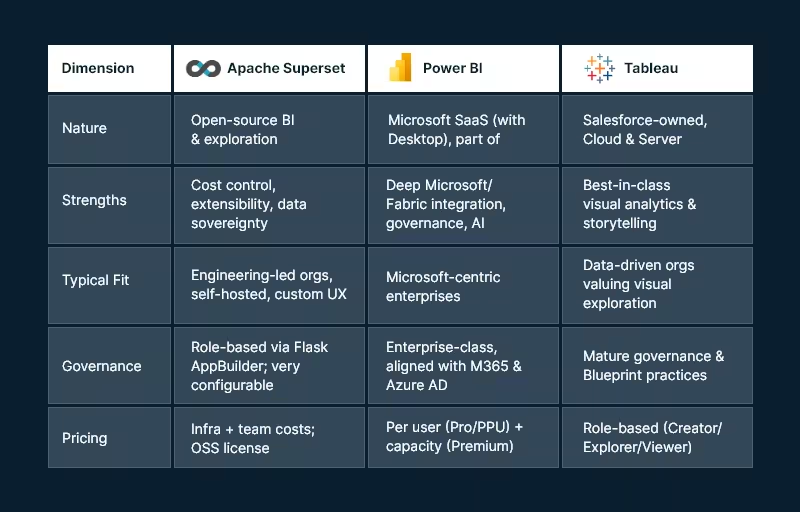
Analytics is no longer a single tool decision; it’s a platform choice that shapes your data architecture, governance model, and talent strategy. Cloud data lakes, lakehouses, and streaming sources have expanded, AI is now table stakes, and governance-by-design is the default expectation from CIOs and CISOs. With budgets under pressure, leaders must balance capability, cost, and vendor lock-in. This guide compares Apache Superset, Microsoft Power BI, and Tableau using enterprise-grade criteria so you can select a platform that fits your architecture, scale, and compliance needs—without surprises later.

Snapshot: the three platforms at a glance

Apache_Superset vs. Power BI vs. Tablue

Core evaluation criteria

  1. Data connectivity & modeling
  2. Visualization & self-service
  3. Governance, security & compliance
  4. Pricing & TCO
  5. AI & automation
  6. Deployment, scalability & performance
  7. Ecosystem & extensibility

Data connectivity & modeling

Apache Superset

Superset connects to SQL-speaking databases through Python DB-API drivers and SQLAlchemy dialects — great for lakehouses and modern warehouses. This approach offers broad coverage and makes adding new engines straightforward, provided drivers/dialects exist.

Modeling approach: SQL-first. You’ll define datasets as saved queries or table references. Complex semantic modeling (like ragged hierarchies or row-level calc logic) is possible but typically handled in the data layer (dbt, views, materializations) or via custom code.

Power BI

Power BI provides multiple modes (Import, DirectQuery, Direct Lake with Fabric) and a robust semantic model (tabular) supporting measures, relationships, and calculations via DAX. The product is increasingly intertwined with Microsoft Fabric (Lakehouse, Dataflows Gen2, Pipelines) to unify ingestion, transformation, and modeling.

Tableau

Tableau connects broadly and emphasizes flexible joins/relationships via the Tableau Data Model, plus Tableau Prep for visual data prep. Prep Builder (authoring) and Prep Conductor (orchestration) integrate into a governed pipeline with the Data Management add-on.

Bottom line:

  • Choose Superset if your team is comfortable modeling in SQL/dbt and wants to leverage your warehouse semantics directly.
  • Choose Power BI if you need a governed semantic layer with DAX and tight integration to a Fabric Lakehouse.
  • Choose Tableau if you want visual modeling and prep that business users can learn quickly.

Visualization & self-service analytics

Apache Superset

Superset’s chart gallery covers essentials (time-series, categorical, geospatial, ECharts) and supports custom visualizations. The focus is on efficient exploration and lightweight dashboard authoring. Power users can extend visuals or embed dashboards into internal apps.

Power BI

The Power BI also blends pixel-perfect visuals with enterprise reporting patterns. Shared datasets, Apps, and reusable semantic models support organizational BI at scale. Tight integration with Office 365 and Teams helps business users collaborate around insights.

Tableau

Tableau remains the benchmark for visual exploration and storytelling. Its drag-and-drop paradigm, level-of-detail expressions, and presentation-ready dashboards make it a favorite for analysts and executives. Tableau’s strengths often show in ad-hoc discovery and interactive stories.

Bottom line:

  • Exploration/storytelling first: Tableau.
  • Standardized, governed reporting at scale: Power BI.
  • Customizable OSS exploration & embedded scenarios: Superset.

Governance, security, & compliance

Apache Superset

Authentication and authorization ride on Flask AppBuilder, enabling role-based access control with fine-grained permissions. Superset’s production security guide (v4+) lists best practices for hardening, SSO, and secrets management—important for regulated environments and self-hosting.

Power BI

Power BI’s governance aligns with Microsoft Entra ID (Azure AD), M365 security, and Fabric administration. Licensing tiers add capabilities (e.g., dataset size limits, deployment pipelines, XMLA endpoints). Premium Per User (PPU) delivers most premium features without dedicated capacity—useful for advanced workloads in smaller groups.

Tableau

Tableau offers a mature governance blueprint, with centralized, delegated, and self-governing models to align with your operating model. Its Data Management (Catalog + Prep Conductor) strengthens lineage, trust, and certified data. Deploy to Tableau Cloud (SaaS) or Tableau Server (self-managed) under role-based or core licensing.

Bottom line:

  • Superset gives you complete control — you own the controls and responsibility.
  • Power BI provides enterprise-grade governance out of the box, especially if you’re already standardized on Microsoft identity and security.
  • Tableau provides clear governance models and strong lineage/certification when combined with Data Management.

Pricing & total cost of ownership (TCO)

Apache Superset

License cost is $0 (Apache 2.0), but you’ll incur infrastructure, DevOps, and support costs. The upside: no vendor lock-in and ability to right-size infra and negotiate cloud costs. Feature parity for niche needs might require engineering effort.

Power BI

As of April 1, 2025, Microsoft lists Power BI Pro at USD $14/user/month and PPU at USD $24/user/month, with Premium capacity priced separately. These increases were announced in Nov 2024 and are now in effect.

Tableau

Tableau pricing is role-based. Official materials describe Creator / Explorer / Viewer and deployment options (Cloud/Server). Public sources commonly reference Creator ~ $75/user/month, Explorer ~ $42, Viewer ~ $15 (billed annually); always verify your regional and enterprise terms.

TCO considerations:

  • Superset can have the lowest cash outlay but requires engineering maturity.
  • Power BI offers predictable per-user economics and can reduce integration costs if you already pay for Microsoft 365/Azure.
  • Tableau can be costlier per Creator seat but may shorten time-to-insight thanks to its visual paradigm — valuable for decision velocity.

AI & automation

  • Power BI integrates with Microsoft Fabric and offers Copilot experiences for report creation and narrative insight generation, with governance controls at the tenant level. For orgs pursuing AI-assisted analytics inside a Microsoft stack, this is compelling.
  • Tableau has expanded Data Management and Prep features, with regular new releases that bolster governance and operationalization — complementary to AI-ready data foundations. (Check the current “What’s New” page for recent features relevant to your version.)
  • Superset relies on the OSS ecosystem for AI — e.g., pairing with notebooks, LLM services, or embedding AI APIs. This keeps you flexible but places more responsibility on your platform team.

Deployment, scalability, & performance

Apache Superset

Superset is cloud-native and designed to scale horizontally. You can containerize, run behind a reverse proxy, and integrate with your observability stack. Tuning is in your hands via superset_config.py and infra choices (workers, caches, async queries).

Power BI

SaaS operations are Microsoft-managed. Scaling is typically managed via capacity (Premium) and workspace governance. Fabric unifies ingestion and storage, lowering cross-tool friction and reducing operational complexity.

Tableau

You can choose Tableau Cloud for managed scaling or Tableau Server for on-prem/VMs/K8s. Tableau’s core-based licensing on Server can suit high-concurrency, view-only workloads; role-based licensing helps plan predictable per-user costs.

Ecosystem & extensibility

  • Superset: Python ecosystem, SQLAlchemy, ECharts/Chart plugins, REST API, and embeddable components—ideal for custom apps, internal portals, and bespoke workflows.
  • Power BI: Deep ISV ecosystem, certified visuals, Power Automate flows, and Azure services (Purview, Synapse, Fabric).
  • Tableau: Extensions API, accelerators, Tableau Exchange, and strong community resources for industry-specific dashboards.

Implementation playbooks (by enterprise profile)

Microsoft-centric enterprise (M365, Azure, Fabric)

  • Primary choice: Power BI
  • Why: Single-sign-on via Entra ID, Fabric lakehouse + Direct Lake for scale, governance aligned with your tenant, and Copilot for faster authoring.
  • Risks to manage: Capacity planning and DAX skill development.

Design-led analytics culture (data storytelling, exec consumption)

  • Primary choice: Tableau
  • Why: Visual exploration, LOD expressions, and storytelling make analytics stickier and speed up insight cycles.
  • Risks to manage: Role mix optimization (Creator vs Explorer vs Viewer) and ensuring certified data via Data Management.

Engineering-first platform (data sovereignty, OSS, custom UX)

  • Primary choice: Apache Superset
  • Why: Open-source flexibility, no vendor lock-in, and ability to embed analytics in internal tools.
  • Risks to manage: Operational ownership (security hardening, upgrades, scaling) and the need for internal SLAs.

Highly regulated, on-prem or hybrid

  • Primary choice: Superset or Tableau Server
  • Why: Self-hosting and granular control. Superset demands more DevOps; Tableau Server provides an enterprise-grade commercial option.

Decision worksheet (quick scoring template)

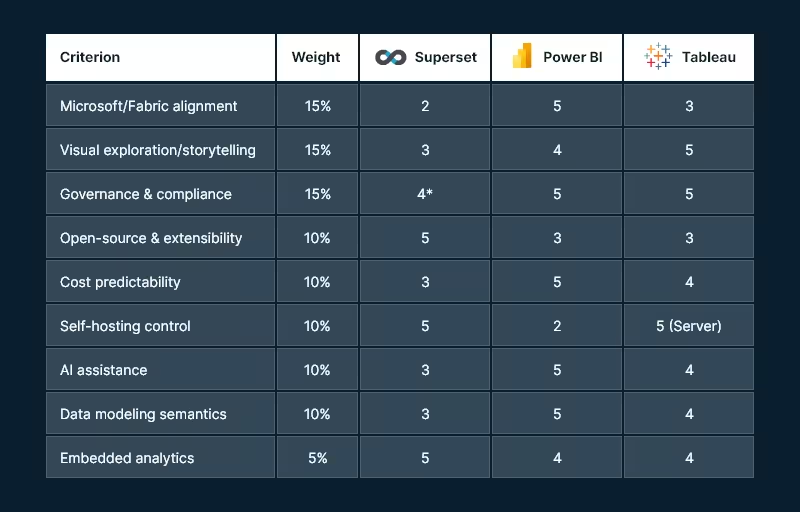
Use a 1–5 score for each criterion (5 = excellent fit). Multiply by the suggested weight to compute a weighted score.

Decision worksheet

* Superset can be excellent for governance if you invest in configuration, SSO, and hardening.

Tip: In real life, weights drive the outcome. If AI and Fabric matter, Power BI often wins. When data sovereignty and extensibility matter, Superset leads. However, when ad-hoc visual discovery is key, Tableau tends to top the list.

Recommended next steps (how Andolasoft can help)

  • Solution discovery workshop (2–3 weeks): Architecture mapping, data source inventory, governance model, and rapid POC in your preferred tool.
  • Pilot implementation: One high-value dashboard end-to-end (ingest → model → govern → publish), with CI/CD and cost telemetry.
  • Migration playbook: If you’re switching tools, we build a content inventory, semantic mapping, and automated testing harness for safe cutover.
  • Managed enablement: Training for creators/explorers, governance council setup, and a Center of Excellence playbook.

Want a hands-on assessment tailored to your stack? Andolasoft can architect and implement Superset, Power BI, or Tableau—including hybrid approaches that leverage your existing investments.

FAQs

Q1. Which tool is most cost-effective for 1,000 viewers and 50 creators?

If you’re already on Microsoft 365 and Azure, Power BI often yields the best per-user economics — especially if you can confine premium workloads to PPU or a single capacity. Tableau can be costlier for Creators but may reduce analysis time. Superset avoids license fees but requires platform engineering and ongoing ops.

Q2. Do I need Microsoft Fabric to use Power BI?

No. You can use Power BI with many data sources. However, Fabric unifies ingestion, storage, and modeling (e.g., Direct Lake) and streamlines operations—so many enterprises adopt it for scale and governance.

Q3. Can Apache Superset meet enterprise security requirements?

Yes — with the right hardening. Superset provides role-based security via Flask AppBuilder and a production security guide (v4+). You’ll need to implement SSO, secret management, and infra best practices.

Q4. What are current Power BI and Tableau prices?

Microsoft lists Power BI Pro at $14 and PPU at $24 per user/month (as of Apr 1, 2025; Premium capacity separate). Tableau uses role-based pricing (Creator/Explorer/Viewer) with commonly referenced figures of $75/$42/$15 per user/month billed annually (verify your quote and region).

Q5. Which tool is best for embedded analytics?

All three support embedding. Superset is attractive for internal app embedding in engineering-heavy orgs; Power BI and Tableau provide commercial-grade embedding SDKs supported by their broader ecosystems.

Q6. We’re a public sector/regulated enterprise — what’s safer?

If you require on-prem, consider Tableau Server or self-hosted Superset. If cloud is acceptable under your regulator, Power BI (with tenant and capacity controls) can meet stringent compliance regimes.

Conclusion: Matching the tool to your enterprise DNA

  • Pick Power BI if your business is already invested in Microsoft and wants AI-assisted analytics with unified Fabric data operations and strong governance.
  • Choose Tableau if your analytics success depends on speed of insight, story-driven dashboards, and you want proven governance models with flexible deployment.
  • Go with Apache Superset if you value open-source control, cost efficiency, and custom embedding, and you have the engineering strength to own the platform.

Most large enterprises end up multi-tool (e.g., Power BI for governed reporting + Tableau for storytelling; or Superset embedded in custom portals). The win is a governed data foundation, a clear RACI for content creation, and automation that keeps data fresh and trustworthy.

When Dashboards Started Thinking: The Journey of Superset and AI

Once upon a time, data was scattered. Teams worked in isolation, reports came late, and dashboards, though detailed, offered only a glimpse of the past. Numbers were there, but clarity was not. Insight was rare. And foresight? Almost impossible.

Then, everything changed.

The Turning Point: From Static to Smart

It started with a realization:

Traditional BI tools showed what happened, but not why. Not what’s next.

That gap led to a powerful new combination:

  • Superset—a flexible, open-source data visualization platform that democratizes data access.
  • Artificial Intelligence (AI)—A game-changer in predictive analytics, pattern recognition, and data storytelling.

Together, they turned dashboards from static charts into intelligent decision-making systems.

Superset: The Canvas for Data Stories

Superset brought visual simplicity and data exploration together:

  • Clean, intuitive interface
  • Connects to popular databases (PostgreSQL, MySQL, BigQuery, Snowflake, etc.)
  • Custom SQL-based reporting and no-code filtering
  • Drag-and-drop dashboards and a wide chart library
  • Real-time data interaction

Whether for a quick KPI snapshot or a deep-dive analysis, Superset became the go-to canvas for visual narratives.
But numbers alone don’t tell the full story. Meaning and intelligence were still missing.

AI: The Brain Behind the Dashboard

AI stepped in to fill that gap, turning data into actionable insights:

  • Trend Detection: Surfaced subtle shifts in data patterns
  • Anomaly Alerts: Spotted unusual activities instantly (e.g., revenue drops, login spikes)
  • Forecasting Models: Predicted future outcomes based on historical trends
  • Natural Language Queries (NLP): Users could ask, “Show Q2 revenue breakdown by product,” and get instant visual answers
  • Proactive Notifications: Triggered alerts when KPIs deviated from the norm

Now, dashboards don’t just show data.

They understood it, reacted to it, and anticipated what’s next.

A New Way to See and Decide

The result? Business intelligence shifted from being data-centered to decision-centered.

  • Teams made faster decisions with contextual insights
  • No more delays or backlogs in reporting requests
  • Data exploration became interactive and ongoing
  • Non-technical users could extract powerful insights without writing a line of SQL

Data was no longer a department—it became a capability across the organization.

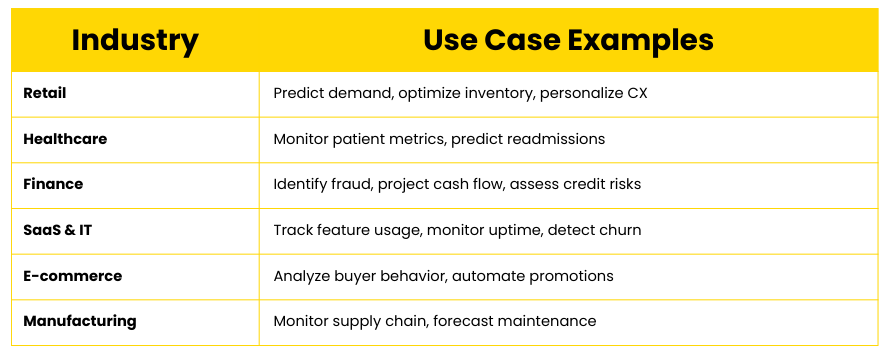
Where This Works Best

Where This Works Best

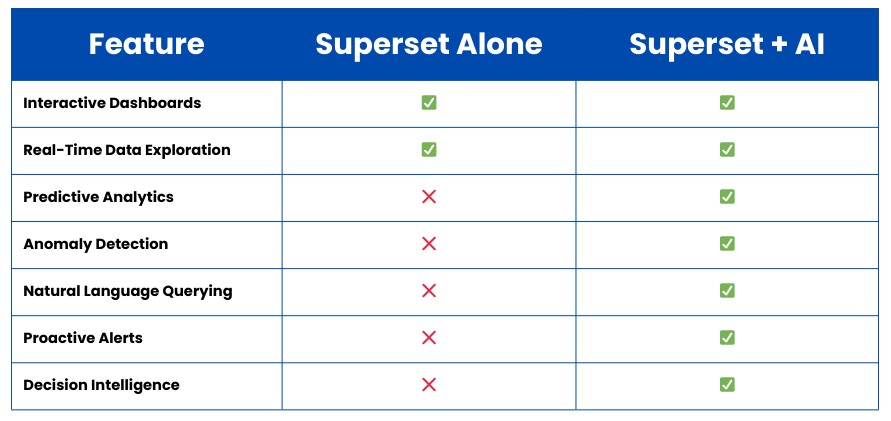
Benefits at a Glance

Benefits at a Glance

From Reactive to Proactive

This isn’t just about having prettier charts. It’s about

  • Moving from reporting to predicting
  • Turning raw data into automated decision support
  • Freeing up analyst time with self-serve insights

Superset and AI don’t just visualize the past.

They help you act on the future.

Ready to Transform the Way You Use Data?

If you’re ready to

  • Stop reacting to reports and start forecasting outcomes
  • Equip every team with smart, real-time dashboards
  • Replace isolated data teams with collaborative insight cultures

Then this is the moment to embrace Superset + AI.

Start your journey to smarter analytics today.

Managed Superset Hosting: Why Cloud-Based BI is a Game-Changer

Business Intelligence (BI) is no longer a luxury—it’s a necessity. As organizations become more data-driven, they need tools that offer speed, scalability, and simplicity. While Apache Superset is one of the most powerful open-source BI platforms available today, hosting and managing it in-house can be complex and time-consuming.

That’s where Managed Superset Hosting comes in.

By moving Superset to the cloud through a managed service provider like Andolasoft, businesses get all the power of Superset with none of the operational headaches. In this blog, we explore why cloud-based Superset hosting is a game-changer for modern enterprises and growing startups alike.

What is Managed Superset Hosting?

Managed Superset Hosting means running Apache Superset in a cloud environment, fully maintained by experts. This includes setup, configuration, performance optimization, scaling, updates, and security, so you can focus on analyzing data instead of managing infrastructure.

At Andolasoft, our Superset BI Services deliver a fully managed, enterprise-grade Superset environment with zero licensing fees and full technical support.

Why Cloud-Based BI is a Game-Changer

Zero Setup Hassles — Go Live Faster

Hosting Superset in the cloud means

  • No need to provision servers or install dependencies
  • No manual upgrades or patching
  • Instant availability of dashboards and analytics tools

You can go from zero to live BI dashboards in a matter of days, not weeks.

Scalability That Grows With You

Your BI platform should never slow you down. With managed hosting, Superset is deployed on a scalable cloud infrastructure that automatically adjusts to:

  • Increasing data volumes
  • More concurrent users
  • Complex analytics workloads

Whether you’re a startup or a growing enterprise, your Superset setup will scale seamlessly.

Enterprise-Grade Security and Compliance

Data security is non-negotiable. Managed Superset Hosting includes:

  • Encrypted data transfers (SSL/TLS)
  • Role-Based Access Control (RBAC)
  • SSO and LDAP integration
  • Audit logs and activity tracking
  • Compliance support (HIPAA, GDPR, SOC 2)

This ensures your business intelligence infrastructure stays secure and compliant without needing a dedicated security team.

24/7 Monitoring and Support

Downtime or performance lags can cost you business. With managed hosting, your Superset instance is

  • Monitored continuously for performance and uptime
  • Backed by a team of BI experts
  • Optimized for speed, reliability, and uptime

This means peace of mind and guaranteed availability, even during peak usage.

Connect to 60+ Data Sources, Instantly

With Andolasoft’s managed Superset hosting, you can plug into:

  • SQL databases (MySQL, PostgreSQL, Oracle, etc.)
  • Cloud data warehouses (BigQuery, Snowflake, Redshift)
  • Marketing and CRM tools (Google Ads, Salesforce, HubSpot)
  • Financial and HR systems (Stripe, QuickBooks, BambooHR)

No custom coding. No integration bottlenecks. Just seamless data access.

No Vendor Lock-In

Superset is open-source, and with managed hosting:

  • You maintain full control over your data and dashboards
  • You can export or migrate anytime
  • You’re not tied to a proprietary BI license model

This gives you freedom, flexibility, and future-proofing.

Embedded Dashboards, Anywhere You Need

Need to display Superset dashboards inside your SaaS product, internal portal, or customer reports?

Managed Supersets Hosting supports secure dashboard embedding, allowing you to

  • Provide real-time insights to your users
  • Create role-based reporting experiences
  • Deliver custom analytics in your workflow

This is perfect for product teams, client reporting, and embedded BI use cases.

Why Choose Andolasoft for Superset BI Hosting?

We’re not just hosting Superset—we’re optimizing it for performance, scale, and business outcomes.

  • Expert setup, support, and customizations
  • Scalable cloud infrastructure (Docker/Kubernetes)
  • Seamless integration with your data ecosystem
  • 200+ ready-to-use dashboards across industries
  • Flexible plans for startups and enterprises

Get Started in Days, Not Weeks

Ready to simplify your BI infrastructure and unlock powerful, real-time analytics?

  • Explore our live dashboard gallery
  • Book a free consultation with our Superset experts
  • Start your managed Superset journey with Andolasoft

Fully managed, scalable, yours.

Case Study: Driving Growth with Tailored Superset Dashboards in SaaS

In the fast-paced world of SaaS, data isn’t just a tool—it’s the growth engine. Understanding customer behavior, product usage, and financial performance in real-time can mean the difference between scaling successfully and missing opportunities.

But many SaaS companies struggle with disconnected data, limited visibility, and expensive BI tools that don’t adapt to their evolving needs.

That’s where Superset comes in.

At Andolasoft, we’ve helped several SaaS companies overcome these challenges by building tailored Apache Superset dashboards that deliver real-time, actionable insights—without breaking the bank. In this case study, we’ll explore how one such company transformed its analytics strategy and unlocked new growth using Superset BI Services.

The Challenge

A mid-sized SaaS company offering a subscription-based project management tool was facing major roadblocks:

  • Scattered data across multiple platforms: Stripe for billing, Google Analytics for web traffic, HubSpot for marketing, and PostgreSQL for product usage
  • Manual reporting with spreadsheets leads to slow, error-prone decision-making
  • Lack of visibility into critical KPIs like Monthly Recurring Revenue (MRR), churn rate, customer engagement, and feature adoption
  • The expensive BI tools they had tested failed to provide flexibility or scale cost-effectively

They needed a solution that was

  • Fast to deploy
  • Easy to customize
  • Capable of unifying multiple data sources
  • Scalable and secure

The Solution: Superset BI Services by Andolasoft

We partnered with the client to design and implement a custom Superset BI solution tailored specifically for their SaaS business model. Here’s how we made it work:

Unified Data Pipeline

Using Superset’s ability to connect to multiple data sources, we integrated

  • Stripe for subscription and payment data
  • PostgreSQL for application usage data
  • Google Analytics for website traffic insights
  • HubSpot for marketing campaign performance

This gave the client a single source of truth—no more switching tabs or pulling data manually.

Tailored KPI Dashboards

We created over 15 interactive dashboards tailored to their SaaS business. Key visualizations included:

  • MRR and ARR trends with breakdowns by region and customer segment
  • Customer churn and retention by cohort
  • Feature usage analytics to track which features were driving engagement
  • Funnel analysis from website visit to conversion
  • Marketing campaign ROI tied directly to product adoption

Each dashboard was designed with filters, drill-down options, and real-time updates to help teams dig into the data as needed.

Embedded Analytics for Leadership and Clients

Using Superset’s secure embedding features, we integrated dashboards into the company’s internal admin portal for:

  • Leadership and finance teams to review KPIs
  • Product teams track usage and feature adoption
  • Sales and success teams to monitor client behavior in real time

This ensured critical insights were available where and when they were needed.

Scalable, Secure, and Cost-Efficient

Thanks to Superset’s open-source architecture, we deployed a Dockerized, scalable BI environment without recurring licensing fees. We also implemented:

  • Role-Based Access Control (RBAC) for team-specific views
  • SSO integration for secure access
  • Audit logs for compliance

The result? A highly secure, future-ready analytics platform at a fraction of the cost of proprietary tools.

The Results

Within just 90 days, the company began seeing tangible benefits:

  • 30% faster decision-making across product and marketing teams
  • Real-time visibility into user engagement, enabling smarter feature rollouts
  • 20% reduction in churn, thanks to better tracking of user drop-off points
  • Elimination of spreadsheet-based reporting, saving hours of manual effort weekly
  • Zero added cost from BI licensing—allowing more investment in growth initiatives

Why Superset Works for SaaS

SaaS businesses live and breathe data, from customer acquisition to retention. Apache Superset, when tailored right, helps SaaS teams:

  • Visualize key SaaS metrics in real-time
  • Track product usage and feature adoption
  • Identify friction points in the customer journey
  • Improve cross-team collaboration with shared insights
  • Scale analytics affordably and securely

Ready to Transform Your SaaS Data Strategy?

At Andolasoft, we specialize in building scalable, secure, and customizable Superset dashboards that deliver measurable business outcomes.

  • Explore our live Superset dashboard gallery
  • Schedule a free strategy call with our Superset BI experts
  • Start turning your SaaS data into your biggest growth asset

SaaS analytics tailored. Growth unlocked.