Unlock Amazing BI Savings With Apache Superset in 2026 Today

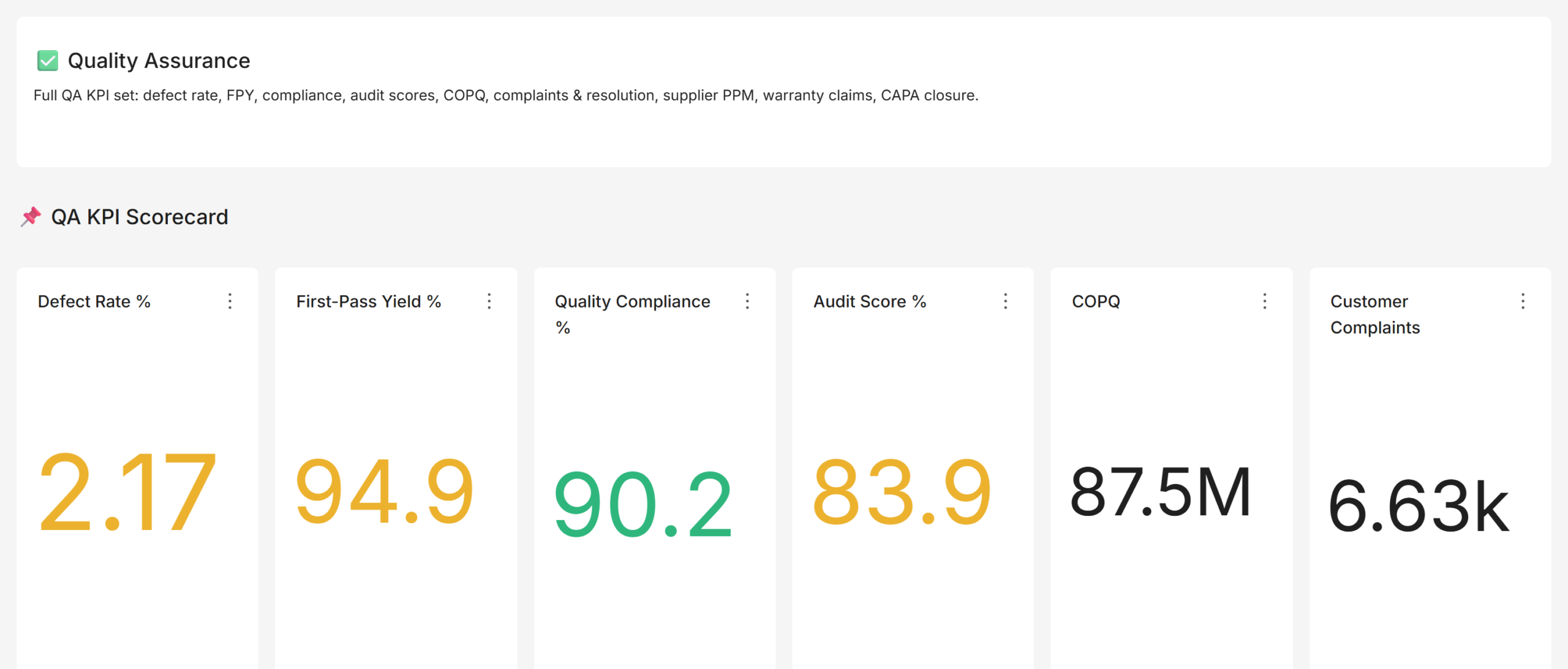
Every dollar counts when you run a startup or SME. Yet most companies waste $50,000 to $120,000 per year on business intelligence (BI) tools they barely use. However, there is a smarter way in 2026 — and it costs almost nothing to start. Apache Superset BI savings are real. Apache Superset is the world’s most popular open-source BI platform, trusted by Airbnb, Nielsen, and thousands of fast-growing companies. Moreover, it gives your team powerful dashboards, deep analytics, and stunning data visualization — without the enterprise price tag that breaks budgets.

In this guide, you will discover exactly how Apache Superset delivers massive BI savings. You will also learn which features make it the best choice in 2026. Additionally, see how Andolasoft’s Superset BI Services help you unlock those savings faster than ever before.

What Is Apache Superset and Why It Matters in 2026

Apache Superset is a modern, open-source BI platform. It was originally developed by Airbnb and later donated to the Apache Software Foundation. Therefore, the software is completely free to use under the Apache 2.0 license.

In 2026, the BI software market will reach $33.3 billion (Gartner). However, most of that spend goes to licensing fees — not actual insights. Apache Superset flips this model. You pay for infrastructure only, not software. As a result, your budget goes toward real analytics value.

At Andolasoft, our Superset BI Services team has deployed Apache Superset for clients across NBFC, BFSI, retail, and SaaS sectors. Furthermore, we consistently see companies slash their BI spend by 60% to 80% within the first year of migration.

Key Facts About Apache Superset

  • Over 50,000+ GitHub stars — one of the most loved open-source BI projects globally
  • Connects to 40+ databases including PostgreSQL, MySQL, BigQuery, Snowflake, and Redshift
  • Fully REST API-enabled for seamless integration with your existing tech stack
  • Built-in SQL Lab lets teams write complex queries without a separate database tool
  • Supports role-based access control (RBAC) to protect sensitive business data

The Real Cost of Traditional BI Tools in 2026

Most organizations do not realize how much they overpay for BI. Let’s look at the hard numbers hurting your bottom line right now.

Tableau charges $70–$115 per user per month. For a 50-person team, that is $42,000–$69,000 per year. Importantly, this does not include training, implementation, or support costs. Power BI is cheaper, however it locks you into the Microsoft Azure ecosystem at $10–$20 per user per month.

Beyond licensing, traditional BI platforms create hidden costs that compound quickly. These include vendor lock-in, expensive consultants for customization, and complex pricing tiers that punish growth. Therefore, switching to Apache Superset is a straightforward decision for most SMEs.

💡 Real Cost Impact: A 50-person team on Tableau spends up to $69,000/year on licensing alone. Switching to Apache Superset with managed hosting reduces this to just $3,000–$8,000/year. That is a saving of up to $61,000 annually.

Furthermore, traditional tools require specialized consultants just to build basic reports. In contrast, our Data Analytics services team enables your internal users to self-serve insights — eliminating costly dependency on outside experts.

How Apache Superset Delivers Massive BI Savings

Apache Superset does not just replace expensive BI tools. It actively creates financial advantages across your entire data operation. Here is how the savings stack up.

Zero Licensing Costs

Apache Superset is 100% open-source under the Apache 2.0 license. You pay nothing for the software itself. Consequently, your only costs are cloud hosting and optional expert implementation — both a fraction of traditional licensing fees.

Reduced Vendor Lock-In

Because Superset is open-source and database-agnostic, you are never trapped with one vendor. If you switch from MySQL to Snowflake, your dashboards follow seamlessly. Moreover, this flexibility pairs beautifully with our Cloud & Infrastructure Services, where we help you build portable, cost-efficient data pipelines.

Faster Time-to-Insight

Traditional BI implementations take 6–12 months. They also cost $80,000–$200,000 in professional services. However, a managed Apache Superset deployment with Andolasoft launches in just 4–8 weeks. This cuts time-to-value by up to 70%.

Self-Service Analytics

Superset empowers business users — not just data engineers — to build their own dashboards. This dramatically reduces analyst workload. Additionally, combined with Intelligent Automation, teams can schedule automated reports and alerts without ongoing manual effort.

Top 7 Ways Apache Superset Cuts Your BI Budget in 2026

Here are the seven proven ways Apache Superset delivers measurable cost savings for SMEs and startups.

  • Eliminates Software Licensing: No per-seat fees exist. There are zero annual license renewals. Your entire organization can access Superset simultaneously at no extra cost.
  • Reduces Infrastructure Costs: Superset runs efficiently on cloud instances from just $200–$500/month for most SMEs. This compares to $4,000–$8,000/month for enterprise BI SaaS plans.
  • Cuts Consultant Dependency: Superset’s intuitive drag-and-drop interface means business analysts build dashboards independently. As a result, costly consultant hours reduce by up to 60%.
  • Accelerates Data-Driven Decisions: Faster insights mean faster pivots. Companies using Superset report 35% faster decision cycles. This directly translates to measurable revenue impact.
  • Integrates With Existing Tools: Superset connects natively to your Python stack, React frontend, and existing databases. Specifically, our Python Development team optimizes these integrations for peak performance.
  • Enables Unlimited Users: Unlike Tableau’s per-seat pricing, Superset scales to any team size at no additional cost. Therefore, adding 100 new users costs the same as adding 10.
  • Powers Financial Analytics: For NBFC and BFSI sectors, Superset powers specialized use cases like our Loan Analytics System and Loan Monitoring System — replacing expensive proprietary financial BI tools entirely.

Apache Superset vs. Tableau vs. Power BI — 2026 Cost Comparison

Numbers speak louder than claims. Here is how Apache Superset compares against Tableau and Power BI on the metrics that matter most to budget-conscious teams in 2026.

Feature Apache Superset Tableau Power BI
License Cost Free (Open-Source) $70–$115/user/mo $10–$20/user/mo
Annual Cost (50 Users) ~$0 (hosting only) $42,000–$69,000 $6,000–$12,000
Cloud Hosting Any cloud provider Tableau Cloud only Azure only
Custom Dashboards Unlimited Limited Limited
SQL Editor Built-in Yes Not included Partial
Open-Source Apache 2.0 Proprietary Proprietary
Vendor Lock-in None High Medium

The verdict is clear. Apache Superset delivers enterprise-grade BI at a fraction of the cost. Moreover, for BFSI and NBFC organizations, the advantage is especially strong. Our specialized BFSI Data Analytics and NBFC Data Analytics solutions show exactly how industry-specific Superset deployments maximize this advantage.

Real-World Use Cases: Companies Saving Big With Apache Superset

Theory is useful. However, real results build conviction. Here are three organizations achieving meaningful BI savings with Apache Superset right now.

Use Case 1: NBFC Company Cuts Reporting Costs by 72%

A mid-sized NBFC was spending $84,000 per year on a proprietary loan reporting platform. After Andolasoft migrated them to Apache Superset — integrated with our NBFC Data Analytics framework — their annual BI cost dropped to $23,500. That is a saving of $60,500 per year. Additionally, they gained better dashboard performance and real-time loan monitoring.

Use Case 2: SaaS Startup Achieves BI in 5 Weeks

A SaaS company needed investor-ready dashboards but had no BI budget. Using Andolasoft’s Superset BI Services and our ReactJS Development team, they launched a full BI layer in just 5 weeks for under $12,000. In comparison, a Tableau implementation quote from another vendor had come in at $95,000.

Use Case 3: Enterprise Team Consolidates 6 Tools Into 1

An enterprise project management team was juggling six separate reporting tools. Our Enterprise Project Management solution consolidated all reporting into a single Superset instance. As a result, they achieved a 68% reduction in reporting overhead and 40% faster team reporting cycles.

How Andolasoft’s Superset BI Services Maximize Your ROI

Implementing Apache Superset correctly is the difference between transformational savings and a frustrating half-deployed tool. Therefore, Andolasoft’s Superset BI Services provide end-to-end expertise — from architecture design to dashboard delivery — so you realize full ROI from day one.

  • Application Modernization: We modernize legacy reporting systems before migrating to Superset. Consequently, you get zero data loss and a smooth, risk-free transition.
  • AI Framework Services: We integrate machine learning models into your Superset dashboards. This enables predictive analytics alongside standard reporting.
  • Digital Strategy & Transformation: We align your Superset implementation with your broader digital roadmap. As a result, you maximize long-term data ROI.
  • Enterprise Integration: We connect Superset to your ERP, CRM, and operational databases using industry-standard integration patterns.
  • Digital Governance Solutions: We ensure your Superset implementation meets regulatory and compliance standards — especially critical in BFSI and healthcare sectors.

For project teams, tools like OrangeScrum pair powerfully with Superset dashboards. Together, they connect project data directly to business analytics, building integrated and cost-efficient operations.

Key Features That Make Apache Superset the Best BI Choice in 2026

Apache Superset is not just affordable. It is genuinely powerful. Here are the features that make it the smartest BI investment for any SME or startup in 2026.

Rich Chart Library

Superset ships with 40+ chart types — from bar charts and heat maps to advanced funnel charts and geospatial visualizations. Furthermore, our Geo-Spatial Engineering & Services team extends these capabilities with custom map layers for logistics and field operations.

SQL Lab for Power Users

Business analysts and data engineers love Superset’s built-in SQL Lab. It supports multi-tab querying, query history, auto-complete, and results download. Therefore, teams no longer need separate database GUI tools.

Role-Based Access Control

Superset’s enterprise-grade RBAC ensures each user sees only the data they are authorized to view. This is critical for Digital Governance Solutions compliance — particularly in regulated sectors like banking and healthcare.

Embedded Analytics

Superset dashboards embed directly into your product or customer portal via its REST API. Combined with Andolasoft’s ReactJS Development expertise, we build seamless embedded analytics experiences that differentiate your product.

Autonomous AI Assistant Integration

In 2026, Superset integrates powerfully with Autonomous AI Assistants to enable natural language querying. Users simply type a question and get instant answers — no SQL knowledge required.

Step-by-Step: Getting Started With Apache Superset

Ready to deploy Apache Superset? Here is the practical 7-step path to your first dashboard and your first BI savings.

  • Audit Your Current BI Stack: Document all existing BI tools, their costs, and actual usage rates. Most teams discover 40% of their BI seats are unused.
  • Define Dashboard Requirements: Identify the 5–10 most critical dashboards your team uses daily. These become your migration priority.
  • Choose Your Cloud Infrastructure: Select a cloud provider for Superset hosting. AWS, GCP, and Azure all work excellently. Our team right-sizes your environment for cost efficiency.
  • Connect Your Data Sources: Use Superset’s connection wizard to link your existing databases and data warehouses in minutes.
  • Build Your Dashboards: Use Superset’s drag-and-drop chart builder to recreate critical dashboards — or let Andolasoft’s team handle it for you.
  • Train Your Team: Superset’s learning curve is gentle. Most business users become productive within 2–3 hours of training.
  • Monitor and Optimize: Use Superset’s built-in query performance metrics to identify slow dashboards and optimize your data models over time.

For payroll-linked analytics in workforce planning, consider pairing Superset with IndPayroll — enabling seamless HR cost reporting directly within your BI dashboards.

The Future of BI Savings: What’s Coming After 2026

Apache Superset continues to evolve rapidly. The 2026 roadmap includes native AI-powered chart recommendations, enhanced Innovation & Product R&D integrations, and improved real-time streaming dashboard support. Therefore, the cost-savings case for Apache Superset will only strengthen over time.

Additionally, as Shopify eCommerce Solutions grow in sophistication, Superset becomes the natural analytics layer for e-commerce operators. Consequently, businesses understand customer behavior, inventory trends, and campaign performance — all without paying premium analytics fees.

Furthermore, teams using our Software Quality Assurance services alongside Apache Superset benefit from rigorous testing of every dashboard. This ensures data accuracy and builds trust across your entire organization.

Conclusion: Your Apache Superset BI Savings Start Today

The evidence is clear. Apache Superset delivers enterprise-grade BI at open-source prices. For SMEs, startups, and project teams, this is one of the highest-ROI technology decisions available in 2026. Therefore, now is the perfect time to make the switch.

You do not need a million-dollar budget to have million-dollar data insights. Apache Superset — expertly implemented by Andolasoft — gives your team the analytical power to compete at the highest level. Moreover, you will spend a fraction of what your competitors pay for legacy BI tools.

Explore our full range of Superset BI Services and read more expert guides on our Andolasoft Blog. Your journey to smarter, leaner BI starts now. Additionally, explore CRMLeaf to see how data-driven CRM integrates seamlessly with your new BI strategy.

Frequently Asked Questions About Apache Superset BI Savings

1. What is Apache Superset and how does it save money?

Apache Superset is a free, open-source BI platform. It replaces costly tools like Tableau and Power BI. Since the software itself is free, your only costs are hosting and optional implementation. As a result, SMEs typically save $30,000–$60,000 per year compared to enterprise BI licensing.

2. Is Apache Superset suitable for small businesses?

Absolutely. Apache Superset is ideal for small and medium businesses precisely because it scales efficiently. You can start with a minimal cloud instance for under $200 per month. Furthermore, you scale only as your data needs grow — with zero increase in licensing costs.

3. How does Apache Superset compare to Power BI in 2026?

Apache Superset is completely free, while Power BI costs $10–$20 per user per month. Superset is also database-agnostic — it is not locked to Azure. Additionally, it supports embedded analytics more flexibly and includes a built-in SQL editor that Power BI lacks.

4. Can Apache Superset connect to my existing databases?

Yes. Apache Superset connects to 40+ data sources out of the box. These include PostgreSQL, MySQL, Snowflake, BigQuery, Redshift, and SQL Server. Moreover, Andolasoft’s team can build custom connectors for proprietary or legacy systems when needed.

5. How long does it take to deploy Apache Superset?

A standard Apache Superset deployment by Andolasoft takes 4–8 weeks from kickoff to go-live. This includes infrastructure setup, database connections, initial dashboard migration, and team training. Therefore, you get value significantly faster than traditional enterprise BI implementations.

6. Is Apache Superset secure enough for financial data?

Yes. Apache Superset includes enterprise-grade RBAC, SSL/TLS encryption, and audit logging. Furthermore, Andolasoft’s implementations — backed by our Enterprise IT Security services — add additional security hardening aligned with banking and financial services compliance requirements. Consequently, your sensitive data stays fully protected.

7. Do I need a dedicated data engineering team to use Superset?

No. While a data engineer is helpful for initial setup, Superset’s business-user-friendly interface allows analysts and non-technical managers to build dashboards independently. Additionally, Andolasoft provides training to ensure your team becomes self-sufficient quickly.

8. Can Apache Superset handle real-time data?

Yes. Apache Superset supports real-time and near-real-time dashboard refresh rates depending on your data source configuration. For streaming use cases, Andolasoft integrates Superset with Apache Kafka or similar streaming platforms. As a result, you get live operational dashboards when you need them.

9. What industries benefit most from Apache Superset BI savings?

Apache Superset delivers particularly strong ROI in NBFC, BFSI, SaaS, retail, healthcare, logistics, and manufacturing sectors. However, any industry with high data volume and a need for cost-efficient reporting can benefit enormously from a well-implemented Apache Superset solution.

10. How do I get started with Andolasoft’s Apache Superset services?

Getting started is simple. Visit Andolasoft‘s Superset BI Services page to explore our implementation packages. Alternatively, sign up for a free CRMLeaf trial to experience data-driven business management firsthand. Our team is ready to help you design the optimal Superset solution for your specific goals and budget.

Apache Superset vs Power BI: Which Wins in 2026?

Introduction

The Apache Superset vs Power BI debate has become one of the most consequential decisions in the business intelligence landscape in 2026. Data teams are under pressure to deliver faster insights, cut tool costs, and integrate AI-driven analytics into their workflows. At the center of that debate, two platforms consistently dominate the conversation: Apache Superset and Microsoft Power BI.

Both tools can visualize data beautifully. Both serve large enterprises. But they are built on fundamentally different philosophies, and choosing the wrong one for your organization can cost you months of migration pain and hundreds of thousands of dollars in licensing.

At Andolasoft, our engineering teams have deployed and managed both platforms across industries — from fintech and pharma to construction and retail. We’ve helped clients like Arvest Bank, Aurobindo Pharma, and Bosch make this exact decision. This comparison is not theoretical. It’s drawn from real implementations, real migrations, and real performance benchmarks across production environments.

Whether you’re evaluating your first BI platform or reconsidering an existing investment, this guide gives you the definitive Apache Superset vs Power BI answer for 2026.

What Is Apache Superset?

Apache Superset is a modern, open-source data analytics and business intelligence platform developed at Airbnb and now maintained under the Apache Software Foundation. It is written in Python with a React-based frontend, and is designed to connect directly to your existing SQL databases and data warehouses — no proprietary data layer required.

Superset supports a wide range of chart types, including bar charts, line charts, heatmaps, geospatial maps, and time-series visualizations. It features SQL Lab, a powerful in-browser SQL IDE, and a no-code chart builder for analysts who prefer a visual interface. It is cloud-native and designed to run on Kubernetes or Docker in environments you fully control.

What Is Microsoft Power BI?

Microsoft Power BI is a cloud-hosted, SaaS-based BI and reporting platform that is deeply integrated with the Microsoft 365 ecosystem — Azure, Excel, Teams, SharePoint, and the broader Power Platform. It offers a rich desktop authoring experience (Power BI Desktop), a cloud-hosted service (Power BI Service), and an embedded analytics SDK for developers.

Power BI’s low barrier to entry, intuitive drag-and-drop interface, and deep Microsoft ecosystem integration have made it one of the most widely adopted BI tools globally, especially in enterprises already running on Azure and Office 365.

Apache Superset vs Power BI: Head-to-Head Comparison

1. Cost and Licensing

This is often the deciding factor for growing organizations comparing Apache Superset vs Power BI.

Power BI uses a per-user SaaS pricing model. Power BI Pro costs approximately $10 per user per month, while Power BI Premium Per User (PPU) runs around $20 per user per month. For larger deployments needing Premium capacity, costs scale sharply — Premium capacity nodes start at several thousand dollars per month.

Apache Superset is free and open source under the Apache 2.0 license. Your only costs are the cloud infrastructure you choose to run it on — typically an AWS EC2 instance, a managed PostgreSQL database (Amazon RDS), and Redis for caching. For most mid-sized teams, this translates to $50–$300/month in infrastructure costs, regardless of how many users access the platform.

See how one of our clients cut their BI bill by 83% using Apache Superset — a real-world case study that shows the cost advantage in action.

Winner: Apache Superset — for cost-conscious organizations and teams scaling beyond 50+ users, the savings are substantial and compounding.

2. Ease of Use and Learning Curve

Power BI wins here for non-technical users. Its drag-and-drop report builder, Excel-like DAX formula language, and extensive Microsoft documentation make it accessible to business analysts with minimal technical training. The Power BI Desktop application is polished and intuitive.

Apache Superset has a steeper initial learning curve, particularly for organizations without internal DevOps capability. Setting up a Superset deployment requires Linux, Docker, Python, and SQL familiarity. However, once deployed, its SQL Lab, no-code chart builder, and dashboard interface are straightforward for analysts to use day-to-day.

Winner: Power BI — for business-led, low-code teams. Superset for technically mature data organizations.

3. Data Source Connectivity

Apache Superset supports over 40 database connections via SQLAlchemy and Apache Arrow Flight SQL, including every major cloud data warehouse and OLAP engine. It is database-agnostic by design. You can query Amazon Redshift, Snowflake, Databricks, Apache Druid, and Trino from the same interface without any data movement.

Power BI offers hundreds of built-in connectors through its proprietary Power Query engine. However, many connectors require Premium licensing to use in production at scale, and connecting to non-Microsoft data sources often requires additional configuration or gateways.

Learn more about must-have enterprise BI features that modern applications require for seamless data source connectivity.

Winner: Apache Superset — for multi-cloud, polyglot data environments. Power BI for Microsoft-first ecosystems.

4. Performance and Scalability

Apache Superset is a query engine-agnostic visualization layer. It pushes computation directly to your underlying data warehouse — Druid, ClickHouse, BigQuery, Redshift — and leverages those engines’ native optimization capabilities. It can scale horizontally on Kubernetes or vertically on larger EC2 instances based on demand. Andolasoft has deployed Superset environments serving hundreds of concurrent users across financial dashboards with no degradation.

Power BI scales well within the Microsoft ecosystem, but Premium capacity constraints can create bottlenecks during high-concurrency usage peaks. Organizations using Power BI’s shared capacity tiers often encounter report refresh rate limits and query throttling at scale.

If you’re evaluating why companies are migrating to cloud-based BI in 2026, scalability is consistently one of the top drivers.

Winner: Apache Superset — for high-concurrency, large-scale analytical workloads.

5. Customization and Extensibility

Apache Superset is fully open source and built on standard web technologies. Your team can contribute custom visualization plugins written in React, build custom authentication backends (LDAP, SAML, OAuth2), extend the API, and white-label the entire interface. Everything is customizable because everything is yours.

Power BI offers some customization via custom visuals (built with the Power BI Visuals SDK) and embedded analytics. However, you are always operating within boundaries set by Microsoft. You cannot customize the core application, alter the branding beyond limited options, or self-host the full Power BI service.

Explore how organizations are leveraging Superset for scalable and customizable data analytics across different industry verticals.

Winner: Apache Superset — for teams that need bespoke visualizations, white-labeling, or deep platform integration.

6. AI and Machine Learning Integration

Power BI has accelerated its AI roadmap through Microsoft Copilot integration, allowing users to generate reports, write DAX measures, and summarize dashboards using natural language prompts directly inside the Power BI interface. For organizations already in the Microsoft 365 ecosystem, this is a genuine productivity accelerator.

Apache Superset does not ship with built-in LLM features out of the box, but its open API architecture means your engineering team can integrate any AI layer — OpenAI, Anthropic, or a self-hosted LLM — directly into the platform. At Andolasoft, we have built custom NL-to-SQL query assistants on top of Superset deployments, allowing analysts to query dashboards in plain English with responses grounded in live warehouse data.

Predictive BI capabilities are increasingly important in 2026 — discover how modern platforms transform raw data into forward-looking insights.

Winner: Power BI out of the box for non-technical Copilot users. Apache Superset for organizations that want full control over their AI integration stack.

7. Security, Governance, and Data Residency

Apache Superset runs entirely within your own infrastructure — your VPC, your network, your encryption keys. Data never leaves your environment. For regulated industries (healthcare, banking, defense), this is not just a preference — it is a compliance requirement. Superset supports Row-Level Security (RLS), OAuth2, SAML, LDAP, and full audit logging.

Power BI is a SaaS product hosted on Microsoft’s Azure infrastructure. While Microsoft holds robust certifications (ISO 27001, SOC 2, HIPAA BAA), enterprise data still flows through and is processed on Microsoft servers. Organizations with strict data residency laws or air-gapped environments face real challenges with this model.

Review our guide on data governance and security best practices for Superset deployments to understand how to implement enterprise-grade controls.

For a broader overview of data governance practices for reliable BI insights, explore how leading organizations structure their governance frameworks.

Winner: Apache Superset — for data privacy, residency compliance, and regulated industries.

Apache Superset vs Power BI: Summary Comparison Table

Criteria Apache Superset Power BI
Cost Free (open source) $10–$20+/user/month
Ease of Use Technical teams Business users
Data Sources 40+ via SQLAlchemy Hundreds (some Premium)
Scalability Horizontal, Kubernetes-native Premium capacity limits
Customization Fully open, white-label Limited, Microsoft-controlled
AI Integration Custom LLM via open API Copilot (Microsoft 365)
Security Self-hosted, full control Azure-hosted SaaS

Who Should Choose Apache Superset?

Choose Superset if you have an engineering team comfortable with Python/Docker, need to control infrastructure and data residency, want to avoid per-user licensing at scale, need to embed analytics directly into a SaaS product, or are building on a multi-cloud or hybrid data stack.

Companies evaluating top embedded BI platforms for SaaS companies consistently find that Superset’s open architecture and white-labeling capabilities make it the preferred choice.

The role of embedded BI in enhancing SaaS products has grown significantly — Superset’s open-source model gives SaaS builders complete control over their analytics experience.

Who Should Choose Power BI?

Choose Power BI if your organization is already deeply invested in Microsoft 365 and Azure, your analysts are non-technical business users, you need rapid time-to-insight without infrastructure management, or you want Copilot-assisted reporting out of the box.

Understanding the top BI implementation mistakes before you commit to either platform can save your team significant time and resources during rollout.

For an unbiased industry perspective, the Gartner Magic Quadrant for Analytics and BI Platforms provides a useful benchmarking framework when evaluating both tools.

How Does Andolasoft Help with Apache Superset vs Power BI?

At Andolasoft, our Apache Superset BI Services help organizations evaluate, deploy, and scale both platforms based on their unique technical requirements, compliance needs, and team capabilities.

We’ve seen firsthand how Apache Superset, when deployed and configured correctly, outperforms Power BI on cost, scalability, data privacy, and long-term flexibility for almost every technically capable team. The perceived complexity of Superset is a deployment and operations problem — one that a specialized partner can solve in days, not months.

That is exactly what Andolasoft’s Apache Superset BI practice does. From initial architecture to production deployment, custom visualization plugins to enterprise RBAC configuration, we handle the complexity so your analysts can focus on insights.

If you’re still comparing options, our in-depth guide on Apache Superset vs Power BI vs Tableau provides a three-way enterprise comparison to help you finalize your decision.

You can also explore Apache Superset vs Tableau: 2026 Full Comparison and learn what makes Superset stand out from other BI tools on the market today.

Ready to evaluate Apache Superset for your organization? Talk to our data engineering team for a free architecture consultation.

Top 15 Benefits of Implementing a Self-Service BI Platform

Today, leaders across industries face a common challenge: business decisions must be faster, more data-driven, and more accurate than ever before. Yet most organizations still struggle with slow reporting cycles, fragmented data sources, and overloaded IT teams. This is where a Self-Service BI Platform creates real competitive advantage.

By empowering teams to independently access, analyze, and visualize data, businesses unlock agility, reduce bottlenecks, and drive high-velocity execution. Moreover, organizations embracing self-service analytics report 30–50% faster decision-making, according to several global BI studies.

In this blog, you’ll discover the top 15 benefits of implementing a Self-Service BI Platform, why it matters in today’s digital era, and how companies can adopt it effectively. You’ll also see how Andolasoft, with its proven expertise in BI, AI, machine learning, SaaS engineering, data analytics, and enterprise solutions, helps global brands transform their data capabilities.

Top 15 Benefits of a Self-Service BI Platform

Why Modern Businesses Need a Self-Service BI Platform

In most organizations, analytics has long been an IT-driven process. Departments rely on data teams to prepare reports, extract datasets, or build dashboards. This creates delays, limits innovation, and slows decision-making.

A Self-Service BI Platform resolves these gaps by democratizing access to insights. It enables business users — sales managers, finance teams, marketers, operations leaders, and product managers — to explore data on their own without technical dependencies.

Why It Matters Today

Modern industries — from healthcare and manufacturing to fintech and eCommerce — operate in fast-moving environments. Data volumes continue to explode, yet delayed insights cause missed opportunities. A Self-Service BI Platform resolves these challenges by:

  • Reducing the decision-making cycle from days to minutes by enabling users to generate reports on demand.
  • Aligning teams on real-time data rather than outdated spreadsheets or manual data pulls.
  • Cutting operational inefficiencies caused by poor data visibility or inconsistent reporting practices.

Industry Use Cases

A Self-Service BI Platform delivers measurable impact across sectors:

  • Healthcare: clinicians access real-time patient metrics, improving care delivery and operational planning.
  • Ecommerce: marketing and product teams monitor campaign performance, purchase behavior, and funnel drop-offs instantly.
  • Manufacturing: plant managers analyze downtime, production defects, and supply chain trends without waiting for IT support.
  • Fintech: regulatory, fraud, and transaction dashboards become self-operational, reducing compliance risks.
  • SaaS: product teams iterate faster using usage analytics, churn insights, and cohort reports.

Risks of Not Adopting Self-Service Analytics

Organizations that do not modernize continue to struggle with:

  • Long reporting delays that slow strategic decisions.
  • High dependency on IT, delaying innovation.
  • Data silos leading to inconsistent insights across teams.
  • Security vulnerabilities due to manual exports and spreadsheet sharing.
  • Revenue loss from inaccurate forecasting or delayed insights.

In a digital-first world, a Self-Service BI Platform is not a luxury—it is a foundational operational capability that enables enterprises to scale efficiently and securely.

Top 15 Benefits of Implementing a Self-Service BI Platform

Below are the most impactful advantages organizations gain when adopting a modern, enterprise-grade Self-Service BI Platform.

1. Faster Decision-Making Across Departments

A Self-Service BI Platform eliminates dependencies on IT teams, enabling business users to generate insights instantly. This results in significantly shorter decision cycles, faster approvals, and quicker execution across sales, finance, supply chain, and operations.

2. Reduced IT Workload & Operational Bottlenecks

IT teams often spend 40–60% of their workload on routine reporting tasks. By shifting routine analytics to end-users, a Self-Service BI Platform frees technical teams to focus on strategic initiatives like automation, modernization, or AI implementation.

3. Unified Data Visibility Across the Organization

Self-service BI brings every department onto a centralized data platform, ensuring everyone works with the same numbers. This promotes alignment, reduces conflicts, and eliminates discrepancies in decision-making.

4. Improved Data Accuracy & Governance

With automated pipelines, role-based access, and standardized dashboards, organizations greatly reduce errors caused by spreadsheets, manual consolidation, and outdated reports.

5. Empowered Business Users and Greater Ownership

Teams that can explore their own data develop deeper analytical thinking and take more ownership of KPIs. This creates a performance-driven culture where insights drive action.

6. Real-Time Reporting and Live Dashboards

Traditional BI usually relies on static reports. A Self-Service BI Platform enables dynamic dashboards that refresh automatically, ensuring real-time visibility into KPIs, customer behavior, and operational metrics.

7. Enhanced Collaboration Between Technical and Business Teams

With self-service analytics, business teams independently generate insights while IT teams focus on data quality, security, and architecture. This leads to stronger collaboration and better alignment.

8. Lower Operational Costs

By automating reporting workflows and reducing manual effort, organizations often reduce analytics costs by 25–40%. The Self-Service BI Platform becomes an engine for efficiency and resource optimization.

9. Discovery of New Insights & Opportunities

Self-service exploration encourages curiosity and experimentation. Teams uncover patterns, root causes, and opportunities that would otherwise remain hidden in data silos.

10. Scalability for Growing Teams & Data Volumes

Self-service BI tools are built for scale. As new departments, markets, or product lines are added, the platform can easily expand without architectural bottlenecks.

11. Stronger Data Security Through Centralized Access Controls

A Self-Service BI Platform reduces risk by eliminating unsecured spreadsheets and enabling enterprise-grade permissions, encryption, and audit trails.

12. Automation of Repetitive Analytics Tasks

Scheduled reports, automated alerts, and prebuilt dashboards minimize manual effort. Teams always have updated insights without repetitive data pulls.

13. Better Customer Experience Through Faster Insights

Modern businesses rely heavily on customer analytics. Self-service BI enables rapid insight into churn, retention, behavior, and personalization opportunities.

14. Improved Forecasting and Strategic Planning

With real-time access to historical and current data, leadership teams produce more accurate forecasts, financial models, and growth strategies.

15. Higher Organizational Agility and Competitive Advantage

Ultimately, a Self-Service BI Platform enables companies to react faster, innovate more confidently, and stay ahead of competition by making decisions powered by real-time intelligence.

Best Practices for Implementing a Self-Service BI Platform

Success with self-service analytics requires thoughtful strategy, process alignment, and the right technology foundation. Below are actionable best practices and frameworks.

1. Establish Clear Data Ownership

Define who manages data quality, governance, and access. Clear roles prevent duplication, data drift, or inconsistent definitions.

2. Build a Centralized Data Architecture

Consolidate sources into a unified data warehouse or lakehouse. This ensures reliability, consistency, and scalability for high-volume analytics.

3. Choose a Flexible, Scalable BI Toolset

Evaluate tools based on visualization capabilities, governance, performance, security, and integration ease.

4. Implement Role-Based Access Controls

Ensure users only access relevant datasets. This protects sensitive information while enabling broad adoption.

5. Standardize Dashboards & Metrics

Create a universal KPI library so every team uses the same definitions for revenue, churn, conversion, utilization, and performance.

6. Enable Training & Upskilling for Non-Technical Teams

Provide training programs on data literacy, dashboard building, and analytics best practices.

7. Use Automation Wherever Possible

Automate ETL pipelines, alerts, data quality checks, and scheduled reporting.

8. Monitor Usage & Continuously Improve

Review dashboard adoption, usage statistics, load times, and user feedback to refine BI strategy.

How Andolasoft Helps Companies Build a Powerful Self-Service BI Platform

Andolasoft provides end-to-end BI and analytics expertise across:

We design scalable, secure, and intuitive BI environments that empower business users while maintaining enterprise governance.

Case Study

For example, a mid-sized transportation provider, partnered with Andolasoft to build a BI Platform that unified data from fleet systems, driver apps, billing tools, and telematics. Within 10 weeks, the company achieved:

  • 40% faster operational decisions due to real-time dashboards.
  • 30% reduction in manual reporting efforts, freeing teams for revenue-generating activities.
  • Enhanced route optimization, reducing fuel costs by nearly 18%.

Here’s what changed: managers gained instant access to KPIs, predictive insights improved planning, and operational bottlenecks reduced significantly.

Key Takeaways

A Self-Service BI Platform is no longer optional—it is essential for modern, data-driven enterprises. The most important insights include:

  • It accelerates decision-making and reduces IT dependency.
  • It creates real-time, unified visibility across the organization.
  • It boosts efficiency, accuracy, governance, and competitive advantage.
  • It empowers teams to innovate, experiment, and take ownership of outcomes.

Organizations implementing a Self-Service BI Platform today position themselves for long-term scalability, efficiency, and digital transformation.

FAQs

1. What is a Self-Service BI Platform?

It is a modern analytics system that enables non-technical users to access, explore, and visualize data independently, without relying on IT teams.

2. Why do businesses need a Self-Service BI Platform?

It improves decision-making speed, reduces bottlenecks, eliminates data silos, and empowers teams to work with accurate data in real time.

3. Is a the BI Platform secure?

Yes. These platforms use role-based permissions, audit trails, encryption, and centralized governance to ensure data protection.

4. How long does implementation typically take?

Depending on the complexity, implementation can take 4–12 weeks with proper planning, architecture setup, and user onboarding.

5. What industries benefit most from a BI Platform?

Healthcare, eCommerce, fintech, manufacturing, logistics, SaaS, retail, and education all gain substantial advantages from real-time analytics.

6. Does Andolasoft build custom BI solutions?

Absolutely. Andolasoft specializes in end-to-end BI engineering, AI-driven analytics, ML models, SaaS development, and enterprise-grade data platforms.

7. Can a Self-Service BI Platform integrate with existing systems?

Yes, modern BI tools integrate seamlessly with CRMs, ERPs, SaaS apps, databases, cloud systems, and third-party APIs.

Top 10 Power BI Alternatives with Better Customization

BIIn an era when the demand for data-driven decision-making is skyrocketing, businesses are increasingly seeking more flexible and customizable analytics platforms than traditional tools. According to market data, the global business intelligence market is projected to nearly double from ~ $34.8 billion in 2025 to over $63 billion by 2032, as companies across industries ramp up investments in data and analytics. For many organizations, however, Microsoft Power BI — while popular — can feel limiting in terms of deep customization, embedded analytics, or integration flexibility. That is why exploring Power BI alternatives has become a critical step for CTOs, product managers, and business leaders.

In this blog, you’ll discover the top 10 Power BI alternatives that deliver superior customization, scalability, and control. Moreover, you’ll learn how a seasoned development partner like Andolasoft can help integrate and extend these tools to build truly tailored BI/analytics solutions for your enterprise needs.

Top 5 Customization in BI Solutions

Why Customizable BI Tools Matter for Growing Businesses

Business intelligence (BI) is no longer a “nice-to-have” — it’s a strategic imperative. As defined by industry experts, BI encompasses the processes and platforms organizations use to collect, analyze, and interpret data to inform decisions.

For growing businesses — whether in healthcare, logistics, eCommerce, education, fintech, or manufacturing — the benefits of BI are tangible: improved operational efficiency, better forecasting, data-driven decision-making, and competitive advantage.

Challenges with Traditional or Out-of-the-Box BI Solutions

  • Many organizations still suffer from low BI maturity: according to a report, over 87% of companies fall into “basic” or “opportunistic” BI maturity levels — relying heavily on spreadsheets or siloed data efforts.
  • Off-the-shelf BI tools may lack the flexibility or extensibility required to adapt to unique business logic, complex workflows, or custom integrations — especially in industries with specialized needs (e.g. multi-warehouse supply chain analytics, real-time IoT data from manufacturing, or compliance-heavy fintech).
  • Without strategic BI implementation, companies risk inefficiencies, poor data governance, security vulnerabilities, and lost revenue opportunities due to underutilized data.

Hence, modern enterprises need customizable, scalable, and secure BI platforms — not patchwork solutions or “quick fix” dashboards.

That’s where exploring Power BI alternatives makes sense — and why partnering with a full-stack development and BI services provider like Andolasoft becomes strategic.

What Makes a Good Alternative? Key Criteria & Best Practices

Before diving into specific tools, it’s useful to understand the criteria and best practices that define a successful BI platform — especially one that seeks to go beyond Power BI’s standard capabilities.

Essential Capabilities to Look For

  • Customizable analytics & dashboards: The ability to build deeply customized reports, dashboards, and visualizations tailored to your domain and metrics.
  • Self-service BI for business users: Non-technical users should be able to explore data, build ad hoc reports, and access insights without deep coding or IT dependence.
  • Scalable, modern architecture: Cloud-native or hybrid platforms that scale with data volume, user load, and complex workflows, with robust governance and security.
  • Integration and flexibility: Ability to integrate with existing data warehouses, data lakes, ETL tools, third-party services, APIs, and custom applications.
  • Embedded & composable analytics: Options to embed BI/analytics within your own web or mobile applications — giving you full control over UI/UX, workflow, permissions, and branding.

Best Practices & Implementation Tips

  • Define your data & analytics strategy first. Establish goals, KPIs, data sources, governance, and ownership before selecting tools — so the BI platform helps solve concrete problems, not just add dashboards.
  • Adopt a modular architecture (data warehouse → analytics engine → presentation layer). This ensures flexibility and future-proofing as data volume and complexity grow.
  • Enable self-service while maintaining governance. Balance user autonomy with data quality, security, and consistent data definitions across the organization.
  • Iterate dashboards & data models over time. Don’t treat BI as a one-time project. Evolve dashboards based on user feedback, changing business requirements, and data volume growth. (Recent research shows that dashboards become more useful when continuously refined.)
  • Use automation, DevOps, and CI/CD for BI pipelines. Treat data pipelines, ETL jobs, models, and dashboard deployments as first-class software — so updates, scaling, and maintenance are systematic and manageable.
  • Ensure scalability and security from day one. As data grows, make sure performance, access control, and compliance remain robust.

Because of these requirements, many businesses find that integrating or customizing a BI tool — rather than using default configurations — yields far higher value. That’s exactly where a partner like Andolasoft brings value, combining expertise in BI, data analytics, SaaS engineering, DevOps, cloud infrastructure, and custom application development.

Top 10 Power BI Alternatives with Better Customization

Here are ten BI tools and platforms that often outshine Power BI when it comes to customization, flexibility, and integration potential. Each of these can be tailored — or embedded — to align with your unique business requirements.

Fully Custom-Built BI Solution by Andolasoft

Sometimes, no standard BI tool fits unique workflows — especially in domains like:

  • Fintech (compliance-heavy custom dashboards)
  • Multi-warehouse logistics (real-time IoT + GIS data)
  • Healthcare (HIPAA-compliant insights)
  • EdTech (student lifecycle analytics)

A full-custom BI solution provides:

  • Controlled data pipelines + governance
  • Tailored dashboards matching exact roles + KPIs
  • Data models specific to business workflows
  • Embedded analytics inside core products
  • Own the full IP + no vendor lock-in

Andolasoft builds these using:

  • Data warehouses (Snowflake, BigQuery, Redshift, etc.)
  • Custom visual layers (React, Angular, mobile apps)
  • Secure pipelines (Airflow, dbt, serverless ETL)
  • AI/ML insights on top of structured metrics

Best suited for:

  • Product-led companies wanting complete control
  • High-growth enterprises needing future-proof scalability
  • Industry-specific use cases NOT supported by generic BI

Google Cloud Looker

Looker is a modern BI platform built around LookML, a semantic modeling layer that ensures consistent business metrics across dashboards, teams, and applications.

It offers extreme flexibility for embedding analytics into web or mobile products — with fully customizable UI/UX and brand-level control. Because Looker queries data in place (no extracts needed), it works seamlessly with any cloud data warehouse.

Best suited for:

  • SaaS products wanting embedded analytics
  • Enterprises needing governed, centralized metrics
  • Organizations working with multi-cloud data architectures

Key customization strengths:

  • Custom modeling with LookML
  • API-first platform for building tailored analytics experiences
  • Pixel-perfect control over front-end analytics

Qlik Cloud Analytics®

This BI solution stands out with its Associative Engine, enabling users to explore all possible relationships in data — not just predefined queries.

Qlik Cloud Analytics® offers high customization through extensions, custom visual scripting, and developer-friendly SDKs.

Best suited for:

  • Businesses with complex multi-source data
  • Data-intensive manufacturing, logistics, retail analytics
  • Teams needing exploratory analytics over rigid reporting

Key customization strengths:

  • Fully extensible dashboards with custom visualizations
  • In-memory engine for real-time exploration
  • Enterprise-grade architecture + advanced governance

ThoughtSpot Agentic Analytics Platform

ThoughtSpot uses AI and natural language search to generate insights — no SQL required. Its core superpower is search-driven analytics, making it incredibly self-service friendly. Developers can embed AI-powered analytics into other systems via APIs.

Best suited for:

  • Leaders who want insights instantly without analyst dependency
  • Data democratization initiatives
  • Sales, CX, operations teams requiring quick answers

Key customization strengths:

  • AI/ML insight recommendations
  • Conversational analytics + spotIQ automation
  • Embedded analytics and fully custom data workflows

Pricing:

  • Essentials (for small teams) – $25 per user/per month
  • Pro (for growing businesses) – $50 per user/per month
  • Enterprise (for large enterprises) – Custom pricing

GoodData

GoodData was designed specifically for composable and embedded analytics, enabling companies to create custom multi-tenant BI products.

It provides headless BI, meaning you can completely control the front-end experience through APIs.

Best suited for:

  • SaaS companies adding analytics into their product
  • Organizations requiring strict governance across different user groups
  • Data products with white-label branding

Key customization strengths:

  • Custom frontend development with React components
  • Fine-grained permissions for customer-facing analytics
  • Flexible data pipelines and governed metrics layer

Sisense

The app allows developers to embed analytics anywhere — portals, dashboards, web products, and even within app workflows.

Sisense Fusion lets you create data apps and tailor analytics experiences to specific business workflows.

Best suited for:

  • Enterprise analytics inside operational systems
  • Complex custom workflows + automation needs
  • Flexible, branded analytics in SaaS

Key customization strengths:

  • White-label dashboards
  • Highly customizable via scripts + API
  • Handles large, complex data models efficiently

Tableau

Tableau is the leader in advanced visualization design with deep customization options.

Developers can extend visual capabilities with JavaScript APIs, plugins, and Tableau Extensions for embedded use cases.

Best suited for:

  • Industries demanding visual analytics and storytelling
  • Enterprises scaling self-service dashboards
  • Teams transitioning from spreadsheets to BI

Key customization strengths:

  • Custom extensions + visual development
  • Full branding control for embedding
  • Massive library of visuals for almost any model

Pricing

  • Tableau Standard – $75 user/month
  • Tableau Enterprise – $115 user/month
  • Tableau + Bundle – Contact Sales

Mode Analytics

Mode unifies SQL + Python + R for analysts and data scientists — perfect for advanced modeling and statistical analytics.

It provides customizable reporting environments, allowing data teams to build powerful models and present insights interactively.

Best suited for:

  • Companies with strong data science / analytics teams
  • Growth-stage SaaS building tailored internal analytics
  • Experiment-heavy product teams

Key customization strengths:

  • Built-in notebooks for advanced ML analytics
  • Deep control over query models + custom visuals
  • Tailored embedded analytics for data-savvy products

Metabase

Metabase is an open-source, self-hosted BI tool — highly cost-efficient with full control over your deployment.

It’s simple for non-technical users yet customizable by engineering teams.

Best suited for:

  • SMEs avoiding licensing lock-in
  • Startups needing fast, low-cost BI
  • Data-sensitive industries that prefer on-premise

Key customization strengths:

  • Complete control over hosting + data
  • Custom dashboards with branding + embedding
  • Developer API for workflow integration

Pricing

  • Open source – Free
  • Starter – $100/month + $6/month per user
  • Pro – $575/month + $12/month per user
  • Enterprise – Custom pricing

Redash (Open Source)

Redash is a lightweight, SQL-first BI and dashboarding tool. Perfect for technical teams who want complete customization without heavy enterprise overhead.

Best suited for:

  • Advanced SQL/engineering-led analytics teams
  • Internal dashboards for operations, engineering, DevOps
  • API + CLI driven BI environments

Key customization strengths:

  • Full source code access = unlimited customization
  • Ideal for embedding minimal dashboards
  • Cost-efficient + developer-friendly

Important insight: There’s no “one-size-fits-all” BI tool — the best Power BI alternative depends on your business model, data architecture, user base, and long-term goals.

How to Evaluate & Implement an Alternative: Best Practices & Actionable Tips

Here’s a framework — built upon years of industry practice — that we at Andolasoft recommend when evaluating or implementing a BI alternative.

1. Define Business Goals & Data Strategy First

  • Clarify what you aim to achieve: improved reporting turnaround, real-time dashboards, embedded analytics in product, or self-service analytics for business users.
  • Map out your data sources (databases, data lakes, third-party services, APIs, IoT, logs, etc.).
  • Define KPIs, metrics, data governance, access controls, and which teams/users need what access.

This ensures that whichever BI platform you choose — or build — aligns precisely with business needs.

2. Prioritize Customization & Embeddability

  • If you need dashboards within your product — for SaaS or internal tools — prefer BI platforms that support embedded analytics or SDKs (e.g. Looker, GoodData, Sisense, Mode).
  • Keep the semantic layer or data model separate from the presentation layer. This avoids breaking dashboards when underlying data changes.

3. Adopt Modular, Scalable Data Architecture

  • Use a modern data stack: data warehouse / data lake (e.g. cloud-based), ETL/ELT pipelines, and analytical layer.
  • Apply DevOps / CI-CD practices to BI pipelines: treat data models, queries, dashboards as code — versioned, tested, and maintained like software.
  • Build with scalability & security in mind: scale as data grows, and enforce role-based access and data governance.

4. Empower Business Users & Maintain Governance

  • Enable self-service BI for non-technical users — so analysts, marketing, sales teams can run their own reports without IT bottlenecks.
  • But also enforce data governance, consistent definitions, and a central data model to avoid data silos or conflicting metrics.

5. Iterate, Gather Feedback, Evolve Dashboards

  • Treat BI as a living product, not a one-time deliverable. Collect feedback from end-users frequently.
  • Improve dashboards over time: refine visualizations, adjust metrics, add new data sources. This approach leads to more meaningful insights and better user adoption.

6. Leverage a Skilled Engineering Partner (When Needed)

Implementing or customizing BI — especially embedding dashboards, integrating data pipelines, ensuring security, and scaling — often requires full-stack engineering, DevOps, cloud architecture, and data expertise.

Here’s why working with a partner like Andolasoft really helps:

  • We offer Custom Web / Mobile App Development — integrating BI dashboards directly into enterprise or customer-facing products.
  • We bring BI, AI & Machine Learning Solutions — enabling advanced analytics, predictive modelling, and data-driven automation.
  • We deliver SaaS Product Engineering — ideal if you are building a SaaS product with embedded analytics.
  • We handle DevOps, Cloud & Automation — setting up scalable data pipelines, data warehouses, and secure infrastructure.
  • We manage Application Modernization & Enterprise IT Services — especially helpful when migrating from legacy BI systems or spreadsheets.

With this breadth, Andolasoft stands as a trusted technology partner to help you implement a BI solution that is not just functional — but tailored, scalable, and future-ready.

Customer Success

For example, a growing logistics company, partnered with Andolasoft to build an embedded analytics dashboard — using a combination of a cloud data warehouse, custom ETL pipelines, and a flexible BI tool. Within 4 months, they replaced multiple spreadsheets and legacy reporting tools with a unified, real-time analytics portal. As a result:

  • Reporting time reduced by 85%, from hours/days to real-time dashboards
  • Manual mistakes were eliminated — improving data accuracy and decision confidence
  • Operations management gained real-time visibility into fleet utilization, delivery times, and route performance — leading to 10% cost savings and 20% faster decision cycles

Here’s what changed: the company equipped its leadership and operations teams with actionable insights — enabling data-driven decisions, dynamic route planning, and quicker responses to changing demand.

Because Andolasoft built the solution end-to-end (data pipelines + BI + embedded dashboards), now has a scalable, maintainable analytics backbone that grows as the business expands.

Key Takeaways

  • Power BI alternatives can offer far greater customization, flexibility, and control — especially when you need embedded analytics, complex data modeling, or custom integrations.
  • A one-size-fits-all BI platform rarely fits all: the right solution depends on your business model, data strategy, and long-term goals.
    Implementing a modern BI system requires strong data architecture, governance, iterative development, and scalability — not just dropping in a tool.
  • Partnering with experts like Andolasoft — who combine BI, data, cloud, and full-stack development — ensures you build a robust, future-ready analytics solution.
  • The time to modernize your BI stack is now: as data volume and complexity grow, businesses that act early gain competitive advantage, operational efficiency and strategic agility.

By choosing one of these top Power BI alternatives — and by building thoughtfully — you unlock the power of data to drive growth, innovation, and impact.

Frequently Asked Questions

  • What makes “Power BI alternatives” necessary when Power BI is widely used?

While Power BI is popular and capable, many businesses need deeper customization, embedding, or data integration flexibility. Power BI alternatives often offer better control over the data model, custom UI/UX, or embedding capabilities — especially suitable for SaaS products, enterprise apps, and complex workflows.

  • Which Power BI alternative is best for embedding analytics in a SaaS product?

Platforms like Looker, GoodData, and Sisense stand out — because they support embedded analytics, composable architecture, and custom UI. They enable you to integrate dashboards directly into your SaaS application with custom branding and controlled user access.

  • Can small or mid-sized companies benefit from Power BI alternatives?

Absolutely. Lightweight or open-source tools such as Metabase, Redash, or Mode Analytics offer affordable, flexible, and self-hosted options. They are ideal for companies wanting to avoid vendor lock-in or requiring full control of data infrastructure.

  • Is it possible to migrate from Power BI to another BI platform?

Yes — with a clear data strategy and planning. Migration typically involves exporting data models, rebuilding dashboards, setting up ETL/data pipelines, and reconfiguring permissions. Engaging a partner experienced in data migration and BI integration (like Andolasoft) can make the transition smooth and efficient.

  • What are common mistakes companies make when implementing a new BI platform?

Some common mistakes include: skipping data governance and data strategy planning; treating BI as a one-time project (rather than ongoing); neglecting scalability, security, and performance requirements; underestimating the need for DevOps in data pipelines; and not involving end-users in dashboard design, resulting in poor adoption.

  • How can Andolasoft help with implementing a customized BI solution?

Andolasoft offers end-to-end services — from data architecture, ETL pipelines, data warehouses, to analytics, embedded dashboards, and DevOps. We help you build scalable, secure, tailored BI solutions that align with your business goals and adapt as you grow.

When Dashboards Started Thinking: The Journey of Superset and AI

Once upon a time, data was scattered. Teams worked in isolation, reports came late, and dashboards, though detailed, offered only a glimpse of the past. Numbers were there, but clarity was not. Insight was rare. And foresight? Almost impossible.

Then, everything changed.

The Turning Point: From Static to Smart

It started with a realization:

Traditional BI tools showed what happened, but not why. Not what’s next.

That gap led to a powerful new combination:

  • Superset—a flexible, open-source data visualization platform that democratizes data access.
  • Artificial Intelligence (AI)—A game-changer in predictive analytics, pattern recognition, and data storytelling.

Together, they turned dashboards from static charts into intelligent decision-making systems.

Superset: The Canvas for Data Stories

Superset brought visual simplicity and data exploration together:

  • Clean, intuitive interface
  • Connects to popular databases (PostgreSQL, MySQL, BigQuery, Snowflake, etc.)
  • Custom SQL-based reporting and no-code filtering
  • Drag-and-drop dashboards and a wide chart library
  • Real-time data interaction

Whether for a quick KPI snapshot or a deep-dive analysis, Superset became the go-to canvas for visual narratives.
But numbers alone don’t tell the full story. Meaning and intelligence were still missing.

AI: The Brain Behind the Dashboard

AI stepped in to fill that gap, turning data into actionable insights:

  • Trend Detection: Surfaced subtle shifts in data patterns
  • Anomaly Alerts: Spotted unusual activities instantly (e.g., revenue drops, login spikes)
  • Forecasting Models: Predicted future outcomes based on historical trends
  • Natural Language Queries (NLP): Users could ask, “Show Q2 revenue breakdown by product,” and get instant visual answers
  • Proactive Notifications: Triggered alerts when KPIs deviated from the norm

Now, dashboards don’t just show data.

They understood it, reacted to it, and anticipated what’s next.

A New Way to See and Decide

The result? Business intelligence shifted from being data-centered to decision-centered.

  • Teams made faster decisions with contextual insights
  • No more delays or backlogs in reporting requests
  • Data exploration became interactive and ongoing
  • Non-technical users could extract powerful insights without writing a line of SQL

Data was no longer a department—it became a capability across the organization.

Where This Works Best

Where This Works Best

Benefits at a Glance

Benefits at a Glance

From Reactive to Proactive

This isn’t just about having prettier charts. It’s about

  • Moving from reporting to predicting
  • Turning raw data into automated decision support
  • Freeing up analyst time with self-serve insights

Superset and AI don’t just visualize the past.

They help you act on the future.

Ready to Transform the Way You Use Data?

If you’re ready to

  • Stop reacting to reports and start forecasting outcomes
  • Equip every team with smart, real-time dashboards
  • Replace isolated data teams with collaborative insight cultures

Then this is the moment to embrace Superset + AI.

Start your journey to smarter analytics today.

How to Leverage Superset for Scalable and Customizable Data Analytics

In today’s digital world, data isn’t just valuable—it’s essential. But having data is only half the battle. The real advantage comes from being able to understand it, visualize it, and act on it quickly.

That’s where Apache Superset steps in.

At Andolasoft, we help businesses unlock the full potential of Superset through our enterprise-grade Superset BI Services. Whether you’re a startup or a large organization, Superset makes it easier to scale your analytics and tailor insights to your exact needs, without the high costs of traditional BI tools.

Here’s how you can make the most of Superset to drive smarter decisions.

Why Superset?

Apache Superset is a modern, open-source platform that helps you explore data, build dashboards, and uncover insights without needing to write complex code. It’s lightweight, fast, and incredibly powerful.

And the best part? It’s free to use with no licensing fees.

Let’s dive into how you can use Superset to power your data strategy.

Say Goodbye to Expensive Licensing

Superset is completely open-source, which means you don’t pay hefty subscription fees like you would with other BI platforms. You maintain full control of your data and infrastructure—no vendor lock-in.

At Andolasoft, we offer full support and customization without any restrictions, so you can focus on what matters: making better business decisions.

Jumpstart Analytics with 200+ Ready Dashboards

Why start from scratch?

We provide over 200 pre-built dashboards covering core business areas like sales, marketing, finance, HR, and operations. These dashboards help your teams track key metrics instantly—no waiting, no guesswork.

You can use them as-is or customize them to fit your specific goals.

Real-Time Reporting for Real-Time Decisions

Forget about outdated reports and delayed updates.

With Superset, your dashboards refresh automatically with live data. This means you can monitor performance in real time and take action as soon as something changes—whether it’s a drop in sales, a spike in website traffic, or an operational bottleneck.

Faster insights lead to faster decisions.

Connect All Your Tools in One Place

Superset connects to over 60 different data sources. From databases and spreadsheets to CRMs and cloud apps, you can bring all your data together for a unified view.

Some popular integrations include

  • Salesforce, Zoho CRM, and HubSpot
  • Google Ads, Facebook Ads, and Mailchimp
  • QuickBooks, Xero, and Stripe
  • MySQL, PostgreSQL, Oracle, and more

This seamless integration makes it easier to see the full picture of your business.

Embed Dashboards Wherever You Need

Superset makes it easy to embed dashboards directly into your existing tools—whether it’s your internal portal, a customer app, or a SaaS product.

This means

  • Your team can access insights without switching platforms
  • Clients can view personalized data securely
  • Everyone stays informed, right within their workflow

Powerful Visualizations That Tell a Story

Superset offers a wide range of visual tools to make your data easier to understand. Whether you’re looking at customer journeys, performance trends, or geographic insights, there’s a visualization for it.

Some popular chart types include

  • Heatmaps
  • Treemaps
  • Funnels
  • Sankey diagrams
  • Time series and geo maps

These visuals help turn complex numbers into clear, meaningful insights.

Built to Scale with Enterprise Security

Superset is designed to grow with your business.

Our Superset BI Services include:

  • Secure login options like SSO and OAuth2
  • Role-based access controls for teams
  • Support for Docker and Kubernetes for large deployments
  • Compliance-ready features for HIPAA, GDPR, and more

You get a robust, secure BI setup that scales with your needs.

Where Superset Makes an Impact

Superset BI Services work across a variety of industries:

  • Healthcare: Track patient outcomes and appointment efficiency while staying HIPAA-compliant
  • Retail: Monitor sales, inventory, and marketing performance in real-time
  • Finance: Detect fraud, manage risk, and ensure compliance
  • Tech & SaaS: Analyze product usage, customer engagement, and client dashboards
  • Education & Government: Track resources, performance, and public-facing data
  • Construction: Monitor costs, track materials, and improve safety oversight

No matter your industry, Superset adapts to your specific goals.

Why Choose Andolasoft?

At Andolasoft, we go beyond just deploying tools. We help you build a complete, scalable BI solution with:

  • Expert setup and configuration
  • End-to-end support—from data connections to dashboard design
  • Custom development to match your branding and functionality
  • Flexible models that work for startups, SMEs, and large enterprises

We make Superset enterprise-ready and easy to use.

Ready to Get Started?

If you’re looking to modernize your data analytics without the high costs, Superset BI Services by Andolasoft is the solution.

  • Explore our gallery of 200+ dashboards
  • See real-time examples in action
  • Book a free consultation with our experts today

Open-source analytics. Enterprise power. Zero compromise.