10 Best Design Principles of iOS app development?

In the ever-evolving world of mobile app development, creating an iOS app that not only functions flawlessly but must also provide an exceptional user experience.

Users have come to expect intuitive and aesthetically pleasing interfaces, making design principles a fundamental aspect of iOS app development.

In this blog post, we will explore the key design principles that can help developers create user-friendly iOS apps that users love to interact with.

  1. Simplicity is Key

“Simplicity is the ultimate sophistication.” – Leonardo da Vinci

When it comes to app design, simplicity reigns supreme. Users should be able to navigate your app with ease, and clutter-free interfaces are more inviting.

Avoid overwhelming users with excessive features and elements. Keep the user interface clean, uncluttered, and intuitive.

Every screen should have a clear purpose, and the app’s functionality should be readily apparent.

  1. Consistency for a Familiar Experience

Consistency is the backbone of good design. Users should feel at home when using your app. Maintain a consistent design language throughout the app, including color schemes, typography, and layout.

Use standard navigation patterns like tab bars, navigation bars, and modal views to provide a familiar and intuitive user experience.

  1. Intuitive Navigation

Navigation is a critical aspect of an app’s design. Users should never feel lost or confused when moving through your app.

Implement clear and logical navigation paths, and ensure that users can easily return to previous screens.

iOS provides well-established navigation components, so make sure to use them effectively.

  1. Feedback and Responsiveness

Users need feedback to understand their actions’ outcomes. Implement immediate and meaningful feedback mechanisms, such as animations, tooltips, or progress indicators.

This helps users understand the system’s response to their interactions and reduces uncertainty.

  1. Accessibility for All

Accessibility is not just a design principle; it’s a legal requirement and a moral obligation. Make your app accessible to everyone, including users with disabilities.

Use accessible design elements, provide alternative text for images, and support VoiceOver for visually impaired users.

  1. Touch Targets and Usability

Design touch targets (buttons, links, etc.) with an appropriate size to accommodate different screen sizes and finger sizes.

A minimum tap target size of 44 x 44 points is recommended.

Ensure that the app’s elements are spaced adequately to prevent accidental taps and enhance usability.

  1. Loading and Performance Optimization

Users expect apps to be responsive and fast. Optimize loading times and overall iOS app performance.

Minimize unnecessary animations and use lazy loading for content. A snappy and efficient app is more likely to retain users.

  1. Error Handling and Clarity

Errors are bound to happen. When they do, your app’s error messages should be clear and helpful.

Guide users on how to resolve issues and avoid using technical jargon in error messages. Keep user frustration to a minimum.

  1. Orientation and Layout

Ensure that your app works seamlessly in both portrait and landscape orientations.

Design responsive layouts that adapt to different screen sizes and orientations, providing a consistent experience in all situations.

  1. User Testing and Iteration

Finally, no design is perfect from the get-go. Conduct user testing and gather feedback to identify pain points and areas for improvement.

Regularly iterate on your app’s design based on user feedback, evolving it to meet changing user expectations.

Top Technologies Used to Develop iOS Apps

Developing apps requires a specific set of technologies and tools to ensure compatibility with Apple’s ecosystem.

Here are some of the top technologies and tools commonly used in app development:

  1. Swift:
    Swift programming is the preferred language for iOS app development. It’s known for its speed, safety, and readability, making it an excellent choice for building apps.
  2. Objective-C:
    While Swift is the modern choice, Objective-C is still used for maintaining and updating legacy apps. It’s also helpful for integrating older codebases with new Swift projects.
  3. Xcode:
    Xcode is Apple’s integrated development environment (IDE) for iOS app development. It provides tools for coding, debugging, testing, and deploying apps. It’s essential for any iOS developer.
  4. UIKit:
    UIKit framework provides the building blocks for creating user interfaces in apps. It includes components like buttons, labels, views, and controllers.
  5. SwiftUI:
    SwiftUI framework simplifies the process of creating user interfaces in Swift. It offers a more declarative and interactive approach to UI design.
  6. Cocoa Touch:
    Cocoa Touch framework extends the Cocoa framework for macOS to iOS. It provides libraries for developing iOS-specific features like multi-touch gestures and UI elements.
  7. Core Data:
    Core Data is a framework for managing the model layer of an app. It’s used for data storage, retrieval, and management, making it crucial for database-driven apps.
  8. Core Animation:
    Core Animation allows developers to create smooth animations and transitions in apps. It’s essential for creating visually appealing user interfaces.
  9. ARKit:
    Apple’s augmented reality ARKit framework, which enables developers to create immersive AR experiences within iOS apps.
  10. Core Location:
    Core Location is used for integrating location-based services, such as GPS, into apps. It’s essential for apps that rely on location data.
  11. Firebase:
    Firebase is a mobile and web application development platform provided by Google. It offers a range of services, including real-time database, authentication, cloud storage, and analytics, which can be integrated into iOS apps.
  12. CocoaPods and Carthage:
    These are dependency managers for iOS development. They allow developers to easily add third-party libraries and frameworks to their projects.
  13. TestFlight:
    TestFlight is Apple’s beta testing platform that allows developers to distribute pre-release versions of their apps to testers for feedback and testing.
  14. GitHub:
    While not exclusive to iOS development, GitHub is a popular version control platform where developers can collaborate, manage code repositories, and track changes in their projects.
  15. Swift Package Manager:
    Swift Package Manager is a dependency management tool integrated into Swift that allows developers to easily add and manage dependencies within their projects.
  16. In-App Purchase and StoreKit:
    For monetization, iOS developers often use In-App Purchase and StoreKit to enable users to buy digital products, subscriptions, or services within their apps.

These technologies and tools form the foundation for iOS app development. The choice of which to use depends on project requirements, the specific features you want to implement, and your personal preferences as a developer.

Now, let’s explore the top things to consider when choosing an iPhone app development company.

Top Things to Consider When Choosing a iOS App Development Company
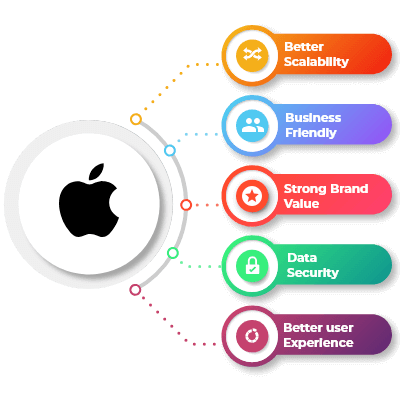
Best Design Principles of iOS app development

Choosing the right development company is a critical decision for your project’s success. Here are the top things to consider when selecting an iOS app development company:

  1. Experience and Expertise:

Look for a company with a proven track record in iOS app development. Check their portfolio and client testimonials to gauge their experience.

  1. Technical Proficiency:

Ensure the company’s developers are proficient in Swift and Objective-C, the primary programming languages for app development.

Verify their knowledge of frameworks and tools, including Xcode, UIKit, and Core Data.

  1. Portfolio and References:

Review their portfolio to assess the quality and diversity of their previous iOS apps. Contact their past clients for references and feedback on their work.

  1. Design Capabilities:

Good design is crucial for apps. Assess their design skills, including user interface (UI) and user experience (UX) design capabilities.

  1. Development Process:

Inquire about their development process. A well-defined and transparent process ensures better project management and on-time delivery.

  1. Project Management:

Understand how they manage projects. Effective communication and project management tools are essential for keeping you updated on progress.

  1. Team Composition:

Learn about the team working on your project, including the roles of developers, designers, QA testers, and project managers. Ensure they have a well-rounded team.

  1. Communication:

Effective communication is vital for a successful partnership. Ensure they are responsive and can communicate in your preferred language and time zone.

  1. Client Reviews and Testimonials:

Read client reviews and testimonials to get insights into their clients’ experiences and satisfaction with their services.

  1. Transparency and Pricing:

Understand their pricing structure and payment terms. A transparent pricing model is essential to avoid unexpected costs.

  1. Maintenance and Support:

Inquire about their post-launch support and maintenance services. A good company should provide ongoing support and updates.

  1. Security and Data Privacy:

Ensure that the company follows best practices for app security and data privacy, especially if your app deals with sensitive user data.

  1. App Store Submission Experience:

Ask about their experience with submitting apps to the Apple App Store. Familiarity with the submission process can prevent delays and rejections.

  1. NDA and Intellectual Property:

Discuss non-disclosure agreements (NDAs) and intellectual property rights to protect your app idea and its assets.

  1. Scalability:

Consider the company’s ability to scale with your project if it grows. Ensure they have the resources and flexibility to accommodate your needs.

  1. Location:

Decide whether you prefer a local, offshore, or remote development team based on your project’s requirements and your comfort level with remote collaboration.

  1. Compliance and Regulations:

If your app involves specific industries or regulations (e.g., healthcare, finance), check if the company has experience complying with relevant standards and regulations.

  1. Post-Launch Services:

Beyond development, evaluate their ability to help you market and maintain the app post-launch, including user acquisition and updates.

By carefully considering these factors, you can choose an iOS app development company that aligns with your project’s goals and ensures a successful partnership.

What are the Top Strategies to Monetize iOS Apps

Monetizing iOS apps can be achieved through various strategies, depending on your app’s nature and target audience. Here are some top strategies to consider when monetizing iOS apps:

  1. Paid Apps:
    Users purchase your app from the App Store for a one-time fee. This model is straightforward but requires a compelling value proposition to justify the cost.
  2. In-App Purchases (IAPs):
    Offer additional content, features, or virtual goods within your app that users can buy. This model works well for freemium apps where the initial download is free.
  3. Subscriptions:
    Provide access to premium content, services, or features on a recurring basis. Subscriptions can be monthly, yearly, or at other intervals. This model can create a steady revenue stream.
  4. Freemium Model:
    Offer a basic version of your app for free and upsell premium features or content. This model encourages users to try the app before committing to a purchase.
  5. Ads:
    Implement advertisements within your app, such as banner ads, interstitials, or rewarded video ads. You can earn revenue based on ad impressions, clicks, or user interactions.
  6. Affiliate Marketing:
    Promote affiliate products or services within your app and earn a commission for each sale or action generated through your app’s referrals.
  7. Sponsorships and Partnerships:
    Partner with other companies or brands to promote their products or services within your app in exchange for sponsorship or affiliate fees.
  8. Sell Data or Insights:
    If your app collects valuable user data (while complying with privacy regulations), consider selling aggregated and anonymized data or insights to interested parties, such as marketers or researchers.
  9. Crowdfunding:
    Use platforms like Patreon or Kickstarter to secure financial support from your app’s most dedicated users. In return, offer exclusive content or benefits.
  10. E-commerce Integration:
    If your app has a shopping or marketplace component, earn a commission on sales made through your platform.
  11. Merchandise and Physical Goods:
    Sell branded merchandise, physical products, or services related to your app’s content or theme.
  12. Cross-Promotion:
    Promote your other apps or products within your existing apps to increase visibility and user engagement across your portfolio.
  13. Event Ticketing:
    If your app is related to events or entertainment, you can sell event tickets or access through your platform and earn a commission on sales.
  14. Donations:
    Allow users to make voluntary donations to support your app. Some users may appreciate the opportunity to contribute to a free or ad-free experience.
  15. Licensing Content:
    If you produce valuable content (e.g., images, music, videos), licence it to other apps or platforms for a fee.
  16. Pay-Per-Use:
    Charge users for specific actions or transactions within the app, such as advanced analytics, document conversions, or premium support.
  17. White-Labelling:
    Offer a white-label version of your app to other businesses or organizations, allowing them to customize and use it for their purposes.
  18. Limited-Time Sales and Discounts:
    Occasionally offer discounts or sales on in-app purchases or subscriptions to encourage more purchases during specific periods.
  19. Referral Programs:
    Reward users for referring friends or other users to download and use your app.
  20. Educational Content:
    If your app offers educational or training content, create premium courses or materials for which users can pay.

Successful monetization often involves a combination of these strategies. Consider your app’s target audience, niche, and unique features when deciding which monetization methods are most suitable.

Additionally, continuously analyze user feedback and adapt your monetization strategy to meet changing market trends and user preferences.

FAQs

  1. What is the typical iOS app development process?

The iOS app development process involves concept and planning, design, development, testing, deployment, and ongoing maintenance and updates.

  1. How long does it take to develop an iOS app?

The development timeline varies depending on the complexity of the app and the team’s experience. Simple apps may take a few months, while more complex projects can take a year or more.

  1. How can I publish my iOS app on the Apple App Store?

To publish your iOS app on the App Store, you’ll need to create an Apple Developer account, adhere to Apple’s guidelines, and submit your app for review.

Conclusion

Mastering these design principles in iOS app development is essential for creating user-friendly experiences that stand out in the crowded app market.

By prioritizing simplicity, consistency, and usability while keeping accessibility and performance in mind, you can build iOS apps that users will enjoy and recommend to others.

Remember, good design is an ongoing process, so stay committed to refining your app’s design to meet evolving user needs and expectations.

10 Popular PHP Development Frameworks to Use in 2023

PHP, the versatile scripting language, has been powering dynamic web applications for decades. With the evolution of web development, PHP frameworks have emerged as indispensable tools that streamline the development process, enhance code organization, and boost efficiency.

If you are enthusiastic about developing stunning PHP web applications you have come to the right place. In this blog we will discuss comprehensively about the various development frameworks, explore its benefits and also outline the top 10 best PHP development frameworks in 2023.

What is PHP Framework?

A framework is a pre-built collection of libraries, tools, and templates designed to facilitate web application development. It provides PHP developers with a structured environment, enforcing best practices, reducing repetitive tasks, and ensuring scalability and maintainability of the codebase.

Why Use PHP Frameworks?

  1. Rapid Development:
    Frameworks provide pre-built components, modules, and libraries that accelerate development time. This means you can focus on building unique features rather than writing repetitive code.
  2. Code Reusability:
    Frameworks encourage the creation of reusable code components. This promotes consistency, reduces redundancy, and simplifies maintenance.
  3. Structured Architecture:
    Most frameworks follow a structured architecture, such as the Model-View-Controller (MVC) pattern. This separation of concerns enhances code organization, making it easier for PHP development service providers to manage and scale applications.
  4. Security Enhancements:
    Frameworks come equipped with built-in security measures, such as input validation, SQL injection prevention, and protection against cross-site scripting (XSS) attacks. This significantly reduces vulnerabilities and enhances the overall security of your application.
  5. Scalability:
    Frameworks offer tools and guidelines that enable PHP development companies to build scalable applications. As your user base grows, your application can handle increased traffic and functionality without significant architectural changes.
  6. Community Support:
    Most popular frameworks have active and vibrant communities. This means you can find tutorials, guides, documentation, and plugins readily available. Community support facilitates problem-solving and encourages continuous learning.
  7. Consistent Coding Standards:
    Frameworks often enforce coding best practices and standards. This ensures that your code is clean, maintainable, and adheres to industry standards.
  8. Database Abstraction:
    Frameworks typically offer tools for database abstraction, making it easier to work with various database systems. This minimizes the effort required to switch between databases or update your application’s data structure.
  9. Testing and Debugging:
    Frameworks often come with built-in testing tools and debugging support. This helps you identify and rectify issues more efficiently, leading to a more stable and reliable application.
  10. Future Compatibility:
    As PHP evolves, frameworks are updated to incorporate new features and security enhancements. Using a framework ensures your application stays compatible with the latest PHP versions, reducing the risk of outdated code.

Top Things To Consider When Choosing a PHP Development Framework

  1. Project Requirements:
    Understand the specific requirements of your project. Consider factors like project size, complexity, scalability needs, and the type of application you’re building (web app, API, content management system, etc.).
  2. Learning Curve:
    Evaluate your team’s familiarity with different frameworks. Opt for a framework that aligns with your team’s skill levels, as some frameworks may have steeper learning curves than others.
  3. Documentation:
    Check the quality and comprehensiveness of the framework’s documentation. Clear documentation is essential for efficient development and troubleshooting.
  4. Community Support:
    A robust and active PHP community can provide valuable resources, plugins, tutorials, and solutions to common challenges. Look for frameworks with thriving communities that can support your development journey.
  5. Performance:
    Consider the framework’s performance benchmarks and how they align with your application’s speed and responsiveness requirements. Certain frameworks may be more suitable for high-traffic applications than others.
  6. Architecture and Features:
    Assess the architecture and features offered by the framework. Does it follow a Model-View-Controller (MVC) pattern or another architecture? Does it include features that align with your project’s needs, such as authentication, caching, or RESTful API support?
  7. Security Features:
    Security is paramount for any application. Evaluate the framework’s built-in security features, such as input validation, protection against SQL injection, and cross-site scripting (XSS) prevention.
  8. Scalability:
    Choose a framework that allows your application to grow without significant architectural changes. Ensure the framework’s structure supports scalability and doesn’t hinder future expansion.
  9. Ecosystem and Integrations:
    Consider the framework’s ecosystem and compatibility with other tools you might use, such as databases, front-end libraries, and third-party APIs.
  10. Community Feedback:
    Research user reviews and feedback from developers who have used the framework. Their experiences can provide insights into the framework’s strengths, weaknesses, and real-world performance.
  11. Longevity and Updates:
    Choose a framework that is actively maintained and updated. This ensures that your application remains compatible with the latest PHP versions and industry trends.
  12. Vendor Lock-In:
    Be cautious of frameworks that tie you into proprietary tools or technologies, potentially limiting your flexibility in the future.
  13. License and Cost:
    Understand the licensing terms of the framework. Some frameworks are open-source, while others may have commercial licenses or additional costs for specific features.
  14. Flexibility vs. Convention:
    Consider whether you prefer a framework that enforces a strong coding structure and conventions or one that offers more flexibility for custom solutions.
  15. Community Contributions:
    Frameworks with a strong community of contributors often offer a broader range of plugins, extensions, and packages that can enhance your development process.

What Are the Best PHP Frameworks in 2023?

  1. Laravel

Laravel is a modern PHP framework known for its elegant syntax, developer-friendly environment, and robust ecosystem. follows the Model-View-Controller (MVC) pattern and provides features like Blade templating, Eloquent ORM, and artisan command-line tool.

Pros:

  • Elegant and expressive syntax that’s easy to learn and read.
  • Extensive documentation and a thriving community with ample resources.
  • Built-in features like authentication, routing, caching, and more.
  • Eloquent ORM simplifies database management and relationships.
  • Powerful Blade templating engine for efficient Laravel front-end development.

Cons:

  • Slightly steeper learning curve for beginners due to its rich feature set.
  • Heavier footprint compared to micro-frameworks, which might impact performance in certain scenarios.
  1. Symfony

Symfony is a robust PHP framework known for its high flexibility, reusable components, and emphasis on best practices. It provides a collection of components that can be used independently or as part of a full-stack framework.

Pros:

  • Highly customizable framework with a modular architecture.
  • Reusable components allow for flexibility and optimized development.
  • Well-documented and follows strict coding standards.
  • Strong emphasis on testing and robust security features.
  • Active community support and long-term stability.

Cons:

  • Requires a solid understanding of PHP and object-oriented programming.
  • Learning curve can be steep for beginners due to its extensive features.
  1. CodeIgniter

CodeIgniter is a lightweight and user-friendly PHP framework that’s ideal for small to medium-sized projects. It emphasizes simplicity and speed, making it a popular choice for rapid development.

Pros:

  • Minimal setup and straightforward documentation.
  • Excellent performance due to its lightweight footprint.
  • Flexibility for custom PHP app development without imposing too many conventions.
  • Active community and user-friendly environment, suitable for beginners.

Cons:

  • Fewer built-in features compared to other frameworks, which may require third-party libraries.
  • Not as suitable for large-scale applications due to its simplicity.
  1. Yii

Yii is a high-performance PHP framework designed for web 2.0 applications. It follows the MVC pattern, comes with powerful caching support, and offers various features that expedite development.

Pros:

  • Fast performance and robust caching mechanisms.
  • Follows strict security practices with built-in authentication and authorization.
  • Powerful code generation tools streamline development.
  • Extensible and suitable for building both small and large applications.
  • Active community and continuous updates.

Cons:

  • Smaller community compared to Laravel or Symfony.
  • Learning curve for beginners due to its advanced features and concepts.
  1. Phalcon

Phalcon is a unique PHP framework implemented as a C extension. This design choice contributes to its exceptional performance and low resource consumption.

Pros:

  • Outstanding performance due to its C extension architecture.
  • Lower memory consumption compared to other frameworks.
  • Rich set of features including ORM, caching, validation, and more.
  • Detailed documentation and active community.
  • Suitable for high-traffic applications and resource-intensive tasks.

Cons:

  • Requires compiling the extension, making deployment slightly more complex.
  • Smaller community compared to more established frameworks.
  1. Slim

Slim is a micro-framework designed for simplicity and flexibility. It’s suitable for building APIs, small web applications, and prototyping.

Pros:

  • Minimalistic design and lightweight footprint.
  • Ideal for small projects and quick prototyping.
  • Excellent choice for building RESTful APIs.
  • Easy to learn, making it beginner-friendly.
  • Customizable and adaptable to specific project needs.

Cons:

  • Limited built-in features compared to full-stack frameworks.
  • Not suitable for complex applications or projects requiring extensive features.
  1. Laminas

Laminas (previously Zend Framework) is a versatile PHP framework that offers a collection of professional-grade components for building robust applications.

Pros:

  • Modular architecture allows for flexible use of components.
  • Suitable for both small and large applications.
  • Emphasis on code quality, best practices, and security.
  • Extensive documentation and strong community support.
  • Smooth transition from Zend Framework to Laminas.

Cons:

  • Requires some understanding of design patterns and best practices.
  • Learning curve for beginners due to its modular nature.
  1. Phinx

Phinx is a database migration tool that’s often used in conjunction with PHP frameworks to manage database schema changes over time.

Pros:

  • Simplifies database migrations and version control.
  • Supports various databases, making it versatile.
  • Command-line interface provides a user-friendly experience.
  • Easily integrates with popular PHP frameworks.
  • Efficiently handles changes to database schemas in collaborative projects.

Cons:

  • Designed specifically for database migrations and not a full PHP framework.
  • Might require additional tools or components for complete application development.
  1. CakePHP

CakePHP is a modern PHP framework that emphasizes rapid development and convention over configuration. It follows the MVC architecture and offers features that promote code reusability. CakePHP is one of the best frameworks for eCommerce development. We have compiled a detailed blog on how to build an eCommerce application using CakePHP.

Pros:

  • Rapid development with conventions that reduce configuration.
  • Built-in features like CRUD operations, authentication, and more.
  • Simple and readable syntax that’s beginner-friendly.
  • Active community and continuous updates.
  • Suitable for building applications of various sizes.

Cons:

  • Less flexible compared to some other frameworks due to its strict conventions.
  • Learning curve for beginners who are new to conventions.
  1. FuelPHP

FuelPHP is a flexible and modular PHP framework designed for rapid application development. It aims to provide a balance between simplicity and functionality, making it suitable for both beginners and experienced PHP developers.

Pros:

  • Modular architecture allows developers to use only the components they need.
  • Emphasizes security with features like input validation, XSS filtering, and CSRF protection.
  • ORM (Object-Relational Mapping) simplifies database operations and relationships.
  • Robust routing system for handling URLs and requests.
  • Active community and user-friendly documentation.

Cons:

  • Smaller community compared to more popular frameworks.
  • Fewer built-in features compared to larger frameworks like Laravel.
  • Limited resources and plugins compared to more established frameworks.
  1. Fat-Free Framework (F3)

Fat-Free Framework, often referred to as F3, is a lightweight PHP framework known for its minimalistic design and fast performance. It aims to provide essential features without unnecessary overhead.

Pros:

  • Extremely lightweight with minimal overhead.
  • Ideal for building small web applications and APIs.
  • Simplicity in design and syntax, making it easy to learn.
  • Modular and extensible architecture.
  • Good performance due to its minimalist approach.

Cons:

  • Limited built-in features compared to full-stack frameworks.
  • May not be suitable for large-scale applications with complex requirements.
  • Smaller community compared to more widely used frameworks.

In conclusion, PHP frameworks offer a host of advantages that streamline development, enhance security, and improve the overall quality of web applications. Whether you’re building a small website or a complex web application, leveraging a PHP framework can significantly boost your productivity and the quality of your final product.

FAQs

Which PHP framework is the best for beginners?

Frameworks like CodeIgniter, Laravel, and Slim are often recommended for beginners due to their user-friendly environments, clear documentation, and ease of learning.

Which PHP framework is best for large-scale applications?

Symfony, Laravel, and Yii are commonly used for large-scale applications due to their robust architectures, scalability features, and extensive libraries.

What is the advantage of using a modular PHP framework?

Modular frameworks like Symfony and Laminas allow PHP developers to use specific components independently, offering greater flexibility and optimizing resource usage.

Is there a PHP framework that focuses on minimalism?

Fat-Free Framework (F3) is designed with minimalism in mind, offering essential features without unnecessary overhead, making it ideal for small applications and APIs.

Can I switch PHP frameworks once my project has started?

While it’s possible, switching frameworks midway through a project can be time-consuming and require significant code changes. It’s best to choose the right framework at the outset.

Top Reasons To Use WordPress Support And Maintenance Service

WordPress is the most popular CMS platform powering millions of websites across the globe. It enables businesses and individuals to create dynamic and engaging online platforms. However, simply setting up a website is not enough as you need ongoing support and maintenance to ensure its success. In this blog, we will delve into the significance of WordPress support and maintenance.

We will highlight the key reasons why it is essential to maintain long-term health and performance of the website.

Enhancing Website Security

One of the most critical reasons for investing in support and maintenance is ensuring the security of your website.

Being an open-source platform, it can be vulnerable to security threats if not properly managed.

Regular updates for the WordPress core, themes, and plugins are essential to patch security vulnerabilities and protect your website from potential hacking attempts and malware infections.

A dedicated support team can monitor security issues proactively, thereby preventing breaches and safeguarding sensitive user data.

Ensuring Optimal Performance

Website speed and performance are vital factors that influence user experience and search engine rankings.

Slow-loading websites lead to high bounce rates and dissatisfied visitors.

WordPress maintenance services focus on optimizing various elements like image sizes, caching, and code to ensure that your website loads quickly and efficiently.

A faster and more responsive website not only pleases your users but also positively impacts SEO, leading to improved search engine rankings and increased organic traffic.

Regular Backups for Data Protection

Data loss is a nightmare scenario for any website owner. Accidents happen, and websites can experience technical issues or even cyber-attacks that may result in data loss.

Regular backups of your website’s files and database are crucial to ensuring data protection and quick recovery in case of emergencies.

With proper maintenance, you can rest assured that your valuable content and business data are safe and can be easily restored if needed.

Continuous Content Management

Keeping your website’s content fresh and up-to-date is essential for engaging your audience and maintaining relevance.

WordPress support and maintenance services offer content management assistance, therefore ensuring that your website’s information is always accurate and timely.

From adding new pages to updating existing content, a dedicated support team can efficiently manage your website’s content, moreover allowing you to focus on your core business activities.

Proactive Issue Resolution

Websites can face various technical issues and glitches over time. By availing WordPress support and maintenance, you can have a team of experts continuously monitoring your website’s performance.

This proactive approach allows them to identify and resolve potential problems before they escalate and affect your website’s functionality or user experience.

Hire WordPress maintenance service providers who have the skills and expertise to keep your website updated and relevant to the changing market needs.

Never miss an update from us. Join 10,000+ marketers and leaders.

Timely issue resolution helps keep your website stable, reducing downtime and minimizing any negative impact on your business operations.

What are the Top 20 WordPress Support and Maintenance Services?

  1. WordPress Core Updates:Regular updates to the latest version of WordPress to ensure security patches and new features are implemented.
  2. Theme Updates:
    Updating themes to the latest versions for improved functionality and security.
  3. Plugin Updates:
    Regularly updating plugins to ensure they are compatible with the latest version and secure from vulnerabilities.
  4. Security Monitoring:
    Continuous monitoring of the website for potential security threats and immediate action in case of any suspicious activities.
  5. Malware Scanning and Removal:
    Regular scans to detect and remove malware from the website as much as needed to maintain a secure environment.
  6. Backup and Restoration:
    Regular backups of website files and database to ensure data protection and the ability to restore the website in case of data loss.
  7. Performance Optimization:
    Fine-tuning website elements like caching, image compression, and code to improve site speed and overall performance.
  8. Database Optimization:
    Regular optimization of the database to henceforth maintain efficiency and reduce website loading times.
  9. Content Management:
    Assistance with adding, updating, or removing website content, likewise including pages, blog posts, images, and multimedia elements.
  10. Broken Link Checks:
    Regularly scanning the website for example checking broken links and fixing them to improve user experience and SEO.
  11. SSL Certificate Management:
    Ensuring the SSL certificate is up to date and valid for a secure browsing experience.
  12. Spam Protection:
    Implementing measures to protect the website from spam comments and form submissions.
  13. Website Security Hardening:
    Strengthening website security through measures in addition disabling directory listing and securing access points.
  14. Site Migration Assistance:
    Help with transferring the website to a new hosting provider or domain.
  15. SEO Optimization:
    Implementing SEO best practices therefore improving website visibility and search engine rankings.
  16. Performance Analytics:
    Monitoring and analyzing website performance metrics in any event to identify areas for improvement.

What are The Top 10 Benefits of Hiring Professional WordPress Support and Maintenance services

  1. Enhanced Security:
    Professional maintenance services implement robust security measures, additionally regularly updating WordPress core, themes, and plugins, and conduct security scans to protect your website from cyber threats and hacking attempts.
  2. Regular Backups and Data Protection:
    Scheduled backups ensure that your website’s data is safe and can be quickly restored in case of data loss due to technical issues or cyber-attacks.
  3. Improved Website Performance:
    Maintenance experts optimize your website’s speed and performance, consequently leading to faster loading times, reduced bounce rates, and better user experiences.
  4. Proactive Issue Resolution:
    Monitoring and regular checks allow the maintenance team to identify and address potential issues before they escalate, minimizing downtime and disruption.
  5. Time and Resource Savings:
    Outsourcing maintenance tasks to professionals frees up your time and resources, therefore allowing you to focus on your core business activities.
  6. Expertise and Knowledge:
    Professional maintenance services have skilled WordPress developer with extensive knowledge of WordPress, ensuring that your website is handled by experts.
  7. Customization and Flexibility:
    Maintenance plans can be tailored to suit your website’s specific needs, therefore ensuring you get the services that align with your requirements.
  8. Reliable Website Uptime:
    Ongoing monitoring and quick troubleshooting lead to improved website uptime, certainly making your site is accessible to visitors at all times.
  9. SEO Optimization:
    Expert WordPress developers can implement SEO best practices to enhance your website’s visibility in search engines, additionally leading to increased organic traffic.
  10. Peace of Mind:
    Knowing that your website is in the hands of professionals who are handling its security, performance, and updates gives you peace of mind, allowing you to focus on growing your business.

Top Stats and Trends on WordPress Support and Maintenance Services

  • WordPress powers over 40% of all websites on the internet, consequently making it the most popular content management system globally.
  • There are more than 58,000 free plugins available in the official WordPress Plugin Repository offering a wide range of functionalities to enhance websites.
  • Users have access to thousands of free and premium themes, allowing them to customize the appearance of their websites.
  • In a survey, 61% of hacked WordPress websites were found to be not running the latest version of the CMS or its plugins, undoubtedly highlighting the critical role of regular updates for security.
  • The global market is expected to witness substantial growth and is projected to reach over $1.3 billion by 2026.
  • Mobile devices account for more than 50% of global web traffic. Maintenance services therefore emphasize mobile responsiveness to cater to the growing mobile user base.
  • 53% of mobile users abandon a website if it takes longer than three seconds to load. Website maintenance focuses on performance optimization to improve user experience and reduce bounce rates.
  • There is a steady increase in demand for support and maintenance services, which is certainly driven by the growing number of businesses establishing an online presence.
  • On average, an hour of website downtime can cost small businesses up to $10,000. Therefore timely issue resolution and uptime monitoring are crucial for businesses relying on their websites.
  • CMS websites experience around 90,000 cyber attacks per minute, which significantly underscored the need for robust security measures and ongoing monitoring.
  • The rise of remote work has fueled the demand for its maintenance services, furthermore businesses seek remote support for managing their online assets.

Conclusion

WordPress support and maintenance are vital aspects of managing a successful website. From ensuring security and data protection to optimizing performance and user experience, regular maintenance enhances your online presence and helps you stay ahead in a competitive digital landscape.

By availing professional services, you can entrust the technical aspects of your website to experts, freeing up your time to focus on growing your business.

Staying informed about the latest statistics and trends in maintenance enables you to make informed decisions, ensuring a smooth and successful website for your audience.

Andolasoft is one of the leading providers of WordPress support and maintenance services. Get expert solutions to keep your website up-to-date and secure.

Are you looking for a WordPress developer

Contact Us

From ensuring security and data protection to optimizing performance and user experience, regular maintenance enhances your online presence and helps you stay ahead in a competitive digital landscape.

By availing professional services, you can entrust the technical aspects of your website to experts, freeing up your time to focus on growing your business.

Staying informed about the latest statistics and trends in maintenance enables you to make informed decisions, ensuring a smooth and successful website for your audience.

FAQ

1: Can I handle WordPress maintenance on my own?

A1: While some aspects of maintenance can be managed by website owners, professional services provide a comprehensive approach and save time and effort.

2: How often should I back up my WordPress website?

A2: It’s recommended to perform daily or weekly backups, chiefly depending on how frequently you update your content.

3: Are WordPress maintenance services expensive?

A3: The cost varies depending on the level of service and the size of your website. However, it is a worthy investment to protect and optimize your online presence.

4: Will regular maintenance impact my website’s performance?

A4: On the contrary, regular maintenance enhances performance and improves user experience by ensuring smooth functionality.

A Complete Guide: Everything You Need to Know About Fintech

Fintech – Like the name suggests fintech apps are a blend of finance and technology. It refers to technologies, softwares and apps that empower businesses and individuals to manage banking and finances or generate insights using mobile and desktop devices.

In today’s world, consumers are progressively embracing tools and applications to efficiently manage and execute a wide range of financial activities. These include funds transfer, budget tracking, expense tracking, as well as generating income and expense insights.

Carrying finance activities on banking applications helps customers manage various financial challenges and reach their finance goals.

Why Do Customers Love Fintech Apps?

Cost-Effective:

Cost effectiveness is the biggest benefit that businesses and individuals get with fintech apps. Fintech app development is designed keeping reusability of the code in mind as various apps can be developed using the same code frameworks.

This significantly reduces time and money facilitating developers to focus on other aspects of application development.

Never miss an update from us. Join 10,000+ marketers and leaders.

Finance app also enables automation of various operations such as automated expense tracking, credit risk management, auto credit score update, faster funds transfer thereby saving time and money for individuals to use.

Faster Access to Banking Services:

Fintech apps enable faster access to banking services. You can carry out most of your banking actions on mobile devices using banking applications.

Financial inclusion and deepening improves customers’ access to banking services which help save money while providing convenience and better experience.

Convenience and Ease-of-Use:

Finance apps are convenient to use which increases the efficiency of the transactions done using mobile devices. It provides better user experience, access to more updated information, and brings transparency to business conducted on mobile devices.

Fintech also makes it possible to provide financial products to people without bank accounts.

Faster Access to Loans:

Businesses and individuals can get same-day loans for their needs which is possible only through Fintech. Various online lenders provide prompt assistance and enable customization of banking products and services.

Streamlined financial operations:

Even though finance is an essential part of the business it is often mismanaged. Fintech’s one of the strongest features is its ability to streamline various financial processes.

Finance management and budget management apps make it easier for businesses to easily manage various activities such as tax filing, bookkeeping, money transactions, receive updates and can provide a wide degree of access to financial products where accounts are assigned with limited privileges.

Improved Customer Experience:

Fintech can be adopted cost-effectively while providing a superior customer experience. While better speed and convenience can improve customer retention such as by using Big Data and AI to provide a more personal and more customized experience.

Fintech Market Overview:

Top Fintech Market Trends and Stats

Fintech Market Overview

  • Fintech assets grew by more than 100% from 2013 to 2022. Where as traditional bank assets grew by only 75%
  • In 2021 Fintech companies acquired $210 billion in global investment
  • In October 2022 there were over 300 unicorn fintech companies worldwide
  • In 2022 the global transaction value of digital payments reached over $8 trillion
  • Insurance fintech companies raised about $15 billion in investment in 2021

These trends suggest that fintech is one of the most trending technologies in 2023; moreover with the advent of technologies such as AI and ML it can truly reduce the chances of fraud making way for greater financial inclusivity.

Here is others reasons of fintech application for being the role model for any industries

How Fintech Works?

There are various types of fintech apps which work in various different ways. It enables safe access of financial account data such as account balance and transactions using apps that enhance or enrich the data.

Wealth and financial management apps aggregate the financial account data from different accounts into one easy to view format. It conveniently provides all related financial information in a single platform.

Are you looking for a Fintech developer

Contact Us

Another way fintech apps work is by funding the new accounts for existing bank accounts, Then use those funds to carry out activities such as trade stocks, cryptocurrencies, and more funds from their bank accounts into separate accounts.

APIs:

Financial APIs safely connect consumer’s bank accounts to this apps and services so that they can share their financial data, transfer funds and verify their identities.

Mobile Apps:

Fintech companies also develop mobile apps that users can use to access funds and insights at any time. It could be a digital banking app, a financial management tool, or an investment platform.

Web-based solutions:

On top of providing mobile apps, some fintech companies also provide web-based solutions where users can log-in through web browsers and access the same functionality they perform on mobile apps.

Types of Fintech

The Top 4 Categories of Fintech Users:

  • B2B bankers
  • Business clients
  • B2C businesses
  • Consumers

Top Technologies Used for Fintech Applications

Fintech companies use a variety of technologies such as AI, Big Data, Blockchain and Robotic Process Automation.

  • Artificial Intelligence can take your spending habits and expenses to create insights and help you forecast your future spending by factoring in your expense pattern and market economy.
  • Big data can forcast an investment plan for you by using data generated from millions of users as well as by understanding the existing market economy.
  • Robotic Process Automation is an AI technology that focuses on automating various repetitive tasks.
  • Blockchain using a digital ledger to keep your finances and financial data secure while you make transactions.

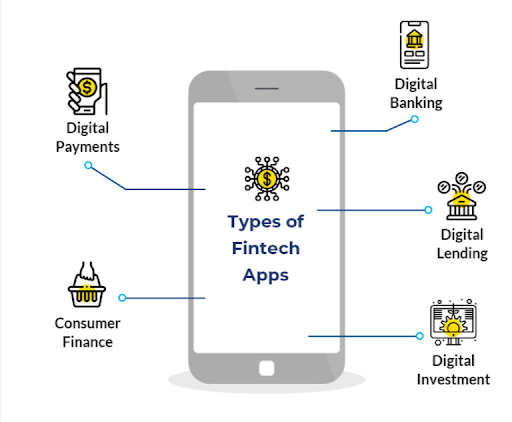
What are the Different Types of Fintech Apps?

What are the Different Types of Fintech Apps

(Image source: https://www.indusnet.co.in/)

  • Lending Apps
  • Payments App
  • Personal Finance Tracking
  • Equity Finance App
  • Consumer Banking App
  • Insurance Apps

How Fintech Influences The Financial Market?

  • Fintech empowers consumers by democratising access to financial services especially in the developing countries. This encourages other financial services to innovate.
  • Improve new service opportunities, new strategies and channel commercialization.
  • Improve efficiency in back-office management and frontline procedures in traditional financial institutions.
  • Creation of new investment opportunities
  • Improve financial supervision
  • Improve and optimise risk management process
  • Prevalence of technology know-how among the general population

What is the Impact of Fintech on Banking Industry

  • Cloud technologies and Big Data enables faster access of data without the need of installing specialised applications on devices.
  • This enables fintech companies to provide personalized offers based on the analysis of fast-moving digital information.
  • Application programming interfaces can be integrated into the systems for interaction with clients.
  • Social media and mobile communication have special applications, this integration of the banking business enables them to collect information about customer preferences for the purpose of using it when proposing new financial products, and establish trust relationships with each bank’s client.
  • The primary advantage of omnichannel banking is that customer’s troubles can be resolved faster. Using the internet and mobile devices both bankers and consumers can avoid in-person interactions in bank branches to get to their point quickly and efficiently.
  • Payment systems are adjusted with tools and AI that can predict their activity in the future and suggest payment methods with reduced fees.

Conclusion

Despite being a complex system, fintech presents significant opportunities for financial services, startups, and the corresponding infrastructure.

The service sector increasingly uses new technologies and tools to influence and improve such as insurance, lending, accounting, asset management, investment, tax administration etc.

Today, many startups are opting for fintech app development to create more convenient and revolutionary solutions to help improve the financial scenarios of their nation.

Fintech is one of the most lucrative sectors attracting tons of business owners to build mobile fintech solutions.


FAQs

  • How can Fintech development benefit my financial business or startup?

Fintech development benefits financial businesses and startups by enabling innovative and user-friendly solutions, streamlining operations, automating processes, enhancing security, and providing personalized financial services. It boosts customer engagement and loyalty, leading to increased competitiveness and growth.

  • How do Fintech developers ensure compliance with financial regulations and data protection laws?

Fintech developers ensure compliance with financial regulations and data protection laws through rigorous testing, encryption, secure data storage, and adherence to industry standards. They implement robust security measures and maintain regular audits to safeguard sensitive financial information.

  • How can Fintech development improve customer experiences in the financial industry?

Fintech development enhances customer experiences by offering convenient, fast, and accessible financial services. It enables features like real-time transactions, personalized recommendations, seamless mobile banking, and easy account management, fostering greater user satisfaction and loyalty.

  • Can Fintech development assist traditional financial institutions in their digital transformation efforts?

Yes, Fintech development can assist traditional financial institutions in their digital transformation efforts. It helps them integrate digital technologies, automate processes, enhance customer interactions, and stay competitive in the rapidly evolving financial landscape.

  • What is the typical cost and timeline for Fintech development projects?

The cost and timeline for Fintech development projects vary based on complexity and scope. Smaller projects may range from a few thousand dollars and a few weeks, while more extensive and intricate projects can cost several hundred thousand dollars and take several months to complete.

Top 8 WordPress Design and Development Trends of 2023

WordPress is one of the most versatile and adaptable platforms that offers a range of features and functions that make it suitable for both individuals and brands to create their online brand presence.

It started-out as a basic blogging platform nearly two decades ago and since then it has become a powerful content management system powering nearly 50% of all websites in the world.

WordPress CMS platform features better technology integration, mobile support and user experience which is also supported by a passionate community of contributors who constantly develop new features and tools that increase its capabilities.

Today, in this blog I am going to list out the latest trends in WordPress design and development which you can implement to increase your brand awareness and sales.

Top Stats and Facts About WordPress Development

  • WordPress Dominance:
    WordPress powers over 40% of all websites on the internet, making it the most popular content management system globally.
  • Themes Availability:
    The official WordPress Theme Directory offers over 8,000 free themes, providing a vast selection of design options for website owners.
  • Plugin Repository:
    WordPress users have access to more than 60,000 free plugins in the official WordPress Plugin Repository, enabling enhanced functionality and customization. 
  • Responsive Websites:
    As of 2021, approximately 70% of WordPress websites are responsive, meaning they automatically adapt to different screen sizes and devices for an optimal user experience. 
  • Mobile Traffic:
    Mobile devices generate around 52% of global website traffic, underlining the importance of mobile-responsive WordPress designs.
  • Popular Page Builder Plugins:
    Page builder plugins like Elementor and WPBakery have gained significant popularity among WordPress users, enabling drag-and-drop design functionality without coding knowledge.
  • E-commerce Integration:
    WooCommerce, a popular ecommerce plugin for WordPress, powers over 5 million online stores, making it a leading choice for online retailers.
  • Multilingual Support:
    WordPress offers support for more than 200 languages, allowing businesses to create multilingual websites to reach a global audience. 
  • Security Concerns:
    WordPress is frequently targeted by hackers due to its popularity. As of 2021, around 90,978 attacks are made on WordPress sites every minute. 
  • Gutenberg Editor Adoption:
    The Gutenberg editor, introduced in WordPress 5.0, is now used by over 47% of all WordPress websites, indicating steady adoption among users. 
  • Open-Source Community:
    WordPress is an open-source software maintained by a global community of developers and contributors, with thousands of individuals actively involved in its continuous improvement.

Here are the Top 8 WordPress Trends to Follow in 2023

  1. Video Backgrounds
  2. Parallax Scrolling
  3. Augmented Reality
  4. Dark Mode UI
  5. Minimalistic Themes
  6. Voice Search Integration
  7. Chatbot Integration
  8. Multilingual Support

Video Backgrounds

Video Backgrounds

(ImageSource: https://qodeinteractive.com/wordpress-theme/kenozoik-vibrant-portfolio-theme/)

Video background is one of the latest trends in WordPress web development which includes using a short video as the background of the web page. It can be achieved by custom developing your WordPress website, installing a pre-developed theme or installing a plugin to this particular effect on your WordPress website.

Why is video background a trend?

  • Video backgrounds provide a stunning and engaging experience for users
  • It retains user attention which encourages users to spend more time on the website
  • Create an immersive user experience which converts more visitors to customers
  • Video backgrounds deliver more meaningful messages that text and still-images
  • Video backgrounds are responsive which can fit to any screen size delivering a consistent user experience across all devices
  • With the availability of plugins it is now easier than ever to implement video background to WordPress site.

Parallax Scrolling

Parallax Scrolling

(Imagesouce: https://stockdutchdesign.com/en/lookbook/)

Parallax scrolling is a WordPress development technique that provides a depth to the movement of the browsing experience. Here the background of the web page moves at a different speed than the foreground content which creates a visually engaging experience for the users.

Never miss an update from us. Join 10,000+ marketers and leaders.

Why parallax scrolling is in trend?

  • Parallax scrolling creates a visually stunning and engaging experience for users.
  • It encourages more engagement from users.
  • It increases user engagement and encourages users to stay longer on the website
  • Parallax scrolling is responsive and can be implemented using plugins and add-ons.

Augmented Reality

Augmented Reality

(Image credit: Dent Reality)

Augmented reality is quickly taking shape to be the next big thing after AI. Companies like Meta and Google are already paving the way for the new companies to emerge in this market. Augmented reality is typically employed by ecommerce stores to provide a more immersive and physical store-like experience to online shoppers.

Why is augmented reality in trend?

  • Customer can get a store-purchase like experience
  • Businesses have wider scope of interaction with the customers
  • Ecommerce store reduces chances of returns and exchange as the shoppers
  • Today’s technology enables WordPress store owners to easily integrate AR and VR to their web store.

Dark Mode UI

Dark Mode UI

(Image Credit: www.apple.com)

Dark mode UI is a trend that involves using darker backgrounds and lighter text to create a visual design that is easy to view. It is in trend because of the increasing mobile usage for which users today prefer dark mode to reduce eye strain when using mobile devices in low-light environments.

Why is dark mode UI in trend?

  • Dark mode delivers a soothing viewing experience for the users.
  • It improves accessibility for users with visual impairments.
  • It reduces energy consumption and requires less power to display backgrounds
  • Availability of plugins and custom code makes it easier than ever to add dark mode themes and features to the WordPress site.

Minimalistic Themes

Minimalistic Themes

(Image Credit: Kalium Themes)

Minimalistic designs are in trend among WordPress development community because of its simple and uncluttered layouts. It creates an attractive and user-friendly layout by utilising a minimalist colour scheme; coupled with a simple typography and minimal use of graphics it gives a sophisticated appearance to the websites.

Why are minimalist themes in trend?

  • Minimalistic themes are pleasing to the eyes and provide information in a more uncluttered way thereby making it easier for them to view and consume content.
  • It increases user engagement and helps businesses succeed in a competitive market and users prefer minimalist design that doesn’t overwhelm them with too much visual information.
  • Minimalist themes are highly customizable enabling users to easily change the color scheme, typography and other visual elements that match their brand persona and style.
  • Minimalist themes are responsive and can be implemented with a simple theme installation.

Voice Search Integration

Voice search integration has become a growing trend. Today, it answers nearly 93% of all search queries. Which signifies the importance of having a voice search feature on web apps. Some consider voice search integration to be a must-have feature on their web apps.

It gives users the ability to search for information with ease and convenience which has grown in trend after the advent of smart home devices such as Google Nest and Amazon Echo.

Why is voice search integration in trend?

  • Voice search provides hands-free search capabilities to users
  • It makes it easier for users to find more accurate search results
  • It facilitates accessibility for users with disabilities thereby enabling businesses to reach a wider audience
  • Today’s technology makes it even easier to add voice search integration to WordPress sites.

Chatbot Integration

Today chatbot is the cornerstone of providing high-quality customer support. Chatbot integration is in top trend as it provides answers to initial queries effectively before transferring it to a real-human being.

It is particularly useful for businesses who get a large number of queries everyday and want to delegate simple queries to chatbots.

It uses artificial intelligence to mimic human conversation and provide helpful information and support to users.

Why is chatbot integration in trend?

  • Chatbots can stay online 24/7 providing on-demand support to customers.
  • It enables businesses to provide better customer support services to their global customer base.
  • Chatbots can be configured to answer queries in any language and all time zones.
  • It can manage a high volume of customer inquiries, thereby enabling businesses to provide better and more efficient customer service.
  • It reduces response times and can respond to queries almost instantly.
  • By using AI, chatbots can personalize their responses and provide a more customized user experience.
  • Chatbots make WordPress websites more cost-effective at the same time provide stellar customer support at a relatively lower cost.
  • It enables businesses to derive valuable insights and data from their WordPress websites.

Multilingual Support

Multilingual Support

Multilingual support is an essential feature in WordPress websites as it enables businesses to reach a global customer base. It facilitates online businesses to reach a wider audience by providing support for multiple languages there by providing an improved user experience for non-English speaking visitors and expanding their customer base.

Are you looking for a WordPress developer

Contact Us

Why is multilingual support in trend?

  • Any WordPress website can be made multilingual by implementing a plugin to the CMS platform.
  • WordPress features a WordPress multi-site that enables web admins to create a separate site for each language in a few clicks.
  • WordPress multilingual site enables business owners to reach a global audience base.

Conclusion

WordPress is a rapidly evolving open-source CMS platform, all thanks to its larger community who keep improving its features and functionalities.

Apart from the design and development trends mentioned above the WordPress community is also witnessing an increase in other lesser known trends such as WooCommerce integration, headless WordPress development, multi-purpose WordPress themes, drag and drop page builder, and WordPress VIP.

If you are a business owner planning to build your next website using WordPress you should consider the above-mentioned trend to stay ahead of the competition and be more successful in your niche.


FAQs

  • What are the pros and cons of following design trends versus sticking with a timeless design?

The pros of the latest design trends is staying current and appealing to modern audiences, showcasing innovation and creativity, and creating a fresh user experience. Whereas the cons of the design trends are that these trends may become outdated quickly, leading to frequent redesigns, and risk of losing brand identity by blending with competitors.

  • Are there any security considerations I should be aware of when implementing these trends?

Be cautious of using third-party plugins or themes from untrusted sources. Regularly update all components to patch vulnerabilities, and ensure secure data handling in features like AI-driven personalization.

  • Will these trends require additional training or expertise to implement effectively?

Implementing complex trends like AI personalization or 3D effects may require specialized knowledge or hiring experts. WordPress tutorials and courses can help bridge knowledge gaps.

  • What are the potential challenges or risks associated with adopting new design and development trends?

Adapting new trends can lead to compatibility issues with older plugins or browsers. Overloading with excessive animations or visuals may slow down website performance. User acceptance and understanding of trendy features are uncertain.

  • Are there any performance optimization tips for websites that incorporate these design trends?

Optimize images and media files to reduce loading times. Minimize HTTP requests by merging CSS and JavaScript files. Use caching plugins to improve page loading speed. Prioritize lightweight themes and clean code to ensure faster website performance.

How To Migrate Your WordPress Website Manually

Migrating a WordPress website manually can seem daunting, but with the right steps and preparation, it can be a relatively straightforward process. Here in this article I will walk you through the process of manually migrating your WordPress site, including how to backup your current site, install a new version of WordPress, import your content, update URLs and file paths, test your new site, and finally go live.

Whether you’re moving to a new hosting provider or simply want to change the domain of your website, this guide will provide the information you need to successfully migrate your site.

Keep in mind that the process can be complex and time-consuming, so it’s always best to consult with an expert if you’re not sure about how to proceed.

Manually WordPress website Migrating steps –

Migrating a WordPress website manually involves several steps, including:

1. Backing up your current site:

This includes creating a full backup of your site’s files, as well as a database export. Backing up your current website is an essential step in the process of manually migrating a WordPress website. Here are the steps to create a full backup of your site:

  1. Database Backup: Using a plugin like “Duplicator” or phpMyAdmin, export a copy of your database. This will save all of your posts, pages, comments, and settings.
  2. File Backup: Use an FTP client like FileZilla to download a copy of all the files from your website. This includes all of your themes, plugins, images, and other media.
  3. Store the Backup: Store the backups in a safe place, like an external hard drive or cloud storage service.

It’s important to regularly backup your site to have a recent copy to restore if something goes wrong during the migration process. Once you have created a backup of your website, you can then proceed to the next step, which is installing a new version of WordPress on your new server or hosting account.

Note: You also can use various backup plugins for WordPress to automate the backup process

2. Installing a new version of WordPress:

Installing a new version of WordPress is the next step after you have backed up your current website. Download and install the latest version of WordPress on your new server or hosting account. Here are the steps to install a new version of WordPress:

  1. Download WordPress: Go to the WordPress.org website and download the latest version of WordPress.
  2. Upload WordPress: Use an FTP client like FileZilla to upload the WordPress files to your new server or hosting account.
  3. Create a Database: Create a new database on your new server or hosting account. Make sure to note the database name, username, and password, as you will need them during the installation process.
  4. Run the Installation: Go to the URL of your new server or hosting account and run the WordPress installation process. This will involve entering the information for your new database, such as the name, username, and password.
  5. Complete the Installation: Follow the prompts to complete the installation process, including setting up your site title, creating a username and password, and selecting a theme.

Once the installation is complete, you can proceed to the next step, which is importing your content into the new site.

It’s important to note that, before installing the new version of WordPress, you must check the server requirements and also the compatibility of the theme and plugins you’re going to use with the latest version of WordPress.

3. Importing your content:

Importing your content is the next step after installing a new version of WordPress. Here are the steps to import your content:

  1. Install the Import/Export Plugin- Go to the WordPress plugin repository and install an import/export plugin such as “All-in-One WP Migration” or “Duplicator”.
  2. Import the Database: Using the plugin, import the database export file that you created earlier in the process. This will import all of your posts, pages, comments, and settings into your new site.
  3. Import Media Files: Use the plugin to import the media files from your file backup. This will include all of your images, videos, and other media.
  4. Check your content: Once the import process is complete, check your new site to make sure that all of your content has been imported correctly. You should also check that all of your links are working properly.
  5. Update Permalinks: Go to the permalink settings page and update the permalinks structure.

It’s important to note that, depending on the size of your website, the import process may take some time. Also, some plugins can have limitations in importing large files, in that case, you may need to split the database into smaller chunks and import them one by one.

Once your content has been imported, you can proceed to the next step, which is updating URLs and file paths.

4. Updating URLs and file paths:

Update any URLs and file paths that have changed, such as when moving from a development domain to a live domain.

Updating URLs and file paths is an important step in the process of manually migrating a WordPress site. This step ensures that all of your links and media files are working properly on your new site. Here are the steps to update URLs and file paths:

  1. Update the URLs: Go to the general settings page in your WordPress dashboard and update the site URL and home URL to the new URL of your site.
  2. Update the file paths: If your file paths have changed, you will need to update them in the database. You can use a plugin such as “Better Search Replace” to do this.
  3. Check your links: After updating the URLs and file paths, check your site to ensure that all of your links and media files are working properly.
  4. Update hard coded links: If you have any hard coded links in your theme or plugin files, you will need to update them manually.
  5. Update internal links: Go through your website and update any internal links that may have changed as a result of the migration.

It’s important to note that, Updating the URLs and file paths can be a tedious task, so it’s essential to double-check everything to avoid any broken links. A broken link can harm the user experience and your SEO ranking.

Once you have updated the URLs and file paths, you can then proceed to the next step which is testing your new site to ensure that everything is working properly.

5. Testing your new site:

Test your new site to ensure that all of your content has been transferred correctly, and that all of your links are working properly.

Testing your new site is an important step in the process of manually migrating a WordPress site. This step ensures that everything is working properly on your new site before you make it live. Here are the steps to test your new site:

  1. Test all the links: Go through your site and test all of the links to ensure that they are working properly.
  2. Test forms: Test all the forms on your site, such as contact forms and registration forms, to ensure that they are submitting and sending properly.
  3. Test media: Check that all of your media, such as images and videos, are displaying correctly.
  4. Test e-commerce functionality: If you have an e-commerce site, test the checkout and payment process to ensure that everything is working correctly.
  5. Test on different devices: Test your site on different devices, such as desktops, laptops, tablets, and smartphones, to ensure that it is responsive and working correctly on all devices.
  6. Test on different browsers: Test your site on different web browsers, such as Chrome, Firefox, Safari, and Edge, to ensure that it is working correctly on all browsers.

It’s important to note that, testing your new site thoroughly is crucial before you make it live, as any issues found after going live can be harmful to your users and your business.

Once you have thoroughly tested your new site and are satisfied that everything is working properly, you can then proceed to the final step, which is going live.

6. Going live:

Once you are satisfied that your new site is working as expected, you can update your DNS settings and make your new site live.

Going live is the final step in the process of manually migrating a WordPress site. This step makes your new site live and accessible to the public. Here are the steps to go live:

  1. Update DNS settings: Update the DNS settings of your domain to point to the new server or hosting account where your new site is located.
  2. Update the CDN: If you’re using a Content Delivery Network (CDN), make sure to update the CDN settings to point to your new site’s IP address.
  3. Set up redirects: Set up redirects from your old site to your new site, to ensure that any incoming traffic to your old site is redirected to your new site.
  4. Monitor your site: Monitor your site’s performance and uptime after going live, to ensure that everything is working as expected.
  5. Update Google Analytics: Update the tracking code of your Google Analytics account with the new site’s tracking code
  6. Notify your visitors: Inform your visitors that the site has been moved and provide them with the new site’s URL

It’s important to note that, going live is a critical step, so make sure to double-check everything before making the switch. It’s also recommended to schedule the migration during a low traffic time to minimize the impact on your visitors.

By following these steps, you can ensure that your site migration is successful, and your new site is up and running smoothly for your visitors.

It’s important to note that this process can be complex and time-consuming, and it’s always recommended to consult with an expert if you’re not sure about how to proceed.

Conclusion:

Manually migrating a WordPress website can be a complex process, but with the right steps and preparation, it can be done successfully. The key to a successful migration is to create a full backup of your site, including both files and database export. Additionally, it’s important to install the latest version of WordPress, import your content, update URLs and file paths, test your new site, and finally go live.

It’s important to note that migrating a site can be time-consuming and may require some technical expertise, so it’s always recommended to consult with an expert if you’re not sure about how to proceed. Here is the quick recap,

  1. Backup your current site.
  2. Install the latest version of WordPress.
  3. Import your content.
  4. Update URLs and file paths.
  5. Test your new site.
  6. Go live.

By following these steps, you can ensure that your migration goes smoothly and your site is up and running on your new server or hosting account in no time. Andolasoft has experienced and skillful experts for consultation. So feel free to communicate with us and schedule a free consultation now.