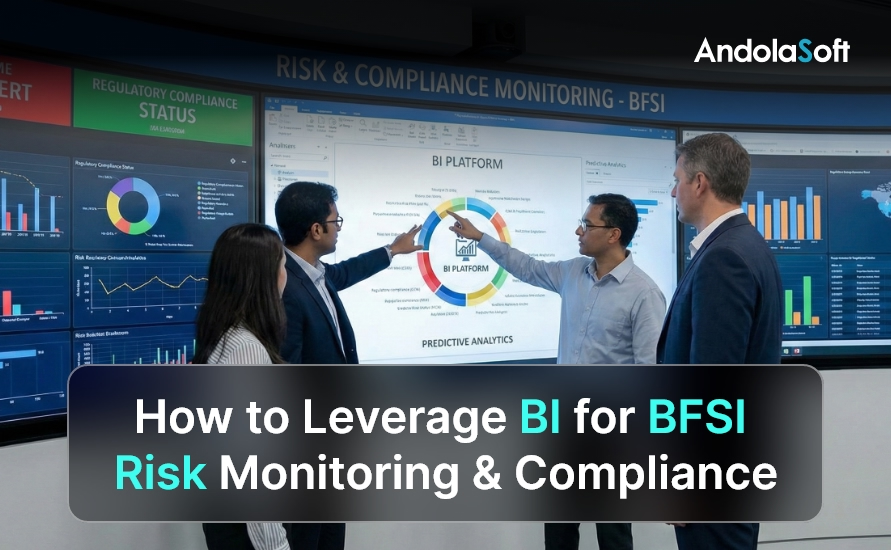
How to Leverage BI for BFSI Risk Monitoring & Compliance?

The BFSI sector operates in one of the most regulated and risk-sensitive environments in the global economy. Every transaction, customer interaction, and financial exposure is governed by regulatory frameworks that continue to evolve.

At the same time, digital banking, real-time payments, and fintech integrations have significantly increased operational complexity.

In this environment, BI for BFSI is no longer a reporting enhancement — it is a foundational capability.

Instead of relying on backward-looking reports and manual reconciliations, BFSI organizations are using BI to continuously monitor risk, validate compliance, and enable faster, more confident decision-making.

As a result, leadership teams gain visibility not only into what has happened, but also into what could happen next.

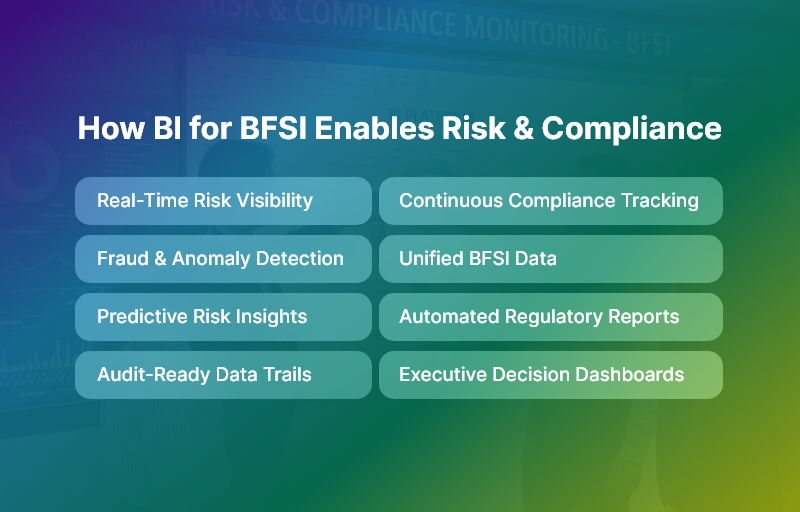
How BI for BFSI Enables Risk & Compliance

What BI for BFSI Really Means

BI refers to Business Intelligence platforms purpose-built to address the unique risk, compliance, and governance needs of banks, NBFCs, financial services firms, and insurance providers.

Unlike generic BI tools, these platforms are designed around regulatory metrics, risk-weighted analytics, and audit-ready data structures.

More importantly, BI for BFSI unifies data from core banking systems, transaction platforms, risk engines, and operational tools into a single intelligence layer.

This ensures that compliance officers, risk managers, and executives all operate from the same source of truth, eliminating inconsistencies and interpretation gaps.

Why Traditional Reporting Models No Longer Work

Many BFSI institutions still rely on static reports generated from siloed systems. While these reports satisfy basic reporting needs, they fail to support real-time risk and compliance oversight.

By the time issues surface in monthly or quarterly reviews, the damage is often already done.

Traditional reporting struggles because it is reactive, fragmented, and highly manual. Compliance teams spend excessive time compiling data, validating numbers, and responding to audit queries.

BI for BFSI replaces this inefficiency with continuous intelligence, allowing teams to focus on risk mitigation rather than data preparation.

How BI for BFSI Supports Core Risk Monitoring

Credit Risk Management

Credit risk is dynamic by nature. Borrower behavior, economic conditions, and sectoral exposure change constantly.

BI for BFSI enables institutions to track these changes in near real time, providing early warning indicators before risks materialize.

Rather than waiting for defaults or overdue accounts, credit teams can proactively assess portfolio health, stress-test exposure, and rebalance risk.

This shift from reactive to predictive credit management is one of the most valuable outcomes of BI for BFSI adoption.

Market Risk Visibility

Market volatility directly impacts treasury operations, investment portfolios, and trading desks.

Small fluctuations in interest rates or foreign exchange markets can significantly affect profitability and capital adequacy.

With BI for BFSI, institutions gain continuous visibility into market exposure.

Real-time dashboards allow leadership to understand sensitivity, simulate adverse scenarios, and align risk appetite with actual market conditions.

Consequently, decisions become data-driven rather than assumption-based.

Operational Risk Control

Operational risk often emerges quietly — through process inefficiencies, system outages, or control failures. These risks are difficult to manage without integrated visibility across departments and branches.

BI for BFSI consolidates operational data, making it easier to identify recurring incidents, process bottlenecks, and control weaknesses.

Over time, organizations can correlate operational risk events with financial impact, enabling targeted improvements and stronger internal controls.

Fraud Risk Detection

Fraud risk has intensified with digital channels and real-time transactions. Manual review processes are no longer sufficient to detect sophisticated fraud patterns.

BI for BFSI enhances fraud monitoring by analyzing transaction behavior, identifying anomalies, and triggering alerts based on predefined risk thresholds.

This intelligence-led approach allows fraud teams to act faster, reduce losses, and improve customer trust.

Strengthening Compliance Through BI for BFSI

Compliance is no longer a periodic exercise. Regulators expect continuous oversight, transparency, and traceability.

BI enables this shift by embedding compliance monitoring directly into operational workflows.

Instead of checking compliance after the fact, institutions can continuously track regulatory thresholds, monitor policy adherence, and flag exceptions before violations occur.

This proactive approach significantly reduces regulatory risk and improves supervisory confidence.

Automated Regulatory Reporting and Audit Readiness

Regulatory reporting demands precision, consistency, and defensible data lineage. Manual reporting processes increase the risk of errors and audit findings.

With BI for BFSI, regulatory reports are generated directly from validated source data. Every metric is time-stamped, traceable, and version-controlled.

As a result, audit readiness becomes an outcome of daily operations rather than a last-minute effort.

Key Capabilities Required in BI for BFSI Platforms

To deliver real value, BI for BFSI platforms must include:

  • Unified data integration across core banking, ERP, CRM, and risk systems
  • Role-based dashboards for compliance, risk, and executive teams
  • Drill-down analytics for investigation and root-cause analysis
  • Predictive insights for emerging risk trends

These capabilities ensure BI supports governance and decision-making, not just visualization.

Best Practices for Implementing BI for BFSI

Successful BI initiatives begin with regulatory and risk priorities rather than dashboard design.

Organizations should standardize data definitions early, design role-specific KPIs, and automate alerts instead of relying solely on reports.

Most importantly, BI should be treated as a governance and control platform.

When aligned with compliance objectives, BI for BFSI becomes a long-term strategic asset rather than a short-term analytics project.

The Future of BI for BFSI

Looking ahead, BI for BFSI will increasingly incorporate AI-driven risk prediction, automated regulatory intelligence, and ESG risk monitoring.

As regulations become more complex and data volumes continue to grow, institutions with advanced BI capabilities will be better positioned to adapt, comply, and scale securely.

Final Thoughts: BI for BFSI as a Strategic Imperative

In today’s BFSI landscape, risk monitoring and compliance define institutional resilience.

Organizations that depend on fragmented reporting remain exposed to regulatory and operational shocks.

Those that adopt BI gain continuous visibility, predictive insight, and audit-ready governance.

By transforming data into intelligence, BI for BFSI enables banks and financial institutions to move faster, comply smarter, and operate with confidence in an increasingly regulated world.

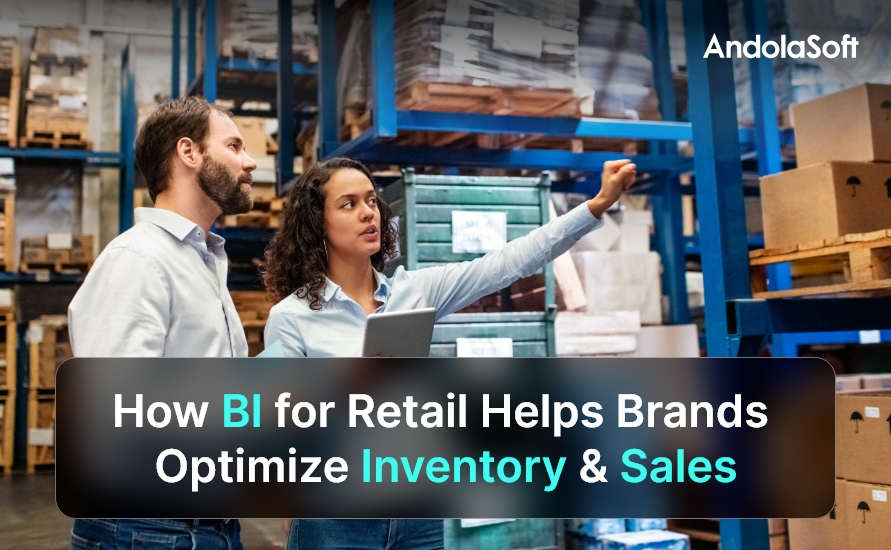
How BI for Retail Helps Brands Optimize Inventory & Sales?

Retailers today face unpredictable consumer demand, rising costs, and fierce competition across every channel. Traditional reporting methods can’t keep up with rapid shifts in buying behavior and supply chain disruptions. This is where BI for Retail becomes a strategic game changer. It empowers retail leaders with real-time visibility into sales, stock, customers, and profitability — enabling faster and smarter decisions that drive performance.

This guide explains how BI for Retail transforms data into insights that help brands optimize inventory and maximize sales growth.

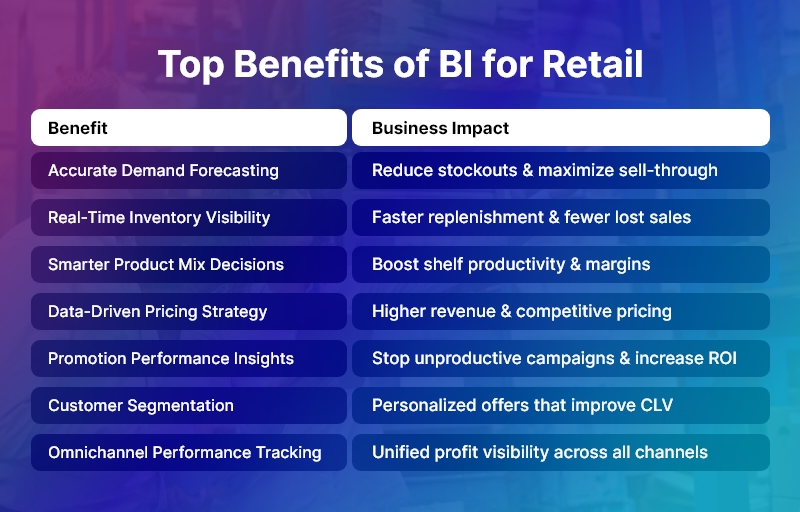
Top Benefits of BI for Retail

What is BI for Retail?

BI for Retail refers to the use of business intelligence tools, analytics, and data visualization designed specifically for retail operations. It consolidates data from:

→ Giving retailers a single source of truth for accurate, fast decision-making.

Why Retailers Need BI Today

Retail Challenge BI for Retail Solution
Overstocking or stockouts Smart demand forecasting & replenishment optimization
High inventory carrying costs Better space utilization & inventory turnover
Limited insights into product performance Real-time SKU profitability
Ineffective promotions Campaign analytics & customer response insights
Slow reporting & decision delays Instant dashboards & automated KPIs
Omnichannel visibility issues Unified analytics across online & offline

How BI Optimizes Inventory

BI ensures the right products are available at the right place and time — without excess waste.

Accurate Demand Forecasting

Predict future sales using:

  • Historical demand
  • Regional trends
  • External factors (weather, holidays)

➡ Lower stock imbalance & higher sell-through rates.

Real-Time Inventory Tracking

Centralized dashboards show exact inventory status across:

  • Stores
  • Warehouses
  • Online channels

➡ Faster replenishment & reduced lost sales.

Safety Stock Optimization

Analytics determine optimal stock buffers to avoid:

  • Stockouts
  • Rush orders
  • Customer dissatisfaction

Supplier Performance Insights

Measure vendor lead time, quality, and delivery reliability.

➡ Fewer delays + stronger procurement strategy.

Shrinkage & Waste Reduction

Retail BI detects:

  • Theft & pilferage patterns
  • Food/perishable spoilage
  • Storage inefficiencies

➡ Better bottom-line performance.

How BI Improves Sales Performance

Smarter Product Mix & Assortment Planning

Analyze:

  • Fast/slow movers
  • Store-level preferences
  • Cross-selling patterns

➡ Improve shelf productivity & margins.

Data-Driven Pricing Optimization

Use real-time pricing intelligence:

  • Margin impact
  • Competitor pricing
  • Customer elasticity

➡ Higher revenue with competitive pricing.

Promotion Analytics

Identify which offers truly drive:

  • Sales uplift
  • Repeat purchase
  • Basket value

➡ Stop spending on unproductive campaigns.

Customer Segmentation & Personalization

BI for Retail leverages RFM scoring to:

  • Reward loyal customers
  • Target offers precisely
  • Increase Customer Lifetime Value (CLV)

Omnichannel Performance Tracking

Bring together:

➡ Holistic insight into profitability across channels.

Key Retail KPIs Tracked Through BI

Inventory Metrics

  • Sell-through rate
  • Inventory turnover ratio
  • Days of inventory on hand
  • Stockout percentage

Sales Metrics

  • Gross margin return on investment (GMROI)
  • Basket size & conversion rate
  • Promo-driven sale percentage
  • Customer retention rate

➡ Retailers can monitor performance in real time.

Systems Integrated with BI

System Example Tools
POS Shopify POS, Square, Lightspeed
ERP SAP, Oracle, Tally
CRM Salesforce, HubSpot, Zoho
eCommerce Platforms Shopify, Magento, WooCommerce
Supply Chain Mgmt WMS, delivery analytics

Integration removes data silos for a unified retail intelligence ecosystem.

AI & Predictive Analytics in BI for Retail

Retail BI uses artificial intelligence to:

  • Predict future demand accurately
  • Suggest automated stock replenishment
  • Forecast the impact of promotions
  • Optimize pricing based on trends
  • Reduce overstock of declining products

➡ Better decisions with less manual effort.

BI for Multi-Location Retail

Benefit Business Impact
Store performance benchmarking Invest where growth is highest
Regional demand analysis Improve stock availability per location
Centralized analytics Consistent business reporting
Data-driven store expansion decisions Maximize ROI

Scalable intelligence for growth-oriented retail networks.

Short Case Example

A lifestyle retailer used BI for stock optimization:

Before BI After BI
22% lost sales due to stockouts <7% lost sales
Overpricing slow-moving stock Dynamic pricing increased sales
Manual, delayed reporting Real-time dashboards

Result: 12% revenue growth & increased customer satisfaction

Best Practices for BI for Retail Implementation

Best Practice Why It Matters
Prioritize clean and standardized data Accurate insights need reliable data
Define KPIs clearly Focus effort on business outcomes
Train teams for daily use Improve adoption across stores
Start with quick wins Build confidence in BI value
Scale to advanced analytics Predictive insights deliver higher ROI

Conclusion

Retail success now depends on data-driven agility — not guesswork.

BI for Retail helps brands:

  • Optimize inventory levels
  • Maximize sales and profitability
  • Improve customer satisfaction
  • Deliver an efficient omnichannel experience
  • Make informed, fast decisions at every level

Retailers that leverage BI for Retail build strong competitive advantages and unlock sustainable growth.

FAQs

How does BI for Retail help reduce stockouts?

It predicts demand and monitors inventory instantly, ensuring timely replenishment.

Can small retail businesses use BI?

Yes — cloud BI offers affordable, easy-to-adopt analytics.

How does BI improve retail profitability?

By optimizing pricing, reducing waste, and maximizing product performance.

What kind of data feeds BI?

POS, ERP, CRM, supply chain, and eCommerce data.

Does BI support omnichannel retail?

Absolutely — it unifies insights across online and in-store experiences.

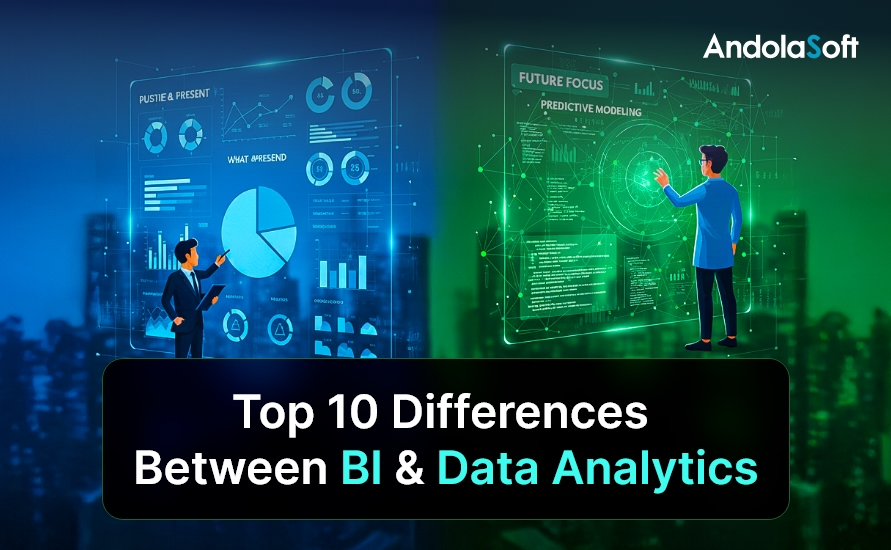
Top 10 Differences Between BI & Data Analytics

In today’s data-driven economy, organizations generate more data than ever before. According to industry research, enterprises analyze less than 30% of the data they collect, leaving valuable insights untapped. This challenge has made analytics-driven decision-making a boardroom priority.

However, one critical confusion persists across leadership teams: BI vs Data Analytics. While these terms are often used interchangeably, they serve distinct business purposes, operate at different levels of maturity, and answer fundamentally different questions.

Understanding the difference between BI vs Data Analytics is no longer optional. For CTOs, founders, and product leaders, this clarity directly impacts investment decisions, platform selection, team structure, and long-term scalability.

In this blog, you’ll learn the top 10 differences between BI vs Data Analytics, real-world use cases across industries, best practices for implementation, and how organizations can combine both for maximum impact. You’ll also see how Andolasoft, with deep expertise in BI, AI, machine learning, and data analytics, helps businesses design future-ready data ecosystems that drive measurable outcomes.

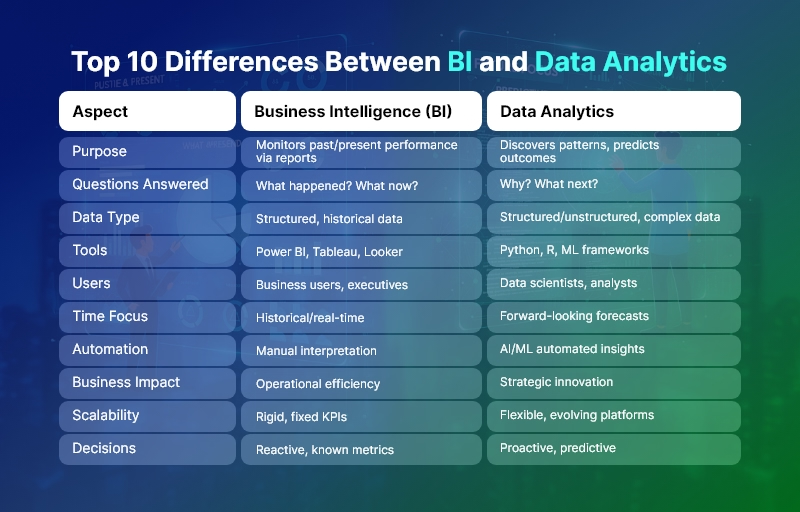
Top 10 Differences Between BI and Data Analytics

Business Need & Importance of Understanding BI vs Data Analytics

Modern organizations operate in an environment defined by speed, competition, and constant change. As a result, leadership teams need accurate insights, predictive intelligence, and real-time visibility to stay ahead. This is where understanding BI vs Data Analytics becomes critical.

Why This Distinction Matters Today

Business Intelligence focuses on what has already happened, while Data Analytics goes further to explain why it happened and what is likely to happen next. Companies that fail to distinguish between the two often invest in tools that don’t align with their goals, resulting in low adoption and poor ROI.

Industry-Wide Challenges

  • Healthcare organizations struggle with historical reporting but need predictive analytics for patient outcomes and capacity planning.
  • eCommerce companies rely on BI dashboards for sales tracking but require advanced analytics for personalization and demand forecasting.
  • Logistics and supply chain firms need BI for operational visibility, yet analytics for route optimization and risk prediction.
  • Fintech and SaaS companies depend on BI for compliance reporting while using analytics for fraud detection and churn reduction.
  • Manufacturing enterprises use BI for production reporting and analytics for predictive maintenance.

Risks of Not Modernizing

Organizations that rely only on legacy BI or fragmented analytics face serious risks:

  • Delayed decision-making due to static reports
  • Revenue loss from missed predictive opportunities
  • Operational inefficiencies and higher costs
  • Poor customer experiences due to lack of personalization
  • Inability to scale analytics across teams

Therefore, businesses need strategic, integrated data platforms instead of patchwork tools. This is where a trusted technology partner like Andolasoft plays a vital role in aligning BI vs Data Analytics with business objectives.

Top 10 Differences Between BI vs Data Analytics

1. Purpose and Core Objective

  • Business Intelligence (BI) primarily focuses on monitoring past and present performance through dashboards, KPIs, and standardized reports.
  • Data Analytics, on the other hand, aims to discover patterns, uncover root causes, and predict future outcomes using advanced analytical techniques.

2. Type of Questions Answered

  • BI answers “What happened?” and “What is happening now?”, enabling descriptive insights.
  • Data Analytics answers “Why did it happen?” and “What will happen next?”, enabling diagnostic and predictive insights.

3. Data Complexity and Depth

  • BI works best with structured, clean, and historical data from data warehouses.
  • Data Analytics handles large, complex, and unstructured datasets, including logs, text, IoT data, and behavioral data.

4. Tools and Technologies Used

  • BI relies on tools like Power BI, Tableau, Looker, and Superset for visualization and reporting.
  • Data Analytics uses Python, R, SQL, Spark, ML frameworks, and AI models for deep analysis.

5. User Base and Skill Requirements

  • BI is designed for business users, executives, and operational teams with minimal technical skills.
  • Data Analytics is driven by data analysts, data scientists, and engineers with strong statistical and programming expertise.

6. Time Orientation

  • BI is historical and real-time, focusing on trends and current performance.
  • Data Analytics is forward-looking, emphasizing forecasting, simulation, and optimization.

7. Level of Automation

  • BI dashboards require manual interpretation and predefined metrics.
  • Data Analytics enables automated insights, anomaly detection, and recommendations through AI and ML.

8. Business Impact Scope

  • BI supports operational efficiency and management reporting.
  • Data Analytics drives strategic transformation, innovation, and competitive advantage.

9. Scalability and Flexibility

  • BI solutions are often rigid, built around fixed KPIs.
  • Data Analytics platforms are highly scalable and flexible, evolving with business needs.

10. Decision-Making Power

  • BI enables reactive decision-making based on known metrics.
  • Data Analytics empowers proactive and predictive decision-making with higher accuracy.

Best Practices, Frameworks & Actionable Tips for BI vs Data Analytics

Step-by-Step Recommendations

  • Define business objectives first, then decide whether BI, Data Analytics, or both are required.
  • Establish a single source of truth using centralized data warehouses or data lakes.
  • Adopt modular architectures that allow BI and analytics to coexist seamlessly.

Best Practices

  • Standardize KPIs for BI to ensure consistency across teams and departments.
  • Invest in data quality and governance, as analytics accuracy depends on clean data.
  • Enable self-service BI while maintaining controlled access to advanced analytics.

Frameworks & Architectures

  • Modern Data Stack (ETL/ELT, cloud data warehouse, BI layer, analytics layer).
  • Lakehouse Architecture for combining BI reporting and advanced analytics.
  • MLOps frameworks to operationalize analytics models at scale.

Do’s and Don’ts

  • Do align BI dashboards with business outcomes, not vanity metrics.
  • Do not overcomplicate BI with unnecessary analytics models.
  • Avoid siloed tools that prevent data sharing across teams.

Quick Wins

  • Automate recurring BI reports to save time.
  • Introduce predictive analytics for high-impact use cases like churn or demand forecasting.

How Andolasoft Helps

Andolasoft enables organizations to implement BI vs Data Analytics effectively through:

  • Custom Web & Mobile Development for analytics-driven applications
  • SaaS Product Engineering with embedded BI and analytics
  • BI, AI & Machine Learning Solutions for predictive intelligence
  • Data Analytics & Application Modernization for legacy systems
  • DevOps, Cloud & Automation for scalable performance

Choosing Andolasoft ensures faster implementation, lower risk, and measurable business value.

Customer Success

For example, a mid-sized healthcare SaaS provider, partnered with Andolasoft to modernize its reporting and analytics platform. Initially, the company relied solely on BI dashboards to track patient engagement and operational metrics.

Andolasoft implemented a unified BI vs Data Analytics solution, combining real-time dashboards with predictive analytics models. Within four months, achieved:

  • 35% faster reporting cycles
  • 25% reduction in operational inefficiencies
  • Improved patient outcome predictions by 40%
  • Higher adoption of analytics across leadership teams

By integrating BI for visibility and Data Analytics for prediction, transformed decision-making from reactive to proactive.

Key Takeaways & Closing

Understanding the difference between BI vs Data Analytics is essential for modern businesses.

  • BI delivers clarity on past and present performance.
  • Data Analytics unlocks predictive and prescriptive intelligence.
  • Together, they create a powerful foundation for data-driven growth.

Organizations that adopt both strategically gain better visibility, smarter decisions, and sustainable competitive advantage. With the right partner, businesses can avoid common pitfalls and maximize ROI.

Andolasoft brings proven expertise in BI vs Data Analytics, helping organizations design, build, and scale intelligent data solutions that drive real outcomes.

FAQs

1. What is the main difference between BI vs Data Analytics?

BI focuses on historical reporting and dashboards, while Data Analytics emphasizes predictive and diagnostic insights using advanced techniques.

2. Can BI and Data Analytics work together?

Yes. Combining BI vs Data Analytics enables organizations to track performance and predict future outcomes effectively.

3. Which is better for executives: BI or Data Analytics?

Executives typically rely on BI for quick insights, while analytics supports strategic forecasting and long-term planning.

4. Is Data Analytics more expensive than BI?

Data Analytics often requires more skilled resources, but it delivers higher strategic value when implemented correctly.

5. Do small businesses need BI vs Data Analytics?

Yes. Even small businesses benefit from BI dashboards and targeted analytics for growth and efficiency.

6. How does Andolasoft help with BI vs Data Analytics?

Andolasoft designs end-to-end BI and analytics solutions, from data engineering to AI-driven insights.

7. When should a company move beyond BI to Data Analytics?

When businesses need forecasting, automation, and deeper insights beyond descriptive reporting, Data Analytics becomes essential.

Top BI Challenges Businesses Face and How to Solve Them?

Business Intelligence (BI) has become a mission-critical function for modern organizations. Leaders want to make faster, data-backed decisions while teams need real-time visibility into performance, market trends, and operational gaps.

However, leveraging BI isn’t always straightforward. Many businesses invest in BI tools but struggle to actually translate data into meaningful outcomes.

In this guide, we uncover the most common BI challenges businesses face and practical solutions to overcome each, so your BI initiative doesn’t just generate dashboards, but drives profitability and strategic growth.

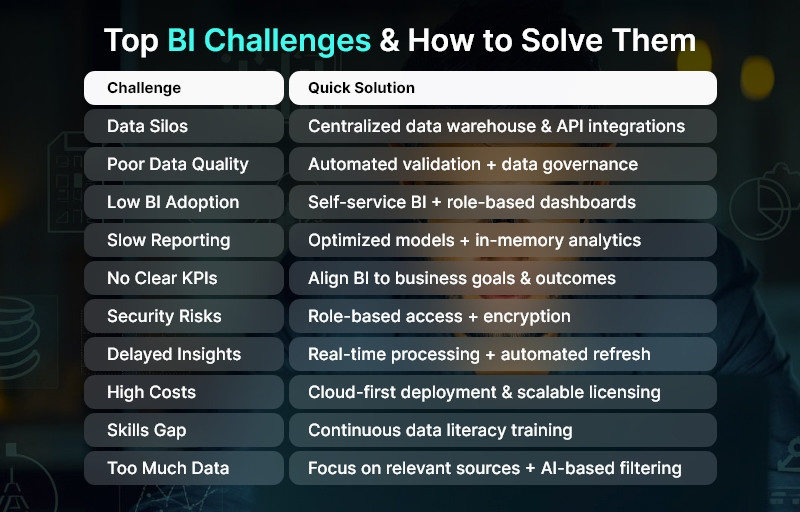
Top BI Challenges & How to Solve Them

Why Business Intelligence Often Fails: The Real Issue

Even with powerful BI tools available today, success often stalls because teams:

  • Don’t know what data is truly valuable
  • Face data accuracy or silo problems
  • Lack BI adoption across business units
  • Fail to align BI with business strategy

The good news? All these challenges are fixable.

Let’s dive into the 10 biggest BI challenges, and how to solve them effectively.

Top 10 BI Challenges and How to Solve Them

  • Data Silos and Lack of Integration

The challenge:

Data lives across multiple systems — CRM, ERP, spreadsheets, marketing tools, and more — making analytics difficult.

The solution:

  • Implement a unified data pipeline
  • Use ETL (Extract, Transform, Load) automation
  • Integrate systems via modern APIs
  • Adopt a centralized data warehouse or lakehouse

Outcome → Single source of truth that improves accuracy and data accessibility.

  • Poor Data Quality

Bad data leads to bad decisions.

Common issues:

  • Duplicates
  • Missing fields
  • Outdated records
  • Inconsistent formats

Solution strategies:

  • Automated data cleaning and validation
  • Data governance policies
  • Master data management (MDM)

Outcome → Trusted data + confident decision making.

  • Low BI Adoption Among Users

Most employees still rely on Excel and intuition — not insights.

Why adoption fails:

  • Tools are too complex
  • Limited training
  • Dashboards don’t solve real problems

How to fix it:

  • Provide intuitive self-service BI tools
  • Build role-specific dashboards
  • Offer guided onboarding and training

Outcome → BI becomes everyone’s habit — not a reporting chore.

  • Slow and Inefficient Reporting

When dashboards take minutes to load, users abandon BI.

Key improvement tactics:

  • Optimized data models
  • In-Memory analytics
  • Incremental refresh instead of full loads
  • Scalability planning

Outcome → Insights available instantly when decisions are needed.

  • Lack of Clear KPIs and Strategy

Without defined business goals, BI becomes random reporting.

How to solve:

  • Start BI with business questions
  • Identify measurable KPIs linked to goals
  • Create data-driven success benchmarks

Outcome → BI aligns directly with growth initiatives and ROI.

  • Security, Compliance & Access Control Issues

Data breaches or unauthorized access can be devastating.

Fix it with:

  • Robust role-based access permissions
  • Encryption in transit and at rest
  • Audit logs and compliance frameworks
  • Regular security governance reviews

Outcome → Secure analytics trusted by leadership and IT.

  • Real-Time Data Not Available

Outdated data = outdated decisions.

How to solve:

  • Use streaming analytics where needed
  • Implement CDC (Change Data Capture)
  • Automate refresh cycles

Outcome → Operational agility and faster risk mitigation.

  • High Cost of BI Implementation

Licensing + integrations + skilled resources = $$$

Cost optimization solutions:

  • Cloud-first BI deployment
  • Scale licensing as users grow
  • Use open-source or freemium BI tools initially
  • Focus on high-value use cases first

Outcome → Lower TCO (Total Cost of Ownership) without sacrificing capability.

  • Skills Gap in Data Literacy

BI software alone doesn’t create analysts.

Solve by:

  • Company-wide data literacy programs
  • Hands-on workshops on using dashboards
  • Embedded help within BI platforms

Outcome → Data becomes a culture, not a department.

  • Overwhelming Volume of Data

More data doesn’t mean better insights — often it’s the opposite.

How to fix:

  • Prioritize relevant data sources
  • Archive historical data strategically
  • Automate metadata management
  • Use AI to surface valuable patterns

Outcome → Right data → right insights → right actions.

Bonus: How to Ensure Long-Term BI Success

A successful BI transformation includes:

Pillar Practice
Strategy Align BI goals with business objectives
Technology Choose scalable BI tools with flexible integration
Governance Maintain data quality, security, and ownership
Skills Train users continuously
Culture Promote evidence-based decision making

BI success isn’t a one-time setup — it’s a continuous journey powered by adoption and improvement.

Conclusion

Business Intelligence can become an organization’s competitive advantage — but only when challenges like data quality, adoption, and integration are handled proactively.

By addressing these BI challenges strategically, businesses unlock:

  • Smarter decisions
  • Increased productivity
  • Reduced operational risks
  • Faster revenue growth

Start small. Focus on solving real business problems. And let data guide the future.

FAQs

1. What causes most BI failures?

Lack of adoption, poor data quality, and misaligned goals are the top reasons BI initiatives fail.

2. How can business intelligence drive ROI?

By improving decision-making, reducing errors, optimizing operations, and discovering revenue opportunities.

3. Which BI tools are most commonly used?

Tools like Power BI, Tableau, Qlik, Looker, and modern cloud-native BI platforms.

4. How do I improve BI adoption?

Deliver easy-to-understand dashboards and train users regularly.

5. What industries benefit most from BI?

Retail, manufacturing, finance, logistics, healthcare — and any data-driven business.

Top 10 Power BI Alternatives with Better Customization

BIIn an era when the demand for data-driven decision-making is skyrocketing, businesses are increasingly seeking more flexible and customizable analytics platforms than traditional tools. According to market data, the global business intelligence market is projected to nearly double from ~ $34.8 billion in 2025 to over $63 billion by 2032, as companies across industries ramp up investments in data and analytics. For many organizations, however, Microsoft Power BI — while popular — can feel limiting in terms of deep customization, embedded analytics, or integration flexibility. That is why exploring Power BI alternatives has become a critical step for CTOs, product managers, and business leaders.

In this blog, you’ll discover the top 10 Power BI alternatives that deliver superior customization, scalability, and control. Moreover, you’ll learn how a seasoned development partner like Andolasoft can help integrate and extend these tools to build truly tailored BI/analytics solutions for your enterprise needs.

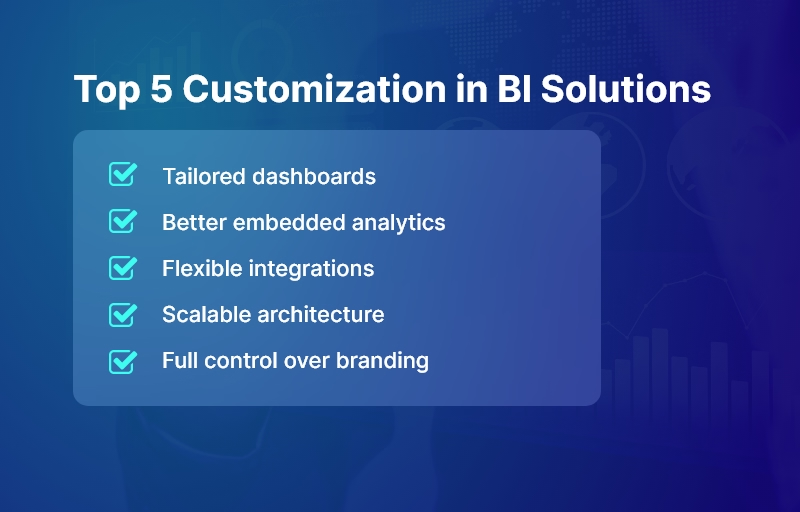
Top 5 Customization in BI Solutions

Why Customizable BI Tools Matter for Growing Businesses

Business intelligence (BI) is no longer a “nice-to-have” — it’s a strategic imperative. As defined by industry experts, BI encompasses the processes and platforms organizations use to collect, analyze, and interpret data to inform decisions.

For growing businesses — whether in healthcare, logistics, eCommerce, education, fintech, or manufacturing — the benefits of BI are tangible: improved operational efficiency, better forecasting, data-driven decision-making, and competitive advantage.

Challenges with Traditional or Out-of-the-Box BI Solutions

  • Many organizations still suffer from low BI maturity: according to a report, over 87% of companies fall into “basic” or “opportunistic” BI maturity levels — relying heavily on spreadsheets or siloed data efforts.
  • Off-the-shelf BI tools may lack the flexibility or extensibility required to adapt to unique business logic, complex workflows, or custom integrations — especially in industries with specialized needs (e.g. multi-warehouse supply chain analytics, real-time IoT data from manufacturing, or compliance-heavy fintech).
  • Without strategic BI implementation, companies risk inefficiencies, poor data governance, security vulnerabilities, and lost revenue opportunities due to underutilized data.

Hence, modern enterprises need customizable, scalable, and secure BI platforms — not patchwork solutions or “quick fix” dashboards.

That’s where exploring Power BI alternatives makes sense — and why partnering with a full-stack development and BI services provider like Andolasoft becomes strategic.

What Makes a Good Alternative? Key Criteria & Best Practices

Before diving into specific tools, it’s useful to understand the criteria and best practices that define a successful BI platform — especially one that seeks to go beyond Power BI’s standard capabilities.

Essential Capabilities to Look For

  • Customizable analytics & dashboards: The ability to build deeply customized reports, dashboards, and visualizations tailored to your domain and metrics.
  • Self-service BI for business users: Non-technical users should be able to explore data, build ad hoc reports, and access insights without deep coding or IT dependence.
  • Scalable, modern architecture: Cloud-native or hybrid platforms that scale with data volume, user load, and complex workflows, with robust governance and security.
  • Integration and flexibility: Ability to integrate with existing data warehouses, data lakes, ETL tools, third-party services, APIs, and custom applications.
  • Embedded & composable analytics: Options to embed BI/analytics within your own web or mobile applications — giving you full control over UI/UX, workflow, permissions, and branding.

Best Practices & Implementation Tips

  • Define your data & analytics strategy first. Establish goals, KPIs, data sources, governance, and ownership before selecting tools — so the BI platform helps solve concrete problems, not just add dashboards.
  • Adopt a modular architecture (data warehouse → analytics engine → presentation layer). This ensures flexibility and future-proofing as data volume and complexity grow.
  • Enable self-service while maintaining governance. Balance user autonomy with data quality, security, and consistent data definitions across the organization.
  • Iterate dashboards & data models over time. Don’t treat BI as a one-time project. Evolve dashboards based on user feedback, changing business requirements, and data volume growth. (Recent research shows that dashboards become more useful when continuously refined.)
  • Use automation, DevOps, and CI/CD for BI pipelines. Treat data pipelines, ETL jobs, models, and dashboard deployments as first-class software — so updates, scaling, and maintenance are systematic and manageable.
  • Ensure scalability and security from day one. As data grows, make sure performance, access control, and compliance remain robust.

Because of these requirements, many businesses find that integrating or customizing a BI tool — rather than using default configurations — yields far higher value. That’s exactly where a partner like Andolasoft brings value, combining expertise in BI, data analytics, SaaS engineering, DevOps, cloud infrastructure, and custom application development.

Top 10 Power BI Alternatives with Better Customization

Here are ten BI tools and platforms that often outshine Power BI when it comes to customization, flexibility, and integration potential. Each of these can be tailored — or embedded — to align with your unique business requirements.

Fully Custom-Built BI Solution by Andolasoft

Sometimes, no standard BI tool fits unique workflows — especially in domains like:

  • Fintech (compliance-heavy custom dashboards)
  • Multi-warehouse logistics (real-time IoT + GIS data)
  • Healthcare (HIPAA-compliant insights)
  • EdTech (student lifecycle analytics)

A full-custom BI solution provides:

  • Controlled data pipelines + governance
  • Tailored dashboards matching exact roles + KPIs
  • Data models specific to business workflows
  • Embedded analytics inside core products
  • Own the full IP + no vendor lock-in

Andolasoft builds these using:

  • Data warehouses (Snowflake, BigQuery, Redshift, etc.)
  • Custom visual layers (React, Angular, mobile apps)
  • Secure pipelines (Airflow, dbt, serverless ETL)
  • AI/ML insights on top of structured metrics

Best suited for:

  • Product-led companies wanting complete control
  • High-growth enterprises needing future-proof scalability
  • Industry-specific use cases NOT supported by generic BI

Google Cloud Looker

Looker is a modern BI platform built around LookML, a semantic modeling layer that ensures consistent business metrics across dashboards, teams, and applications.

It offers extreme flexibility for embedding analytics into web or mobile products — with fully customizable UI/UX and brand-level control. Because Looker queries data in place (no extracts needed), it works seamlessly with any cloud data warehouse.

Best suited for:

  • SaaS products wanting embedded analytics
  • Enterprises needing governed, centralized metrics
  • Organizations working with multi-cloud data architectures

Key customization strengths:

  • Custom modeling with LookML
  • API-first platform for building tailored analytics experiences
  • Pixel-perfect control over front-end analytics

Qlik Cloud Analytics®

This BI solution stands out with its Associative Engine, enabling users to explore all possible relationships in data — not just predefined queries.

Qlik Cloud Analytics® offers high customization through extensions, custom visual scripting, and developer-friendly SDKs.

Best suited for:

  • Businesses with complex multi-source data
  • Data-intensive manufacturing, logistics, retail analytics
  • Teams needing exploratory analytics over rigid reporting

Key customization strengths:

  • Fully extensible dashboards with custom visualizations
  • In-memory engine for real-time exploration
  • Enterprise-grade architecture + advanced governance

ThoughtSpot Agentic Analytics Platform

ThoughtSpot uses AI and natural language search to generate insights — no SQL required. Its core superpower is search-driven analytics, making it incredibly self-service friendly. Developers can embed AI-powered analytics into other systems via APIs.

Best suited for:

  • Leaders who want insights instantly without analyst dependency
  • Data democratization initiatives
  • Sales, CX, operations teams requiring quick answers

Key customization strengths:

  • AI/ML insight recommendations
  • Conversational analytics + spotIQ automation
  • Embedded analytics and fully custom data workflows

Pricing:

  • Essentials (for small teams) – $25 per user/per month
  • Pro (for growing businesses) – $50 per user/per month
  • Enterprise (for large enterprises) – Custom pricing

GoodData

GoodData was designed specifically for composable and embedded analytics, enabling companies to create custom multi-tenant BI products.

It provides headless BI, meaning you can completely control the front-end experience through APIs.

Best suited for:

  • SaaS companies adding analytics into their product
  • Organizations requiring strict governance across different user groups
  • Data products with white-label branding

Key customization strengths:

  • Custom frontend development with React components
  • Fine-grained permissions for customer-facing analytics
  • Flexible data pipelines and governed metrics layer

Sisense

The app allows developers to embed analytics anywhere — portals, dashboards, web products, and even within app workflows.

Sisense Fusion lets you create data apps and tailor analytics experiences to specific business workflows.

Best suited for:

  • Enterprise analytics inside operational systems
  • Complex custom workflows + automation needs
  • Flexible, branded analytics in SaaS

Key customization strengths:

  • White-label dashboards
  • Highly customizable via scripts + API
  • Handles large, complex data models efficiently

Tableau

Tableau is the leader in advanced visualization design with deep customization options.

Developers can extend visual capabilities with JavaScript APIs, plugins, and Tableau Extensions for embedded use cases.

Best suited for:

  • Industries demanding visual analytics and storytelling
  • Enterprises scaling self-service dashboards
  • Teams transitioning from spreadsheets to BI

Key customization strengths:

  • Custom extensions + visual development
  • Full branding control for embedding
  • Massive library of visuals for almost any model

Pricing

  • Tableau Standard – $75 user/month
  • Tableau Enterprise – $115 user/month
  • Tableau + Bundle – Contact Sales

Mode Analytics

Mode unifies SQL + Python + R for analysts and data scientists — perfect for advanced modeling and statistical analytics.

It provides customizable reporting environments, allowing data teams to build powerful models and present insights interactively.

Best suited for:

  • Companies with strong data science / analytics teams
  • Growth-stage SaaS building tailored internal analytics
  • Experiment-heavy product teams

Key customization strengths:

  • Built-in notebooks for advanced ML analytics
  • Deep control over query models + custom visuals
  • Tailored embedded analytics for data-savvy products

Metabase

Metabase is an open-source, self-hosted BI tool — highly cost-efficient with full control over your deployment.

It’s simple for non-technical users yet customizable by engineering teams.

Best suited for:

  • SMEs avoiding licensing lock-in
  • Startups needing fast, low-cost BI
  • Data-sensitive industries that prefer on-premise

Key customization strengths:

  • Complete control over hosting + data
  • Custom dashboards with branding + embedding
  • Developer API for workflow integration

Pricing

  • Open source – Free
  • Starter – $100/month + $6/month per user
  • Pro – $575/month + $12/month per user
  • Enterprise – Custom pricing

Redash (Open Source)

Redash is a lightweight, SQL-first BI and dashboarding tool. Perfect for technical teams who want complete customization without heavy enterprise overhead.

Best suited for:

  • Advanced SQL/engineering-led analytics teams
  • Internal dashboards for operations, engineering, DevOps
  • API + CLI driven BI environments

Key customization strengths:

  • Full source code access = unlimited customization
  • Ideal for embedding minimal dashboards
  • Cost-efficient + developer-friendly

Important insight: There’s no “one-size-fits-all” BI tool — the best Power BI alternative depends on your business model, data architecture, user base, and long-term goals.

How to Evaluate & Implement an Alternative: Best Practices & Actionable Tips

Here’s a framework — built upon years of industry practice — that we at Andolasoft recommend when evaluating or implementing a BI alternative.

1. Define Business Goals & Data Strategy First

  • Clarify what you aim to achieve: improved reporting turnaround, real-time dashboards, embedded analytics in product, or self-service analytics for business users.
  • Map out your data sources (databases, data lakes, third-party services, APIs, IoT, logs, etc.).
  • Define KPIs, metrics, data governance, access controls, and which teams/users need what access.

This ensures that whichever BI platform you choose — or build — aligns precisely with business needs.

2. Prioritize Customization & Embeddability

  • If you need dashboards within your product — for SaaS or internal tools — prefer BI platforms that support embedded analytics or SDKs (e.g. Looker, GoodData, Sisense, Mode).
  • Keep the semantic layer or data model separate from the presentation layer. This avoids breaking dashboards when underlying data changes.

3. Adopt Modular, Scalable Data Architecture

  • Use a modern data stack: data warehouse / data lake (e.g. cloud-based), ETL/ELT pipelines, and analytical layer.
  • Apply DevOps / CI-CD practices to BI pipelines: treat data models, queries, dashboards as code — versioned, tested, and maintained like software.
  • Build with scalability & security in mind: scale as data grows, and enforce role-based access and data governance.

4. Empower Business Users & Maintain Governance

  • Enable self-service BI for non-technical users — so analysts, marketing, sales teams can run their own reports without IT bottlenecks.
  • But also enforce data governance, consistent definitions, and a central data model to avoid data silos or conflicting metrics.

5. Iterate, Gather Feedback, Evolve Dashboards

  • Treat BI as a living product, not a one-time deliverable. Collect feedback from end-users frequently.
  • Improve dashboards over time: refine visualizations, adjust metrics, add new data sources. This approach leads to more meaningful insights and better user adoption.

6. Leverage a Skilled Engineering Partner (When Needed)

Implementing or customizing BI — especially embedding dashboards, integrating data pipelines, ensuring security, and scaling — often requires full-stack engineering, DevOps, cloud architecture, and data expertise.

Here’s why working with a partner like Andolasoft really helps:

  • We offer Custom Web / Mobile App Development — integrating BI dashboards directly into enterprise or customer-facing products.
  • We bring BI, AI & Machine Learning Solutions — enabling advanced analytics, predictive modelling, and data-driven automation.
  • We deliver SaaS Product Engineering — ideal if you are building a SaaS product with embedded analytics.
  • We handle DevOps, Cloud & Automation — setting up scalable data pipelines, data warehouses, and secure infrastructure.
  • We manage Application Modernization & Enterprise IT Services — especially helpful when migrating from legacy BI systems or spreadsheets.

With this breadth, Andolasoft stands as a trusted technology partner to help you implement a BI solution that is not just functional — but tailored, scalable, and future-ready.

Customer Success

For example, a growing logistics company, partnered with Andolasoft to build an embedded analytics dashboard — using a combination of a cloud data warehouse, custom ETL pipelines, and a flexible BI tool. Within 4 months, they replaced multiple spreadsheets and legacy reporting tools with a unified, real-time analytics portal. As a result:

  • Reporting time reduced by 85%, from hours/days to real-time dashboards
  • Manual mistakes were eliminated — improving data accuracy and decision confidence
  • Operations management gained real-time visibility into fleet utilization, delivery times, and route performance — leading to 10% cost savings and 20% faster decision cycles

Here’s what changed: the company equipped its leadership and operations teams with actionable insights — enabling data-driven decisions, dynamic route planning, and quicker responses to changing demand.

Because Andolasoft built the solution end-to-end (data pipelines + BI + embedded dashboards), now has a scalable, maintainable analytics backbone that grows as the business expands.

Key Takeaways

  • Power BI alternatives can offer far greater customization, flexibility, and control — especially when you need embedded analytics, complex data modeling, or custom integrations.
  • A one-size-fits-all BI platform rarely fits all: the right solution depends on your business model, data strategy, and long-term goals.
    Implementing a modern BI system requires strong data architecture, governance, iterative development, and scalability — not just dropping in a tool.
  • Partnering with experts like Andolasoft — who combine BI, data, cloud, and full-stack development — ensures you build a robust, future-ready analytics solution.
  • The time to modernize your BI stack is now: as data volume and complexity grow, businesses that act early gain competitive advantage, operational efficiency and strategic agility.

By choosing one of these top Power BI alternatives — and by building thoughtfully — you unlock the power of data to drive growth, innovation, and impact.

Frequently Asked Questions

  • What makes “Power BI alternatives” necessary when Power BI is widely used?

While Power BI is popular and capable, many businesses need deeper customization, embedding, or data integration flexibility. Power BI alternatives often offer better control over the data model, custom UI/UX, or embedding capabilities — especially suitable for SaaS products, enterprise apps, and complex workflows.

  • Which Power BI alternative is best for embedding analytics in a SaaS product?

Platforms like Looker, GoodData, and Sisense stand out — because they support embedded analytics, composable architecture, and custom UI. They enable you to integrate dashboards directly into your SaaS application with custom branding and controlled user access.

  • Can small or mid-sized companies benefit from Power BI alternatives?

Absolutely. Lightweight or open-source tools such as Metabase, Redash, or Mode Analytics offer affordable, flexible, and self-hosted options. They are ideal for companies wanting to avoid vendor lock-in or requiring full control of data infrastructure.

  • Is it possible to migrate from Power BI to another BI platform?

Yes — with a clear data strategy and planning. Migration typically involves exporting data models, rebuilding dashboards, setting up ETL/data pipelines, and reconfiguring permissions. Engaging a partner experienced in data migration and BI integration (like Andolasoft) can make the transition smooth and efficient.

  • What are common mistakes companies make when implementing a new BI platform?

Some common mistakes include: skipping data governance and data strategy planning; treating BI as a one-time project (rather than ongoing); neglecting scalability, security, and performance requirements; underestimating the need for DevOps in data pipelines; and not involving end-users in dashboard design, resulting in poor adoption.

  • How can Andolasoft help with implementing a customized BI solution?

Andolasoft offers end-to-end services — from data architecture, ETL pipelines, data warehouses, to analytics, embedded dashboards, and DevOps. We help you build scalable, secure, tailored BI solutions that align with your business goals and adapt as you grow.

BI Dashboards: Must-Have Metrics for CEOs and COOs

In today’s data-driven era, over 68% of CEOs agree that timely insights from BI dashboards directly improve organizational performance. Yet, many leaders still struggle with siloed spreadsheets, inconsistent reporting, and outdated visualizations.

Imagine having live, actionable metrics at your fingertips — guiding every strategic move, from revenue forecasting to operational efficiency.

This blog will help you understand:

  • Why BI dashboards are critical for modern leadership
  • The must-have KPIs for CEOs and COOs
  • Best practices to build dashboards that deliver value
  • Real-world success examples powered by Andolasoft

Let’s dive in.

BI Dashboards Metrics

Why BI Dashboards Matter for Executives

Fast-moving markets require leaders to operate on more than intuition — they need accurate, real-time insights. BI dashboards act as a strategic nerve center that consolidates data from ERP, CRM, IoT, and external APIs.

However, legacy systems commonly create:

Key Challenges Executives Face

Challenge Impact
Data Silos & Inconsistencies Conflicting numbers lead to poor decisions
Inefficient Reporting Cycles Manual reporting consumes days, delaying action
Security & Compliance Risks Data spread across tools increases exposure

Industry Impact Examples

  • Healthcare: Lack of dashboards results in poor visibility into patient flow and resource usage.
  • eCommerce: Reliance on delayed metrics causes missed sales and inventory risks.
  • Logistics: Without real-time tracking, fuel costs rise and delivery delays increase.
  • Fintech/SaaS: Inability to correlate churn with product usage slows growth.

The consequences? Revenue leakage, reduced efficiency, and slower innovation.

By partnering with Andolasoft, enterprises modernize reporting with scalable BI, AI, and ML-driven insights.

Best Practices for Building Executive BI Dashboards

To create dashboards that empower CEOs and COOs, follow these proven steps:

Define Clear Objectives

  • Align KPIs with strategic goals
  • Limit dashboards to 3–5 core objectives
  • Avoid “dashboard bloat”

Choose the Right Metrics

Example KPI Categories:

  • Revenue & Profitability → MRR/ARR, EBITDA, Gross Margin
  • Operational Efficiency → Cycle times, on-time delivery, resource utilization
  • Customer Experience → NPS, CSAT, churn rate
  • Employee Productivity → Utilization rate, project completion speed

Use Proven Frameworks

  • Balanced Scorecard → 360° organizational view
  • OKRs → Tie metrics to measurable outcomes

Ensure Data Quality & Governance

  • Standardized ETL/ELT pipelines
  • RBAC permissions, audit logs & encryption

Prioritize Usability & Design

  • Large KPI cards for priority metrics
  • Drill-downs and filters for deeper insights
  • Mobile-responsive layout for executives on the go

Optimize Scalability & Speed

  • Leverage Snowflake, BigQuery or Redshift
  • Use caching and incremental loads to improve performance

Adopt Agile & DevOps for BI

  • CI/CD pipelines for dashboard releases
  • Automated data validation and monitoring

Avoid Common Pitfalls

  • Limit to max 8 widgets per view
  • Don’t ignore mobile analytics use cases

Quick Wins for Faster Impact

  • Executive summary cards
  • Slack/email alerts
  • Industry-specific dashboard templates

Andolasoft’s Role in BI Transformation

With deep expertise in:

Andolasoft builds future-ready BI systems with modern architecture, security, DevOps automation, and scalable design.

Customer Success Story

A fintech startup partnered with Andolasoft to build a real-time credit risk dashboard. Results in 12 weeks:

Outcome Impact
40% Faster Reporting From 3 days to 30 minutes
30% Higher Conversion Optimized loan journey based on behavior insights
25% Cost Reduction Smart scaling eliminated cloud waste

Executives now make real-time, data-backed decisions, with predictive alerts and improved risk controls.

Key Takeaways

  • Define objectives before selecting metrics
  • Focus on core KPIs aligned with financial, operational, and customer outcomes
  • Ensure data governance and scalable cloud architecture
  • Use agile processes for continuous improvement
  • Partner with experts — BI dashboards aren’t plug-and-play

BI dashboards are no longer optional — they’re a strategic advantage.

FAQs

Q1. What are the most critical BI dashboard metrics for CEOs and COOs?

MRR/ARR, gross margin, cycle times, on-time delivery, NPS, CSAT, churn rate, and employee utilization.

Q2. How can I ensure data accuracy?

Standardize ETL/ELT pipelines, enforce RBAC, and automate validation.

Q3. Can Andolasoft integrate legacy systems?

Yes — we connect outdated systems to modern cloud warehouses with secure workflows.

Q4. Which BI tools are recommended?

Microsoft Power BI, Tableau, Qlik Sense, and Looker.

Q5. How fast can we deploy a dashboard?

A functional MVP can be ready in 4–6 weeks.