Apache Superset has become one of the most widely deployed open-source analytics platforms in the world. It connects to virtually any SQL database, renders rich interactive dashboards, and costs nothing per seat. But teams that adopt it quickly discover a gap: Superset ships without built-in Apache Superset collaboration features. Analytics is a team sport, yet Superset, out of the box, is built for viewing, not for discussing. There are no dashboard comments and no way to annotate a chart. There is also no folder tree to organise a growing library of dashboards.
The result is familiar to anyone who has run a review meeting from a BI tool. Someone screenshots a chart, pastes it into an email or chat thread, and circles the anomaly in a paint tool. The discussion about the data happens everywhere except next to the data. Context is lost, and decisions go undocumented. Three weeks later, nobody remembers why anyone queried the number or what the team agreed.
This article explains what Superset offers natively, plus three practical ways to add Apache Superset collaboration features on top of it. It also shows how Andolasoft builds them as clean, upgrade-safe extensions for enterprise clients.
What Superset Supports Natively, and Where the Gaps Are
Superset’s native collaboration surface is real but thin. Dashboards can be shared by link and published or kept as drafts. Ownership controls who can edit them. Tags let you label dashboards and filter the list page. Role-based access control and row-level security govern who sees what. Alerts and reports can be emailed or rendered in a dashboard on a schedule.
What is missing is the conversational layer: no inline comments, no visual markup, no review workflow, and no hierarchical folders. Tags can stand in for folders on the list page. But business users outside BI tools find a flat, filterable list a poor substitute for a browsable library. These gaps are consistently the top adoption complaints from non-technical stakeholders.
Three Ways to Add Apache Superset Collaboration Features
1. Pinned Comments and Visual Annotations on Dashboards
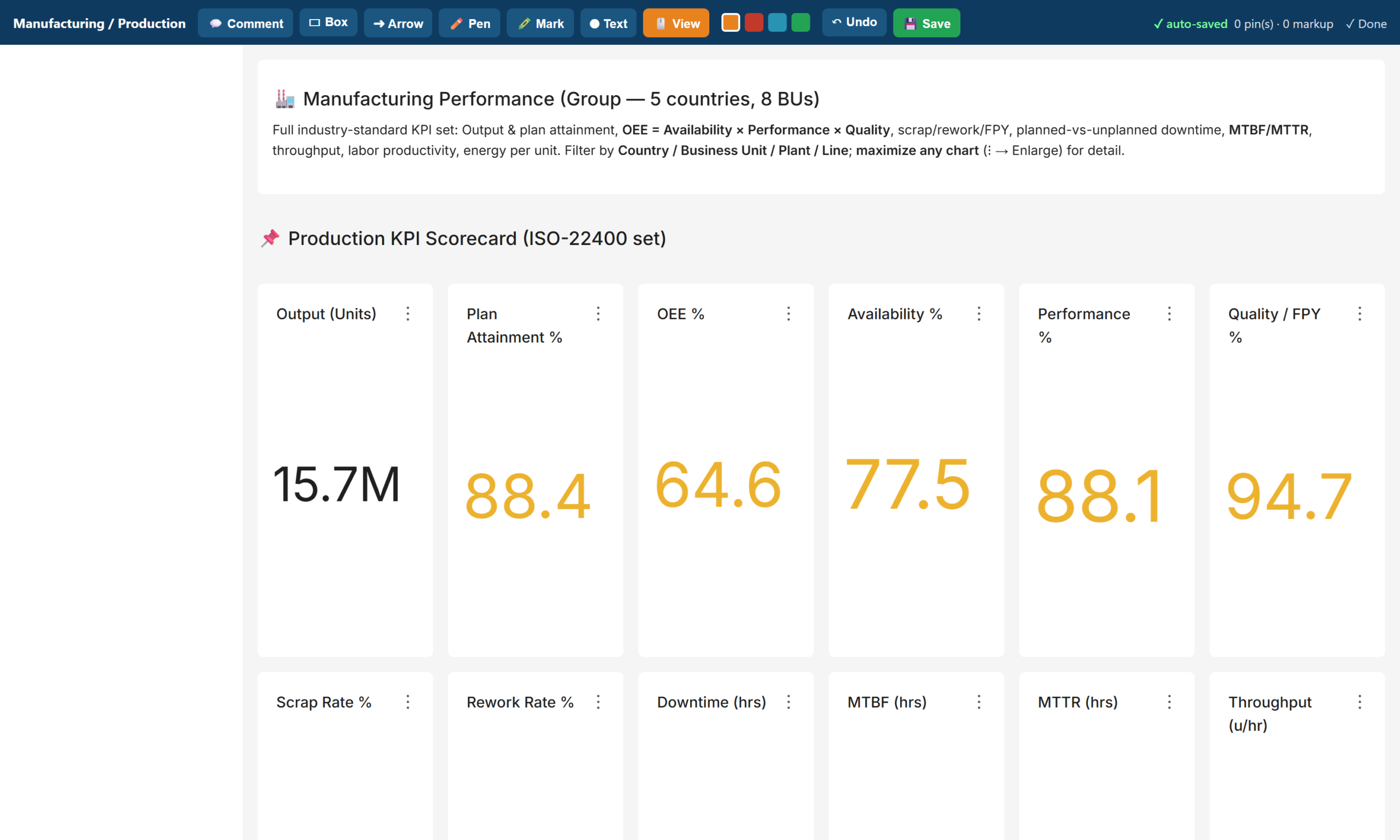
The highest-value addition is an in-dashboard markup layer. A reviewer opens a dashboard and clicks the exact chart in question. They pin a comment there, with a priority and a status, so the team can track it to resolution. Alongside pins, a drawing toolkit adds boxes, arrows, freehand marks, highlights, and text. Reviewers can mark up the live dashboard the way they would mark up a PDF. They can then save the annotation set for others to see.
Mechanically, a lightweight companion app delivers this feature inside Superset itself. It renders the target dashboard in an overlay and stores pins and drawings in your own database. Because it runs behind Superset’s session, the system attributes every comment to an authenticated user. And because it reuses Superset’s authentication, enabling Single Sign-On for Superset also enables it for the markup layer. Reviewers who never build charts just need a URL, their corporate login, and a pencil.
2. Folder-Style Navigation with Previews, Tags, and Search
The second addition solves discovery. A folder app presents the dashboard estate as a set of coloured folder cards, one per function. Examples include Executive, Sales, Finance, and Operations. Opening a folder shows each dashboard as a card with a live preview thumbnail, its tags, and a chart count. Clicking a card opens a full preview with a jump-through to the real dashboard. A search box filters across every folder by title or tag.
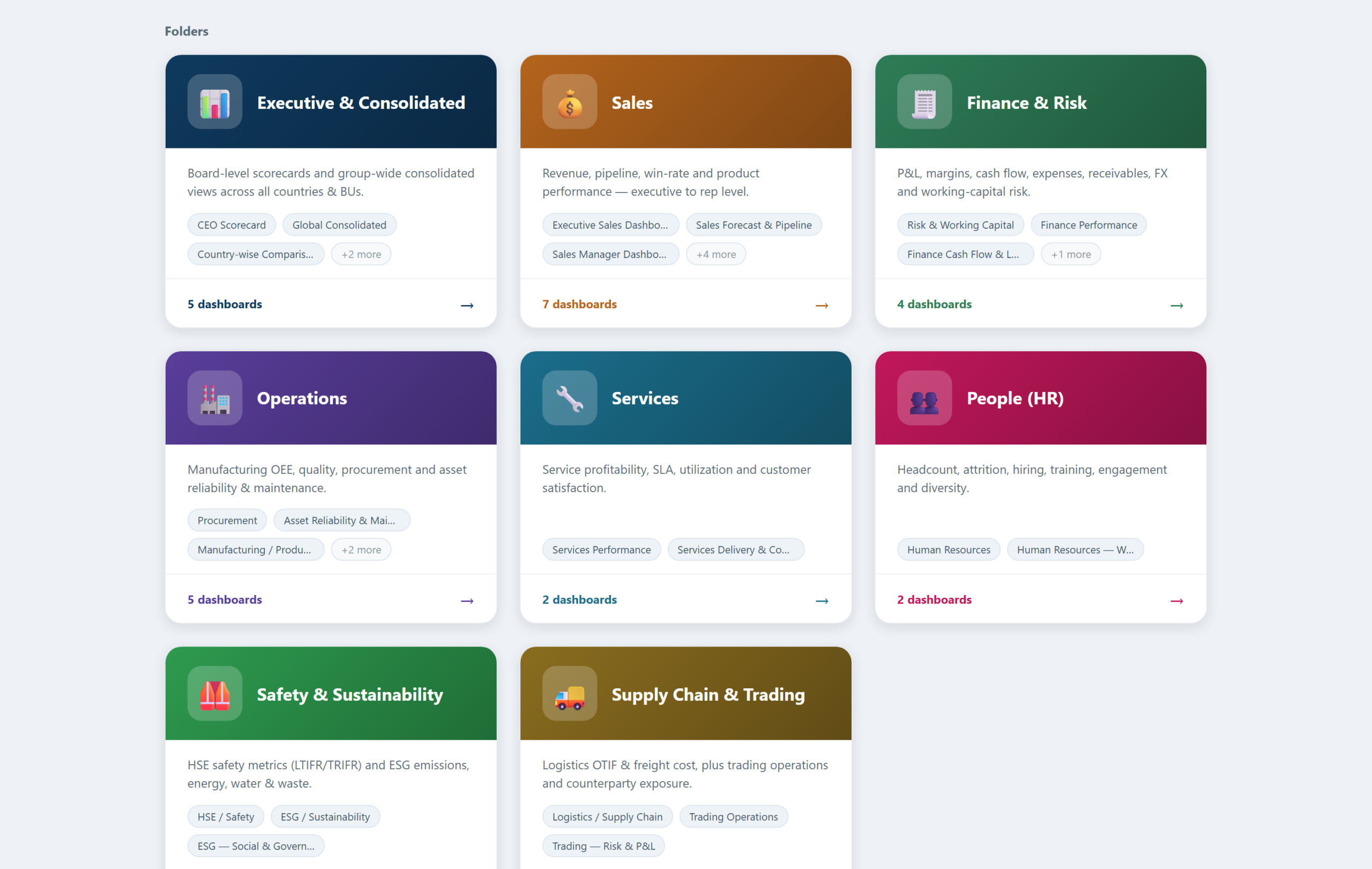
The important design decision: folders generate live from the dashboard titles and tags already in Superset. The library maintains itself. Publish a new dashboard, and it appears in the right folder immediately, complete with its preview and tags. It’s instantly searchable too. No curator required.
3. Tags, RBAC, and Row-Level Security as the Governance Layer
Collaboration without governance becomes noise. The third layer is configuration, not code. A tag taxonomy, organised by department and by audience, powers both the native list filters and the folder app. Roles separate admins, editors, and viewers. Row-level security lets a country manager see their country and a business-unit head see their unit. Single Sign-On ties all of it to the corporate identity provider. Together, these controls make the collaborative layer trustworthy: every comment is attributable, and nobody annotates data they should not see.
How Andolasoft Builds Apache Superset Collaboration Features, Upgrade-Safely
The naive way to add features to Superset is to fork it and edit the source. That works until the next Superset release, at which point every upgrade becomes a merge conflict. Our implementations follow a stricter rule: never patch core.
- Extensions, not forks: Flask blueprints deliver the comment, annotation, and folder apps alongside Superset. They use its session, authentication, and metadata, but touch none of its source files.
- Your data, your database: pins, drawings, and folder definitions live in your PostgreSQL database. The team versions and backs them up with everything else.
- Upgrade-safe by construction: we modify nothing in the core. A Superset version upgrade becomes a container-image bump plus a regression pass, not a re-implementation.
- Security inherited, not duplicated: the apps inherit Superset’s login, so SSO, roles, and row-level security apply automatically.
What Changes for the Team
- Reviews happen in context: feedback lands on the exact chart, with an author and a timestamp. It replaces the old screenshot thread.
- Meetings get shorter: pre-meeting comments mean the meeting starts at the decision, not at the description of the problem.
- Nothing falls through the cracks: comments carry a status. The team either resolves each query or leaves it visibly open.
- The library invites browsing: non-technical users navigate a folder library with previews and search instead of a flat list. Adoption follows.
Frequently Asked Questions
Can You Add Apache Superset Collaboration Features Like Comments?
Not natively. In practice, though, a lightweight companion app can add Apache Superset collaboration features to any dashboard. These include pinned comments and visual annotations. It runs on Superset’s own login and SSO, and stores everything in your own database.
Does Superset have folders for dashboards?
No. Tags provide folder-like filtering on the dashboard list. A custom folder app can add full card-based navigation, with live previews, tags, and search. It generates automatically from the dashboards you already have.
Will Apache Superset Collaboration Features Break on Upgrade?
Not if you build them as extensions rather than source patches. Flask-blueprint apps that sit alongside an unmodified Superset core survive version upgrades with a simple regression pass.
Do reviewers need a Superset licence or training?
Superset is open source, so there are no licences at all. Reviewers need only a corporate login and a URL. Commenting and annotating require no chart-building knowledge.
Build It With Andolasoft
Andolasoft designs and deploys governed, board-ready analytics platforms on Apache Superset for manufacturing and industrial companies. See our detailed Superset dashboard templates for manufacturing KPIs for an example. Our BI practice covers the full lifecycle: KPI modelling to global standards (ISO 22400, SCOR, GRI) and data modelling with conformed dimensions. It also includes department dashboards with direction-aware RAG scorecards, row-level security, and Single Sign-On. Folder navigation and the Apache Superset collaboration features covered above round out the platform. Because Superset is open source, the entire platform runs without per-seat licence fees. The investment goes into your KPIs, not licences.
If your leadership team is still waiting for month-end spreadsheets, talk to us. We will stand up a working demo on a representative dataset and walk your stakeholders through it. Then we’ll give you a clear, fixed-scope plan to production.