Technology to run Android on Windows without emulation

android31There are numerous operating systems available in the market such as windows, MacOSX, Linux etc. But there is no way to run Android OS natively on a computer. In order to carve this problem, advancements have been made to run Android on a windows system without a simulator. It will enable the Android operating system to run on ‘Windows’ kernel instead of its usual ‘Linux’ kernel. This system will detach the need of an emulation layer, therefore making the android OS performance ultra-fast.

Some of the first hand users said that this wasn’t the first application to run Android on windows but its ability to negate the use of emulation layer, is what makes it welcoming.

The system is currently believed to be working with Android 4.0 and could be installed on Windows 8, Windows 7 and Windows Vista. But in order to set-up the application, it would require a little android application development familiarity, more than the basic knowledge of using an android Smartphone. Once installed, it can be used like a native android OS on a computer. It will be enabled to run all kinds of android applications including the 3D games. This technology will bring new possibilities to run simulated environment on a different OS, without any hindrances.

At Andolasoft we develop the most intriguing android mobile applications for individuals and from start-ups to established companies. We’ve an expertise team of android application developers developing the most innovative apps for all android devices.

How to do tagging in Rails with gem ‘Acts_as_taggable_on’

ror41Tagging is a way to give a keyword and search by that particular keyword. In Rails “acts-as-taggable-on” is one of the popular gem for tagging. With ‘acts_as_taggable_on’, you can tag a single model on several contexts, such as skills, interests, and awards

Below is an example to describe how to implement it in a Rails application:

    Step#1

  • Add the gem to your Gemfile:
  • gem ‘acts-as-taggable-on'
  • Then run the bundle
  • bundle install

    Step#2

  • Run the generator command
  • rails g acts_as_taggable_on:migration
  • Run the migration file
  • rake db:migrate

    This migration will create two tables in the database: tags and taggings.
    Step#3
    Now you have to modify your model where you want to implement tagging.
    For example, we like to implement the tagging on Post model.

  • Add the following codes to the “Post” model to have acts_as_taggable and also add a “tag_list” field to the attr_accessible list.
  • attr_accessible :content, :name, :tag_list
    acts_as_taggable

    Step#4

  • Add a new field to your post form.
  • <%= f.label :tag_list, "Tags (separated by commas)" %>
    <%= f.text_field :tag_list %>

    Step#5

  • Add the following codes, if you want to show the tags for the tagged posts in the listing page:
  • <% @posts.each do |post| %>
    <h2><%= link_to post.name, post %></h2>
    <%= simple_format post.content %>
    <p>
    Tags: <%= raw post.tag_list.map { |t| link_to t, tag_path(t) }.join(', ') %>
    </p>
    <% end %>

    Step#6

  • Modify your route file to get the tags
  • get 'tags/:tag', to: 'posts#index', as: :tag

    Step#7

  • Modify your controller:
  • class PostsController < ApplicationController
    def index
    if params[:tag]
    @posts = Post.tagged_with(params[:tag])
    else
    @posts = Post.all
    end
    end
    end
    

Voila! You have done it.

Role of Cloud Testing in Applications

QA

All business applications are now becoming more dynamic and component-based. Industries are now shifting towards cloud computing for better productivity. But to ensure the functionalities of these cloud-based applications, Cloud testing plays a major role in the Cloud industry. 

Cloud testing is the testing processes which are executed with the use of cloud resources. It is helpful when the testing process includes many test machines like several workstations for load testing. It is also helpful while testing application that operates over a LAN or the Web like on a client’s server.

Now let’s take a look at some of the major requirement of Cloud testing

  • Sufficient test models and criteria

QA engineers should be provided with sufficient test models and criteria that support cloud and web application testing. These test models and criteria should be in areas like SaaS and Cloud-based application. This scalability model is used to validate or measure the performance of the system. It also requires Integration models and criteria to address cloud-based connectivity protocols and APIs for end-to-end application integration across the cloud.

  • Proper test methods and solutions

The requirements and features of cloud applications are in continuous change, for which it requires newer test methods and solutions. Methods like continuous validation and regression testing solutions for the applications which change continuously due to bug fixing and feature updates. Application tester should also be given automatic testing facilities for the multi-lease feature of cloud computing.

At Andolasoft we have expertise team of quality annalist and testing engineers with strong market specific testing experience to provide extensive Quality Assurance services throughout the product life-cycle. We also execute cloud-based testing to provide the best in quality product services.


CloudLinux’s Recent Integration of PHP 5.5 Alpha 2 Version

Shared hosting operating system provider CloudLinux has expanded their PHP offerings by declaring the availability of PHP 5.5 Alpha2 version to its PHP selector tool.

With the ability to select PHP versions, PHP selector allows the users to get the latest feature updates

and preferred PHP version like PHP 5.2, 5.3, 5.4, and now, 5.5 Alpha2 from their web hosting control panel. CloudLinux places each individual website in a virtual private server.

Never miss an update from us. Join 10,000+ marketers and leaders.

Each account is then assigned a specific amount of hardware resources and a desirable PHP version, by using the PHP selector tool.

PHP 5.5 Alpha2 version includes new features like the most awaited password hashing API and providing users the ability to use bcrypt along with loop-controlling generators.

Igor Seletskiy the CEO of CloudLinux has expressed that the availability of PHP selector has made it easier to get access to PHP features. He quoted “PHP is possibly the most widely used aspect of any shared web hosting plan.”

Igor Seletskiy also added “Like the rest of the web hosting community, we are excited to start exploring the new features of PHP version 5.5.

However, many hosting companies and their customers would not usually deploy an Alpha version on a large-scale, server-wide basis.

CloudLinux and PHP Selector make it possible for hosting providers to assign individual accounts their own PHP version without affecting other sites on the same hardware.” Integrating such features in CloudLinux has helped PHP development to become easier and more productive

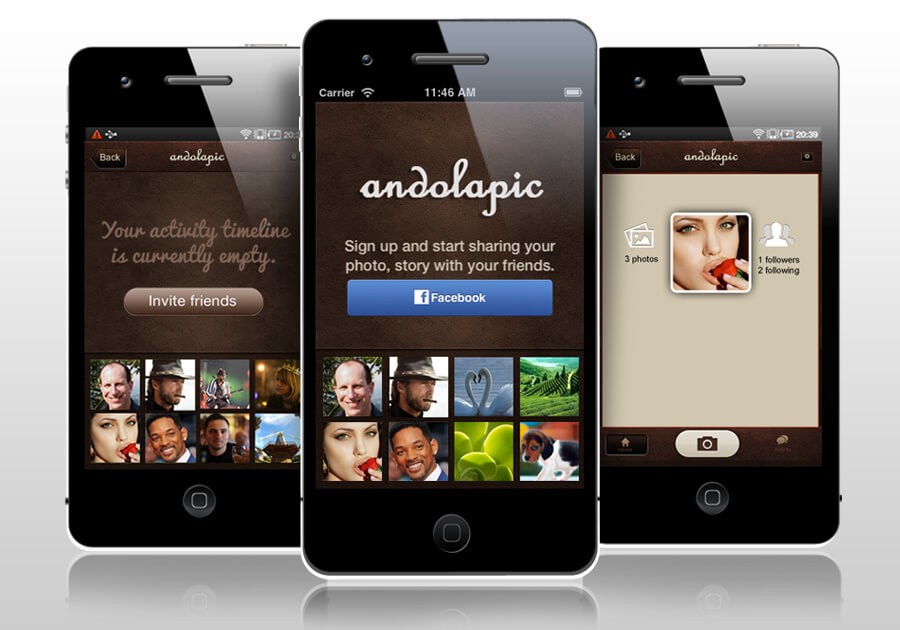
Share your memories instantly with Andolapic

Andolapic iOS APPIf you like to take photos, you would like to share them as well. There are numerous apps available, which let you share your photos with your friends and this photo-sharing trend is at its pinnacle nowadays.

Andolapic a photo-sharing iPhone app developed by Andolasoft which offers interesting features to help you share your memories with your friends.

Andolapic is quite amazing like Instagram and features intriguing functionality to improve your photo sharing experience.

To make photo sharing even easier it is built on top of social photo-sharing app which lets you share photos instantly with your friends.

Some of the features of Andolapic are:

Snap & Share: You don’t have to wait, to click and share your photos. Photos are shared instantly, the moment you take a snap from Andolapic.

Follow and Un-follow: Follow your friends whose photos you want to see and comment. Un-follow if they are clogging photos which are most undesirable.

Post, Like and Comment: User can Post photos, like friend’s photos, and leave comments easily.

Upload and Remove Pics: Upload photos through Andolapic and remove them if you don’t like it to be visible. We’ve also developed it for the iPad for more convenience. Andolapic is also available to Facebook users to share photos directly from Facebook.

Andolapic is one of the best photo sharing apps in the market which gives you amazing photo sharing experience and is a marvel of iPhone application development. You can get it from iTunes.

How To Send Files To Remote Server Via SSH In PHP

You may have faced a situation where you need to send server files to a remote server. If you are working on a website that requires remote server access and files regularly, it is impossible to keep on transferring the file every time they are updated.

This means that you cannot keep these files in your local system and need to transfer them to the remote server only when they’re updated. To do this, you will need SSH access to the server so that you can send files securely via SFTP or any other secure file transfer protocol.

Once you learn how to set up SSH access, there are some things that you need to know about how SSH works and how it’s used with different servers.

Never miss an update from us. Join 10,000+ marketers and leaders.

This example describes ‘How to SSH to remote server in PHP and send files from one server to another server using libssh2.’

ssh2_connect() – Connect to a remote server
ssh2_scp_send() – Send a file via SSH
ssh2_exec() – Execute a command on a remote server

Install libssh2 and then install PECL SSH2 extension for PHP.

Example:   

$ip = "192.168.2.101";
$username = "test";
$port = 22;
$public_ssh_key = "/var/www/html/ssh_keys/id_dsa.pub";
$private_ssh_key = "/var/www/html/ssh_keys/id_dsa";
 
if(function_exists("ssh2_connect")) {
$ssh_conn = ssh2_connect($ip, $port);
if($ssh_conn) {
//Validate your username with ssh keys
if(ssh2_auth_pubkey_file($ssh_conn, $username, $public_ssh_key, $private_ssh_key, 'secret')) {
 
// Check file list
$stream = ssh2_exec($ssh_conn, 'ls -l /home/test/');
if($stream) {
stream_set_blocking($stream, true);
while ($buf = fread($stream,4096)) {
flush(); // comment this line
$data.=$buf;
print_r($buf); // comment this line
}
fclose($stream);
}
 
// send file from one server to another
ssh2_scp_send($ssh_conn, '/path/from/file.ext', '/home/test/file.ext', 0777);
 
}
else {
die("SSH validation failed using Username: ".$username." (specify valid SSH keys or check your SSH key path)");
}
}
else {
die("SSH validation failed for IP: ".$ip);
}
}
else {
die("'ssh2_connect()' doesn't exists. Install libssh2 with PECL SSH2 extension");
}

Other commands:

ssh2_sftp() – Initialize SFTP subsystem
ssh2_sftp_mkdir()– Create directory on remote server

$sftp = ssh2_sftp($ssh_conn);
ssh2_sftp_mkdir($sftp, '/var/www/html/test');

ssh2_auth_password()  – Authenticate over SSH using a plain password
ssh2_auth_pubkey_file() – Authenticate using a public key
ssh2_shell() – Request an interactive shell
ssh2_tunnel() – Open a tunnel through a remote server