WooCommerce vs Shopify: Which is Better For Your Online Store?

Are you thinking about starting your own ecommerce store or want to upgrade your existing ecommerce to a newer more dynamic platform then WooCommerce or Shopify are the two best options you have at your disposal.

WooCommerce and Shopify are the two most popular and biggest ecommerce platforms existing today. Together they enjoy nearly 80% of all ecommerce stores in the world.

As per market share WooCommerce is the most popular and the easiest-to-use ecommerce platform but Shopify is not to be ignored as it provides many features that are on-par or in some areas surpass WooCommerce.

Today, in this blog we are going to weigh WooCommerce vs Shopify, listing out their offerings across various categories so that you can make an informed choice when opting for an ecommerce platform for your next website.

WooCommerce vs Shopify – Side-by-Side Comparison

WooCommerce Shopify
Number of users 6.5 million users 4.4 million users
Market share 64.39% in ecommerce platforms 15.60% in ecommerce platforms
Number of Themes 5562 free and paid themes 133 free and paid themes
Plugins and extensions 700+ WooCommerce extensions 8000+ applications for Shopify store
Cost WooCommerce is free to use but customers pay for hosting, domain name, and extensions. Three pricing plans – Basic ($39/mo); Shopify ($105/mo); Advanced ($399/mo)
Free Trial Length WooCommerce is a free and open-source software 14 days free trial, no credit card required
Hosting Hosting is not included Hosting is included
Blog Best in class blog content creation Limited blogging features
Mobile Version Depends on the theme Yes
Email Newsletter Yes, but using a plugin Yes
Help and Support An active community publishes help content on forums and blogs. Support from theme and plugin editors Support over phone, chat, email, documentation, forum
Sales Commissions No From 0.5% to 2%
Storage Space Depends on Server size Unlimited

An Overview (WooCommerce vs Shopify)

WooCommerce

WooCommerce is an open-source platform which is a plugin for WordPress to turn any WordPress site into an ecommerce store.

It was launched in 2011 where WooCommerce quickly gained popularity in the eCommerce industry and has since then become world’s most popular eCommerce solution with over 6 million users and counting.

Never miss an update from us. Join 10,000+ marketers and leaders.

The CMS (Content Management System) provides easy-to-use content addition features to store owners. This open-source platform comes with tons of advanced features and unlimited customization options; making it a great option for first-time store owners who want to set-up their online store with-in a budget and want to be able to scale-up or down when needed.

Shopify

Unlike WooCommerce, Shopify is not an open-source platform but provides tons of powerful features to meet various needs such as payment gateways, dropshipping, blogging, website security, SEO optimization, marketplace connection and more.

Shopify charges a monthly fee to set-up its store: Basic ($39/mo); Shopify ($105/mo); Advanced ($399/mo). Compared to WooCommerce, Shopify is much easier to set-up and is easier for beginners to build an online store from scratch.

Note: Both Shopify and WooCommerce feature easy store setup and don’t require coding skills. New users can easily set-up a basic store but for store customization you would need to hire WooCommerce development company or Shopify development agency.

Ease of Use

WooCommerce (4/5)

WooCommerce has a steeper learning curve; creating a basic ecommerce site is not biggie but to develop a professional looking online site with all its bells and whistles you will need the help of a professional.

Because WooCommerce is an open-source platform a number of editors from around the world develop WooCommerce plugins and extensions for the store which can be cumbersome if you are new to WooCommerce.

Shopify (4.5/5)

Shopify is the easiest-to-use of the two ecommerce platforms. Once you become familiar with the ecommerce platform it becomes fairly easier for new users to get things around in Shopify.

Moreover, Shopify is a hosted ecommerce platform which means it takes care of a ton of technicalities for you. A few aspects of ecommerce hosting such as domain name, hosting, and security (SSL) certificates are taken care of by Shopify.

With Shopify you don’t have to install, manage or update any software so there is no worry about security and backups.

Store Build Time & Themes

WooCommerce (3.5/5)

If you start from scratch or build on your own, WooCommerce can be challenging to set-up. Its basic store set-up has an amateur storefront which may not be everyone’s cup of tea.

To create a truly stunning online store you would need to buy themes, integrate SEO plugins, payment gateways, and other additional functional modules to improve your site features and capabilities.

Although it’s easier to begin with, getting a fully-functional eCommerce store on your own using WooCommerce is rather difficult. But store owners have a ton of creative control when using WooCommerce.

WooCommerce’s entry theme is fully responsive on mobile devices but to make your online store truly stand-out you need to put in hours of coding for customization.

Shopify (4.5/5)

Shopify is the best option for store owners who want to make their ecommerce store live faster and quicker.

Unlike setting up a store with WordPress the process is not manual and there is no dependency on external agencies like hosting providers, and data servers to manage your store.

In a nutshell Shopify will let you get your store live quicker than WooCommerce. When you have limited technical skills, Shopify is the best option.

Shopify theme stores have over 100+ free and paid themes to choose from. Moreover, Shopify themes are very polished – created with the latest design trends in mind.

Plugins & Integrations

WooCommerce (4.5/5)

Installing apps and plugins enables you to add more features to your store. On both platforms you can install apps to add extra functionality such as payment integration, SEO optimization, marketing metrics, social media and more.

Being an open-source platform WooCommerce relies on plugins to improve store features and there are over 50,000+ different plugins across various categories to choose from.

This enables you to build a bespoke website without any limitation. And if you hire a professional WooCommerce development agency you can bring your wildest ecommerce ideas to reality.

Shopify (3.5/5)

Shopify is a paid platform which suggests the brand has its own set of guidelines for plugins which is why there are only 1200+ free and paid apps in contrast to WooCommerce’s 50,000+ different plugins.

With Shopify, you can integrate marketing features such as email marketing, social media integrations, store locator features, drop shipping, analytics, and marketing plugins.

Payment & Transactions

WooCommerce (4.5/5)

When it comes to payment integration WooCommerce offers the best support hands-down. It has support for over 50 extensions in payment processors and gateways such as Stripe, PayPal, Authorize.Net, Cryptoniq, and more.

WooCommerce supports all popular payment methods such as credit cards, bank transfer, Apple Pay etc.

Shopify (4/5)

Shopify supports major payment methods such as Shopify Payments, PayPal, Stripe, Authorize.Net, Opayo, Verifone, WorldPay, Klarna, Square etc.

SEO Optimization

WooCommerce (4.5/5)

SEO or Search Engine Optimization is the key to attracting new customers and is a must needed feature in any ecommerce platform. When it comes to WooCommerce it offers the most comprehensive SEO optimization capabilities than Shopify.

Are you looking for a WooCommerce developer

Contact Us

With WooCommerce you can install plugins to optimize store URLs, optimise meta titles and descriptions, enable breadcrumbs, add product descriptions, images, tags and more.

Shopify (4/5)

Shopify offers multiple SEO optimization features but not to the extent WooCommerce provides. With Shopify you can optimize store links, remove duplicate URLs, set-up store blog, and page redirects.

Data Security

WooCommerce (3.5/5)

Providing high-level security to your customers is an important aspect of being a trust-worthy eCommerce store as you will not only be processing customer’s money but also holding their personal information.

When it comes to security Shopify offers better security features with built in SSL certificate and PCI-DSS compliance.

WooCommerce is not automatically PCI-DSS compliant and doesn’t have its own SSL.

Shopify (4.5/5)

It takes care of store security for you because it’s a hosted platform. Shopify has built-in SSL (Secure Socket Layer) providing security when processing customer’s payment and personal information.

It is also PCI-DSS (Payment Card Industry Data Security Standard) compliant and there is no additional effort required from store owners to set up any other security features.

Pricing

WooCommerce (4.8/5)

WooCommerce is free to use where store owners have to pay only for hosting and other plugins and themes they install to improve website performance.

Because WooCommerce is free to use it offers a wider scope of store customization options.

Shopify (4/5)

Shopify offers only a 3-day trial and three pricing plans.

  • Basic ($39/mo) – $1/month for the first 3 months
  • Shopify ($105/mo) – $1/month for the first 3 months
  • Advanced ($399/mo) – $1/month for the first 3 months
  • Get 10% discount on annual plans

Final Thoughts

When we weigh in all the features they both stack-up close to one another. So, which eCommerce platform really is the best option for? The answer is it depends!

If you want a ton of customization options and can cough out thousands of dollars WooCommerce is the best solution for you. The platform itself is free to begin with but to avail advanced store features you need to hire a professional WooCommerce development agency. Who can set-up a powerful eCommerce store and can customize it as per your business requirement.

On the other hand, Shopify doesn’t provide much customization option but you can set-up a trend-setting ecommerce store in a few clicks. Shopify provides built-in hosting, and payment gateway integration which makes it easier for store-owners, who don’t have coding skills, to set-up and make their online store go live in a few days if not hours.

Andolasoft is a leading WooCommerce development agency providing custom ecommerce development solutions to global customers. If you are looking for an ecommerce development partner we can collaborate to bring your ideas to reality using the latest open-source technology.

What is the Role of Volume in Forex Trading?

what is volume in forex

When the volume is high, there are lots of traders opening positions and thus creating momentum. In case volume declines while the trend continues, this trend is probably set for a reversal. If the market reaches a new peak on lower volume compared to the prior peak, a trader will usually look for an opportunity to go short. In case the market reaches a new dividend etfs to buy and watch for 2021 bottom and volume marks a new high, it is likely that the market may test again or surpass that bottom.

The eventual breakout from the trading range occurs, accompanied by a massive increase in volume, as losing traders are in a hurry to exit. If the breakout occurs on low volume, this signifies that traders show little emotional commitment to the new trend, while the market is likely to return into the range. When price moves in a market, it is often because it rides the waves of higher trading volumes. Sometimes, those waves are part of a larger tide pushing the price into a trend. Other times, a swirl in the ocean of volume causes somewhat erratic price movements.

This suggests that the price movement is more likely to be sustainable and not just driven by a few market participants. On the other hand, when there is low volume during price movements, it suggests that there is a lack of enthusiasm and conviction among traders. When there is a price breakout during a current trend, and the volume decreases, it indicates a higher probability of a false breakout and signals traders to hold onto their trades. The real breakout occurs when the currency pair prices break above or below their current prices with an increasing volume. This indicates traders to place orders along with the market and increasing volume.

what is volume in forex

I had a few hundred British pounds saved up (I grew up in England), with which I was able to open a small account with some help from my Dad. I started my trading journey by buying UK equities that I had read about in the business sections of newspapers. I was fortunate enough in my early twenties to have a friend that recommended a Technical Analysis course run by a British trader who emphasized raw chart analysis without indicators. Having this first-principles approach to charts influences how I trade to this day. Remember, volume alone should not be used as the sole basis for trading decisions. It is essential to consider other technical and fundamental factors alongside volume analysis to gain a comprehensive understanding of the market.

Importance of Volume in Forex Trading

Some trading platforms provide volume indicators that can be added to charts. These indicators calculate volume based on the number of ticks or the number of contracts traded. However, it is important to note that these volume indicators may not be as accurate as in the stock market due to the decentralized nature of the forex market. Consider the EUR/USD currency pair, which has been in a downtrend. A trader notices that the volume increases substantially as the price approaches a significant support level.

Understanding the Significance of Volume

You hold onto the position as long as the currency pair price is trending higher than the resistance level. In case the currency pair volume stops increasing during the current trend, there is a chance of potential reversal. To confirm this, traders can use the 20-period moving average trendline along with the OBV indicator. When the currency pair prices are continuously rising, they depict a strong upward trend which also means that there is a strong buying interest for the currency pair. This, in turn, leads to an increased volume being traded from the buyer’s side and signals market continuation. On the other hand, when the markets are choppy and are not following a particular trend, it depicts that the volume being traded is low, and the markets can fxopen introduces stp accounts potentially reverse.

Therefore, forex volume should be used as a relative measure rather than an absolute one. The OBV trendline strategy makes use of price trendlines to determine if there is an increasing volume in the market or a decreasing volume. Traders can compare the volume being traded today to the volume that was traded for a currency pair over the last one to five years.

Forex Trading Strategy Based on Analyzing Multiple Time Frames

Both are useful metrics for traders and typically they have a high positive correlation of up to about 90%. Studying stock volume is the best place to start if you want to learn more about volumes. For any market, in case volume is 25% and more higher than the average volume during the past two weeks, it is referred to as “high volume”. In case volume is 25% and more lower than the average volume during the past two weeks, it is referred to as “low volume”.

  1. Equally, a high volume of sellers relates to the price going down.
  2. I identify the bullish or bearish setup using price action with the trading volume as a confirming factor in all my examples.
  3. VO measures currency pair volume by determining the relationship between a slow-moving and fast-moving average.
  4. With this strategy, you can limit the total amount of contribution in the forex market compared to the overall average daily volume traded, which helps in minimising risks.

Using volume to confirm a breakout

When volume starts to decrease while the price continues to rise, it may indicate a weakening uptrend. This divergence between volume and price can be a warning sign of a possible trend reversal. Similarly, when volume starts to decrease while the price continues to fall, it may suggest a weakening downtrend. Traders can use this information to anticipate potential trend reversals and adjust their trading strategies accordingly. The forex market is the largest and most liquid financial market in the world, with trillions of dollars being traded daily.

what is volume in forex

Forex trading is a decentralized market where currencies are bought and sold. It is known for its high liquidity and constant price fluctuations, making it an attractive market for traders around the world. When it how to become a web development consultant comes to analyzing the forex market, there are several tools and indicators that traders use to make informed decisions.

The more recent the data being compared, the higher the chance of future volume prediction being correct. When the big players start opening positions, something called ‘directional bias’ begins, the price continues to move towards desired levels and tick volumes increase. Just remember, when a big player makes a move, it can have a huge effect on price and trend. Three, tick volume represents the number of price changes during a specific period of time, for instance 1 hour. I trade the major Forex pairs, some Futures contracts, and I rely entirely on Technical Analysis to place my trades. I began trading the markets in the early 1990s, at the age of sixteen.

The role of volume in Forex trading, then, in a sense, is to be able to follow the institutions, and leverage what you know for profit. Volume during reactions against the underlying trend also needs to be examined. When a bull trend is followed by a drop, volume usually increases, as market players are anxious to take profits. When the drop in prices continues, but volume also drops, this is an indication that buyers are no longer active or selling pressure is spent. When volume plays out, this shows that market reaction is almost over and the bull trend is poised for resumption. When trading is in a range, volume usually remains low, because traders seem to be indecisive about market direction.

Top 10 Best Marketing Automation Tools For Your Business Growth

Most businesses look for a Marketing Automation tool to effectively handle their Marketing team. Marketing Automation is an important step to improve your marketing operation.

If you are looking for the right Marketing Automation Software for your business, then it is going to be quite difficult.

Therefore to help you with this, here I have listed the top 10 automation tools that will help you choose the right Marketing Automation Tools.

The marketing automation industry has reached a $500m market and it is expected to reach $64bn by 2024. According to a report by Salesforce’s state of marketing report, 67% of marketing leaders are using the marketing automation platform and 21% are planning to use one.

63% of companies using marketing automation systems have beat down their competitors.

What are Marketing Automation Tools?

Marketing Automation tool handles routine marketing tasks. Common Marketing automation workflows includes behavioral targeting, email marketing and personalized advertising.

Marketing Growth(Source: Animemania.com)

80% of businesses have generated more leads in their business by using the Marketing automation software.

Never miss an update from us. Join 10,000+ marketers and leaders.

Top Marketing Automation Tools:

1. Marketo:

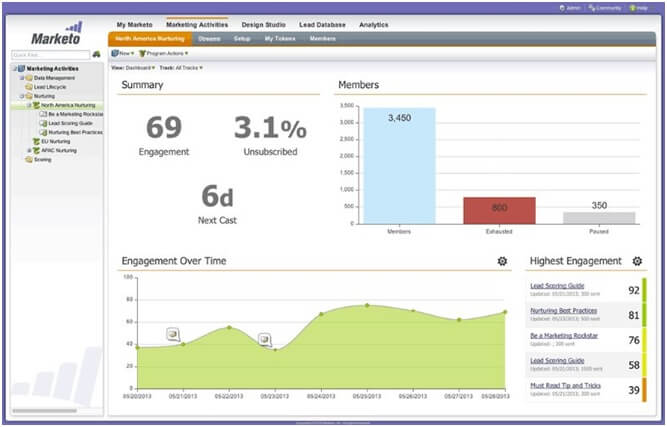
It is known as the best marketing Automation software and includes many best features. It has a full suite feature that doesn’t only help the marketing manager to handle the email campaigns but it also helps the sales team with their sales process. It also has a marketplace, known as launch point and has lots of integrations.

In the below image you can see the dashboard of Marketo automation tools that highlights the engagement rate, unsubscribed users, total members and other important details.

Marketo

Who uses it

Marketo is the tool used by organizations who want advanced features automation software.

2. Customer.io:

The main reason to use Customer.io is it’s very much flexible. It is a lightweight UI with fast and personal customer support.

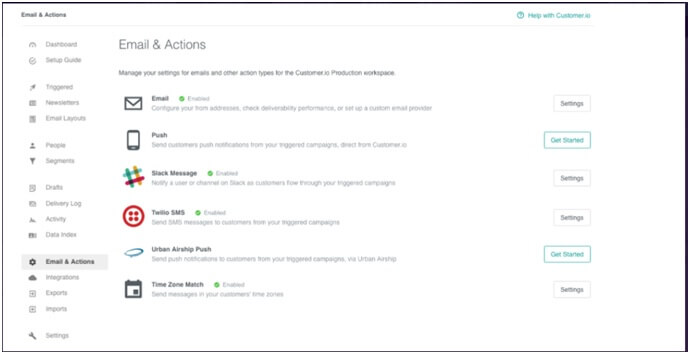
Customer.io was developed recently but has become more popular because it is easy to use and provides lots of features. It is used to trigger mails based on page views and events.

Customerio

As shown in the below image, with Customer.io you can easily track and send your emails and take necessary actions to get more leads and convert them into your loyal customers.

Who uses it

Companies who are looking for marketing automation and want a lightweight UI, then this is the perfect tool for them.

Also the companies who are in search of the automation tools with advanced features, and provide more flexibility and customization, then it’s the right tools.

Never miss a single post from Andolasoft. Join 10,000+ others who get our weekly post with insider tips!.

3. Hubspot:

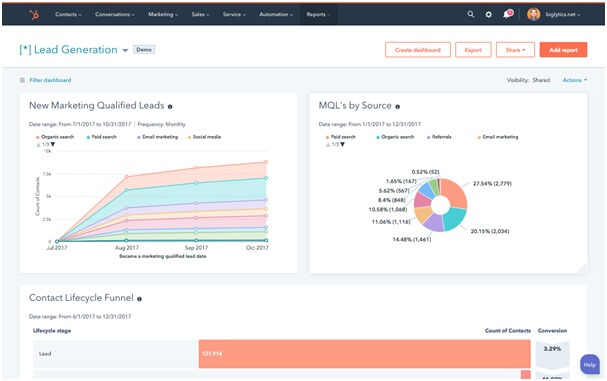
Hubspot offers a free version of their software; it doesn’t include any kind of marketing automation features. If you want to use Hubspot for marketing automation then you need to spend a large amount. It is inbound marketing software.

With Hubspot Automation tools you can easily get a graphical representation of the lead generation and other important parts as given below.

Hubspot

Who uses it

It is best for small business owners. It also provides additional marketing features beyond email marketing.

4. Convertkit:

It is a simple marketing automation tool, which is designed primarily for content creators and bloggers. Beginners who are in search of the best marketing automation tools.

With Convertkit you can get  a quick look on the visual automation such as what’s happening in your sales funnel as shown in the above given imageConverkit

Who uses it

It is one of the best marketing automation software for the beginners and the content based industries.

5. Omnisend:

Omnisend Marketing Automation platform is a completely new tool in the marketing automation field. It provides many innovative features, including integrations like Facebook messenger and Whatsapp.

It has helped many large e-commerce marketers to market across several channels.
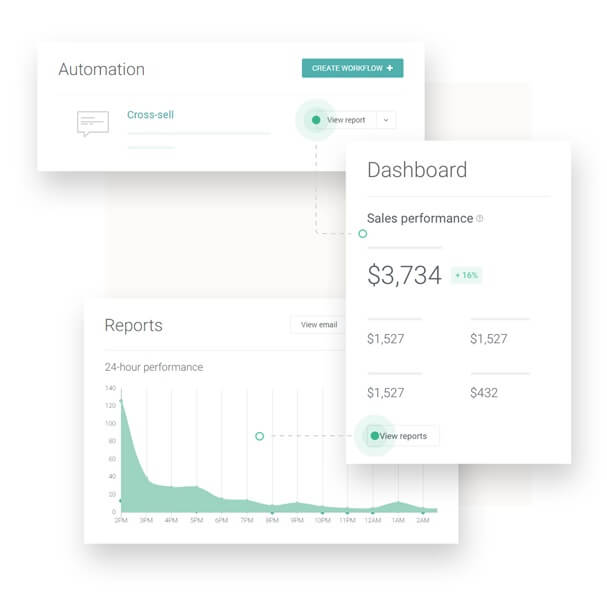
With Omnisend, you can easily get a detailed report on the sales performances and other reports as given in the above image.Omnisend

Who uses it

It is used by many leading E-commerce businesses. Many small and big E-commerce industries also use these tools for better marketing.

Never miss a single post from Andolasoft. Join 10,000+ others who get our weekly post with insider tips!.

6. ExactTarget:

It stood out from other automation tools because of the system’s ability to target communications through multiple channels.

Many marketing automation software focus on email, with ExactTarget lets you target on the mobile application notification and shows messages that appears directly on the dashboard.

ExactTarget

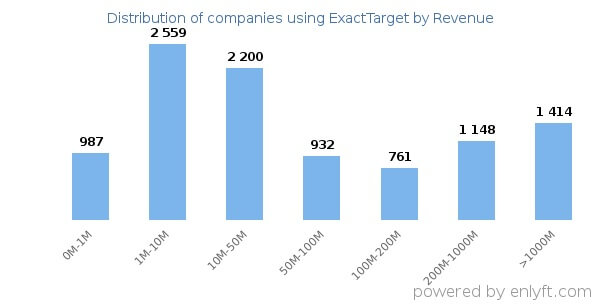
In the above given image it has represented the distribution of companies who are using ExactTarget according to their revenue. This shows that every form of business is using these tools.

Who uses it

It is a tool for the company that desires to go above and beyond marketing automation. Companies who are looking for a future in marketing automation and wants to connect with the customers in various channels.

7. Active Campaign:

This tool is used by many small businesses. It is one of the best marketing automation platforms, and the first tool that provides visual automation sequence builder.

Companies can develop strong and complex automation sequences without the need of learning about the features.

Active Campaign

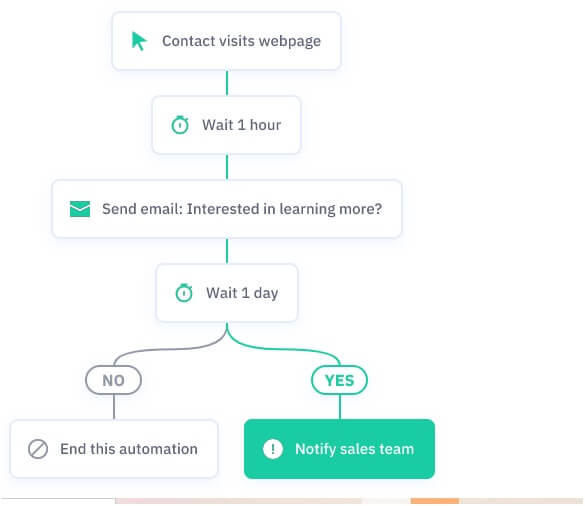
With Active Campaign you can easily handle all the marketing details. As shown in the above image you can easily manage your emails with all necessary details.

Who uses it

Many small sized businesses run these marketing automation tools as it is completely affordable and holds all the latest features.

8. Pardot:

It is the marketing automation tools that fulfill all the needs of B2B marketers. It supports all the necessary things like B2B analytics and account based marketing solutions.

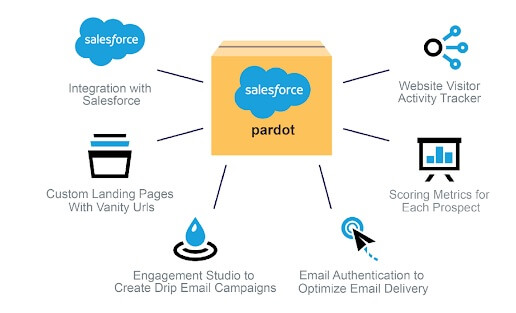
By using Pardot automation tools you can use lots of features such as integration with the sales force, track the visitor’s activity in your website, engagement, custom landing page and many other features as given in the below image.

PardotWho uses it

All the B2B marketers prefer using Pardot as it is one of the best marketing automation tools with all the necessary requirements for a B2B market.

9. Rejoiner:

It is a managed marketing automation platform. Unlike other automation tools, where a user pays for the subscription fee and then figures out about the tool used, rejoiner share this accountability with everyone.

It is an intuitive and well tailored platform for many SaaS and eCommerce businesses. Its incremental improvement will help in major growth in revenue.

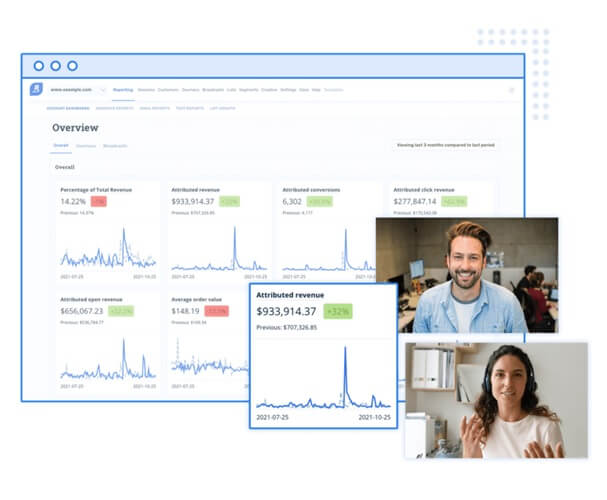
As rejoiner Automation Tools  is a best tool for Email marketing, that shows a representational data of the total marketing overview as given in the below image.

RejoinerWho uses it

Most SaaS business and Ecommerce business use this automated marketing solution for better outcome and revenue generation.

10. UserFox:

It is a new marketing automation tool. However, it provides a lightweight interface and is designed to trigger emails based on events.

With UserFox Automation tools you can easily get more customers, get demographic representation on your marketing process and other necessary data as shown in the above image.

UserFoxWho uses it

It is a top marketing automation platform for tech companies as it provides lightweight interfaces that are mostly needed by the tech companies.

I’ve worked with the team at Andolasoft on multiple websites. They are professional, responsive, & easy to work with. I’ve had great experiences & would recommend their services to anyone.

Ruthie Miller, Sr. Mktg. Specialist

Salesforce, Houston, Texas

LEARN MORE

FAQ:

1. What are the necessary features of a Marketing Automation Tools?

A marketing automation tool helps to :

  • Manage lead
  • Get real time alerts
  • Organized workflow
  • Trigger responses from customers
  • Personalized messaging

 2. How does marketing automation help?

Marketing automation software provides lots of benefits:

  • You can analyze the data of your marketing activity and get the insight of all the activities that are done by you and your prospect customers.
  • The tools make follow-up and generate leads more easily.
  • It allows us to track the visitors and their activities right from the beginning.

3. How do you make the best use of marketing Automation Tools?

With the Marketing Automation Tools you can lead your customers to create a path in which they get more engaged with your brands. You can use the marketing automation tools to send mass emails, utilize the psycho graphic data, used to deliver emails for optimal times.

4. Why should I use Marketing Automation Tools?

As in the process of automation lies several steps in the marketing and sales that gives your team more time to focus on the overall strategy and nurture the leads.

It means more prospects and more customers. Marketing Automation provides a richer and more detailed view on your customers’ behavior.

Conclusion:

Choosing the right automated marketing solution for your team can become quite difficult, but by considering the right things will help you to choose the right tools.

Looking for the right integrations, reporting strength, testing functions and other important factors will help you to choose the right marketing automation system for our business.

However, with this blog we can guide you with the automation tools. If you want to create your own automation tools for your business or other purposes, Andolasoft dedicated developers will help you with it. Contact us, for detailed discussions.

How To Customize WordPress Website Theme

It’s always great to have a website for your business and if that is with WordPress, then you are one step ahead of your competitors. Because the CMS WordPress offers easy customization options with outstanding features and plugins to make your website user-friendly and search engine friendly.

After successful installation of WordPress theme, if you find it’s not the right fit for your business and needs customization for an engaging website. I’m sure it’s not annoying, as there are several options available for you to customize your WordPress themes.

Never miss an update from us. Join 10,000+ marketers and leaders.

Here are some facts and figures of WordPress below,

  1. WordPress commands 39.6% of the internet in 2021, it was 35% in 2020. Thus the growth of nearly 5%, which is also 1% better than the previous year.
  1. If you count only CMS-build sites, 64.1% of them are powered by WordPress – a 4% increase from 2020 (60%)
  1. Over 60 million websites are hosted on the Custom WordPress Development Services platform.
  1. The website base of WordPress increased by nearly 3.2% between 2019 and 2021.
  1. Some of the popular WordPress plugins such as WooCommerce get as many as a million installations per week.
  1. Over 14% of the top 100 websites on the internet are powered by WordPress.
  1. As of 2021, WordPress.org has more than 54,000 plugins and over 7,000 themes.
  1. Over 13% of all WordPress websites use the WooCommerce plugin. The plugin has been downloaded over 60 million times and installed by 3 million websites worldwide.
  1. WordPress is preferred and recommended by over 50% of CMS users and web designers.

(Source – blog.sagipl.com)

But the major challenge is finding the most right way.

So here are several options that you need to follow for the customization of your WordPress theme. This article definitely helps you to identify the right one for you.

Options To Customize Your WordPress Theme:

Before diving in and start making changes to your theme, you need to know the best options that are available for customizing of your WordPress themes.

Here you go,

  • If you want to add functionality to your WordPress theme, install WordPress Plugin.
  • Use the customizer to your WordPress admin screens for customizer fonts, colors, and layouts, depending on the theme you choose.
  • If you work on a page builder theme, use its feature for customizing the design of your WordPress website.
  • When you install a framework theme, you can use a child theme that is available to customize your site.
  • As your theme is specific to your site and you are comfortable with it. You can edit the theme’s code directly.
  • As you want to edit the code of the third-party theme, you can go with the child theme.

If you want you can edit the code, there are a number of options available to you. You can go with the block editor, to the customizer, all you need to do is some editing.

Why Do You Need To Customize Your WordPress Theme?

With a customized WordPress theme you can change the website appearance completely. It is a great form of promoting your own unique style. It will help you to stand away from the crowd.

Most of the top brands make sure to have distinct designs of their website. Their unique touch helps them emerge as a unique brand. With WordPress themes, you are not only adding design and features to your websites but it is also a way of promoting your business.

Also, sometimes you come across many themes that have poor design layout, poor build, bad color combination, and are not well optimized. All these factors may impact website’s performance.

No single theme available which can be 100% perfect to fulfill all the requirements. However, customization helps here.

How To Customize WordPress Themes?

There are many ways, you can customize your WordPress theme but the only effective method is the one on which you are comfortable with. Some of the common methods are:

  • Default WordPress Customizer
  • Customization with codes
  • Customizing WordPress theme with a page builder tool

By default, WordPress provides an inbuilt WordPress customization feature that helps the website admins to customize some part of the website easily. But if you have WordPress developer who is good enough with coding, then you can do endless modification according to your need.

Premium WordPress themes are also allowing to do customization.

But before you move into customizing your WordPress themes and start using codes. It is better to develop a child theme first and do changes whatever you want rather than creating any kind of mess by editing the parent theme file.

Create A Child Theme And Make Your Changes To It:

It is the best solution to avoid any kind of data loss to your WordPress theme customization or update to develop a child theme. It is one of the best ways to have custom codes or snippets and avoid them from being erased.

The child theme has all the same functions and features as that of a parent theme. But the WordPress theme will read the archive.php file from the child theme and not from the parent theme.

Also if you don’t want to mess with any theme files and codes, you can start the customization of your WordPress theme by using the default customizer.

How To Customize Your WordPress Theme With A Default Customizer?

Instead of getting into the coding and all, you can use the theme customization tools. All you need to do is, first visit your WordPress Theme repository and select a theme that you will use for installation and customization.

Then go back to the WordPress dashboard, go to the Appearance menu section to get more options on the left side of your dashboard menu.

Theme Customization(Source: Stack Overflow)

Taskbar, Appearance > Themes> Select Theme> Install > Customize

Some common features that you can customize in the WordPress theme by using WordPress customizers are:

Add Identity To Your WordPress Website:

Adding an icon, title, and logo to your WordPress website will help in promoting and developing a brand with a tagline that will highlight the motto of your brand.

Customize Your WordPress Theme Color:

There are some WordPress premium themes available that don’t allow the users to customize the theme. They may ask extra money for the customization. It completely depends on the theme you are choosing.

If your theme allows you can easily get colors and dark mode options available in the WordPress customizer panel.

Lots of customization you can do with your personal and business website. Some themes allow you to add widgets while some other allows homepage settings. With WordPress any type of customization you can do based on your requirements.

FAQ:

How To Create A Custom WordPress Theme?

To create a custom WordPress theme

  • Go to WordPress Admin Panel
  • Then go to pages
  • Click on Add New.

You can see the new custom page template that is listed on the right side. There you can create a new page and set the template in the page with outside bar. Once you are done, publish it.

How Can You Change Your WordPress Theme Without Losing Your Content?

To change your WordPress theme without losing your content by following the simple steps:

  • You need to set a staging copy of your website
  • Install the new theme and preview it.
  • You can activate the new theme
  • Solve the issue and replace the missing elements
  • Push the staging website into live.

Can You Customize Your WordPress Theme?

Yes, WordPress themes can be customized in many ways. It depends on the extent to which you want to change your theme look and feel.

I’ve worked with the team at Andolasoft on multiple websites. They are professional, responsive, & easy to work with. I’ve had great experiences & would recommend their services to anyone.

Ruthie Miller, Sr. Mktg. Specialist

Salesforce, Houston, Texas

LEARN MORE

You can develop powerful theme customization settings that are built right into the WordPress customizer, to add WordPress plugins and have real-time CSS Editors such as Site Origin CSS

Conclusion:

One of the best parts of building a website with WordPress is you can take control over the way you are developing it and this will let you know how much customization is required.

A theme is an important part of your website. Also, many users stick with the same WordPress theme for a very long period. Minimal things like breadcrumbs and schema markup can do a lot more to your WordPress Website’s Dedicated wordpress app developer and rankings.

There are lots of things to customize in your WordPress website.

You can customize your WordPress on your own, but if you feel difficulty in doing so, we are here to help you. With Andolasoft dedicate WordPress developers, you can customize as per your business requirement.

Are you looking to customize your WordPress theme or want more information on WordPress website customization! Book a free consultation with Andolasoft experts.

How Much Does A WordPress Website Cost?

WordPress being an open source software is affordable and really value for money.

Are you planning to develop a website for your business?

If yes, this blog will help you to decide on the best option available.

Here I’m sharing the details regarding the WordPress website development cost.

Also you can get an idea of how to develop a WordPress Website with a minimal cost and avoid overspending.

Since it is free being an Open-Source Software, it gives you the freedom to install it for any kind of website.

Then the question arises, from where does the cost arise?

Here you go, the cost for a WordPress site includes,

  • Buying a Domain
  • Spend for WordPress Hosting
  • Buy Plugins and Extension (Apps), if any
  • Buy ready-made theme/customize designs

The WordPress website can start with as low as $75.

What is required to develop a Website?

For developing a website you need a domain name, a hosting plan, themes and other basic criteria that will help you to develop a better website.

The first thing you need is a domain name. It will be your website address on the internet. This is what your users will enter in the browser to visit your website.

The standard cost of a domain is pretty much affordable. The cost starts as low as $12 for each year for a typical .net, .com, .org and many more.

Next, if you’re planning to develop a self-hosted WordPress website, you need to buy a web hosting plan, which helps you to store your files.

There are various hosting plans available for every kind of website. You need to choose the one that suits best of your requirements and fits to your budget.

In WordPress, you get a wide range of ready-made templates that you can choose for your website.

However, if you want to customize you can purchase a template and deploy a developer to do the customization or go for a Custom WordPress development Company.

There are more than 58k+ free plugins available for WordPress, which provides features like contact form, gallery, etc.

So, it depends on you, whether you want to build a website by just hosting, the domain cost will add up accordingly. But you might need to pay for extra tools and services. It confuses people to find the real cost to develop a WordPress site.

WordPress Website Cost(Source – Sag IPL)

Design and Themes:

WordPress provides various themes available for every user. For some themes you have to pay. These themes are best for beginners, but these themes don’t provide all the necessary features for serious business owners.

WordPress provides a massive library for themes. You need to browse to find what you are looking for. You can make the changes later using the WordPress Plugin. It helps you to find a theme that fits your website.

You need to decide whether you want your website to be a simple one or a professional one.

Also you can filter the search results using these features, layout, and subject related to the vision.

But it is not compulsory to use WordPress’s premade templates. If you want to use another template you can get it from different websites like Template monster.

Also, while choosing a WordPress theme for your website, make sure it’s a mobile-friendly theme.

Most users go for premium themes to get maximum features. Some premium themes come with membership packages that are purchased either annually or for a lifetime that come with a minimum of $57. Some themes have pro upgrade features that start from $54.

However, you can buy themes from a third-party SaaS company like ThemeForest, elegant, etc. It doesn’t integrate automatically with the native plug-in that you want for your website.

The WordPress professionals usually charge depending on the specific task and the work your website needs. For example, a 5 page website (that consists of home, about, contact, blog, pricing) will charge you at a minimum cost of $100 as a one-time price you pay for a basic set-up and design.

Also, if you are adding any custom work to your websites the cost increases. For customization in your website you need to hire WordPress developer.

Sometimes the user doesn’t get satisfied with any of these themes. In such cases, you can take the service of a WordPress Web Developer like Andolasoft to develop your customized theme.

Plugins and Extension:

The WordPress Plugin is the smallest bit of coding that you apply to develop your business website. Some extensions or plugins are free. The premium extensions can run from anywhere and it starts from $100.

By using a plugin to your WordPress your website becomes successful. But you need to install the plugin that is important for your business. The less number of plugins you install the faster your website will run.

How much does a WordPress Website maintenance cost?

A WordPress website maintenance cost depends on the service you chose for your maintenance.

If you are choosing in-house website maintenance, it starts from $25. But if you are choosing freelance website maintenance then it will start from $45.

WordPress Website Maintenance Cost(Source: FixRunner)

Final Calculation:

In the end, the total cost you spend ranges at a minimum cost of $ 25.  The price depends on the things you want to add for your business website. Your website cost depends on the traffic and the speed you want for your website.

WordPress is capable of handling traffic, opt-ins, leads, conversations, and customers. You need to use the right theme and the right plug-ins.

If you want to know how your WordPress website is built, then follow our latest blog: How to develop your WordPress website in 2021?

FAQ:

How much does a WordPress website cost?

The cost of WordPress website depends on the types of features you are adding to your website. However a website will start at a minimum range of $11.

How much time will it take to create a WordPress website?

If you are planning to build a typical brochure website without any advanced function. Then it takes six various page templates. For an advanced custom web design.

Most probably it takes around 25 hours to develop a website with basic features from a dedicated WordPress Developer. You can also develop your WordPress web Application from a professional WordPress Web Application Developer.

Is WordPress premium worth getting?

A lot of advantages are available when you upgrade to WordPress premium. The price tag comes with many additional features.

These features are helpful and with WordPress website development, your website becomes more easy and convenient to use. With Premium you get more support, a lot of themes and more security is available.

What is the difference between WordPress personal and premium?

The WordPress Premium plan also includes hosting. The only difference between the Premium and Personal plan when it comes to hosting, is the Premium plan provides 13 GB space and the personal plan offers only 512mb of storage.

Conclusion

Most top brands use WordPress. By spending some amount will help you build a perfect business website. You can get more traffic and customers.

Choosing a dedicated WordPress development agency is important. A good WordPress development company will definitely guide you in developing the best WordPress website for your business at an affordable price.

With Andolasoft you can develop your own website. Being a WordPress outsourcing service we provide professional developers that help you build your website the way you want it. Contact us to hire dedicated WordPress Developer.

How to Stop Earnin from Taking Money Tips That Work!

how to stop earnin from taking money

The reporting for this story was supported by the Economic Hardship Reporting Project. The CFPB will review your complaint and work to resolve the issue on your behalf. Let’s see below what each of them is so that, based on that, you can decide on the platform. It is crucial then to consider these reasons seriously before opting for account deletion through either email or directly via the app – both methods ensuring quick relief without denting your pocket.

Create your username and password

  1. If you’re looking for a simple and efficient solution to unlink your bank account from Earnin, utilizing third-party services like DoNotPay can be a game-changer.
  2. To ensure security and verify ownership, details such as when the account was created and when you last logged in may be required.
  3. The early wage access industry has emerged because so many Americans aren’t paid enough, and they aren’t paid quickly enough.
  4. Living paycheck to paycheck can be challenging, mainly when unexpected expenses arise.
  5. Earnin complies with all applicable laws and regulations to ensure the safety and security of its users’ financial information.

Luckily, there’s a reliable solution for those seeking access to a portion of their earned wages before their scheduled payday – the EarnIn app. This app was created in 2013 under “Activehours” and launched as “EarnIn” in 2014. In Pennsylvania, the company Activehours, Inc., better known as the early wage access app EarnIn, is facing a lawsuit alleging that its interest rates, fees, and other charges exceed the state’s maximum interest rate of 6 percent.

Our mission is to create clear, accessible journalism to empower understanding and action. If you’re one of the more than a third of Americans who couldn’t afford to cover a $400 emergency, waiting a week or two or longer for a paycheck is a pain, especially if an emergency upends your already tight budget. We’re the Consumer Financial Protection Bureau (CFPB), a U.S. government agency that makes sure banks, lenders, and other financial companies treat you fairly. Using the app may be appropriate for you, but there are certain precautions you should take first. To cancel your Earnin account, you can simply close your account within the app.

how to stop earnin from taking money

Employer-based programs generally charge fees of a few dollars per transaction, depending on the amount of money that’s requested, while cash advance app fees can range from less than a dollar to over $20, according to Nerdwallet. Earnin is an innovative online financial service software that serves as a bridge between paychecks. It’s designed to enable users like you and me to access our hard-earned money ahead of payday.

Delete Your Earnin Account With the Help of DoNotPay

If caught, you could face account suspension, legal action, and adverse effects on your credit score. Earnin is a cash advance app that allows users to access their earnings before their next payday. You have full control over when and how you use the app to receive cash outs. Earnin will only deduct the amount you receive as an advance from your next paycheck. In theory, early wage access programs are best used as a one-off, to cover an unexpected expense or budget shortfall. But once workers start using it, they tend to start needing it for every paycheck, trapping them in a cycle of needing a cash advance every pay period, Farahi said.

Cancel Automatic Withdrawals through the App

A March 2022 paper by Harvard and Yale researchers, examining data from the Mexican fintech firm Minu, found that 40 percent of workers who began using early wage access continued to use it afterward. With their popularity surging, early wage providers are now facing intensifying regulatory scrutiny, which could limit their ability to extract high fees from their customers. But the industry is also working to head off regulation by carving itself out of laws that protect consumers from predatory lending. Tell your bank or credit union right away if you see a payment that you did not allow (authorize) or a payment that was made after you revoked authorization. Federal law gives you the right to dispute how long has your gpu lasted mining 24/7 and get your money back for any unauthorized transfers from your account, as long as you tell your bank in time. Tell your bank that you have “revoked authorization” for the company to take automatic payments from your account.

how to stop earnin from taking money

Unlock Financial Freedom with Online Income Secrets

When asked about the status of the inquiry, a spokesperson for DFS said it cannot comment on ongoing investigations. The apps are popular across industries that employ low-wage workers, including food service, retail, and gig work, according to a 2021 report by the New York-based accounting and consulting firm KPMG. For the early wage industry, it’s critical to avoid being defined as credit because that would make it subject to state and federal credit regulations, such as caps on fees or interest rates, Saunders said. The ALEC bill would create “a gigantic loophole” in state lending laws, she said, enabling a new form of payday loan available at the click of a button that comes with predatory annual interest rates of 150 percent to 500 percent. Some companies cover their workers’ fees for early wage programs, so they can get their pay earlier at no extra charge, while others pass the costs onto employees and contractors.

Deleting Account through the App

This lack of communication can be frustrating when trying to resolve any issues related to unlinking your bank account. Unlinking your bank account from Earnin can be a challenging process with a few obstacles along the way. One of the main challenges is that once you’ve linked your bank account to Earnin, the company gains access to certain aspects of your financial information.

If you owe money to Earnin, you will need to contact your bank to discuss payment options. Earnin does not charge interest or fees on the money you have received, but if you have used the app to get an advance, you will need to repay the amount you borrowed. Seeking expert advice is crucial as they will have a deep understanding of consumer protection laws, including the Consumer Financial Protection Bureau (CFPB), which ensures fair treatment for consumers like yourself.

However, those who frequently withdraw funds a few times a month may incur a nominal $5-10 fee per withdrawal. The app aims to help users bridge the gap between pay periods and avoid financial stress by providing a reliable and safe way to access their earned wages early. Selecting to unlink your bank account from Earnin can emerge from a variety of reasons. Some users might find that using services like Earnin leads to unhealthier financial habits, such as spending money before it’s technically in their possession, which can escalate into long-term financial issues. With the fact that Earnin is a financial service software allowing you to withdraw interest-free money before payday, sometimes it might get tricky when you decide to change things up. Though a faster payment system would benefit workers, the financial services sector has benefited somewhat from America’s slow payments system through bank overdraft fees and check-cashing services.

However, you will no longer be able to use the app to get advances on your paycheck. If you’re struggling to stop Earnin from taking money and the previous steps haven’t worked, it may be time to seek professional advice. Consulting with a debt settlement lawyer can provide valuable guidance in dealing with this situation. There’s also an increased risk for overdraft fees if there’s not enough money in your account when Earnin debits repayments.

Earnin complies with all applicable laws and regulations to ensure the safety and security of its users’ financial information. Yes, you can delete your bank account from Earnin by going to the bank accounts section in the app and tapping on the button next to the account you want to unlink. Taking money out regularly before payday essentially creates a dependency on the app, leading to poor money management.