How Retrieval-Augmented Generation (RAG) Is Transforming Government Knowledge Systems?

Every government department stores enormous amounts of information. Policies, circulars, court rulings, RTI responses, notifications, citizen applications — the list never ends. However, despite digitization, employees still struggle to find the right answer quickly.

An officer often searches across portals, PDFs, and emails before responding to a simple query. Consequently, decisions get delayed, citizens wait longer, and productivity drops.

This is exactly where the Retrieval-Augmented Generation in government changes the equation. Instead of manually searching documents, systems can now retrieve verified information instantly and generate accurate responses based on official records.

In other words, AI stops guessing and starts referencing.

This shift is redefining government knowledge management and enabling the next phase of public sector digital transformation.

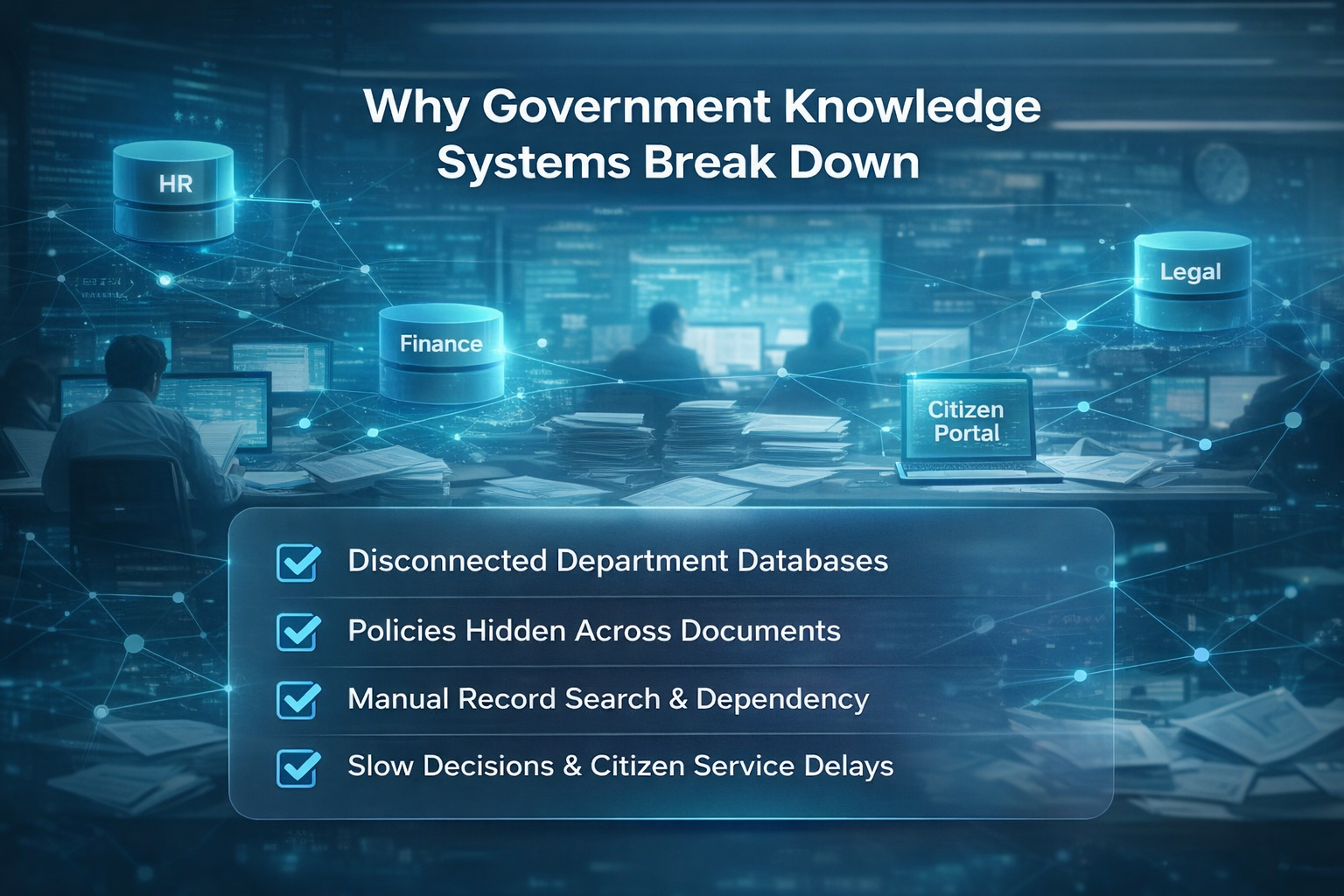
Why-Govt-Knowledge-Systems-Break-Down

The Knowledge Crisis in Government Systems

Government organizations have digitized records for years. However, digitization alone does not equal accessibility.

The real problems still exist

  • Data Silos: Different departments maintain separate databases. Therefore, officers cannot access cross-department information easily.
  • Policy Complexity: Policies evolve constantly. Moreover, circulars amend previous rules, which creates confusion.
  • RTI & Citizen Queries: Officials spend hours searching historical records just to answer a single question.
  • Manual Search Dependency: Employees depend on experienced staff because knowledge lives in people, not systems.
  • Decision Delays: As a result, approvals slow down, compliance risks increase, and citizen services suffer.

Even though portals exist, information remains buried. Consequently, productivity declines despite digital infrastructure investments.

This is not a technology problem — it is an information retrieval problem.

What Is Retrieval-Augmented Generation in Government?

Retrieval-Augmented Generation in government combines two capabilities:

  1. AI retrieves relevant official documents
  2. AI generates answers strictly from those documents

So, instead of predicting an answer, the system grounds responses in government records.

Traditional AI vs RAG

Capability Traditional LLM AI Retrieval-Augmented Generation
Knowledge Source Pre-trained internet data Government documents
Accuracy Probabilistic Evidence-backed
Updates Requires retraining Instant document updates
Hallucination Risk High Very low
Compliance Suitability Limited High
Transparency Weak Strong with citations

Why Fine-Tuning Alone Fails

Many agencies attempt to train AI models on internal data. However:

  • Retraining is expensive
  • Data changes frequently
  • Security risks increase
  • Auditability decreases

Therefore, fine-tuning becomes impractical for governance.

On the other hand, AI-powered document retrieval allows systems to reference live records. Consequently, responses remain updated, traceable, and compliant.

How Retrieval-Augmented Generation in Government Improves Knowledge Systems

Real-Time Document Retrieval

  • The system searches millions of files instantly.
  • For example: An employee asks — “What is the latest pension eligibility rule?”
  • Instead of searching manually: The system retrieves the latest circular and generates a response.
  • Therefore, decisions become faster and consistent.

Secure and Compliant AI Usage

Unlike consumer AI tools, secure AI for the government never trains on confidential data.

  • Data stays within infrastructure
  • Queries remain private
  • Access follows permissions

Consequently, departments adopt AI without compliance risks.

Context-Aware Responses

  • RAG understands policy context.
  • So instead of giving generic answers, it responds like:
  • “According to the circular dated 14 March 2024, rule 7 subsection B applies.”
  • Therefore, employees trust the system.

Reduced Manual Workload

Officials spend significant time searching documents.

RAG reduces:

  • File lookup
  • Cross-checking
  • Re-verification
  • Escalations

As a result, teams focus on decision-making instead of searching.

Improved Citizen Service Delivery

Faster responses mean:

  • Faster approvals
  • Accurate information
  • Fewer grievances

Consequently, AI for public administration directly improves citizen satisfaction.

Key Use Cases Across Government Departments

  • Policy Interpretation Assistant

Officers interpret rules consistently across offices.

  • Legal & Compliance Support

Systems instantly provide regulation references.

  • Citizen Query Resolution

Service centers respond accurately within seconds.

  • Internal Knowledge Copilot

New employees learn procedures without training dependency.

  • Document Intelligence for Audits

Audit teams retrieve historical decisions instantly.

Example impact:

  • Helpdesk response time reduced by up to 70%
  • Training dependency reduced significantly
  • Decision consistency improved across locations

This drives government data intelligence in daily operations.

Security, Compliance & Data Governance

Government AI adoption depends on trust. Therefore, governance matters more than intelligence.

RAG Enables Safe Deployment

  • No training on sensitive data: Models never memorize confidential records.
  • On-Premise or Private Cloud: Departments retain control over infrastructure.
  • Controlled Access: Responses depend on user role permissions.
  • Auditability: Every answer links to source documents.
  • Explainability: Officers see “why” an answer exists.

This makes secure AI for the government practically achievable.

The Strategic Impact on Public Sector Digital Transformation

When information becomes instantly accessible, administration changes fundamentally.

  • Faster Decisions: Officers verify rules instantly. Therefore, files move quicker.
  • Reduced Operational Cost: Manual effort decreases across departments.
  • Increased Transparency: Every answer references an official source.
  • Better Citizen Trust: Citizens receive consistent responses.
  • Intelligent Governance Systems: Policies become executable knowledge.

Industry Insight

Studies show government employees spend nearly 30–40% of their time searching information instead of acting on it. RAG shifts this time toward decision-making.

Additionally, organizations adopting knowledge AI systems report up to 60% efficiency improvement in internal queries.

Therefore, RAG directly accelerates eGovernance innovation.

Why RAG Is the Next Step in eGovernance Innovation

Governments already completed:

  • Digitization → Documents online
  • Automation → Workflows online
  • Integration → Systems connected

Now comes the final phase:

Intelligence → Knowledge accessible

This is where Retrieval-Augmented Generation in government becomes foundational infrastructure.

Future government employees will not search portals — they will ask systems.

The Smart Governance Roadmap

  • Phase 1: Data digitized
  • Phase 2: Processes automated
  • Phase 3: Systems integrated
  • Phase 4: Knowledge intelligent (RAG)

Therefore, RAG is not just another tool. It becomes the interface to governance itself.

And this is exactly where enterprise AI solutions for government enable scalable transformation across ministries, municipalities, and public agencies.

From Digital Government to Intelligent Government

Governments have invested heavily in digital platforms. However, access to knowledge still limits efficiency.

Retrieval-Augmented Generation in government changes how administration functions:

  • Employees stop searching
  • Systems start assisting
  • Decisions accelerate
  • Citizens benefit

This marks the shift from digital governance to intelligent governance.

Andolasoft enables this transition by delivering secure, scalable AI platforms designed specifically for public sector environments.

FAQs

1. Is RAG safe for confidential government data?

Yes. It does not train on sensitive data and works within secure infrastructure.

2. How is RAG different from chatbots?

Chatbots generate generic answers, while RAG retrieves official documents and responds accurately.

3. Can RAG integrate with existing portals?

Yes. It connects to document repositories, DMS, and databases without replacing systems.

4. Does it support multilingual governance environments?

Yes. RAG systems can retrieve and respond across multiple languages.

5. What departments benefit most?

Citizen services, compliance, legal, administration, finance, and audit teams benefit immediately.

The New Age of Work: How Generative AI Is Redefining Productivity

I’ll be honest: I didn’t expect AI to change how I work this fast.

Not long ago, I was juggling a dozen tabs, battling endless to-do lists, and somehow trying to stay creative in the chaos. Fast forward to today, and I start most mornings with a few prompts typed into ChatGPT, Midjourney, or a handful of AI tools I now consider coworkers.

This isn’t a “sci-fi future” post. It’s what’s already happening.

Generative AI isn’t just changing how we work—it’s rewriting the rules of productivity. And if you’ve felt overwhelmed, curious, or just plain lost in the hype, I get it. This blog is here to make it real, simple, and useful for you.

Let’s unpack what’s really going on—and how you can use GenAI to work smarter, not harder.

Before AI: The Time Sink

Remember those tasks that felt endless?

  • Writing follow-up emails
  • Compiling meeting notes
  • Creating social media visuals
  • Drafting reports that nobody reads

I used to lose hours on this stuff. Now? AI helps me knock them out in minutes—and it’s not just me. A recent McKinsey report says over 40% of work hours in today’s knowledge jobs are already touched by GenAI.

This is bigger than just speeding things up. It’s changing what we focus on. Suddenly, our time can go toward strategy, creativity, problem-solving—the things that actually matter.

Meet My New Coworkers: The AI Coding Agents

Let me introduce you to my current AI “team.” You might already know some of them.

  • ChatGPT & Claude: My go-to writing partners. Emails, blog intros, summaries—you name it.
  • Midjourney & Adobe Firefly: I give them a prompt, they give me beautiful images.
  • Zapier AI: It connects the dots. Email → CRM → Slack update? Done.
  • Notion AI: My digital brain. It summarizes, organizes, and even creates to-do lists.

And then there’s the real game-changer: AI agents.

These aren’t just chatbots—they’re goal-driven mini-workers. Some read my email, respond, and log client details into my CRM. Seriously.

This is no longer about “trying AI.” It’s about building a workflow with AI.

Ready to Build Your Own AI Workflow?

Don’t just read about AI—start using it.

  • A curated list of top tools for writing, design, and automation
  • Reusable prompts to plug into ChatGPT, Jasper, Notion, and more

Real-Life Use Cases (That Aren’t Just Hype)

Use Case Spotlight

How a Solo Marketing Consultant Doubled Output with Generative AI

One of the most compelling examples of generative AI in action comes from Alina, a freelance marketing consultant supporting early-stage startups. Operating as a one-person team, Alina was responsible for everything from strategy to execution—including campaign copy, content design, reporting, and client communication.

Despite her expertise, she faced the same challenge many professionals do: limited time and increasing client demands.

The Challenge

Alina spent 6–8 hours a day managing time-consuming tasks such as writing ad copy, designing visuals, and formatting reports. This bottleneck capped her client load and left little room for strategic or creative thinking. The workload was sustainable—but far from scalable.

The AI-Driven Solution

By incorporating generative AI tools into her daily workflow, Alina was able to streamline her operations, boost efficiency, and deliver higher-quality results. Here’s how:

  • Content Creation: She used Jasper and ChatGPT to draft ad copy, blog posts, email campaigns, and client proposals. With AI handling first drafts, she cut her writing time by 60%.
  • Visual Design: Canva AI enabled her to produce on-brand graphics and campaign visuals quickly. She leveraged Magic Design and template automation to maintain consistency across assets.
  • Strategic Planning: With Notion AI, Anika automated project planning, created content calendars, and summarized campaign reports. This allowed her to spend more time on strategy and insights.
  • Workflow Automation: Using Zapier, she connected her AI tools to platforms like Google Drive, Buffer, and Slack, automating everything from content scheduling to client updates.

The Results

The transformation was immediate and measurable:

  • 15–20 hours saved per campaign
  • Client capacity doubled without additional headcount
  • 45% increase in revenue over six months
  • Significant reduction in workload-related stress and burnout

“AI didn’t just help me scale—it helped me improve the quality of work I deliver to clients,” she notes. “Now, I focus on high-level strategy while AI takes care of the repetitive tasks.”

Takeaway

For solo professionals and lean teams, generative AI offers a competitive edge by enabling more output with less effort. Anika’s experience highlights how thoughtful integration of AI can shift the focus from execution to innovation—without compromising on quality or creativity.

My 3-Step Plan for Anyone Starting Out

If you’re feeling behind—don’t. Here’s how I recommend starting:

  • Pick One Task You Do Often: Choose something repetitive—like email replies or blog outlines. Try using ChatGPT or Notion AI to assist. You’ll be amazed.
  • Build a Tiny Workflow: Let’s say you receive leads via email. Use Zapier AI to extract info and add it to a spreadsheet or CRM. One automation = hours saved.
  • Create Your “AI Stack”: Document the tools and prompts you like. I keep mine in a Notion page with sections like “Prompts I Use Weekly” or “Best Image Generators.”

And guess what? I made a free starter kit just for this

Want Help Applying AI to Your Business?

Whether you’re a solo entrepreneur or managing a small team, generative AI can transform your workflow—fast.

Book a free 20-minute AI Strategy Call and we’ll help you:

  • Identify bottlenecks AI can solve
  • Recommend tools specific to your goals
  • Create a basic automation plan for your team

Schedule your free call now → Meeting Link 

Final Thoughts: You Don’t Need to Be an Expert—Just Curious

Here’s what I’ve learned over the past year: GenAI rewards the curious

You don’t need to learn how to code or become an AI researcher. You just need to be willing to experiment, type a prompt, and explore.

The tools are here. The use cases are real. And the people who embrace them early will have an edge.

So here’s my question to you:
What could you do with five extra hours this week?

Because with AI, that’s not a hypothetical—it’s possible.

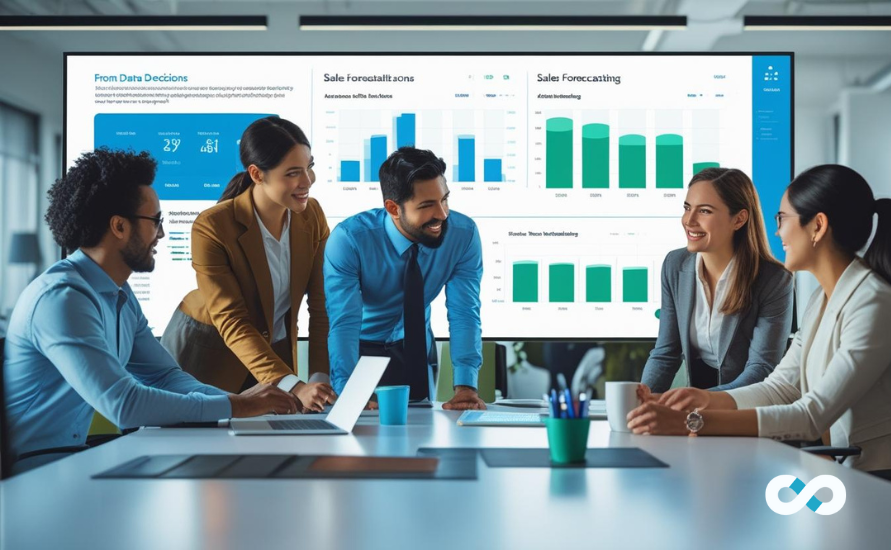
From Data to Decisions: Leveraging AI in CRMLeaf for Smarter Sales Forecasting

This edition includes richer insights, practical examples, and in-depth business function coverage across Sales, Marketing, Operations, Finance, and HR to make the content impactful and robust for a website, eBook, or PDF format.

The Forecasting Revolution

Why Sales Forecasting Isn’t Just for Sales Anymore

Forecasting used to be a sales manager’s concern. Today, every department—from operations to HR—relies on accurate predictions to stay competitive, agile, and profitable.

Traditional forecasting struggles because:

  • It’s static: Spreadsheets are outdated as soon as they’re created.
  • It’s isolated: Sales works in a silo while other departments guess.
  • It’s reactive: There’s no foresight—only hindsight.

Inaccurate forecasts cost businesses up to 15% in lost revenue annually
61% of sales leaders say their current forecasts are unreliable

That’s where CRMLeaf’s AI-driven forecasting comes in.

How CRMLeaf Makes a Difference

CRMLeaf transforms raw data into real-time, intelligent forecasts using:

  • Machine learning models
  • Historical and behavioral data analysis
  • 15-minute live forecast refreshes
  • Integrated views across teams

With CRMLeaf, forecasts are:

  • Dynamic – updated constantly as deal status and customer activity evolve
  • Cross-functional – accessible to marketing, finance, ops, and HR
  • Prescriptive – not just “what will happen,” but “what to do next”

Sales Forecasting—Evolved

Sales: Focused, Faster, More Predictable Closures

CRMLeaf’s AI analyzes thousands of data points to prioritize leads, deals, and reps’ time.

What it does:

  • Scores deals based on likelihood to close
  • Flags at-risk opportunities
  • Identifies best-performing sales behaviors

Use Case:

A SaaS company with 150 deals in Q2 ($2.1M total value) finds that only 58 deals ($1.2M) are highly likely to close.
With this insight, the sales team focuses on these deals → Close rate improves by 22%, and rep productivity jumps 30%

Key Sales Benefits

  • 25–40% reduction in time spent on dead deals
  • Accurate weekly forecasts for leadership reviews
  • Adjusts automatically based on rep inputs, client responses, and CRM changes

The Marketing, Ops, and Finance Triangle

Marketing: Data-Driven Campaign Strategy

CRMLeaf shows which lead sources convert fastest and most profitably. AI connects marketing channels to revenue impact—not just MQLs.

Use Case:

Marketing finds webinar leads are 3X more likely to convert than paid social ads. Budget is shifted accordingly → Campaign ROI increases by 37% over the quarter.

Impact:

  • Smarter spend allocation
  • Better timing of campaigns to match pipeline stage
  • Content personalization based on buyer readiness

Operations: Capacity Planning with Confidence

No more guesswork around order fulfillment, onboarding, or delivery timelines.

Use Case:

A product company forecasts a 20% Q3 sales spike. CRMLeaf alerts ops 8 weeks ahead → Extra inventory is ordered → Zero stockouts, delivery SLAs met

Impact:

  • Align resources to demand
  • Prevent over/understocking
  • Schedule field/service staff proactively

Finance: Forecast-Driven Budgeting

Finance gets early alerts on pipeline shifts, deal health, and expected revenue fluctuations.

Use Case:

AI forecasts a potential $300K shortfall for Q2. Finance adjusts monthly spending and defers new hiring → Cash flow stays positive

Key gains:

  • Timely CAPEX/OPEX adjustments
  • Revenue recognition planning
  • Forecasts sync with P&L models

HR & Strategic Leadership

HR: Predictive Workforce Planning

CRMLeaf’s forecasts help HR plan staffing based on sales and customer pipeline volume.

Use Case:

A 45% increase in enterprise sales means more customer onboarding → CRMLeaf flags this trend → HR accelerates hiring for onboarding specialists → Training begins 3 weeks early

HR wins:

  • Align recruitment with demand
  • Scale support teams as new customers onboard
  • Reduce burnout and attrition with smarter staffing

Strategic Alignment for Executives

With all functions plugged into the same forecasting engine, leadership can:

  • Review department goals with unified metrics
  • Run “what-if” growth scenarios (e.g., 10% drop in pipeline)
  • Make M&A, expansion, or investment decisions based on real-time forecast models

“CRMLeaf is our single source of truth. It connects all the dots—from marketing intent to HR strategy.”
— CEO, Fintech Startup

Real Results + Getting Started

Quantified Business Outcomes from CRMLeaf AI Forecasting

  • 35% faster decision-making across departments
  • 20–30% better forecast accuracy
  • 15% increase in revenue visibility
  • Fewer missed deadlines and operational delays
  • Optimized team utilization across HR and support

Testimonials

“Our forecast accuracy went from 62% to 91% in just two quarters with CRMLeaf.”
— CRO, B2B Software Company

“Marketing and sales now speak the same language. That alone is worth it.”
— CMO, eCommerce Retailer

Start Forecasting Smarter—Today

Implementing CRMLeaf AI forecasting takes less than 30 minutes, and the payoff begins instantly.

No more guesswork. No more reactive firefighting.

Just clear, confident decisions across your entire organization.

Schedule a Demo with CRMLeaf and turn your data into direction.

How Open-Source BI Platforms Like Superset Lower Costs Without Sacrificing Power

If you’re like most business leaders today, you know how important data is for making smart decisions. But here’s the catch — most traditional business intelligence (BI) tools come with hefty price tags that make it tough to scale without breaking the bank.

You want powerful insights, real-time dashboards, and easy customization, but you don’t want your budget to go through the roof.

That’s where open-source BI platforms like Apache Superset come in. They deliver enterprise-level capabilities without the usual expensive licensing fees, hidden costs, or vendor lock-ins.

Let’s dive into the real problems companies face with traditional BI tools—and how Superset solves them while saving you money and boosting your analytics power.

The Real Cost Problems Holding Back BI Success

High Licensing Fees That Grow Faster Than Your Business

Here’s the painful reality: Many BI platforms charge you per user or per feature. So when your team grows, your BI bill grows — often faster than your revenue.

Imagine having to cut back on giving your marketing, sales, or operations teams access because of cost. Or worse, getting hit with surprise upgrade fees when you want to add new data sources.

That’s not just frustrating — it slows down your entire company’s ability to be data-driven.

Slow Data Refreshes Lead to Missed Opportunities

How often do your dashboards update? If it’s hourly, daily, or worse, weekly, you’re making decisions on stale data.

Missed sales trends, delayed product fixes, and outdated customer insights can cost you big—lost revenue, unhappy customers, and wasted marketing spend.

Vendor Lock-In Limits Your Flexibility

Stuck with a proprietary BI tool? Changing providers or adding custom features can feel like pulling teeth.

This lack of flexibility means your BI solution can’t keep up with your evolving business needs, and you keep paying for features you don’t even use.

Complex Tools That Only Data Scientists Can Use

If your BI dashboards require heavy SQL knowledge or constant support from IT teams, you’re leaving value on the table.

Non-technical teams end up waiting for reports or avoid BI tools altogether. That’s a big problem in a world where every team needs fast access to insights.

How Apache Superset Solves These Challenges — Without Breaking Your Budget

Zero Licensing Costs — Scale Freely

Superset is fully open-source, which means no licensing fees, no per-user charges, and no surprise costs.

  • Deploy it to all your teams without worrying about the bill.
  • Save thousands (or even millions) by avoiding expensive software contracts.
  • Put your budget toward growing your data infrastructure and training users instead.

Real-Time Dashboards Keep You Ahead of the Game

Superset’s dashboards auto-refresh with live data so your teams get the most up-to-date info possible.

  • Spot customer churn as it happens.
  • Adjust campaigns based on live sales data.
  • React instantly to operational hiccups.

Real-time data means better, faster decisions—and real competitive advantage.

Freedom to Choose Where and How You Deploy

Whether you want cloud, on-premise, or hybrid deployments, Superset adapts to your environment.

  • Avoid vendor lock-in and keep control of your data.
  • Connect to 60+ data sources seamlessly—SQL databases, REST APIs, cloud apps, and more.
  • Customize your infrastructure to fit security and compliance needs.

Intuitive Dashboards Empower Everyone

Superset’s easy-to-use interface means marketing, finance, sales, and operations teams can build and customize their own dashboards without relying on data engineers.

  • Faster adoption across your company.
  • Less burden on your IT and analytics teams.
  • Data-driven culture flourishes when insights are in everyone’s hands.

Customize and Embed Analytics Your Way

Need to embed dashboards inside your SaaS product or client portal? No problem.

Superset lets you build custom visualizations, embed them securely, and create tailored analytics experiences—all without extra licensing costs.

The Bottom Line: More Power, Less Cost, Real Impact

Companies switching to Superset often see:

  • Massive savings on licensing and support fees.
  • Faster time-to-insight with real-time, interactive dashboards.
  • Greater flexibility to grow and innovate on their own terms.
  • Higher user adoption thanks to easy, self-service analytics.

It’s not just about cutting costs—it’s about unlocking the full potential of your data without barriers.

Ready to Transform Your BI Strategy?

Don’t let expensive licenses and rigid platforms hold your business back.

Explore how Andolasoft’s Superset BI Services can help you deploy scalable, customizable, and cost-effective BI solutions — with over 200+ ready-to-use dashboards, enterprise-grade security, and expert support.

Take control of your data journey today—because powerful BI shouldn’t cost a fortune.

Data Governance and Security Best Practices for Superset Deployments

In today’s data-driven business landscape, it’s not enough to just have data—you need to secure it, manage it responsibly, and make sure only the right people have access to the right insights at the right time.

Apache Superset, as a powerful open-source business intelligence (BI) platform, gives organizations the freedom to explore and visualize data at scale. But with that freedom comes the responsibility of implementing strong data governance and security practices, especially when deploying Superset in production environments or across multiple teams.

Whether you’re running Superset in the cloud or on-premises, this blog outlines key best practices to ensure your BI environment stays secure, compliant, and trustworthy.

Best Practices for Superset Deployments

Implement Role-Based Access Control (RBAC)

Superset supports RBAC natively, allowing you to define who can access what. Use it to:

  • Assign roles like Admin, Alpha, Gamma, and custom roles
  • Limit access to specific dashboards, charts, datasets, or data sources
  • Prevent unauthorized users from editing critical data or visualizations

Pro Tip: Customize roles based on your organizational structure. For example, allow sales teams to view dashboards but restrict editing rights to analysts.

Enable Authentication and Single Sign-On (SSO)

Using SSO makes it easier to manage user access while ensuring compliance with company-wide security protocols.
Recommended integrations:

  • OAuth2
  • SAML
  • LDAP/Active Directory
  • Google/GitHub/Okta authentication

SSO not only strengthens your security posture but also streamlines user onboarding and offboarding.

Encrypt Data In Transit and At Rest

Security must start with how your data moves and where it resides.

  • Use HTTPS for all Superset connections to protect data in transit.
  • Encrypt sensitive data at the storage level (e.g., with encrypted cloud storage or database encryption protocols).
  • Ensure Superset’s metadata database (which stores dashboard and user info) is also secured.

This is essential when working with personally identifiable information (PII) or confidential financial, healthcare, or enterprise data.

Audit Logs and Activity Monitoring

Superset allows you to track user activity through logs, making it easier to:

  • Identify unauthorized access attempts
  • Trace changes to dashboards, datasets, and configurations
  • Monitor system performance and query loads

Best Practice: Integrate Superset logs with centralized log management systems like ELK Stack, Splunk, or AWS CloudWatch for real-time monitoring and compliance audits.

Limit Access to Underlying Databases

Even though Superset enables SQL Lab for ad-hoc exploration, not every user should have direct SQL access. Here’s what you should do:

  • Control access to SQL Lab by role
  • Whitelist only the queries or data sources a user is authorized to explore
  • Use read-only database users for Superset connections

This prevents accidental (or intentional) changes to your source data and maintains the integrity of your backend systems.

Secure Embedding and API Access

If you’re embedding dashboards in internal tools or customer-facing apps, make sure to

  • Use signed URLs or JWT tokens to control access
  • Apply row-level security filters to limit data visibility by user role or group
  • Restrict API tokens to the minimal required privileges

Embedding dashboards securely ensures you’re not exposing sensitive insights to unauthorized viewers.

Use Containerized Deployments for Isolation and Scalability

For enterprise-scale deployments, consider containerizing Superset using Docker and orchestrating with Kubernetes. Benefits include:

  • Isolated environments per department or region
  • Automated scaling and load balancing
  • Easier patching and rollback capabilities

This approach also makes it simpler to implement DevOps best practices like CI/CD, infrastructure as code, and automated testing.

Practice Least Privilege and Data Minimization

Don’t give users access to more than they need. It sounds simple, but it’s one of the most effective ways to reduce risk.

  • Hide unused charts or dashboards
  • Mask or anonymize sensitive data when not necessary
  • Grant access incrementally based on business needs

Data governance starts with asking, “Does this person need this data to do their job?”

Stay Updated with the Latest Releases

Apache Superset is under active development, with new features and security patches released frequently. Make it a habit to:

  • Monitor the official Superset GitHub repo for updates
  • Regularly apply security patches and version upgrades
  • Subscribe to open-source mailing lists or RSS feeds

Staying current helps you benefit from performance improvements, bug fixes, and stronger security.

Educate Your Users

Even the most secure BI system can be compromised by poor user behavior. Train your users to:

  • Use strong passwords
  • Log out of sessions when finished
  • Avoid downloading sensitive data unless necessary
  • Report suspicious activity or unusual dashboard behavior

Security is everyone’s responsibility, and education is your first line of defense.

Final Thoughts

Superset offers an incredible platform for democratizing data across your organization. But with great power comes great responsibility. By putting the right data governance and security measures in place, you not only protect your data but also build trust in your analytics.

At Andolasoft, we deliver enterprise-ready Superset BI solutions with best-in-class security, governance, and performance baked in—whether you’re running your BI in the cloud or on-premise.

Ready to Secure Your Superset BI Deployment?

  • Get expert help with RBAC, SSO, and custom roles
  • Launch a secure cloud Superset instance in days
  • Explore real-time dashboards with full compliance controls

Schedule a free Superset consultation today and see how we can help you turn your data into insights—safely and effectively.

Scalable. Secure. Designed for the data-driven enterprise.

Case Study: Driving Growth with Tailored Superset Dashboards in SaaS

In the fast-paced world of SaaS, data isn’t just a tool—it’s the growth engine. Understanding customer behavior, product usage, and financial performance in real-time can mean the difference between scaling successfully and missing opportunities.

But many SaaS companies struggle with disconnected data, limited visibility, and expensive BI tools that don’t adapt to their evolving needs.

That’s where Superset comes in.

At Andolasoft, we’ve helped several SaaS companies overcome these challenges by building tailored Apache Superset dashboards that deliver real-time, actionable insights—without breaking the bank. In this case study, we’ll explore how one such company transformed its analytics strategy and unlocked new growth using Superset BI Services.

The Challenge

A mid-sized SaaS company offering a subscription-based project management tool was facing major roadblocks:

  • Scattered data across multiple platforms: Stripe for billing, Google Analytics for web traffic, HubSpot for marketing, and PostgreSQL for product usage
  • Manual reporting with spreadsheets leads to slow, error-prone decision-making
  • Lack of visibility into critical KPIs like Monthly Recurring Revenue (MRR), churn rate, customer engagement, and feature adoption
  • The expensive BI tools they had tested failed to provide flexibility or scale cost-effectively

They needed a solution that was

  • Fast to deploy
  • Easy to customize
  • Capable of unifying multiple data sources
  • Scalable and secure

The Solution: Superset BI Services by Andolasoft

We partnered with the client to design and implement a custom Superset BI solution tailored specifically for their SaaS business model. Here’s how we made it work:

Unified Data Pipeline

Using Superset’s ability to connect to multiple data sources, we integrated

  • Stripe for subscription and payment data
  • PostgreSQL for application usage data
  • Google Analytics for website traffic insights
  • HubSpot for marketing campaign performance

This gave the client a single source of truth—no more switching tabs or pulling data manually.

Tailored KPI Dashboards

We created over 15 interactive dashboards tailored to their SaaS business. Key visualizations included:

  • MRR and ARR trends with breakdowns by region and customer segment
  • Customer churn and retention by cohort
  • Feature usage analytics to track which features were driving engagement
  • Funnel analysis from website visit to conversion
  • Marketing campaign ROI tied directly to product adoption

Each dashboard was designed with filters, drill-down options, and real-time updates to help teams dig into the data as needed.

Embedded Analytics for Leadership and Clients

Using Superset’s secure embedding features, we integrated dashboards into the company’s internal admin portal for:

  • Leadership and finance teams to review KPIs
  • Product teams track usage and feature adoption
  • Sales and success teams to monitor client behavior in real time

This ensured critical insights were available where and when they were needed.

Scalable, Secure, and Cost-Efficient

Thanks to Superset’s open-source architecture, we deployed a Dockerized, scalable BI environment without recurring licensing fees. We also implemented:

  • Role-Based Access Control (RBAC) for team-specific views
  • SSO integration for secure access
  • Audit logs for compliance

The result? A highly secure, future-ready analytics platform at a fraction of the cost of proprietary tools.

The Results

Within just 90 days, the company began seeing tangible benefits:

  • 30% faster decision-making across product and marketing teams
  • Real-time visibility into user engagement, enabling smarter feature rollouts
  • 20% reduction in churn, thanks to better tracking of user drop-off points
  • Elimination of spreadsheet-based reporting, saving hours of manual effort weekly
  • Zero added cost from BI licensing—allowing more investment in growth initiatives

Why Superset Works for SaaS

SaaS businesses live and breathe data, from customer acquisition to retention. Apache Superset, when tailored right, helps SaaS teams:

  • Visualize key SaaS metrics in real-time
  • Track product usage and feature adoption
  • Identify friction points in the customer journey
  • Improve cross-team collaboration with shared insights
  • Scale analytics affordably and securely

Ready to Transform Your SaaS Data Strategy?

At Andolasoft, we specialize in building scalable, secure, and customizable Superset dashboards that deliver measurable business outcomes.

  • Explore our live Superset dashboard gallery
  • Schedule a free strategy call with our Superset BI experts
  • Start turning your SaaS data into your biggest growth asset

SaaS analytics tailored. Growth unlocked.