Top 15 Benefits of Implementing a Self-Service BI Platform

Today, leaders across industries face a common challenge: business decisions must be faster, more data-driven, and more accurate than ever before. Yet most organizations still struggle with slow reporting cycles, fragmented data sources, and overloaded IT teams. This is where a Self-Service BI Platform creates real competitive advantage.

By empowering teams to independently access, analyze, and visualize data, businesses unlock agility, reduce bottlenecks, and drive high-velocity execution. Moreover, organizations embracing self-service analytics report 30–50% faster decision-making, according to several global BI studies.

In this blog, you’ll discover the top 15 benefits of implementing a Self-Service BI Platform, why it matters in today’s digital era, and how companies can adopt it effectively. You’ll also see how Andolasoft, with its proven expertise in BI, AI, machine learning, SaaS engineering, data analytics, and enterprise solutions, helps global brands transform their data capabilities.

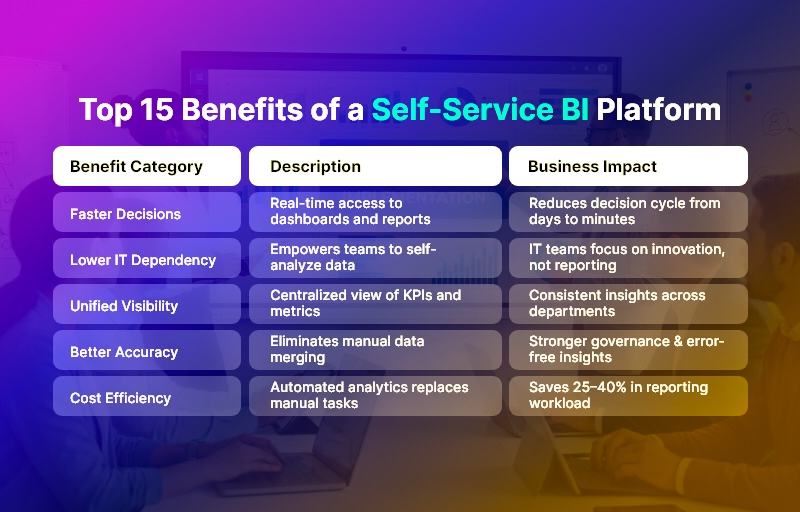
Top 15 Benefits of a Self-Service BI Platform

Why Modern Businesses Need a Self-Service BI Platform

In most organizations, analytics has long been an IT-driven process. Departments rely on data teams to prepare reports, extract datasets, or build dashboards. This creates delays, limits innovation, and slows decision-making.

A Self-Service BI Platform resolves these gaps by democratizing access to insights. It enables business users — sales managers, finance teams, marketers, operations leaders, and product managers — to explore data on their own without technical dependencies.

Why It Matters Today

Modern industries — from healthcare and manufacturing to fintech and eCommerce — operate in fast-moving environments. Data volumes continue to explode, yet delayed insights cause missed opportunities. A Self-Service BI Platform resolves these challenges by:

  • Reducing the decision-making cycle from days to minutes by enabling users to generate reports on demand.
  • Aligning teams on real-time data rather than outdated spreadsheets or manual data pulls.
  • Cutting operational inefficiencies caused by poor data visibility or inconsistent reporting practices.

Industry Use Cases

A Self-Service BI Platform delivers measurable impact across sectors:

  • Healthcare: clinicians access real-time patient metrics, improving care delivery and operational planning.
  • Ecommerce: marketing and product teams monitor campaign performance, purchase behavior, and funnel drop-offs instantly.
  • Manufacturing: plant managers analyze downtime, production defects, and supply chain trends without waiting for IT support.
  • Fintech: regulatory, fraud, and transaction dashboards become self-operational, reducing compliance risks.
  • SaaS: product teams iterate faster using usage analytics, churn insights, and cohort reports.

Risks of Not Adopting Self-Service Analytics

Organizations that do not modernize continue to struggle with:

  • Long reporting delays that slow strategic decisions.
  • High dependency on IT, delaying innovation.
  • Data silos leading to inconsistent insights across teams.
  • Security vulnerabilities due to manual exports and spreadsheet sharing.
  • Revenue loss from inaccurate forecasting or delayed insights.

In a digital-first world, a Self-Service BI Platform is not a luxury—it is a foundational operational capability that enables enterprises to scale efficiently and securely.

Top 15 Benefits of Implementing a Self-Service BI Platform

Below are the most impactful advantages organizations gain when adopting a modern, enterprise-grade Self-Service BI Platform.

1. Faster Decision-Making Across Departments

A Self-Service BI Platform eliminates dependencies on IT teams, enabling business users to generate insights instantly. This results in significantly shorter decision cycles, faster approvals, and quicker execution across sales, finance, supply chain, and operations.

2. Reduced IT Workload & Operational Bottlenecks

IT teams often spend 40–60% of their workload on routine reporting tasks. By shifting routine analytics to end-users, a Self-Service BI Platform frees technical teams to focus on strategic initiatives like automation, modernization, or AI implementation.

3. Unified Data Visibility Across the Organization

Self-service BI brings every department onto a centralized data platform, ensuring everyone works with the same numbers. This promotes alignment, reduces conflicts, and eliminates discrepancies in decision-making.

4. Improved Data Accuracy & Governance

With automated pipelines, role-based access, and standardized dashboards, organizations greatly reduce errors caused by spreadsheets, manual consolidation, and outdated reports.

5. Empowered Business Users and Greater Ownership

Teams that can explore their own data develop deeper analytical thinking and take more ownership of KPIs. This creates a performance-driven culture where insights drive action.

6. Real-Time Reporting and Live Dashboards

Traditional BI usually relies on static reports. A Self-Service BI Platform enables dynamic dashboards that refresh automatically, ensuring real-time visibility into KPIs, customer behavior, and operational metrics.

7. Enhanced Collaboration Between Technical and Business Teams

With self-service analytics, business teams independently generate insights while IT teams focus on data quality, security, and architecture. This leads to stronger collaboration and better alignment.

8. Lower Operational Costs

By automating reporting workflows and reducing manual effort, organizations often reduce analytics costs by 25–40%. The Self-Service BI Platform becomes an engine for efficiency and resource optimization.

9. Discovery of New Insights & Opportunities

Self-service exploration encourages curiosity and experimentation. Teams uncover patterns, root causes, and opportunities that would otherwise remain hidden in data silos.

10. Scalability for Growing Teams & Data Volumes

Self-service BI tools are built for scale. As new departments, markets, or product lines are added, the platform can easily expand without architectural bottlenecks.

11. Stronger Data Security Through Centralized Access Controls

A Self-Service BI Platform reduces risk by eliminating unsecured spreadsheets and enabling enterprise-grade permissions, encryption, and audit trails.

12. Automation of Repetitive Analytics Tasks

Scheduled reports, automated alerts, and prebuilt dashboards minimize manual effort. Teams always have updated insights without repetitive data pulls.

13. Better Customer Experience Through Faster Insights

Modern businesses rely heavily on customer analytics. Self-service BI enables rapid insight into churn, retention, behavior, and personalization opportunities.

14. Improved Forecasting and Strategic Planning

With real-time access to historical and current data, leadership teams produce more accurate forecasts, financial models, and growth strategies.

15. Higher Organizational Agility and Competitive Advantage

Ultimately, a Self-Service BI Platform enables companies to react faster, innovate more confidently, and stay ahead of competition by making decisions powered by real-time intelligence.

Best Practices for Implementing a Self-Service BI Platform

Success with self-service analytics requires thoughtful strategy, process alignment, and the right technology foundation. Below are actionable best practices and frameworks.

1. Establish Clear Data Ownership

Define who manages data quality, governance, and access. Clear roles prevent duplication, data drift, or inconsistent definitions.

2. Build a Centralized Data Architecture

Consolidate sources into a unified data warehouse or lakehouse. This ensures reliability, consistency, and scalability for high-volume analytics.

3. Choose a Flexible, Scalable BI Toolset

Evaluate tools based on visualization capabilities, governance, performance, security, and integration ease.

4. Implement Role-Based Access Controls

Ensure users only access relevant datasets. This protects sensitive information while enabling broad adoption.

5. Standardize Dashboards & Metrics

Create a universal KPI library so every team uses the same definitions for revenue, churn, conversion, utilization, and performance.

6. Enable Training & Upskilling for Non-Technical Teams

Provide training programs on data literacy, dashboard building, and analytics best practices.

7. Use Automation Wherever Possible

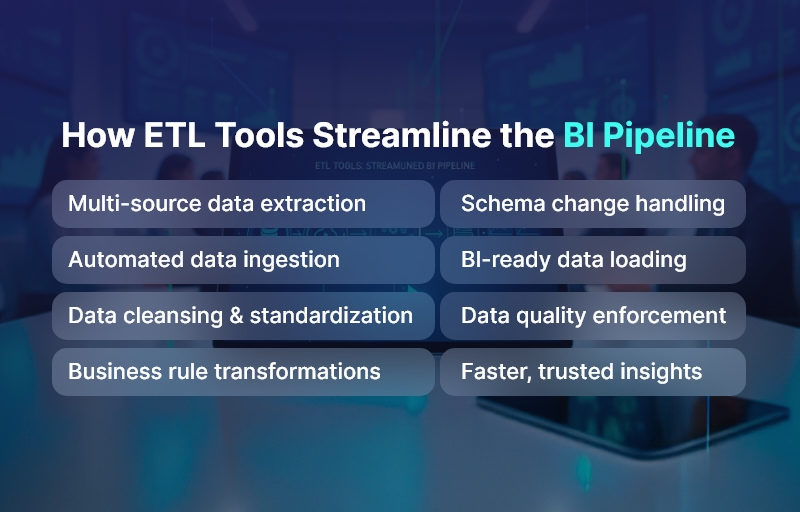
Automate ETL pipelines, alerts, data quality checks, and scheduled reporting.

8. Monitor Usage & Continuously Improve

Review dashboard adoption, usage statistics, load times, and user feedback to refine BI strategy.

How Andolasoft Helps Companies Build a Powerful Self-Service BI Platform

Andolasoft provides end-to-end BI and analytics expertise across:

We design scalable, secure, and intuitive BI environments that empower business users while maintaining enterprise governance.

Case Study

For example, a mid-sized transportation provider, partnered with Andolasoft to build a BI Platform that unified data from fleet systems, driver apps, billing tools, and telematics. Within 10 weeks, the company achieved:

  • 40% faster operational decisions due to real-time dashboards.
  • 30% reduction in manual reporting efforts, freeing teams for revenue-generating activities.
  • Enhanced route optimization, reducing fuel costs by nearly 18%.

Here’s what changed: managers gained instant access to KPIs, predictive insights improved planning, and operational bottlenecks reduced significantly.

Key Takeaways

A Self-Service BI Platform is no longer optional—it is essential for modern, data-driven enterprises. The most important insights include:

  • It accelerates decision-making and reduces IT dependency.
  • It creates real-time, unified visibility across the organization.
  • It boosts efficiency, accuracy, governance, and competitive advantage.
  • It empowers teams to innovate, experiment, and take ownership of outcomes.

Organizations implementing a Self-Service BI Platform today position themselves for long-term scalability, efficiency, and digital transformation.

FAQs

1. What is a Self-Service BI Platform?

It is a modern analytics system that enables non-technical users to access, explore, and visualize data independently, without relying on IT teams.

2. Why do businesses need a Self-Service BI Platform?

It improves decision-making speed, reduces bottlenecks, eliminates data silos, and empowers teams to work with accurate data in real time.

3. Is a the BI Platform secure?

Yes. These platforms use role-based permissions, audit trails, encryption, and centralized governance to ensure data protection.

4. How long does implementation typically take?

Depending on the complexity, implementation can take 4–12 weeks with proper planning, architecture setup, and user onboarding.

5. What industries benefit most from a BI Platform?

Healthcare, eCommerce, fintech, manufacturing, logistics, SaaS, retail, and education all gain substantial advantages from real-time analytics.

6. Does Andolasoft build custom BI solutions?

Absolutely. Andolasoft specializes in end-to-end BI engineering, AI-driven analytics, ML models, SaaS development, and enterprise-grade data platforms.

7. Can a Self-Service BI Platform integrate with existing systems?

Yes, modern BI tools integrate seamlessly with CRMs, ERPs, SaaS apps, databases, cloud systems, and third-party APIs.

Apache Superset vs Power BI vs Tableau: Which BI Tool Fits Your Enterprise?

Analytics is no longer a single tool decision; it’s a platform choice that shapes your data architecture, governance model, and talent strategy. Cloud data lakes, lakehouses, and streaming sources have expanded, AI is now table stakes, and governance-by-design is the default expectation from CIOs and CISOs. With budgets under pressure, leaders must balance capability, cost, and vendor lock-in. This guide compares Apache Superset, Microsoft Power BI, and Tableau using enterprise-grade criteria so you can select a platform that fits your architecture, scale, and compliance needs—without surprises later.

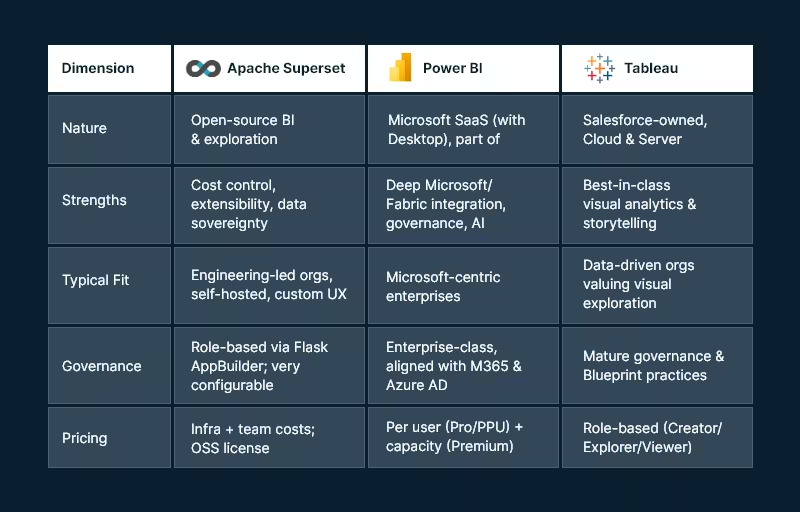
Snapshot: the three platforms at a glance

Apache_Superset vs. Power BI vs. Tablue

Core evaluation criteria

  1. Data connectivity & modeling
  2. Visualization & self-service
  3. Governance, security & compliance
  4. Pricing & TCO
  5. AI & automation
  6. Deployment, scalability & performance
  7. Ecosystem & extensibility

Data connectivity & modeling

Apache Superset

Superset connects to SQL-speaking databases through Python DB-API drivers and SQLAlchemy dialects — great for lakehouses and modern warehouses. This approach offers broad coverage and makes adding new engines straightforward, provided drivers/dialects exist.

Modeling approach: SQL-first. You’ll define datasets as saved queries or table references. Complex semantic modeling (like ragged hierarchies or row-level calc logic) is possible but typically handled in the data layer (dbt, views, materializations) or via custom code.

Power BI

Power BI provides multiple modes (Import, DirectQuery, Direct Lake with Fabric) and a robust semantic model (tabular) supporting measures, relationships, and calculations via DAX. The product is increasingly intertwined with Microsoft Fabric (Lakehouse, Dataflows Gen2, Pipelines) to unify ingestion, transformation, and modeling.

Tableau

Tableau connects broadly and emphasizes flexible joins/relationships via the Tableau Data Model, plus Tableau Prep for visual data prep. Prep Builder (authoring) and Prep Conductor (orchestration) integrate into a governed pipeline with the Data Management add-on.

Bottom line:

  • Choose Superset if your team is comfortable modeling in SQL/dbt and wants to leverage your warehouse semantics directly.
  • Choose Power BI if you need a governed semantic layer with DAX and tight integration to a Fabric Lakehouse.
  • Choose Tableau if you want visual modeling and prep that business users can learn quickly.

Visualization & self-service analytics

Apache Superset

Superset’s chart gallery covers essentials (time-series, categorical, geospatial, ECharts) and supports custom visualizations. The focus is on efficient exploration and lightweight dashboard authoring. Power users can extend visuals or embed dashboards into internal apps.

Power BI

The Power BI also blends pixel-perfect visuals with enterprise reporting patterns. Shared datasets, Apps, and reusable semantic models support organizational BI at scale. Tight integration with Office 365 and Teams helps business users collaborate around insights.

Tableau

Tableau remains the benchmark for visual exploration and storytelling. Its drag-and-drop paradigm, level-of-detail expressions, and presentation-ready dashboards make it a favorite for analysts and executives. Tableau’s strengths often show in ad-hoc discovery and interactive stories.

Bottom line:

  • Exploration/storytelling first: Tableau.
  • Standardized, governed reporting at scale: Power BI.
  • Customizable OSS exploration & embedded scenarios: Superset.

Governance, security, & compliance

Apache Superset

Authentication and authorization ride on Flask AppBuilder, enabling role-based access control with fine-grained permissions. Superset’s production security guide (v4+) lists best practices for hardening, SSO, and secrets management—important for regulated environments and self-hosting.

Power BI

Power BI’s governance aligns with Microsoft Entra ID (Azure AD), M365 security, and Fabric administration. Licensing tiers add capabilities (e.g., dataset size limits, deployment pipelines, XMLA endpoints). Premium Per User (PPU) delivers most premium features without dedicated capacity—useful for advanced workloads in smaller groups.

Tableau

Tableau offers a mature governance blueprint, with centralized, delegated, and self-governing models to align with your operating model. Its Data Management (Catalog + Prep Conductor) strengthens lineage, trust, and certified data. Deploy to Tableau Cloud (SaaS) or Tableau Server (self-managed) under role-based or core licensing.

Bottom line:

  • Superset gives you complete control — you own the controls and responsibility.
  • Power BI provides enterprise-grade governance out of the box, especially if you’re already standardized on Microsoft identity and security.
  • Tableau provides clear governance models and strong lineage/certification when combined with Data Management.

Pricing & total cost of ownership (TCO)

Apache Superset

License cost is $0 (Apache 2.0), but you’ll incur infrastructure, DevOps, and support costs. The upside: no vendor lock-in and ability to right-size infra and negotiate cloud costs. Feature parity for niche needs might require engineering effort.

Power BI

As of April 1, 2025, Microsoft lists Power BI Pro at USD $14/user/month and PPU at USD $24/user/month, with Premium capacity priced separately. These increases were announced in Nov 2024 and are now in effect.

Tableau

Tableau pricing is role-based. Official materials describe Creator / Explorer / Viewer and deployment options (Cloud/Server). Public sources commonly reference Creator ~ $75/user/month, Explorer ~ $42, Viewer ~ $15 (billed annually); always verify your regional and enterprise terms.

TCO considerations:

  • Superset can have the lowest cash outlay but requires engineering maturity.
  • Power BI offers predictable per-user economics and can reduce integration costs if you already pay for Microsoft 365/Azure.
  • Tableau can be costlier per Creator seat but may shorten time-to-insight thanks to its visual paradigm — valuable for decision velocity.

AI & automation

  • Power BI integrates with Microsoft Fabric and offers Copilot experiences for report creation and narrative insight generation, with governance controls at the tenant level. For orgs pursuing AI-assisted analytics inside a Microsoft stack, this is compelling.
  • Tableau has expanded Data Management and Prep features, with regular new releases that bolster governance and operationalization — complementary to AI-ready data foundations. (Check the current “What’s New” page for recent features relevant to your version.)
  • Superset relies on the OSS ecosystem for AI — e.g., pairing with notebooks, LLM services, or embedding AI APIs. This keeps you flexible but places more responsibility on your platform team.

Deployment, scalability, & performance

Apache Superset

Superset is cloud-native and designed to scale horizontally. You can containerize, run behind a reverse proxy, and integrate with your observability stack. Tuning is in your hands via superset_config.py and infra choices (workers, caches, async queries).

Power BI

SaaS operations are Microsoft-managed. Scaling is typically managed via capacity (Premium) and workspace governance. Fabric unifies ingestion and storage, lowering cross-tool friction and reducing operational complexity.

Tableau

You can choose Tableau Cloud for managed scaling or Tableau Server for on-prem/VMs/K8s. Tableau’s core-based licensing on Server can suit high-concurrency, view-only workloads; role-based licensing helps plan predictable per-user costs.

Ecosystem & extensibility

  • Superset: Python ecosystem, SQLAlchemy, ECharts/Chart plugins, REST API, and embeddable components—ideal for custom apps, internal portals, and bespoke workflows.
  • Power BI: Deep ISV ecosystem, certified visuals, Power Automate flows, and Azure services (Purview, Synapse, Fabric).
  • Tableau: Extensions API, accelerators, Tableau Exchange, and strong community resources for industry-specific dashboards.

Implementation playbooks (by enterprise profile)

Microsoft-centric enterprise (M365, Azure, Fabric)

  • Primary choice: Power BI
  • Why: Single-sign-on via Entra ID, Fabric lakehouse + Direct Lake for scale, governance aligned with your tenant, and Copilot for faster authoring.
  • Risks to manage: Capacity planning and DAX skill development.

Design-led analytics culture (data storytelling, exec consumption)

  • Primary choice: Tableau
  • Why: Visual exploration, LOD expressions, and storytelling make analytics stickier and speed up insight cycles.
  • Risks to manage: Role mix optimization (Creator vs Explorer vs Viewer) and ensuring certified data via Data Management.

Engineering-first platform (data sovereignty, OSS, custom UX)

  • Primary choice: Apache Superset
  • Why: Open-source flexibility, no vendor lock-in, and ability to embed analytics in internal tools.
  • Risks to manage: Operational ownership (security hardening, upgrades, scaling) and the need for internal SLAs.

Highly regulated, on-prem or hybrid

  • Primary choice: Superset or Tableau Server
  • Why: Self-hosting and granular control. Superset demands more DevOps; Tableau Server provides an enterprise-grade commercial option.

Decision worksheet (quick scoring template)

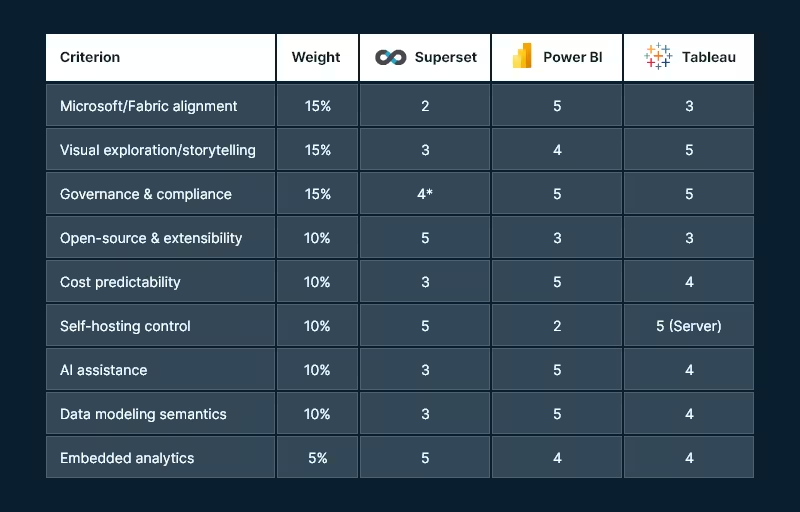
Use a 1–5 score for each criterion (5 = excellent fit). Multiply by the suggested weight to compute a weighted score.

Decision worksheet

* Superset can be excellent for governance if you invest in configuration, SSO, and hardening.

Tip: In real life, weights drive the outcome. If AI and Fabric matter, Power BI often wins. When data sovereignty and extensibility matter, Superset leads. However, when ad-hoc visual discovery is key, Tableau tends to top the list.

Recommended next steps (how Andolasoft can help)

  • Solution discovery workshop (2–3 weeks): Architecture mapping, data source inventory, governance model, and rapid POC in your preferred tool.
  • Pilot implementation: One high-value dashboard end-to-end (ingest → model → govern → publish), with CI/CD and cost telemetry.
  • Migration playbook: If you’re switching tools, we build a content inventory, semantic mapping, and automated testing harness for safe cutover.
  • Managed enablement: Training for creators/explorers, governance council setup, and a Center of Excellence playbook.

Want a hands-on assessment tailored to your stack? Andolasoft can architect and implement Superset, Power BI, or Tableau—including hybrid approaches that leverage your existing investments.

FAQs

Q1. Which tool is most cost-effective for 1,000 viewers and 50 creators?

If you’re already on Microsoft 365 and Azure, Power BI often yields the best per-user economics — especially if you can confine premium workloads to PPU or a single capacity. Tableau can be costlier for Creators but may reduce analysis time. Superset avoids license fees but requires platform engineering and ongoing ops.

Q2. Do I need Microsoft Fabric to use Power BI?

No. You can use Power BI with many data sources. However, Fabric unifies ingestion, storage, and modeling (e.g., Direct Lake) and streamlines operations—so many enterprises adopt it for scale and governance.

Q3. Can Apache Superset meet enterprise security requirements?

Yes — with the right hardening. Superset provides role-based security via Flask AppBuilder and a production security guide (v4+). You’ll need to implement SSO, secret management, and infra best practices.

Q4. What are current Power BI and Tableau prices?

Microsoft lists Power BI Pro at $14 and PPU at $24 per user/month (as of Apr 1, 2025; Premium capacity separate). Tableau uses role-based pricing (Creator/Explorer/Viewer) with commonly referenced figures of $75/$42/$15 per user/month billed annually (verify your quote and region).

Q5. Which tool is best for embedded analytics?

All three support embedding. Superset is attractive for internal app embedding in engineering-heavy orgs; Power BI and Tableau provide commercial-grade embedding SDKs supported by their broader ecosystems.

Q6. We’re a public sector/regulated enterprise — what’s safer?

If you require on-prem, consider Tableau Server or self-hosted Superset. If cloud is acceptable under your regulator, Power BI (with tenant and capacity controls) can meet stringent compliance regimes.

Conclusion: Matching the tool to your enterprise DNA

  • Pick Power BI if your business is already invested in Microsoft and wants AI-assisted analytics with unified Fabric data operations and strong governance.
  • Choose Tableau if your analytics success depends on speed of insight, story-driven dashboards, and you want proven governance models with flexible deployment.
  • Go with Apache Superset if you value open-source control, cost efficiency, and custom embedding, and you have the engineering strength to own the platform.

Most large enterprises end up multi-tool (e.g., Power BI for governed reporting + Tableau for storytelling; or Superset embedded in custom portals). The win is a governed data foundation, a clear RACI for content creation, and automation that keeps data fresh and trustworthy.