How To Hire Ruby on Rails Developer and How Much Does it Cost

Ruby on Rails is one of the most amazing and popular framework to develop full-featured web applications rapidly. It is pretty simple for a ruby on rails developer (beginner) to start and achieve to build a robust application within a very short time.

Ruby is an object-oriented programming language with a syntax that was expressly designed with a productive mind. Any good programmer can be a very productive ruby on rails developer.

No doubt ruby on rails is an excellent choice for your application development.

Ruby is a very powerful language… it is natural that when you start your first project, you get carried away by the productivity the language gives you and don’t worry about Ruby’s best practices.

                                                                                                                                                                     – José Valim

So, now the question arises how and from where you will hire a good RoR developer for your project? And what are the things you need to consider at the time of your hiring?

Wrong hiring can lead to a disastrous outcome. Make sure your developer must have a huge knowledge of ruby and its various versions.

Tips To Hire Ruby on Rails Developer

Before sharing some quick tips on how you can go for hiring. Let’s have a look at where you can get good developers.

Normally, you can get qualified and experienced developers in multiple sources like job search websites, RoR communities, social networks, specialized events like rails programmers meeting place and application development agency like Andolasoft

1. Experience and Specialization Matters a lot:

It’s always beneficial for you if you will go with specialized and experienced developers. He or she must have adequate knowledge in understanding ruby, understanding the MVC pattern and understanding about the smart object-oriented model properly.  

There is no substitute for a perfect experience!

Experience developers take the help of tools like GitHub and bitbucket to manage their codes and ensuring that your code will be secured from external threats. They also use project management tools (like Orangescrum) for the smoother operation and collaboration of project works with the team and you.

So don’t consider developers having minimum experience or the agencies with low industry experience.

2. Know what Challenges they are taking

According to the latest trends and user requirements, too many new challenges are coming in the day-to-day life for ruby on rails developer. Among all challenges building and testing new application features, optimizing user experience, product development road map creation are the major.

You must judge the developer how he/she is getting out from these day to day challenges and what best practices he/she is adopting to take you to the next level.    

3. Approach and Flexibility Towards Work

The analytical skill of a developer is very important for the work. It’s all about the process and commitment of the RoR agency matching your goal.

The most important thing is how they are comfortable to update and modify the new features and fix various issues continuously. Flexibility for adoption is the most important thing to ensure a long-term relationship for customer satisfaction.

We at Andolasoft are very much flexible and adopt a decent approach to all.

4. Work Portfolio and Customer Review:

A good developer and perfect application development agency would never hesitate to share their previous work (portfolio) with prospects. Work portfolio carries a mark and establishes trust with the potential customers.

Never forget to check the reviews of the developer or the software development agency has won from various sources. By going through the reviews you can know the real-time experience of customers. This is another kind of trust you get, which is convincing and appreciable too.

Hope the tips above can help you to select a right ruby on rails developer for your dream project.

Hiring world-class Ruby on Rails developers is not so difficult. Hire Us Now

So now coming to the second point and it’s time to think how much does it cost to hire a Ruby developer? You like this question, isn’t it?

The development pricing of your project completely depends on your requirement, the level of expertise you require, and the overall scope of your project. You need to ask the developer or the application development company about their packages and you need to decide whether you are comfortable with their pricing.  

Before taking any decision, make sure to check the average rates or per hour rate of a Ruby on Rails Developer to cross-check whether your Developer is charging you too much!.

We are at Andolasoft has three engagement models such as Dedicated/Full-stack Developer, Fixed bid and  Time & Material to develop your project. We are flexible and affordable too in comparison to others. Stay assured that there are no hidden charges.

We are not just pitching, but more committed towards quality delivery to your satisfaction.

Good reasons why to hire Andolasoft Ruby on Rails developer? Let’s have a free consultation.

Conclusion:

Choosing the right and experienced ruby on rails developer is not a big deal. However, you need to use your good sense by doing some research over the internet. Hope the above tips would definitely help you lot while selecting the developer for your dream app. And a good application development company would guide you 100% in selecting the best ones with cost-effective price.

At Andolasoft we have a team of ruby on rails developer and we are delivering successful applications to our global customers according to their business requirement from the last 10 years. Wakeupsales our CRM product is the best example of our ruby on rails development work.

What is stopping you? Hire Us Now!
How to install MongoDB on RHEL/Centos/Fedora Server

Introduction to MongoDB:-

MongoDB is an open source schema less database system which provides a document-oriented data model. The prime concern was that MySQL is written using SQL queries, while MongoDB is focused on BSON (Binary JSON). It is a cross-platform NoSQL database. It is table based relational database structure in favor of json like documents with dynamic schemas, making the integration of data in certain types of applications easier and faster. MongoDB is free and open-source software.

So let’s see the steps to install mongoDB on RHEL/Centos or Fedora Server.

How-to-install-MongoDB-on-RHELCentos-Fedora-Server

Installation procedure:-

Step: 1  System Login as root user. We are checking system OS type and system bit type.

 # uname –a
   # cat /etc/issue

Step: 2  Now we are creating a yum repo file .like /etc/yum.repos.d/mongodb.repo

# vi /etc/yum.repos.d/mongodb.repo

For we are using as 64 bit System:

[mongodb]
name=mongodb Repository
baseurl=http://downloads-distro.mongodb.org/repo/redhat/os/x86_64
gpgcheck=0
enabled=1

For we are using as 32 bit System:

[mongodb]
name=mongodb Repository
baseurl=http://downloads-distro.mongodb.org/repo/redhat/os/i686
gpgcheck=0
enabled=1

Step:3  Now we install MongoDB client and server using Yum

       # yum install mongo mongo-server

Step:4  Now we can configure and basic setting in MongoDB Database Server

       # vi /etc/mongod.conf
       logpath=/var/log/mongo/mongod.log
       port=27017
       dbpath=/var/lib/mongo

Step:5  Start MongoDB Server

       # /etc/init.d/mongod start

Step:6  Start MongoDB Server on system boot time

       # chkconfig mongod on

Step:7  Test MongoDB server

# mongo
   	> use test
   	switched to db test
  	> db.test.find()
 	> db.test.save({sd: 1})
	> db.test.find()
  	{ "_id" : ObjectId("4b9ef53c4f450969bb35a1a9"), "sd" : 1 }
   > db.test.update( {sd: 1}, {sd: 5})
   > db.test.find()
 	{ "_id" : ObjectId("4b9ef53c4f450969bb35a1a9"), "sd" : 5 }


Conclusion:-

MongoDB has an official driver for a variety of popular programming languages and development environments.

We at Andolasoft having vast expertise on implementing MongoDB database as backend in several cutting edge applications. We have developed many apps like OrangeGigs, SQUADZ  by using MongoDB as backend.

You can also see: How to Import csv configuration file to device’s SQLite db

Hope it will be helpful for you. I’d love to hear about your thoughts on this.
Thank you for your Interest.

How To Access Remote Amazon RDS With PHPMyAdmin

Amazon Relational Database Service (Amazon RDS) is a web service that makes it easy to set up, operate, and scale a relational database in the cloud. It provides cost-efficient and resizable capacity while managing time-consuming database management tasks, freeing you up to focus on your applications and business.

First of all we need to install PHPMyAdmin in ec2 instance (CentOS, Fedora, Amazon Linux AMI)

Step:1

First we need to enable the RPMforge repository on our CentOS system as PHPMyAdmin is not available in the official CentOS/Fedora/Amazon Linux AMI repositories:

Import the RPMforge GPG key:

# rpm --import  http://dag.wieers.com/rpm/packages/RPM-GPG-KEY.dag.txt

On x86_64 systems:

#  yum install http://pkgs.repoforge.org/rpmforge-release/rpmforge-release-0.5.2-2.el6.rf.x86_64.rpm

On i386 systems:

# yum install http://pkgs.repoforge.org/rpmforge-release/rpmforge-release-0.5.2-2.el6.rf.i686.rpm

Step:2

PHPMyAdmin can now be installed as follows:

# yum install phpmyadmin

Step:3

Now, we configure PHPMyAdmin. We change the Apache configuration so that PHPMyAdmin allows connections not just from localhost (by commenting out the <Directory “/usr/share/phpmyadmin”> stanza):

vi /etc/httpd/conf.d/phpmyadmin.conf
#
# Web application to manage MySQL
#
 
#<Directory "/usr/share/phpmyadmin">
# Order Deny, Allow
# Deny from all
# Allow from 127.0.0.1
#</Directory>
 
Alias /phpmyadmin /usr/share/phpmyadmin
Alias /phpMyAdmin /usr/share/phpmyadmin
Alias /mysqladmin /usr/share/phpmyadmin

Step:4

Next, we change the authentication in PHPMyAdmin from cookie to http: and host from local to RDS host url:

vi /usr/share/phpmyadmin/config.inc.php
[...]
/* Authentication type */
$cfg['Servers'][$i]['auth_type'] = 'http';
[...]
/* Server parameters */
$cfg['Servers'][$i]['host'] = '*******.******.us-east-1.rds.amazonaws.com';

Step:5

Restart Apache service:

# /etc/init.d/httpd restart

Step:6

Now we can browse RDS database.

# http://<IPADDRESS> /phpmyadmin

Or

# http://<Domain name>/phpmyadmin

Advantages Of PHPMyAdmin Over Command line Interface.

  • One of the advantages of using PHPMyAdmin is that it has a user interface and you can run queries within the SQL.
  • It is also used in checking referential integrity in MyISAM tables.
  • One can execute, edit and bookmark any SQL-statement, even batch-queries (This will work only in the latest version of PHPMyAdmin).
  • Multiple MySQL servers can be managed by PHPMyAdmin.
  • One can export data to various formats: CSV, SQL, XML, Excel and more.
  • Using Query-By-Example(QBE), create complex queries automatically connecting required tables.
  • One can Browse, view and drop databases, tables, views, fields and indexes.
  • It supports InnoDB tables and foreign keys.

Also See: How to install and configure Jaspersoft in Linux Server(RHEL/Centos/Fedora)

I hope you will find this useful. Feel free to give your valuable feedback.

If you want to update your traditional IT infrastructure to cloud computing, then you can hire expert cloud engineers from Andolasoft.

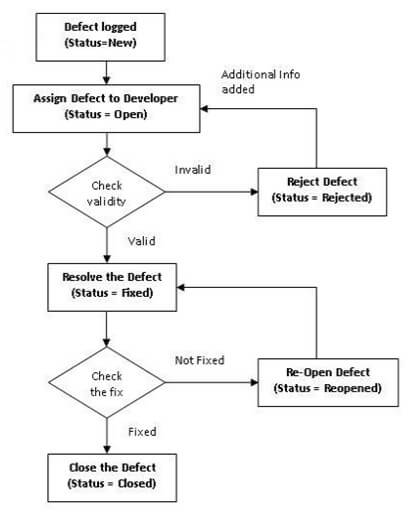
Defect Management Process in Software QA/QC

A defect is an error or bug found in the application. A programmer while designing and developing the software could make mistake. These mistakes or errors are also termed as faults in the software.

While testing a software application or product, if the actual result deviates from the expected result then it is termed as defect.

A Software defect / bug is a condition in software which does not meet the requirement or end-user expectation.

Defect Management Process:

Defect management process includes the following steps:

Identify
This step involves detecting a defect. The person noticing the defect is mostly someone in the testing team. In the real world, it can be anyone including individuals in the project team, or even the end-user(customer).

Category
When a defect is reported, it is assigned to a designated team member to confirm that the defect is actually a defect as opposed to an enhancement, or other appropriate category. Once categorized, the defect moved into the process flow and the next step is to prioritize it.

Priority
Priority is based on combination of the severity of impact on the usability, relative effort to fix, along with a comparison against other defects. The priority should be determined with representatives of the customer and the project team.

Assign
Once a defect has been prioritized, it is then assigned to a developer or other technical person to fix.

Resolve
The developer fixes (resolves) the defect and follows the organization’s process to deploy the fixed code to the environment where the defect was originally identified.

Verify
Depending on the environment where the defect was found and the fix was applied, the software testing team or customer verifies that the fix is actually resolved the defect.

Close
Once a defect has been resolved and verified, the defect is marked as closed.

Defect report or Bug report consists of the following information:

  • Defect_ID – Every bug or defect has its unique identification number
  • Defect Description – This includes the abstract of the issue.
  • Product Version – This includes the product version of the application in which the defect is found.
  • Description – This includes the detailed steps to be followed to re-create the issue with the screenshots attached so that developers can recreate it easily.
  • Date Raised – Date when the bug is reported
  • Reported By – This includes who reported the bug like tester Name and ID
  • Status – This field includes the Status of the defect like New, Assigned, Open, Re-test, Verification, Closed, Failed, Deferred, etc.
  • Fixed by – This field includes the details of the developer who fixed it like Name and ID
  • Date Closed – Date when the bug is closed
  • Severity: Based on the severity (Critical, Major or Minor) it tells us about impact of the defect or bug in the software application
  • Priority: Based on the Priority set (High/Medium/Low) the order of fixing the defect can be made.

See Also: How to identify Cross Site Scripting (XSS) Vulnerabilities threat

Defect management process or bug tracking is an integral part of our Quality Assurance process. Avail our QA services not just for projects done by us but also for projects done by you or your vendors.

I hope you enjoyed this topic, if you have any questions or comments please share below!

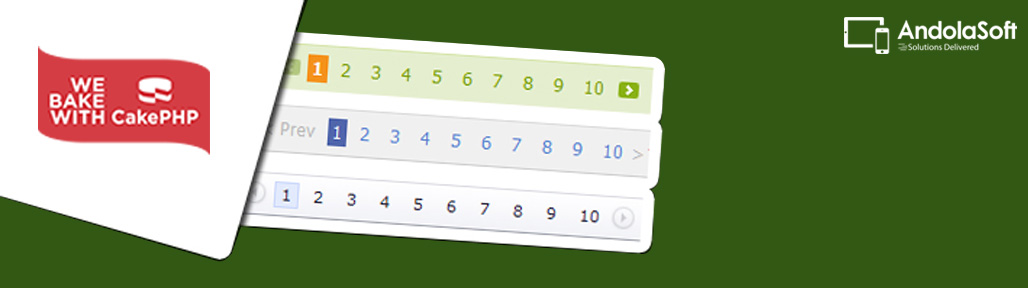
How To Do Custom Pagination In CakePHP

Sometimes we need to do pagination in CakePHP using a traditional SQL query, thereby the CakePHP predefined pagination functionality is lost.

We can implement pagination method in the Model or Behavior when we are using standard SQL query in CakePHP. Just need to make sure that the result cannot be obtained with core model methods, or a custom finder before implementing custom queries pagination.

But we can’t just use the standard pagination on the custom queries, we have to override the paginate functions in model or behavior.

To use our own method/logic to override the CakePHP pagination in the model, we need to add two functions: paginate() and paginateCount().

In these functions, we can implement our own paginate logic.

Overriding paginate() function in CakePHP Post Model:

[php]public function paginate($conditions, $fields, $order, $limit, $page = 1, $recursive = null, $extra = array()) {
$orderStr = ”;
foreach($order as $k =&amp;amp;amp;amp;amp;amp;amp;amp;amp;amp;amp;amp;amp;amp;amp;amp;amp;amp;amp;gt; $ord) {
$orderStr[] = $k . ‘ ‘ . $ord;
}
$orderStr = ‘ORDER BY ‘. implode(‘, ‘, $orderStr);

$qryCond = ‘1’;
if (isset($conditions[‘Post.title LIKE’])) {
$qryCond = ‘title LIKE \”.$conditions[‘Post.title LIKE’].’\”;
}

$qryFlds = ‘*’;
if ($fields) {
$qryFlds = implode(‘, ‘, $fields);
}

$sql = ‘SELECT ‘.$qryFlds.’ FROM posts as Post WHERE ‘.$qryCond.’ ‘.$orderStr . ‘ LIMIT ‘ . (($page-1) * $limit) . ‘, ‘ . $limit;
$results = $this-&amp;amp;amp;amp;amp;amp;amp;amp;amp;amp;amp;amp;amp;amp;amp;amp;amp;amp;amp;gt;query($sql);
return $results;
}[/php]

Overriding paginateCount() function in CakePHP Post Model:

[php]public function paginateCount($conditions = null, $recursive = 0, $extra = array()) {
$qryCond = ‘1’;
if (isset($conditions[‘Post.title LIKE’])) {
$qryCond = ‘title LIKE \”.$conditions[‘Post.title LIKE’].’\”;
}

$sql = ‘SELECT COUNT(*) as count FROM posts as Post WHERE ‘.$qryCond;

$this-&amp;amp;amp;amp;amp;amp;amp;amp;amp;amp;amp;amp;amp;amp;amp;amp;amp;amp;amp;gt;recursive = -1;

$results = $this-&amp;amp;amp;amp;amp;amp;amp;amp;amp;amp;amp;amp;amp;amp;amp;amp;amp;amp;amp;gt;query($sql);
return $results[0][0][‘count’];
}[/php]

Using in the Post Controller: We can adjust the fields to get, column ordering, add certain conditions or adjust row limit per page.

[php]public function index() {
$this-&amp;amp;amp;amp;amp;amp;amp;amp;amp;amp;amp;amp;amp;amp;amp;amp;amp;amp;amp;gt;paginate = array(
‘limit’ =&amp;amp;amp;amp;amp;amp;amp;amp;amp;amp;amp;amp;amp;amp;amp;amp;amp;amp;amp;gt; 10,
‘fields’ =&amp;amp;amp;amp;amp;amp;amp;amp;amp;amp;amp;amp;amp;amp;amp;amp;amp;amp;amp;gt; array(‘Post.id’, ‘Post.title’, ‘Post.created’),
‘conditions’ =&amp;amp;amp;amp;amp;amp;amp;amp;amp;amp;amp;amp;amp;amp;amp;amp;amp;amp;amp;gt; array(‘Post.title LIKE’ =&amp;amp;amp;amp;amp;amp;amp;amp;amp;amp;amp;amp;amp;amp;amp;amp;amp;amp;amp;gt; ‘%search_keyword%’),
‘order’ =&amp;amp;amp;amp;amp;amp;amp;amp;amp;amp;amp;amp;amp;amp;amp;amp;amp;amp;amp;gt; array(‘Post.title’ =&amp;amp;amp;amp;amp;amp;amp;amp;amp;amp;amp;amp;amp;amp;amp;amp;amp;amp;amp;gt; ‘asc’, ‘Post.id’ =&amp;amp;amp;amp;amp;amp;amp;amp;amp;amp;amp;amp;amp;amp;amp;amp;amp;amp;amp;gt; ‘asc’)
);
try {
$this-&amp;amp;amp;amp;amp;amp;amp;amp;amp;amp;amp;amp;amp;amp;amp;amp;amp;amp;amp;gt;set(‘posts’, $this-&amp;amp;amp;amp;amp;amp;amp;amp;amp;amp;amp;amp;amp;amp;amp;amp;amp;amp;amp;gt;paginate(‘Post’));
} catch (NotFoundException $e) {
$this-&amp;amp;amp;amp;amp;amp;amp;amp;amp;amp;amp;amp;amp;amp;amp;amp;amp;amp;amp;gt;redirect(‘index_custom’);
}
}[/php]

The above example is based on specific model and requirement, need to adjust the methods according to the requirements.

See Also: Creating a custom handler session in CakePHP 2.x

Best of luck and happy pagination.

Hope you liked this. Let me know if you want to add anything?

How To Setup CakePHP DataSource For Solr?

Imagine that you have millions of data and your SQL database is not optimized enough to handle them, then “Solr” is your best data source. Apache Solr is a fast search platform. It’s major features include full-text search faceted search, dynamic clustering, database integration, rich document handling. Solr is highly scalable and it is the most popular enterprise search engine.

This document will guide you through DataSource setup for Solr in CakePHP. Set-up the Solr DataSource in CakePHP and query Solr with your CakePHP model “find” function, just similar to querying any other SQL database.

/app/Config/database.php:

Configuring your the DataSource for Solr database connection:

  • host: Solr server address.
  • port: Solr server port.
  • datasource: This should match with your DataSource at /app/Model/Datasource/SolrSource.php

[php]class DATABASE_CONFIG {
public $solr = array(
‘datasource’ =&amp;amp;amp;gt; ‘SolrSource’,
‘host’ =&amp;amp;amp;gt; ‘192.168.2.131’,
‘port’ =&amp;amp;amp;gt; ‘9983’,
‘path’ =&amp;amp;amp;gt; ‘/solr/’
);
}[/php]

/app/Model/Solr.php:

Use the database config in your models like:

[php]class Solr extends AppModel {
 public $useTable = false;
 public $useDbConfig = ‘solr’;
 }[/php]

/app/Model/Datasource/SolrSource.php:

Below code describes only the most required functions.

  • You can find other required functions at http://book.cakephp.org/2.0/en/models/datasources.html
    Like: calculate($model, $func, $params) and others create(), update(), delete().
  • Below DataSource only implements read() function.
  • Create a file called SolrSource.php and use below code:

[php]App::uses(‘HttpSocket’, ‘Network/Http’);
require_once($_SERVER[‘DOCUMENT_ROOT’].’/root_folder/app/Vendor/Apache/Solr/Service.php’);
class SolrSource extends DataSource {

protected $_schema = array();
protected $_host;
protected $_port;

public function __construct($config){
parent::__construct($config);
$this-&amp;amp;amp;gt;Http = new HttpSocket();

$this-&amp;amp;amp;gt;host = $config[‘host’];
$this-&amp;amp;amp;gt;port = $config[‘port’];
$this-&amp;amp;amp;gt;_schema = $config[‘path’];

$this-&amp;amp;amp;gt;solr=new Apache_Solr_Service($this-&amp;amp;amp;gt;host, $this-&amp;amp;amp;gt;port, $this-&amp;amp;amp;gt;_schema);
}

public function read(Model $model, $queryData = array(), $recursive = null) {
$results = array();
$query = $queryData[‘conditions’][‘solr_query’];
if (Configure::read(‘log_solr_queries’) === true) {
CakeLog::write(‘debug’, $query); /* Logs the solr query in app/tmp/logs/debug.log file */
}

try {
$solr_docs = $this-&amp;amp;amp;gt;solr-&amp;amp;amp;gt;search($query, $queryData[‘offset’], $queryData[‘limit’], array(‘sort’ =&amp;amp;amp;gt; $queryData[‘order’]));
} catch (Exception $e) {
CakeLog::write(‘error’, $e-&amp;amp;amp;gt;getMessage()); /* Logs the solr errors message in app/tmp/logs/error.log file */
CakeLog::write(‘error’, $query); /* Logs the solr query in app/tmp/logs/error.log file */
}
$model-&amp;amp;amp;gt;params = $solr_docs-&amp;amp;amp;gt;responseHeader-&amp;amp;amp;gt;params;
$model-&amp;amp;amp;gt;numFound = $solr_docs-&amp;amp;amp;gt;response-&amp;amp;amp;gt;numFound;
$docs = $solr_docs-&amp;amp;amp;gt;response-&amp;amp;amp;gt;docs;
foreach ($docs as $doc) {
$document = array();
foreach ($doc as $fieldName =&amp;amp;amp;gt; $fieldValue) {
$document[$fieldName] = $fieldValue;
}
$results[] = $document;
}
return array($model-&amp;amp;amp;gt;alias =&amp;amp;amp;gt; $results);
}
}[/php]

/app/Controller/UsersController.php:

Getting data from Solr server by using above SolrSource.

[php]App::uses(‘AppController’, ‘Controller’);
class UsersController extends AppController {

public $name = ‘Users’; //Controller name
public $uses = array(‘Solr’); //Model name

function beforeFilter(){
parent::beforeFilter();
$this-&amp;amp;amp;gt;Auth-&amp;amp;amp;gt;allow(‘index’);
}

public function index(){
$cond = "active:1";
$sort = "timestamp desc";

$params = array(
‘conditions’ =&amp;amp;amp;gt;array(
‘solr_query’ =&amp;amp;amp;gt; $cond
),
‘order’ =&amp;amp;amp;gt; $sort,
‘offset’ =&amp;amp;amp;gt; 0,
‘limit’ =&amp;amp;amp;gt; 1
);

$result = $this-&amp;amp;amp;gt;Solr-&amp;amp;amp;gt;find(‘all’, $params);
$this-&amp;amp;amp;gt;layout = ‘ajax’;
header(‘Content-Type: application/json; charset=utf-8’); /* To send response in json format */
echo json_encode($result);
die;
}
}[/php]

See Also : How to use ‘neighbors’ with ‘find’ method

Debugging:

The above code has been tested and validated with CakePHP 2.2.3, PHP 5.3.1 .
Incase you face any problems:

  • First check the DataSource configuration in /app/Config/database.php.
  • Check /app/Model/Solr.php for this line: public $useDbConfig = ‘solr’;
  • Make sure Solr Service Vendor loaded in /app/Model/Datasource/SolrSource.php.
  • Check the path is correct for the Solr vendor.

Hope you liked this. Let me know if you want to add anything?