How Modern BI Tools Drive Real-Time Decision-Making for Enterprises?

Every 15 seconds, a global enterprise loses over $1 million in opportunity costs due to delayed insights and data silos. Modern BI Tools Drive Real-Time Decision-Making for Enterprises is no longer a luxury — it’s a strategic imperative.

In an era where milliseconds matter, businesses must harness live dashboards, predictive analytics, and AI-embedded insights to stay competitive. Today’s leaders — from CTOs and product managers to founders and business strategists — demand solutions that deliver actionable intelligence instantly, not hours or days later.

In this post, you’ll learn:

  • Why enterprises across healthcare, eCommerce, logistics, and more need real-time BI now
  • Best practices and frameworks for adoption, ensuring security, scalability, and performance
  • How Andolasoft partners with you to implement custom BI, AI, and data analytics solutions
  • A mini case study showcasing measurable results

Let’s explore how Andolasoft’s deep expertise in BI, AI/ML, and enterprise solutions can transform your data into a live strategic asset.

Why Real Time BI Matters

Why Modern BI Tools Drive Real-Time Decision-Making for Enterprises

In today’s fast-paced market, data-driven agility separates winners from laggards. Modern BI tools address long-standing challenges — data latency, siloed reporting, and manual processes — by providing an always-on analytics layer. Gartner reports that by 2025, 50% of enterprises will rely on real-time analytics for operational decisions, up from just 15% in 2021.

  • Bridging data silos: Traditional BI often stitches data manually, causing delays. Modern BI platforms unify disparate sources — ERP, CRM, IoT — automatically, giving teams instant visibility.
  • Enhancing responsiveness: Real-time alerts and drip-feed dashboards empower decision makers to act on anomalies — supply chain disruptions or customer churn signals — within minutes, not days.
  • Leveraging AI-driven insights: Embedded machine learning algorithms continuously learn patterns, forecast trends, and recommend optimized actions, ensuring foresight rather than hindsight.

Without adopting these strategic solutions, enterprises risk inefficiencies, revenue leakage, and missed market opportunities. Patchwork or legacy systems simply cannot support the velocity or scale demanded by modern business.

Business Need & Importance

Enterprises across verticals are facing unprecedented data volumes and velocity:

  • Healthcare providers must monitor patient vitals and resource utilization in real time to improve outcomes and reduce costs.
  • eCommerce platforms need instant visibility into inventory, website performance, and customer behaviors to personalize experiences and prevent cart abandonment.
  • Logistics companies require live tracking and demand forecasting to reroute shipments and optimize fleets.
  • Fintech firms depend on instant fraud detection and regulatory compliance reporting to protect assets and reputation.
  • Manufacturing plants leverage sensor data for predictive maintenance, avoiding costly downtime.
  • Educational platforms analyze learner interactions to tailor content and boost retention.

Risks of Inaction

  • Inefficiencies and manual reconciliation hinder growth, leading to frustrated teams and customers.
  • Security risks amplify when outdated reporting platforms lack modern encryption and role-based access controls.
  • Poor user experiences and delayed insights can drive customers to more agile competitors.
  • Data loss and compliance breaches result from unsupported legacy databases.

Why Strategic, Modern Tech Matters

Adopting a comprehensive, future-ready BI strategy ensures cohesive architecture, robust data governance, and enterprise-grade scalability. Rather than piecing together point solutions, companies must invest in platforms that grow with their data needs, integrate seamlessly with AI/ML models, and provide a unified view of operations. Andolasoft brings decades of real-world delivery experience to architect and implement these end-to-end solutions.

Best Practices, Frameworks & Actionable Tips

Deploying modern BI for real-time decision-making involves more than selecting a tool. It requires an integrated approach across people, processes, and technology. Here are step-by-step recommendations and do’s & don’ts:

Define Clear Business Objectives

  • Align BI initiatives with strategic goals, such as reducing order fulfillment times or improving patient care metrics.
  • Involve stakeholders from finance, operations, and IT early to ensure cross-functional buy-in.

Establish a Scalable Data Architecture

  • Adopt a cloud-first data warehouse (e.g., Snowflake, AWS Redshift) to handle streaming data and on-demand queries at scale.
  • Implement a data lake for unstructured logs and real-time sensor feeds, ensuring a single source of truth.

Leverage Real-Time Data Integration

  • Use ETL/ELT pipelines with tools like Fivetran or Apache Kafka to ingest and transform data continuously.
  • Ensure robust data quality checks and automated schema detection to prevent inconsistencies.

Apply AI & Machine Learning Models

  • Build and deploy predictive models using frameworks like TensorFlow or PyTorch, integrated into your BI dashboards for live scoring.
  • Continuously retrain models with fresh data so forecasts remain accurate.

Prioritize Security & Governance

  • Implement role-based access and row-level security controls to protect sensitive information.
  • Encrypt data both at rest and in transit, adhering to compliance standards like GDPR and HIPAA.

Optimize Performance & Scalability

  • Use in-memory analytics engines (e.g., Apache Druid) to handle high-concurrency, sub-second query responses.
  • Architect microservices and containerized deployments to add capacity dynamically via Kubernetes or Docker Swarm.

Encourage User Adoption

  • Provide intuitive, self-service dashboards built with tools like Power BI, Tableau, or Looker, reducing reliance on IT.
  • Offer training workshops and create data literacy programs to empower business users.

Monitor & Iterate

  • Set up automated monitoring with alerts for data pipeline failures or performance bottlenecks.
  • Schedule regular performance reviews and stakeholder feedback sessions to refine dashboards and KPIs.

Quick Wins:

  • Implement a real-time sales dashboard to track daily revenue and inventory levels.
  • Automate monthly financial close processes, reducing cycle time by 30%.
  • Integrate chatbots powered by AI models to handle routine customer queries, cutting support tickets by 25%.

How Andolasoft Helps?

  • Custom Web Development: We craft interactive, responsive dashboards tailored to your branding and workflows.
  • Mobile App Development: Access live analytics on the go with secure iOS & Android apps.
  • SaaS Product Engineering: Build multitenant analytics platforms that scale with your customer base.
  • BI, AI & Machine Learning Solutions: From data ingestion to model deployment, we deliver end-to-end AI-infused BI.
  • Data Analytics: Our experts design data pipelines, ETL frameworks, and data warehouses that empower real-time insights.
  • Application Modernization: We migrate legacy BI systems to modern cloud-native architectures, eliminating performance bottlenecks.
  • Enterprise IT Services: Benefit from our managed data services, 24/7 support, and governance best practices.
  • DevOps, Cloud & Automation: Continuous integration and deployment pipelines ensure your BI infrastructure evolves without downtime.

Choosing Andolasoft means partnering with a team that combines deep technical expertise with proven delivery frameworks, ensuring your BI transformation is seamless, secure, and sustainable.

Customer Success Example

For example, a healthcare analytics company, partnered with Andolasoft to build a real-time patient monitoring dashboard. Within 12 weeks, they achieved:

  • 40% faster incident detection by consolidating EHR and wearable device data flows
  • 35% reduction in manual data reconciliation through automated ETL pipelines
  • 20% improvement in clinician response times, enhancing patient outcomes

Here’s what changed: clinicians received live alerts on critical vitals, administrators accessed on-demand capacity reports, and HealthPulse leadership made data-driven decisions that improved both operational efficiency and patient satisfaction.

Key Takeaways & Closing

  • Modern BI Tools Drive Real-Time Decision-Making for Enterprises by unifying data, accelerating insights, and embedding AI for predictive foresight.
  • Adopting a cloud-native, security-first BI architecture eliminates data silos and ensures scalability.
  • Following best practices — from defining clear objectives to continuous iteration — guarantees successful implementations.
  • Quick wins like live sales dashboards or automated closings build momentum and user confidence.

Partnering with a proven technology leader like Andolasoft transforms your BI vision into reality, delivering measurable ROI.

In an age where every second counts, embracing real-time BI is no longer optional. Start your journey today and unlock the strategic edge your enterprise deserves.

Ready to build your next digital product? Book a free consultation with Andolasoft.

FAQs

What are Modern BI Tools and why are they important for enterprises?

Modern BI Tools are cloud-enabled platforms that provide live dashboards, self-service analytics, and embedded AI. They are important because they enable real-time decision-making, eliminate data silos, and drive strategic agility across the organization.

How do Modern BI Tools Drive Real-Time Decision-Making for Enterprises?

By ingesting streaming data, applying automated ETL processes, and leveraging in-memory engines, modern BI tools deliver
instant insights. They integrate AI/ML models for forecasting, and use role-based security to ensure data integrity and compliance.

Which industries benefit most from Real-Time BI implementations?

Healthcare, eCommerce, logistics, fintech, manufacturing, and education all benefit. Real-time analytics optimize patient monitoring, personalize shopping experiences, streamline supply chains, ensure regulatory compliance, and tailor learning paths.

What are common mistakes to avoid when deploying real-time BI?

Avoid loading all data at once, skipping data governance, and overlooking user training. Instead, implement scalable architectures, enforce security policies, and invest in data literacy programs to maximize adoption and ROI.

How can Andolasoft help with Real-Time BI and analytics?

Andolasoft offers end-to-end services—from custom web and mobile dashboards to AI/ML model integration, cloud migrations, and DevOps automation. We ensure your BI transformation is swift, secure, and aligned to business goals.

What quick wins can enterprises achieve with Modern BI Tools?

Enterprises can launch a live sales dashboard, automate financial close processes, and deploy AI-powered chatbots for customer support — yielding faster insights, reduced manual effort, and improved customer satisfaction.

How do I measure the ROI of a Real-Time BI initiative?

Track metrics like time-to-insight, reduction in manual reconciliation, increased revenue capture, and improved operational uptime. These KPIs quantify how Modern BI Tools Drive Real-Time Decision-Making for Enterprises and deliver business value.

Transforming Insights with Intelligent Heatmaps: Multi-Threshold Coloring Comes to Superset 4.1

Heatmaps have long been a staple of modern analytics. They’re fast, intuitive, and visually expressive. But as organizations — especially data-intensive sectors like NBFCs — evolve in their analytical requirements, traditional heatmaps no longer provide the clarity needed for high-stakes decisions.

In NBFC operations, the difference between a healthy metric and a risky one can be razor thin. Early detection of stress indicators, repayment behavior patterns, fraud risk, delinquency zones, and operational inefficiencies can directly impact revenue, portfolio quality, and regulatory compliance.

This is where intelligent visualization becomes more than a design choice — it becomes a strategic advantage. Today, we’re excited to introduce our Advanced Multi-Threshold Heatmap Customization for Superset 4.1, purpose-built to empower NBFCs and modern enterprises with sharper insights and clearer decision boundaries.

Why Multi-Threshold Heatmaps Matter

Why Heatmaps Needed an Upgrade — Especially for NBFCs

Traditional heatmaps rely on simple gradient scales that blur critical distinctions. But NBFC data environments demand sharper, more explicit boundaries for better decision-making. These use cases require precise segmentation:

  • Portfolio delinquency segmentation
  • Risk-tier classification
  • Branch-level performance variance
  • Collections prioritization zones
  • Fee income heatmaps
  • Recovery cycle analysis
  • Borrower behavior scoring

A simple gradient doesn’t tell the full story — it hides it.

NBFCs need clarity, not ambiguity.
That’s exactly why multi-threshold color segmentation is transformative.

Introducing Multi-Threshold Heatmap Coloring for Superset 4.1

Our custom Superset plugin brings next-level intelligence to heatmaps by enabling multiple thresholds — each with its own distinct, meaningful color.

Key Enhancements

  • Custom color bands per threshold
  • Segmentation aligned with risk and performance tiers
  • Optimized for large portfolios and multi-branch NBFC datasets
  • Configurable to NBFC scoring models, risk matrices, and internal policy rules
  • Compatible across underwriting, collections, operations, audit, MIS, and CXO dashboards

With this upgrade, your heatmap no longer looks like a generic chart — it becomes a decision-ready dashboard.

A Smarter Way to Interpret Complex Data

NBFCs manage diverse and complex datasets — geographies, risk classes, customer cohorts, credit products, and operational KPIs. Multi-threshold heatmaps convert every range into a clear signal.

What This Unlocks

  • Identify early stress zones in portfolio quality
  • Highlight operational bottlenecks in branches or tele-calling teams
  • Spot early signs of delinquency shifts
  • Detect unusual patterns in product performance
  • Prioritize collections based on risk severity
  • Present high-clarity insights for leadership and CXOs

Decision-makers don’t just see color.

They see context.

Real-World Use Cases

This customization is inspired by sectors dealing with intense risk segmentation, compliance needs, and operational complexity.

1. Portfolio Delinquency Heatmap

Visualize DPD (Days Past Due) ranges with color-coded thresholds:

  • 0–10 days = Green
  • 11–30 days = Amber
  • 31–90 days = Red
  • 90+ days = Critical

This instantly highlights risk pockets across regions, loan products, or borrower cohorts.

2. Branch-Level Performance & Productivity

Evaluate multiple branches using key thresholds like:

  • Disbursement volume
  • Collection efficiency
  • NPA movement
  • Bounce rate
  • Conversion funnel health

Branches needing attention become instantly visible.

3. Risk Scoring & Underwriting Patterns

Identify hidden behavior patterns across:

  • Bureau score buckets
  • Customer segments
  • Ticket sizes
  • Loan tenures
  • Co-applicant or guarantor clusters

Threshold colors help uncover unusual underwriting clusters and risk trends.

4. Early Warning Signals (EWS) for Credit Risk

Automatically highlight risk triggers based on:

  • EMI payment delays
  • Sudden shifts in repayment behavior
  • Suspicious transaction patterns
  • Geographic risk escalation

This allows NBFC risk teams to act before issues escalate.

5. Collections & Recovery Planning

Segment borrower buckets for targeted action:

  • High-risk accounts
  • Bounce-prone groups
  • Field-visit-required clusters
  • Tele-caller performance variations

This ensures optimal allocation of collection resources.

6. Fraud Detection Matrices

Visualize risk indicators like:

  • Unusual application clusters
  • Common or repeated KYC attributes
  • High-risk geographic zones
  • Agent-level anomaly scores

heatmap thresholds help detect early signs of fraud or anomalies.

7. Audit, Compliance & Operational Monitoring

Monitor branch-level compliance factors:

  • KYC completeness
  • Document submission accuracy
  • Policy deviations
  • Reconciliation mismatches

Clear segmentation supports smarter audit planning and compliance oversight.

In short, heatmap thresholds allow NBFCs to see risks before they become losses.

Built for Superset 4.1, Designed for Enterprise BI

Our plugin is engineered for Superset’s latest architecture, ensuring:

  • Seamless, clean integration
  • High performance on large, complex datasets
  • Cloud and on-premises compatibility
  • Smooth version upgrades
  • Full support for multi-tenant NBFC deployments

Perfect for NBFCs with distributed teams, multi-branch operations, and advanced MIS needs.

High-Level Deployment: Bringing the Plugin Into Production

We ship the complete plugin package, making enterprise deployment predictable and stable.

1. Get the Custom Plugin Bundle

Includes:

  • Frontend build artifacts
  • Plugin configuration
  • Optional backend enhancements

2. Integrate with Superset’s Plugin Framework

Your DevOps team places the plugin in the Superset plugin folder.

3. Rebuild the Superset Frontend

Your CI pipeline bundles the custom chart into Superset.

4. Deploy to Staging and Then Production

Validate performance across NBFC dashboards:

  • Collections
  • Risk MIS
  • Portfolio health
  • CXO insights

Once approved, move to production with zero manual patching.

5. Give Role-Based Access (RBAC)

Grant access to:

  • Risk teams
  • Collections teams
  • Branch operations
  • MIS and analytics teams
  • CXO groups

Works seamlessly with your existing permission model.

Why NBFCs Choose Our Superset Customizations

We build analytics solutions tailored to industries that rely on accurate, timely, and actionable insights.

Our capabilities include:

  • Custom Superset charts and plugins
  • NBFC-ready dashboards & MIS systems
  • Risk, delinquency, and exposure visualization
  • Collections and productivity analytics
  • Workflow and data modeling enhancements
  • Ongoing Superset maintenance and upgrade support

We understand the operational realities of NBFCs — from disbursements and risk scoring to collections and audits — and build tools designed to solve them.

Conclusion: Giving NBFCs the Visual Intelligence They Deserve

The Multi-Threshold Heatmap Plugin for Superset 4.1 is more than a visual upgrade — it’s a strategic tool that empowers NBFCs with sharper risk visibility, enhanced operational control, and faster decision-making.

When thresholds guide your color logic, insights become instant.
Risks become visible.
Decisions become faster.

If your NBFC needs sharper, more intelligent dashboards, we’re here to help bring that transformation to life.

Top 5 Reasons: Why You need Business Intelligence

In general, each organization needs Business Intelligence (BI) at some point. For example, when a retail company is started – there was no scope for ERP with minimal business transactions having few employees on the roll.

As the business picked up, I wanted to find answers to some obvious questions like “What is the sales trend over a given period?”, “Which commodity is having more demand during festive seasons?”, “What is rate of growth year-wise?” etc.

Having said that, even the tiniest organizations need some kind of analyzed data, graphical display adds value.

BI – A need for Any Sized Company:

Be it mid-sized or smaller companies (SMBs), they do have same need as the big companies do for using BI.

It is required for better visibility of the business performance followed by corrective decisions. In summary, the intelligence reports are equally important for irrespective of the company size.

Challenges:

The truth is, most SMBs usually use the Excel spreadsheet as a tool for analysis. Every day they enter the data and prepare the report manually.

Several reports created by various employees very often without any real coordination resulting in-appropriate intelligent output.

So, when management asks a simple question like, “What is the percent of growth rate compared to that in last financial year?” and the answers don’t match. In addition to that, it will take longer to deliver the reports.

With time the company increases, with increase in employees, and thereby hike in transactions, it becomes too much to be handled for analysis.

The need for BI is necessitated.

Business-Intelligence-Tool

Solutions:

To meet the challenges to get an accurate intelligence output, the KPI (Key-Performance-Indicators) & key metrics need to be well defined for the business.

These are to be supported by data warehouse and BI reporting tools.

For example, as a retail vendor, we need to analyze our business pipeline over the period of the entire year.

We could get the fact that the most favorable period is December-January and the most slowdown period is March-April.

Based on this intelligence report we plan our purchasing strategy and can minimize the losses.

So, for this purpose we did not opt for any expensive software rather we built our own BI Tool with open source components and interfaces of latest trend.

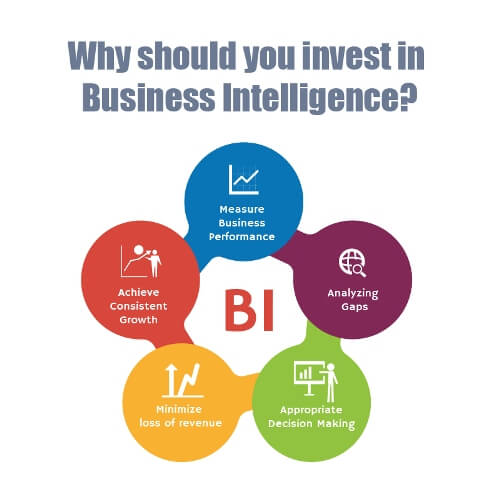
So, we can agree that, in order for prosperity & growth of your organizations, you must consider to have BI in place so that the performance can be measured and appropriate decisions can be taken based on the gaps found.

Conclusion:

5 reasons to invest in Business Intelligence today

  1. Measure Business Performance
  2. Analyzing Gaps
  3. Appropriate decision making
  4. Minimize loss of revenue
  5. Achieve consistent growth

If you are really interested to boost your business, Andolasoft is committed to provide the high-performance business intelligence through reporting, monitoring and consultation.

Read also : How Business Intelligence can help Direct Sale Organization

It would be a great pleasure for me, if you contributed your informative idea on this post.

Thank you for your involvement.

Organization Attribution Model: Complicated but Important to Understand

Most of the time entrepreneurs get trapped, when they are looking for some insight queries about their organization, which help them to invest their money on proper channel to get maximum return. That time they take help of data analyst, and they help them to find solutions for some complex queries like:

  • Which are the most effective acquisition channels for investment ?
  • What people actually do before making purchases?
  • What prompts them to make purchases?

Attribution-mdoel-solves-your-business-query

You will get all your answer if you select right Attribution Model.

Google defined attribution model is the rule, or set of rules, that determines how credit for sales and conversions is assigned to touch points in conversion paths.

There are basically three types of Attribution:

  • Online to Offline Attribution Model: Try to understand the impact of online marketing campaign on offline marketing channel. Number of offline leads we generate because of our online marketing campaign.
  • Multi Device Attribution Model: Try to understand how different gadgets contribute to conversion and how much credit goes to distinct devices for a conversion. Let’s say a customer watch an ad on TV, then he makes search on mobile, later he reads reviews on his tab and finally purchase that product online by visiting the website directly through his laptop.

multidevice-attribution-model

  • Multi Channel Attribution Model: Similarly try to understand how different channel contributes to conversion and how much credit goes to each channel for conversions. Let’s take below example.

multi-channel-attribution

There is another attribution model, which is more realistic one and this model is blending of over three attribution models. First two models are still unresolved puzzled for data scientists. However, you can use the last one to know the real forces or channels behind your revenues.

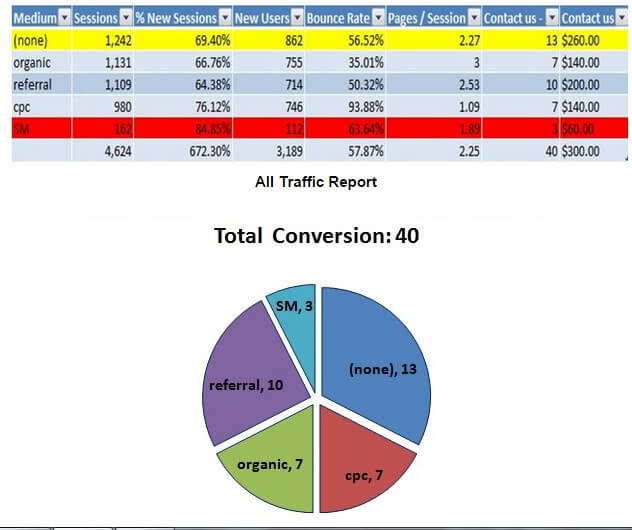
Now let’s find out which channels gives you better return. Let’s go and check data in your analytic report.

pie-chart

From the above report and pie-chart, you arrive at the conclusion that your most successful medium is direct one while minimum effective medium is SM and CPC medium respectfully. So you need give more focus on referral medium or organic medium than paid medium because it will give more conversion or revenue. Am I right?

Here, attribution model comes into picture. Before taking any decision, just I need to educate you that above multichannel attribution model is focused around last interaction model, mean last interaction or touch point before conversion gets 100% credit. This is the default one in Google Analytic; whereas some other models like: last Non-Direct Click, Last Adword Clicks, First interaction, Linear, Time decay, and position based attribution model are also available(For more you can see : https://support.google.com/analytics/answer/1665189?hl=en&ref_topic=3205717)

Some organizations used different attribution model like first Interaction Model or linear model or something else. So if you see the above chart table by considering the different model, then you may reach some other conclusion. Chances are there if you go for first Interaction Model; you can see CPC medium is more profitable than direct medium because in this model the 100% credit goes to channel which introduces your product or service for the first time.

Therefore, it is important to understand attribution model and for this, you should have deep knowledge about your business, products, and the target market. Otherwise, it will lead you to wrong attribution model and which causes losing money. You can also compare your ROI/ROAS by comparing different attribution model which gives you clearer picture. For this, you can take help Comparison Tool and Multi Channel Funnel Report in Google Analytics.

Read Also: 5 Google services to help you to reach your business goal!

I hope you find this topic useful. At Andolasoft we are still in a process to understand users behavior through different attribution model and I would also like to hear your thoughts regarding this in comment section.

How Business Intelligence Can Help Direct Sale Organization

As of now, Big-data has already created a lot of buzz across all industries. An organization has to handle various types of data like financial, personnel, accounting, sales and lots more.

These lists are endless. To discover information that could help in the better decision making process or to identify new business opportunities from those endless sets of data, is one of the biggest challenges for an organization.

This challenge becomes more enormous for direct sales organisations.

In today’s Business intelligence dashboards, the end users of every sector follow an effective method of gaining greater insights into their business without the need to go back to the IT or business analysts to get more data.

Never miss an update from us. Join 10,000+ marketers and leaders.

And those types of data information, business intelligence and knowledge in the hands of the sales and marketing team means growth for those departments.

What Is Business Intelligence?

Business Intelligence is the combination of various technologies, tools, applications and best practices that helps a business to integrate, collect, analyse and present raw data to an actionable and insightful business data.

Business intelligence is prepared with:

  • Data Mining
  • Querying and reporting
  • Analytical processing

The major challenges for the direct dales companies :

  • The business hierarchies need to be on top across all the brands.
  • Taking longer to answer to critical business questions.
  • Lot of person-hours wasted for preparing daily transaction report.
  • Difficult to maintain the inventory for which the customers do not getting the right product in right time.
  • Lack in customer satisfaction without good services.
  • Preparation of the business report for board meeting.
  •  A single application could reduce technical support but impact planning flexibility thereby possibly reducing the performance and reliability.
  • Individual multiple applications could provide the flexibility required by the individual brands but would increase development time, cost and continuous technical support.
  • As per the need, a combined corporate view of actual, budgets and forecast scenarios must be taken care of.
  • Reporting requirements to be based on each brand, zone, categories and time.
  • Collect source files from the third party vendor.
  • Send the report through mail & put into the drop-box.
  • To build the excel report using ‘n’ number of sheets with separate dynamic report headers.
  • Organizations who are struggling with such immense data, Business Intelligence(BI)  is the right option for them. BI can help to identify new opportunities from those massive unstructured information; whose may  be remain unnoticed.

“People will forget what you said, people will forget what you did, but people will never forget how you made them feel” – Maya Angelou– Salesmate.

At Andolasoft we provide following supports to our clients.

  • The data-warehouse solution has been implemented in MYSQL 5.1, and incorporates data  from one principal source such as, Daily’s sales/order information.
    MYSQL 5.1 provides extreme performance for large data warehouses, improves  data warehouse performance, availability, and manageability by partitioning large tables.
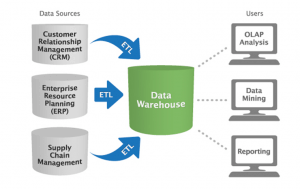
  • Pentaho(Kettle) used as an Extract, Transform & Load (ETL) tool for loading data into the data warehouse from different data sources: Data consolidated from various data sources such as Flat files(csv, xls, txt) & OLTP databases.
  • The data in the warehouse is being processed for reporting and analysis purposes. The data is accessed through Excel. Data can be captured by stylist, item, store, zone, accounting year, quarter and period, and brand and concept.

Business-Intelligence-2-300x189

Reports:

  • Pentaho, Excel & CSV Add-ons were used for the purpose of reporting and analysis.
  • Reports could be generated for a specific stylist aggregation, i.e. zone, company, concept, brand, for a sequence day, week, quarter, or year.
  • Reports could be generated for a specific time to know the information about the booked item.
  • Reports could be generated to know the revenue income of the organization & compare with current MTD to Last MTD, like that current QTD & Last QTD.

Technologies That We Used:

  • MYSQL 5.1
  • Pentaho (Kettle)
  • Pentaho (Mondrian) as an OLAP
  • Excel & CSV Add-ons

Overall Benefits:

  • Data Warehouse designed for analysis, pattern search and reporting has been created.

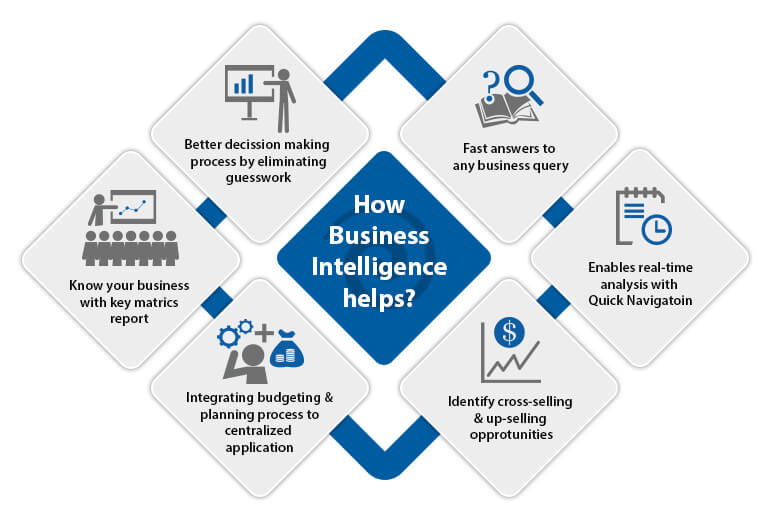
How-Business-Intelligence-helps

  • Help to develop and deliver better forecasting: Answer ‘what if’ questions with a click of a button. Forecasting and planning can be conducted by taking existing data sets, applying theoretical projections and estimations to that information, to model and predict future outcomes.
  • Eliminate guesswork: Business intelligence can provide more accurate historical data, real-time updates, synthesis between departmental data stores, forecasting and trending, and even predictive ‘what if?’ analysis,” eliminating the need to guesstimate.
  • Get faster answers to any business queries
  • Get key business metrics reports when and where we need them
  • Identify cross-selling and up-selling opportunities: BI allows firms to leverage customer data to build, refine and modify predictive models that help sales representatives to up-sell and cross-sell products at appropriate customer touch points.
  • Manage better inventory
  • See where your business has been, where it is now and where it is going: BI has been very successful at explaining what happened to the business over some defined period of time — for example, how many products were sold, through which party, in which geography, or by which customer segment
  • Integrated budgeting & planning processes in a centralized web-based application.

Read Also: Data-Warehousing for Small & Medium Organizations

Implementation Of BI For A DS Organization

We at Andolasoft have expertise on building revenue, budgeting and forecasting data warehouse(DWH) to take care of the needs of each brand, timezone and category which minimizes both IT support and the technical expertise required by the management.

In the present market, the DWH reporting tools are expensive and beyond the affordability for the medium scale organizations. To cut down the cost, we provide well-formatted .xls & .csv file reports for the top management.

I’ve worked with the team at Andolasoft on multiple websites. They are professional, responsive, & easy to work with. I’ve had great experiences & would recommend their services to anyone.

Ruthie Miller, Sr. Mktg. Specialist

Salesforce, Houston, Texas

LEARN MORE

 Conclusion:

One of the goals of business intelligence is to help the corporate executives, managers and other operational heads to take necessary data driven decisions for business.

Most of the companies use BI for cost-cutting, creating better business opportunities and identifying inefficient processes of business.

If you are in search of a better Business Intelligence software development service, you can contact us. Our Andolasoft expertise will help to develop a budgeting, revenue and forecasting data warehouse that helps in your business growth.

Do you wish to add anything to this topic? Share it in the comments section below.

How to install and configure Jaspersoft in Linux Server(RHEL/Centos/Fedora)

Jaspersoft is a commercial open source software vendor focused on business intelligence, including data visualization, reporting, and analytics. It provides commercial as well as open source software, support services and licensing around the Jasper report, Jasper report server, Jaspersoft Studio, i-report and ETL products.

Jaspersoft is offered the communities open source edition as well as several commercial editions with broad support for various databases and data sources, including NoSQL and other big data sources. Jaspersoft’s main related product is JasperReports Server, a Java web application that provides advanced report server capabilities such as report scheduling, permissions, ad hoc reporting, dashboards, and multi-tenancy.

Unlike other traditional BI tools, it allows anyone to easily self-serve and get the answers they need inside their preferred app or on their favorite device. Our platform, unlike desktop visualization tools, scales architecturally and economically to reach everyone.

jaspersoft

Steps to Install ‘Jaspersoft Server’

STEP:1 Install JAVA 1.7 or above

STEP:2 Install Mysql server

# yum install mysql-server mysql php-mysql

STEP:3 Install tomcat 6 or tomcat 7
# yum install tomcat6 tomcat6-webapps tomcat6-admin-webapps

STEP:4 Download jaspersoft war file from “http://sourceforge.net/projects/jasperserver” by issuing the below command

# wget http://sourceforge.net/projects/jasperserver/files/JasperServer/JasperReports%20Server%20Community%20Edition%205.6.0/jasperreports-server-cp-5.6.0-bin.zip/download

STEP:5 Unzip zip file and move to “ opt “ directory

[sourcecode language=”plain”]# unzip jasperreports-server-cp-5.6.0-bin.zip
# mv jasperserver-ce-3.7.0-linux-installer.bin /opt/[/sourcecode]

STEP:6 Start Mysql service and Stop the tomcat service.

[sourcecode language=”plain”]# /etc/init.d/mysqld start
# /etc/init.d/tomcat6 stop[/sourcecode]

STEP:7
Go to this directory /opt/jasperreports-server-cp-5.6.0-bin/buildomatic
Then COPY “mysql_master.properties” file from this directory jasperreports-server-cp-5.6.0-bin/buildomatic/sample_conf/mysql_master.properties and Rename the “mysql_master.properties” to “default_master.properties”

STEP:8 Edit the default_master.properties file with vi editor

[sourcecode language=”plain”]# vi default_master.properties[/sourcecode]

Uncomment this below line

[sourcecode language=”plain”]# appServerType = tomcat6[/sourcecode]

Go to Tomcat app server root dir and modify“Catalina home and base “path as below
# If linux package managed tomcat instance, set two properties below

[sourcecode language=”plain”]CATALINA_HOME = /usr/share/tomcat6/
CATALINA_BASE = /var/lib/tomcat6/[/sourcecode]

# Change database location and connection settings setup as your own mysql passwd.

[sourcecode language=”plain”]dbHost=localhost
dbUsername=root
dbPassword=passwd[/sourcecode/]
# web app name
# (set one of these to deploy to a non-default war file name) uncomment as below any one
[sourcecode language="plain"]webAppNameCE = jasperserver
# webAppNamePro = jasperserver-pro[/sourcecode]

STEP:9 Download the mysql connector jar file from

[sourcecode language=”plain”]# wget https://total-pos.googlecode.com/files/mysql-connector-java-5.1.17-bin.jar[/sourcecode ]

<strong>STEP:10</strong> Put the mysql-connector-java-5.1.17-bin.jar file in tomcat directory
[sourcecode language="plain"]# /usr/share/tomcat6/lib/mysql-connector-java-5.1.17-bin.jar[/sourcecode]

STEP:11 Install this file under this directory

[sourcecode language=”plain”]# cd /opt/jasperreports-server-cp-5.6.0-bin/buildomatic
# ./js-install-ce.sh[/sourcecode]

STEP:12 Start the tomcat service

[sourcecode language=”plain”]# /etc/init.d/tomcat6 start[/sourcecode]

STEP:13 Browse in url

[sourcecode language=”plain”]# http://<ip-address>:8080/jasperserver[/sourcecode]

STEP:14 Login username and password
User login: jasperadmin
Passwd: jasperadmin

Conclusion:  Jaspersoft is available under an open source license for use in conjunction with open source infrastructure such as MySQL and JBoss, or a commercial license for enterprise deployments involving commercial databases and application servers. Jaspersoft’s main related product is JasperReports Server, a Java EE web application that provides advanced report server capabilities such as report scheduling and permissions.

Share your thoughts with comments