Top Embedded BI Platforms for SaaS Companies

In a crowded SaaS market, integrating analytics into your product is no longer optional—it is essential. That’s where embedded BI platforms come in.

This guide explores the best embedded BI platforms for SaaS companies, how to evaluate them, and how to implement them successfully.
You will walk away with clear insights so your SaaS product becomes more data-driven, sticky, and profitable.

What Are Embedded BI Platforms?

Put simply, BI platforms allow software vendors to integrate business intelligence directly into their applications.

Instead of users leaving the product to analyze data, they get actionable dashboards, visualizations, and analytics without context switching.

These platforms deliver:

  • Real-time analytics inside your app
  • Customizable dashboards
  • Self-service reporting
  • Advanced data modeling
  • Alerts and notifications
  • Role-based access

Embedding analytics transforms standard SaaS features into data-rich experiences. That makes your product more valuable to users and increases retention.

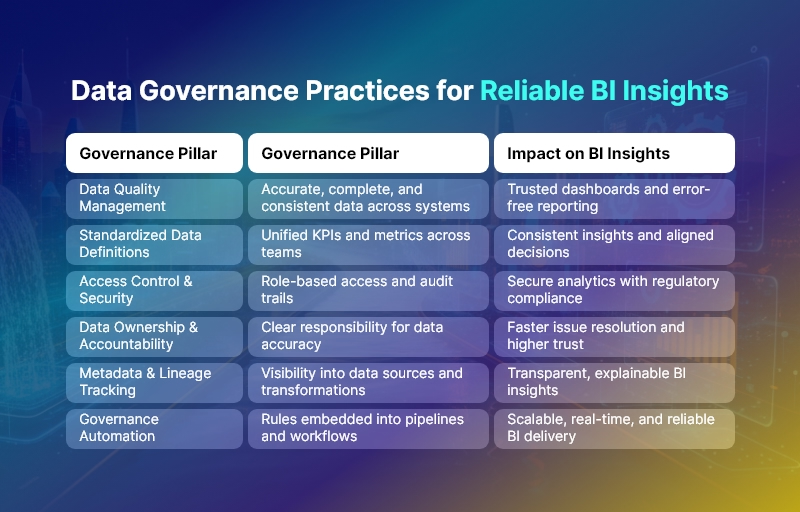
What Embedded BI Platforms Deliver

Why SaaS Companies Need Embedded BI Platforms

Before we review the best embedded BI platforms, let’s cover why they matter for SaaS companies:

  • Retention and Stickiness: When users rely on analytics inside your app, they stay longer.
  • Upsell Opportunities: Premium analytics features can drive higher-tier subscriptions.
  • Better Decision-Making: Users make faster, smarter decisions with insights at their fingertips.
  • Competitive Differentiation: Products with integrated analytics outperform competitors.
  • Reduced Churn: Analytics help users see value faster, lowering churn.

Embedding analytics isn’t just a feature — it is a strategic advantage.

Criteria to Evaluate Embedded BI Platforms

Before choosing among BI platforms, assess them on:

  • Integration complexity
  • Scalability
  • Custom branding
  • API and SDK support
  • Security and compliance
  • Performance
  • Pricing model

Use the following evaluation checklist:

Checklist for Choosing Embedded BI Platforms

  • Offers white-labeling
  • Supports multi-tenant SaaS
  • Provides REST APIs
  • Handles high query loads
  • Role-based security
  • GDPR and SOC 2 compliance

This checklist ensures you choose the right BI platforms for your growth goals.

Top Embedded BI Platforms for SaaS Companies

Here are the best BI platforms that SaaS companies should consider. Each one is evaluated for scalability, ease of integration, and value for SaaS products.

1. Tableau Embedded Analytics

Tableau is a leader among embedded BI platforms with enterprise-grade analytics and robust visualization tools.

Pros:

  • Advanced visuals
  • Strong community and support
  • Scales for enterprise users

Cons:

  • Higher cost
  • Requires more development effort

Best for: Large SaaS companies with complex analytics needs.

2. Power BI Embedded

Microsoft’s Power BI Embedded makes Tableau-level analytics accessible at a lower entry cost.

Benefits:

  • Microsoft ecosystem integration
  • Real-time dashboards
  • Affordable pricing tiers

Considerations:

  • Less flexible than some specialized products
  • Licensing can be complex

Ideal for: SaaS companies using Azure and Microsoft tools.

3. Looker Embedded Analytics

Looker’s architecture makes it one of the most modern BI platforms available.

Highlights:

  • Centralized data modeling
  • SQL-based transformations
  • Strong API support

Challenges:

  • Learning curve for LookML
  • Pricing tailored to enterprise customers

Perfect for: Data-centric SaaS applications and analytics-minded teams.

4. Sisense for Cloud Data Teams

Sisense offers powerful embedded analytics with flexible APIs and cloud-native performance.

Key Features:

  • Elastic analytics engine
  • Fully customizable UI
  • Multi-tenant SaaS support

Points to Note:

  • Teams need technical resources
  • Pricing can scale with usage

Best fit: SaaS products requiring deep integration and customization.

5. Chartio (Now Part of Atlassian)

Although Chartio was acquired, its embedded analytics capabilities continue to influence current embedded BI platforms.

Pros:

  • Simple interface
  • Drag-and-drop analytics
  • Fast onboarding

Limitations:

  • Feature set not as deep as others
  • Transitioning under new brand

Great for: Early-stage SaaS products with basic analytics needs.

6. Metabase Embedded

Metabase is an open-source option among embedded BI platforms, ideal for budget-conscious teams.

Advantages:

  • Open-source flexibility
  • Quick deployment
  • Community support

Drawbacks:

  • Limited enterprise features
  • Requires self-management

Best choice: Small to mid-size SaaS companies.

7. Qlik Sense Embedded

Qlik Sense combines strong analytics with associative data indexing — great for complex data needs.

Benefits:

  • Smart visual associations
  • High performance
  • Strong security

Considerations:

  • Higher learning curve
  • Pricing suited for large organizations

Best for: Data-intensive SaaS platforms.

Embedded Analytics Use Cases by Industry

Understanding real use cases clarifies how embedded BI platforms deliver value in specific scenarios.

SaaS Analytics Use Cases

  • Customer Success Dashboards
  • Product Usage Insights
  • Financial Performance Metrics
  • Operational Reports
  • Executive Scorecards

Bullet points make complex benefits tangible:

  • Track customer adoption trends
  • Surface churn risk indicators
  • Deliver revenue forecasting
  • Enable self-service analytics

These use cases ensure embedded analytics adds measurable business outcomes.

Implementation Best Practices

Implementing BI platforms without a clear plan often leads to delays. Follow these steps for success:

Step-by-Step Strategy

Define Business Goals

  • What decisions will analytics drive?
  • Who are the users?

Prepare Your Data Infrastructure

Select Your Embedded BI Platform

  • Use the evaluation checklist above
  • Build proof of concept

Design Dashboards for Users

  • Keep it simple
  • Prioritize actionable insights

Measure Adoption

  • Track usage metrics
  • Iterate on feedback

Implementing embedded analytics is a project — not just a purchase.

Common Mistakes When Choosing BI Platforms

Avoid these pitfalls:

  • Choosing based on cost alone
  • Ignoring future scalability
  • Skipping user experience design
  • Underestimating data governance needs

By avoiding these mistakes, SaaS companies maximize ROI from embedded analytics.

Pricing Models for Embedded BI Platforms

Understanding pricing helps SaaS teams budget appropriately.

Common Models:

  • Per-user pricing
  • Usage-based pricing
  • API call pricing

Example bullet list:

  • Flat licensing fee
  • Tiered feature pricing
  • Consumption-based billing

Always request transparent pricing before committing.

How to Measure Success

Quantifiable success metrics help justify investment in BI platforms:

Measure these regularly to optimize value.

Integrating Embedded BI Platforms with SaaS Products

Integration approaches vary by platform:

Native SDK Integration

  • Deep customization
  • White-label analytics

iFrame Embedding

  • Fast to deploy
  • Limited customization

API-Driven Integration

  • API first
  • High control

Choose based on technical resources and product roadmap.

Conclusion

Choosing the right BI platforms can transform your SaaS product from a tool into a strategic asset. Embedded analytics drives retention, boosts revenue, and makes your product indispensable.

Evaluate these platforms based on your current needs and future goals, and implement them with a clear roadmap.

If you want growth, better user engagement, and data-driven value, embedded analytics is not optional — it is foundational.

FAQs

1. What are embedded BI platforms?

BI platforms are analytics solutions that allow SaaS companies to integrate dashboards, reports, and visual analytics directly into their applications, enabling users to access insights without leaving the product.

2. How do embedded BI platforms differ from traditional BI tools?

Traditional BI tools operate as standalone systems, whereas embedded BI platforms are integrated within SaaS products, offering contextual, in-app analytics tailored to end users.

3. Why are embedded BI platforms important for SaaS companies?

BI platforms improve product stickiness, reduce churn, enable data-driven decision-making, and create opportunities to monetize analytics as premium features.

4. Can small or early-stage SaaS companies use embedded BI platforms?

Yes. Many BI platforms offer flexible pricing, open-source options, or scalable architectures that suit startups and growing SaaS businesses.

5. What features should SaaS companies look for in embedded BI platforms?

Key features include multi-tenant support, white-labeling, API and SDK access, role-based security, scalability, performance optimization, and compliance capabilities.

6. Are embedded BI platforms secure for customer data?

Most enterprise-grade BI platforms provide strong security features such as role-based access control, encryption, audit logs, and compliance with standards like GDPR and SOC 2.

7. How long does it take to implement embedded BI platforms?

Implementation timelines vary based on complexity, data readiness, and customization needs, ranging from a few weeks to several months.

8. Can embedded BI platforms support multi-tenant SaaS architectures?

Yes. Leading BI platforms are designed to support multi-tenant environments, ensuring data isolation and secure analytics for each customer.

9. How do SaaS companies monetize embedded analytics?

SaaS companies monetize BI platforms through premium analytics tiers, add-on reporting modules, usage-based pricing, or enterprise analytics packages.

10. What are common mistakes when choosing embedded BI platforms?

Common mistakes include focusing only on cost, ignoring scalability, underestimating integration effort, neglecting user experience, and overlooking long-term data governance needs.
Must-Have Enterprise BI Features for Modern Applications

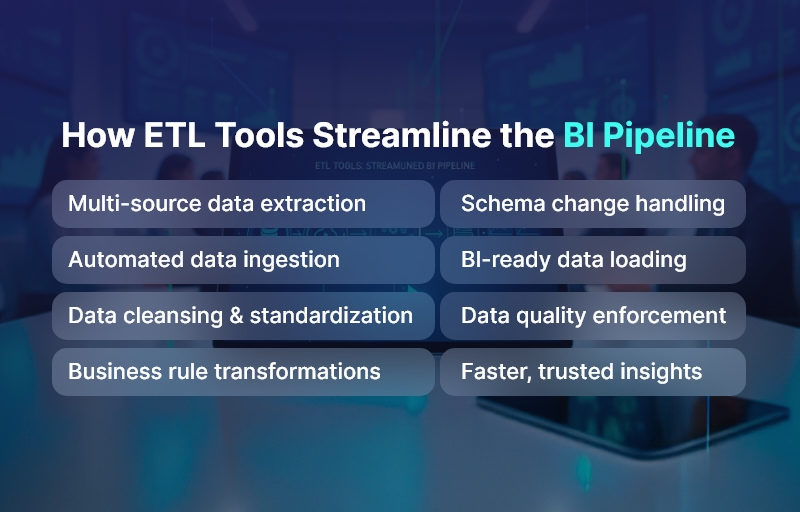
Enterprise software no longer competes on features alone. It competes on how fast decisions are made, how accurately performance is measured, and how quickly leaders can respond to change. That is exactly why enterprise BI has moved from a “nice-to-have” analytics layer to a core operating system for decision-making.

Today, every serious enterprise application — whether it is ERP, CRM, HRMS, FSM, construction management, or financial systems — must embed or integrate BI at its core.

However, not all analytics are created equal.

True enterprise BI is not about pretty dashboards. Instead, it is about governance, scale, trust, performance, security, and decision velocity. Therefore, choosing the right BI features is a strategic architecture decision, not a UI decision.

In this definitive guide, you will learn:

  • What enterprise BI really means in modern enterprises
  • Why basic reporting tools fail at scale
  • The must-have BI features for any serious enterprise application
  • How BI drives adoption, ROI, and competitive advantage
  • How to evaluate an BI platform properly

Let us begin with the fundamentals.

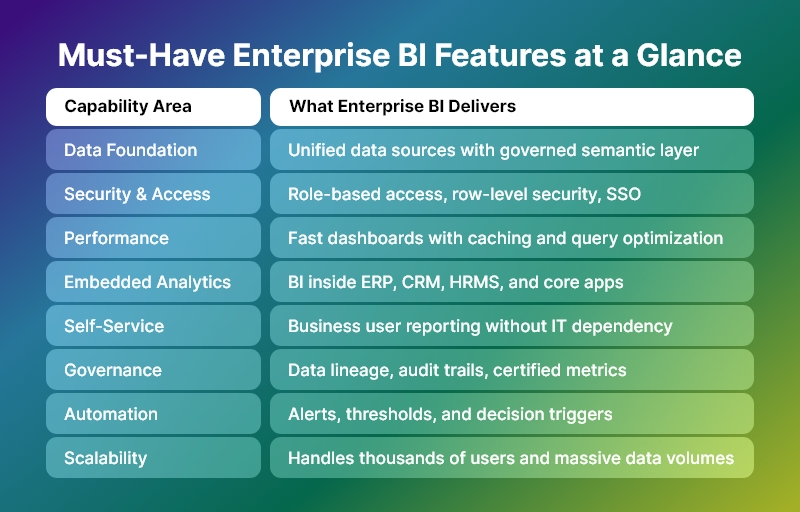
Must-Have-Enterprise-BI-Features-at-a-Glance

What Is Enterprise BI?

It (Enterprise Business Intelligence) is a scalable, governed, secure, and performance-driven analytics layer that supports decision-making across the entire organization—from frontline teams to executive leadership.

Unlike basic BI tools, enterprise BI:

  • Serves hundreds or thousands of users
  • Handles millions or billions of rows of data
  • Enforces data governance and security
  • Supports mission-critical business workflows
  • Integrates deeply into core enterprise applications

In other words, BI is not a reporting tool. It is a decision infrastructure.

Why Basic BI Fails in Enterprise Environments

Many organizations start with simple dashboards. However, they quickly hit limitations.

Basic BI fails because:

  • It cannot scale to large data volumes
  • It breaks under concurrent user load
  • It lacks role-based security and governance
  • It creates multiple versions of truth
  • It depends heavily on analysts instead of business users
  • It does not integrate deeply into enterprise workflows

As a result, enterprises either:

  • Lose trust in data
  • Slow down decision-making
  • Or build expensive, fragmented analytics stacks

This is exactly why enterprise BI exists.

The Strategic Role of Enterprise BI in Enterprise Applications

Modern enterprise applications are no longer transactional systems only. They are decision platforms.

Therefore, BI must:

  • Power daily operational decisions
  • Support strategic leadership decisions
  • Enable cross-department visibility
  • Drive process optimization
  • Enforce data accountability
  • Accelerate business execution

Consequently, BI becomes a core competitive advantage.

Must-Have Enterprise BI Features (Complete Enterprise Checklist)

Below is the definitive feature framework for evaluating or building a true BI system.

1. Enterprise-Grade Data Architecture

BI must handle complexity at scale.

It must support:

  • Multiple data sources (ERP, CRM, HRMS, IoT, Finance, Ops, external data)
  • Structured and semi-structured data
  • Large volumes and high refresh rates
  • Historical and real-time data together

Core capabilities include:

  • Data connectors and ingestion pipelines
  • Data modeling and semantic layers
  • Incremental refresh and caching
  • Support for cloud, on-prem, and hybrid data

Without this foundation, enterprise BI collapses under growth.

2. Single Source of Truth (Semantic Layer)

One of the biggest reasons BI fails is metric chaos.

Therefore, enterprise BI must provide:

  • Centralized metric definitions
  • Business-friendly semantic models
  • Reusable KPIs across dashboards and apps
  • Governance over calculations and logic

Benefits:

  • No conflicting numbers
  • No department-level data politics
  • No spreadsheet shadow systems
  • High trust in executive reporting

In short, BI must enforce truth at scale.

3. Enterprise Security and Access Control

Enterprise BI is useless if it is not secure.

It must support:

  • Role-based access control (RBAC)
  • Row-level and column-level security
  • SSO and enterprise authentication (SAML, OAuth, LDAP, etc.)
  • Audit logs and access tracking
  • Data masking for sensitive fields

Why this matters:

  • Finance, HR, and leadership data must not leak
  • Compliance requirements demand strict controls
  • Large organizations cannot rely on manual permissions

Therefore, security is not optional in BI. It is foundational.

4. Performance at Scale

Enterprise BI must stay fast even when:

  • Data grows 10x
  • Users grow 50x
  • Queries become complex
  • Dashboards become heavier

Critical performance features include:

  • Intelligent caching
  • Query optimization
  • In-memory acceleration
  • Pre-aggregations
  • Load balancing
  • Asynchronous query execution

Because in enterprises:

If dashboards are slow, decisions are slow. And slow decisions cost money.

5. Embedded Analytics for Enterprise Applications

Modern enterprise BI must not live in a separate portal.

Instead, it must:

  • Embed inside ERP, CRM, HRMS, FSM, or industry apps
  • Respect application user permissions
  • Adapt to application workflows
  • Feel like a native feature

Embedded BI enables:

  • Contextual decision-making
  • Higher adoption
  • Better user experience
  • Stronger product differentiation

Today, enterprise BI is a product feature, not a separate product.

6. Self-Service Analytics for Business Users

BI cannot depend entirely on analysts.

It must empower:

  • Managers
  • Operations leaders
  • Finance teams
  • Sales leaders
  • Department heads

Self-service features include:

  • Drag-and-drop reports
  • Filter and slice-and-dice
  • Drill-down and drill-through
  • Custom views and saved dashboards
  • Ad-hoc exploration without SQL

This ensures:

  • Faster answers
  • Less dependency on data teams
  • Higher data culture maturity

7. Advanced Dashboarding and Visualization

Enterprise BI dashboards must support:

  • Executive-level KPI views
  • Operational performance views
  • Departmental scorecards
  • Process monitoring screens

Core visualization capabilities:

  • Interactive charts and tables
  • Cross-filtering
  • Drill-down hierarchies
  • Conditional formatting
  • Alerts and thresholds
  • Storytelling views

However, remember:

Enterprise BI is not about visuals. It is about decisions enabled by visuals.

8. Real-Time and Near Real-Time Analytics

Many enterprise use cases require:

  • Live operations monitoring
  • SLA tracking
  • Incident detection
  • Financial risk control
  • Supply chain visibility

Therefore, BI should support:

  • Streaming or near-real-time data
  • Incremental refresh
  • Low-latency dashboards
  • Operational alerting

This transforms enterprise BI from reporting to control systems.

9. Alerts, Automation, and Decision Triggers

Modern BI must not wait for users to open dashboards.

It must:

  • Push alerts when thresholds are crossed
  • Trigger workflows
  • Send notifications to email, Slack, Teams, etc.
  • Integrate with business processes

Examples:

  • Alert when cash flow drops below limit
  • Alert when project cost overruns
  • Alert when churn risk spikes
  • When compliance metrics fail

This is how enterprise BI becomes proactive instead of reactive.

10. Data Governance and Lineage

At enterprise scale, governance is non-negotiable.

  • BI must provide:
  • Data lineage tracking
  • Impact analysis
  • Change management
  • Certification of datasets
  • Ownership and stewardship models

This ensures:

  • Audit readiness
  • Compliance confidence
  • Trust in enterprise-wide metrics
  • Controlled evolution of analytics

11. Collaboration and Sharing

Enterprise BI is a team sport.

It must support:

  • Shared dashboards
  • Commenting and annotations
  • Versioning
  • Scheduled reports
  • Role-based sharing

This transforms analytics into organizational conversation, not isolated analysis.

12. AI and Advanced Analytics (Optional but Strategic)

Modern enterprise BI increasingly includes:

  • Forecasting
  • Anomaly detection
  • Trend analysis
  • What-if simulations
  • Natural language queries

While not mandatory for every enterprise today, this is rapidly becoming a strategic differentiator.

13. Scalability and Future-Proof Architecture

Enterprise BI must scale across:

  • Users
  • Data volume
  • Use cases
  • Departments
  • Geographies

Therefore, it must support:

  • Modular architecture
  • API-first integration
  • Cloud and hybrid deployment
  • Horizontal scaling
  • Multi-tenant or multi-org setups

How Enterprise BI Drives Real Business Outcomes

When implemented correctly, BI delivers:

  • Faster decision cycles
  • Higher operational efficiency
  • Lower reporting overhead
  • Better leadership visibility
  • Stronger governance
  • Higher ROI from enterprise systems

In short:

BI turns data into organizational leverage.

How to Evaluate an Enterprise BI Platform

Use this checklist:

  • Does it scale to thousands of users?
  • Does it enforce governance and security?
  • Does it embed inside your application?
  • Does it support self-service safely?
  • Does it perform under heavy load?
  • Does it integrate with your data stack?
  • Does it reduce dependency on analysts?

If the answer is “no” to several of these, it is not true BI.

Final Thoughts: Enterprise BI Is Not Optional Anymore

In 2026 and beyond, BI is not an add-on.

It is:

  • A core layer of enterprise architecture
  • A strategic decision platform
  • A competitive advantage
  • A governance system
  • A performance engine

Organizations that treat BI as a strategic system will out-execute, out-learn, and out-scale those that do not.

And that is the real power of BI.

BI and AI Explained: Turning Business Data into Predictive Intelligence

In today’s digital-first economy, data is no longer the differentiator — predictive intelligence is. Organizations generate massive volumes of data every day, yet many still struggle to turn that data into timely, actionable insights.

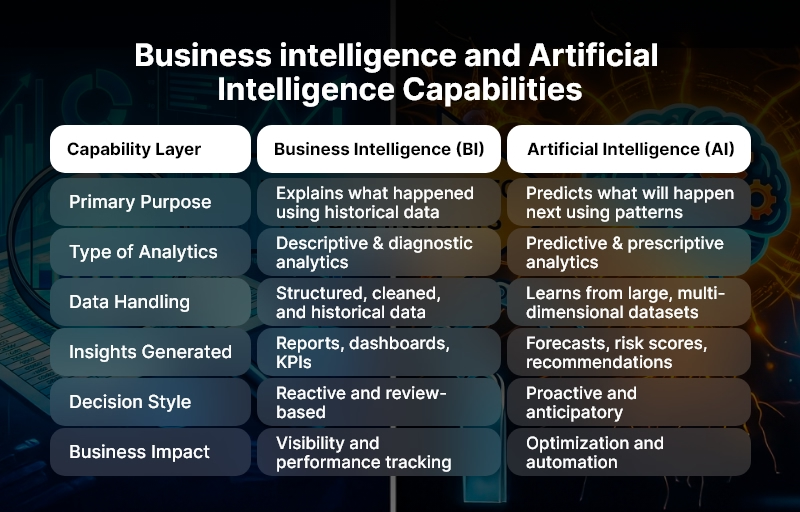
Traditional dashboards explain what happened, but modern businesses need answers to what will happen next. This is exactly where BI and AI come into play.

By combining Business Intelligence (BI) with Artificial Intelligence (AI), organizations can move beyond static reporting and unlock predictive intelligence — insights that anticipate trends, forecast outcomes, and recommend actions before problems arise.

As competition intensifies and decision cycles shorten, this capability has become mission-critical.

In this guide, you will learn how BI and AI works together, why it matters across industries, and how businesses can implement it successfully.

More importantly, you will see how Andolasoft helps organizations design, build, and scale predictive intelligence in data platforms that deliver real business outcomes — not just charts and dashboards.

Business intelligence and Artificial Intelligence Capabilities

Business Need & Importance of BI and AI

Modern businesses operate in environments defined by speed, complexity, and uncertainty. Customer expectations change rapidly, markets fluctuate, and operational risks emerge without warning.

In this context, relying on historical reports alone creates blind spots.

Why BI and AI Matters Today

BI and AI matters because it converts raw data into foresight. While BI organizes and visualizes structured data, AI analyzes patterns, learns from historical behavior, and predicts future outcomes. Together, they enable smarter, faster, and more confident decision-making.

Key business drivers include:

  • Exploding data volumes: Data from apps, IoT devices, CRMs, ERPs, and customer interactions is growing exponentially. Manual analysis simply cannot keep up.
  • Demand for real-time decisions: Leaders need insights now, not at the end of the month or quarter.
  • Competitive pressure: Companies that predict customer needs and operational risks earlier gain a clear advantage.

Industry-Specific Impact of BI and AI

Across industries, BI and AI is transforming how decisions are made:

  • Healthcare: Predictive analytics helps forecast patient admissions, detect anomalies in diagnostics, and optimize resource allocation.
  • eCommerce: AI-powered BI predicts demand, personalizes recommendations, and reduces cart abandonment through behavioral insights.
  • Logistics & Supply Chain: Companies forecast delays, optimize routes, and proactively manage inventory risks.
  • Fintech: Fraud detection models and credit risk predictions enhance security and regulatory compliance.
  • SaaS & Technology: Usage analytics and churn prediction enable proactive customer retention strategies.
  • Manufacturing: Predictive maintenance reduces downtime by identifying equipment failures before they occur.

Risks of Not Adopting BI and AI

Organizations that delay adoption face serious consequences:

  • Operational inefficiencies due to reactive decision-making
  • Revenue loss from missed opportunities and late responses
  • Security and compliance risks caused by delayed anomaly detection
  • Poor customer experience driven by generic, non-personalized interactions

Therefore, companies increasingly require strategic, scalable BI and AI solutions, not fragmented tools or legacy systems that fail to evolve with business needs.

Best Practices, Frameworks & Actionable Tips for BI and AI Implementation

Successfully implementing BI and AI requires more than tools — it demands the right strategy, architecture, and execution partner.

1. Start with Business Questions, Not Data

Successful BI and AI initiatives begin with clear business objectives. Instead of asking what data is available, define what decisions need improvement.

  • Identify high-impact use cases such as demand forecasting, churn prediction, or operational risk analysis.
  • Align analytics outputs directly with KPIs that leadership cares about.
  • Avoid building dashboards without a clear decision-making purpose.

2. Build a Strong Data Foundation

AI is only as good as the data it learns from. Data quality, consistency, and governance are non-negotiable.

  • Consolidate data from multiple sources into a centralized data warehouse or lake.
  • Standardize data definitions to eliminate reporting inconsistencies.
  • Implement strong data governance and access controls from day one.

3. Use the Right Architecture

A modern BI and AI architecture typically includes:

  • Data ingestion pipelines for real-time and batch data
  • Cloud-based data storage for scalability and performance
  • BI visualization layers for descriptive and diagnostic analytics
  • AI/ML models for predictive and prescriptive insights

This modular approach ensures flexibility as business needs evolve.

4. Combine Descriptive, Predictive, and Prescriptive Analytics

BI and AI works best when analytics maturity progresses in stages:

  • Descriptive analytics explains what happened.
  • Predictive analytics forecasts what will happen.
  • Prescriptive analytics recommends what actions to take next.

Skipping stages often leads to low adoption and mistrust in AI outputs.

5. Focus on Explainability and Trust

Business users must trust AI-generated insights.

  • Use explainable AI models where possible.
  • Clearly show which factors influenced predictions.
  • Provide confidence scores and scenario comparisons within dashboards.

6. Avoid Common BI and AI Mistakes

Common pitfalls include:

  • Treating AI as a plug-and-play feature rather than a continuous learning system.
  • Overengineering solutions before validating business value.
  • Ignoring change management and user adoption.

7. Quick Wins to Build Momentum

Low-effort, high-impact improvements include:

  • Automating anomaly detection in existing BI dashboards.
  • Adding predictive forecasts to sales and demand reports.
  • Using AI to prioritize leads or support tickets.

How Andolasoft Helps Implement BI and AI

Andolasoft delivers end-to-end BI and AI solutions tailored to business goals, not generic templates. Their expertise spans:

  • Custom Web Development for analytics platforms
  • SaaS Product Engineering with embedded BI and AI capabilities
  • BI, AI & Machine Learning Solutions for predictive intelligence
  • Data Analytics & Visualization for executive decision-making
  • Application Modernization to upgrade legacy BI systems
  • DevOps, Cloud & Automation for scalable, secure deployments

Choosing the right technology partner ensures long-term scalability, security, and ROI from BI and AI investments.

Customer Success Example: BI and AI in Action

For example, a mid-sized eCommerce company partnered with Andolasoft to modernize its analytics and forecasting capabilities. The company struggled with inventory overstocking, frequent stockouts, and delayed reporting that limited proactive decisions.

Andolasoft designed a BI and AI-driven predictive analytics platform that unified sales, customer behavior, and supply chain data into a single predictive intelligence layer. AI models were implemented to forecast product demand, identify high-risk SKUs, and recommend replenishment actions.

Within six months, the results were measurable:

  • 30% improvement in demand forecast accuracy
  • 25% reduction in inventory holding costs
  • 40% faster reporting cycles
  • Significantly improved executive visibility into future trends

Most importantly, decision-making shifted from reactive firefighting to predictive, data-driven planning.

Key Takeaways & Closing

To summarize, BI and AI represents a fundamental shift in how organizations use data:

  • BI provides clarity, while AI delivers foresight
  • Together, they enable predictive intelligence, not just reporting
  • Businesses across industries gain faster decisions, lower risk, and higher efficiency
  • Success depends on strategy, data quality, architecture, and execution

Adopting BI and AI now positions organizations to compete in a future where speed and predictive intelligence define winners. With the right approach and an experienced partner like Andolasoft, businesses can confidently turn data into a strategic asset — not an operational burden.

FAQs

1. What is BI and AI in simple terms?

BI and AI combine business intelligence reporting with artificial predictive intelligence to analyze data, predict outcomes, and recommend actions automatically.

2. How is BI and AI different from traditional BI?

Traditional BI focuses on historical data, while BI and AI adds predictive and prescriptive insights using machine learning models.

3. Which industries benefit most from BI and AI?

Healthcare, eCommerce, fintech, logistics, SaaS, manufacturing, and education see significant value from BI and AI adoption.

4. Is BI and AI only for large enterprises?

No. With cloud and modular architectures, BI and AI is now accessible and scalable for startups and mid-sized businesses.

5. How long does it take to implement BI and AI?

Initial use cases can go live in weeks, while full-scale implementations typically take a few months depending on complexity.

6. What data is required for BI and AI?

Structured and semi-structured data from CRMs, ERPs, applications, and operational systems form the foundation for BI and AI.

7. Why choose Andolasoft for BI and AI projects?

Andolasoft combines deep technical expertise, real-world delivery experience, and business-first thinking to deliver measurable BI and AI outcomes.

Top 10 BI Implementation Mistakes and How to Get It Right?

Business Intelligence initiatives promise data-driven decision-making, operational clarity, and competitive advantage — yet, industry studies consistently show that a significant percentage of BI projects fail to deliver expected ROI. The reason is rarely the technology itself. More often, it is BI implementation mistakes made early in planning, execution, and adoption.

In today’s data-saturated landscape, organizations generate massive volumes of structured and unstructured data across applications, platforms, and devices. However, without a well-defined BI strategy, this data becomes fragmented, unreliable, and underutilized. As a result, leaders make decisions based on incomplete insights, outdated reports, or manual spreadsheets.

This blog breaks down the top 10 BI implementation mistakes organizations make — and more importantly, how to avoid them. You will learn best practices, frameworks, and actionable strategies to build BI systems that scale, perform, and drive measurable outcomes.

Drawing from real-world delivery experience, Andolasoft helps businesses design, build, and modernize BI platforms that convert raw data into actionable intelligence — securely and sustainably.

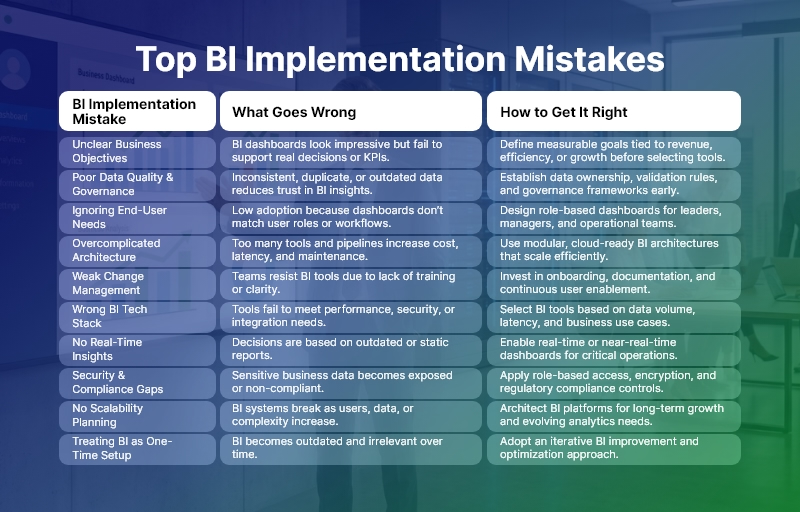
Top BI Implementation Mistakes

Business Need & Importance of Avoiding BI Implementation Mistakes

Modern businesses operate in environments where speed, accuracy, and insight define success. From healthcare providers optimizing patient outcomes to eCommerce brands improving conversions, BI has become a strategic necessity rather than a reporting add-on.

However, many organizations still struggle because of BI implementation mistakes, such as disconnected data sources, poorly defined metrics, and lack of stakeholder alignment. These issues lead to dashboards that look impressive but fail to answer real business questions.

Why BI matters today:

  • Healthcare: Enables predictive analytics, operational efficiency, and compliance reporting — without compromising data security.
  • eCommerce & SaaS: Drives personalization, churn reduction, and revenue forecasting through real-time insights.
  • Logistics & Manufacturing: Improves demand forecasting, inventory optimization, and cost control.
  • Fintech & Education: Ensures transparency, risk management, and performance tracking across complex systems.

Risks of poor BI implementation:

  • Inefficient decision-making due to inconsistent or inaccurate data
  • Security vulnerabilities caused by unmanaged data access
  • Low user adoption when BI tools are complex or irrelevant
  • Revenue loss from delayed insights and reactive strategies

Therefore, companies must move beyond patchwork tools and legacy reporting. They need modern, scalable BI solutions designed with clear business alignment — something Andolasoft specializes in through its BI, data analytics, and digital transformation services.

Top 10 BI Implementation Mistakes

1. Lack of Clear Business Objectives

Many BI projects start with tools instead of outcomes. Without defined goals, dashboards become cluttered and unused.

Best practice: Align BI initiatives with KPIs such as revenue growth, operational efficiency, or customer retention.

2. Poor Data Quality and Governance

Inconsistent, duplicate, or outdated data undermines trust in BI systems.

Best practice: Implement strong data governance, validation rules, and ownership models early.

3. Ignoring End-User Needs

BI built only for leadership often fails adoption at operational levels.

Best practice: Design role-based dashboards tailored for executives, managers, and frontline teams.

4. Overcomplicated Architecture

Excessive tools, pipelines, and integrations increase maintenance costs.

Best practice: Use modular, cloud-ready architectures with scalable data pipelines.

5. Underestimating Change Management

Users resist BI if it disrupts workflows without training.

Best practice: Invest in onboarding, documentation, and continuous enablement.

6. Choosing the Wrong Tech Stack

Not all BI tools fit all use cases.

Best practice: Select tools based on data volume, latency, security, and integration needs.

7. No Real-Time or Near-Real-Time Capabilities

Static reports limit agility.

Best practice: Enable real-time dashboards for critical business functions.

8. Weak Security & Compliance Planning

BI systems often expose sensitive data.

Best practice: Apply role-based access control, encryption, and compliance frameworks.

9. Failing to Plan for Scale

What works for 10 users fails at 1,000.

Best practice: Architect BI for future growth in users, data sources, and analytics complexity.

10. Treating BI as a One-Time Project

BI requires continuous evolution.

Best practice: Adopt an iterative improvement model with regular feedback loops.

Customer Success

For example, a mid-sized eCommerce SaaS company partnered with Andolasoft to overcome recurring BI implementation mistakes that limited visibility into customer behavior and revenue trends.

The company struggled with siloed data across CRM, marketing automation, and finance tools. Reports were manually generated, often inconsistent, and delayed by weeks.

Andolasoft designed a unified BI architecture that integrated all data sources into a centralized analytics platform. Role-based dashboards were created for leadership, marketing, and operations teams. Automated pipelines ensured real-time data availability with built-in governance and security controls.

Results within 4 months:

  • 35% faster decision-making cycles
  • 28% improvement in campaign ROI
  • 50% reduction in manual reporting effort
  • Single source of truth across departments

The transformation allowed leadership to shift from reactive decisions to proactive, insight-led strategies — demonstrating the value of avoiding common BI implementation mistakes with the right technology partner.

Key Takeaways & Closing

Successful BI initiatives are not about dashboards — they are about decisions, outcomes, and impact. Most failures stem from avoidable BI implementation mistakes, including unclear goals, poor data quality, and lack of user adoption.

The most important takeaways:

  • Start with business objectives, not tools
  • Invest in data governance and security
  • Design BI for users, scale, and continuous improvement
  • Choose experienced partners who understand both technology and business

As data complexity grows, organizations that modernize BI thoughtfully will gain a decisive advantage. With deep expertise in BI, AI, data analytics, SaaS engineering, and digital transformation, Andolasoft helps businesses build future-ready BI platforms that deliver lasting value.

Avoid the pitfalls. Build BI the right way — starting now.

FAQs

1. What are the most common BI implementation mistakes?

The most common BI implementation mistakes include unclear objectives, poor data quality, low user adoption, and lack of scalability planning.

2. Why do BI projects fail despite good tools?

BI fails due to strategy, governance, and adoption issues — not because of tools. Avoiding BI implementation mistakes requires business alignment.

3. How long does a successful BI implementation take?

A well-planned BI implementation typically takes 3–6 months, depending on data complexity and integration scope.

4. How can companies improve BI adoption?

User-centric design, role-based dashboards, and training significantly improve BI adoption.

5. Is cloud BI better for modern businesses?

Yes. Cloud BI offers scalability, cost efficiency, and faster deployment when implemented correctly.

6. How does Andolasoft support BI initiatives?

Andolasoft provides end-to-end BI services, including strategy, architecture, development, analytics, and ongoing optimization.

7. Can BI be integrated with AI and machine learning?

Absolutely. Modern BI platforms integrate AI and ML for predictive insights, anomaly detection, and automation.