Organization Attribution Model: Complicated but Important to Understand

Most of the time entrepreneurs get trapped, when they are looking for some insight queries about their organization, which help them to invest their money on proper channel to get maximum return. That time they take help of data analyst, and they help them to find solutions for some complex queries like:

  • Which are the most effective acquisition channels for investment ?
  • What people actually do before making purchases?
  • What prompts them to make purchases?

Attribution-mdoel-solves-your-business-query

You will get all your answer if you select right Attribution Model.

Google defined attribution model is the rule, or set of rules, that determines how credit for sales and conversions is assigned to touch points in conversion paths.

There are basically three types of Attribution:

  • Online to Offline Attribution Model: Try to understand the impact of online marketing campaign on offline marketing channel. Number of offline leads we generate because of our online marketing campaign.
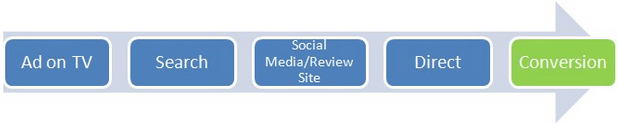
  • Multi Device Attribution Model: Try to understand how different gadgets contribute to conversion and how much credit goes to distinct devices for a conversion. Let’s say a customer watch an ad on TV, then he makes search on mobile, later he reads reviews on his tab and finally purchase that product online by visiting the website directly through his laptop.

multidevice-attribution-model

  • Multi Channel Attribution Model: Similarly try to understand how different channel contributes to conversion and how much credit goes to each channel for conversions. Let’s take below example.

multi-channel-attribution

There is another attribution model, which is more realistic one and this model is blending of over three attribution models. First two models are still unresolved puzzled for data scientists. However, you can use the last one to know the real forces or channels behind your revenues.

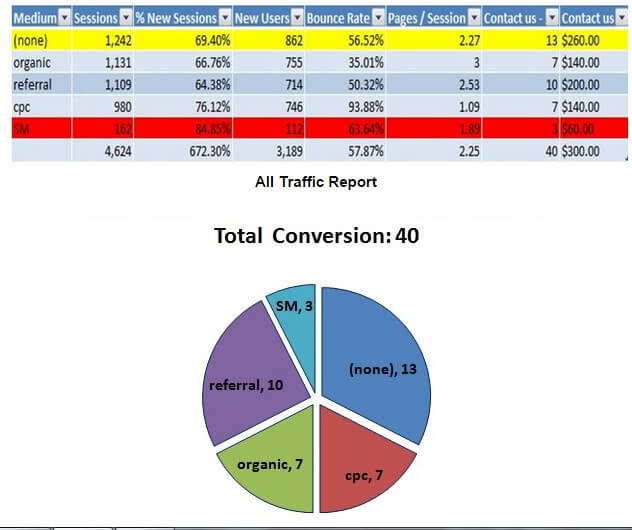
Now let’s find out which channels gives you better return. Let’s go and check data in your analytic report.

pie-chart

From the above report and pie-chart, you arrive at the conclusion that your most successful medium is direct one while minimum effective medium is SM and CPC medium respectfully. So you need give more focus on referral medium or organic medium than paid medium because it will give more conversion or revenue. Am I right?

Here, attribution model comes into picture. Before taking any decision, just I need to educate you that above multichannel attribution model is focused around last interaction model, mean last interaction or touch point before conversion gets 100% credit. This is the default one in Google Analytic; whereas some other models like: last Non-Direct Click, Last Adword Clicks, First interaction, Linear, Time decay, and position based attribution model are also available(For more you can see : https://support.google.com/analytics/answer/1665189?hl=en&ref_topic=3205717)

Some organizations used different attribution model like first Interaction Model or linear model or something else. So if you see the above chart table by considering the different model, then you may reach some other conclusion. Chances are there if you go for first Interaction Model; you can see CPC medium is more profitable than direct medium because in this model the 100% credit goes to channel which introduces your product or service for the first time.

Therefore, it is important to understand attribution model and for this, you should have deep knowledge about your business, products, and the target market. Otherwise, it will lead you to wrong attribution model and which causes losing money. You can also compare your ROI/ROAS by comparing different attribution model which gives you clearer picture. For this, you can take help Comparison Tool and Multi Channel Funnel Report in Google Analytics.

Read Also: 5 Google services to help you to reach your business goal!

I hope you find this topic useful. At Andolasoft we are still in a process to understand users behavior through different attribution model and I would also like to hear your thoughts regarding this in comment section.

How To Install Nagios Core on CentOS, Fedora, or RHEL Server

Nagios® Core™ is the industry standard Open Source system and network monitoring application which enables organizations to identify, resolve IT infrastructure problems before they affect critical business processes. It watches hosts and services that you specify, alerting you when things go bad and when they get better. Nagios Core serves as one of the foundation blocks of Nagios XI – commercial monitoring solution.

It was originally designed to run under Linux, although it should work under most other unices as well.

Steps to install :

STEP-1:

Install prerequisites packages

       #   yum  install  gd  gd-devel  httpd  php  gcc  glibc  glibc-common

STEP-2:

Disable selinux. open the file: /etc/selinux/config by issuing the following command          

       # vi /etc/selinux/config

Then, type “disable” opposite to “SELINUX” e.g  SELINUX= disable

STEP-3:

Create a user “nagios” and set password for it by typing the below commands.

       #   /usr/sbin/useradd -m nagios
       #   passwd nagios

STEP-4:

Create a new group “nagios” for allowing external commands to be submitted    through the web interface and add both the nagios user and the apache user to the group by following the below steps

       #    /usr/sbin/groupadd nagios
       #    /usr/sbin/usermod -a -G nagios nagios
       #    /usr/sbin/usermod -a -G nagios apache

STEP-5:

Create a directory “download “ and download nagios-core and plugins to it.

       #  mkdir download                  
       #  cd  download
       #  wget http://prdownloads.sourceforge.net/sourceforge/nagios/nagios-3.4.4.tar.gz
       #  wget http://prdownloads.sourceforge.net/sourceforge/nagiosplug/nagios-plugins-1.4.16.tar.gz

STEP-6:

Compile and Install nagios-core package by following below steps

  • Change directory to “download” folder
       #   cd ~/download
  • Untar the nagios-core tar bal
       #   tar xzf nagios-3.4.4.tar.gz
  • Change the directory to “nagios-3.4.4”
       # cd nagios-3.4.4
  • Configure the package and install
    #  ./configure
    #   make all
    #   make install
    #   make install-init
    #   make install-commandmode
    #   make install-config
    #   make install-webconf

STEP-7:

Create a password to log in to the web interface by issuing the following command.

       # htpasswd -c /usr/local/nagios/etc/htpasswd.users nagiosadmin

STEP-8: 

Start the service and set it on chkconfig to start at booting time.

       #  service nagios start
       #  chkconfig nagios on

STEP-9:  

Compile and Install nagios-plugin package by following below steps.

  • Change directory to “download” folder
       # cd   ~/download
  • Untar nagios-plugin tar ball
       # tar xzf  nagios-plugins-1.4.16.tar.gz
  • Change the directory to “nagios-plugins-1.4.16”
       # cd  nagios-plugins-1.4.16
  • Configure the package and install.
       # ./configure
       # make
       # make install

STEP-10:

Start the apache service and enable it on boot by issuing following command.

       # service httpd start
       # chkconfig httpd on

STEP-11:  Now, connect to your nagios server through browser by typing.

       # http://Your-Nagios-IP/nagios or  http://localhost/nagios

Then, enter login credentials.
Username: nagiosadmin & password you have chosen earlier

Features of NAGIOS Core

  • Monitoring of network services (SMTP, POP3, HTTP, NNTP, PING, etc.)
  • Monitoring of host resources (processor load, disk usage, etc.)
  • Simple plugin design that allows users to easily develop their own service checks
  • Parallelized service checks
  • Ability to define network host hierarchy using “parent” hosts, allowing detection of and distinction between hosts that are down and those that are unreachable
  • Contact notifications when service or host problems occur and get resolved (via email, pager, or user-defined method)
  • Ability to define event handlers to be run during service or host events for proactive problem resolution
  • Automatic log file rotation
  • Support for implementing redundant monitoring hosts
  • Optional web interface for viewing current network status, notification and problem history, log file, etc.

Recommended Blog: How to install and configure Jaspersoft in Linux Server(RHEL/Centos/Fedora)

I hope you liked this topic, if you have any questions or comments please feel free to put under comments!

Comparison between ASP.NET MVC or ASP.NET Web Forms

When it comes to web development using Microsoft’s .NET framework, two popular approaches are ASP.NET MVC (Model-View-Controller) and ASP.NET Web Forms.

Both have their strengths and weaknesses, and the choice between them depends on the specific needs of your project.

In this blog post, we’ll compare ASP.NET MVC and ASP.NET Web Forms in terms of architecture, development style, flexibility, and other key factors to help you make an informed decision.

When developing web apps using Microsoft’s .NET framework, the two most popular approaches that developers employ are the ASP.NET MVC and the ASP.NET Web Forms.

Both have their strengths and weaknesses; the choice between which one is best depends on the specific needs of the projects. 

In this blog post we will compare the ASP.NET MVC and ASP.NET Web Forms in terms of architecture, development style, flexibility and other key factors to help to make the right decision. 

ASP.NET MVC ASP.NET Web Forms
Architecture:
  • MVC is a design pattern that separates an application into three components: Model, View, and Controller.
  • This separation of concerns provides a more organized and maintainable codebase.
  • Developers have fine-grained control over the HTML, enabling them to create SEO-friendly and responsive web applications.
  • Web Forms follow a more traditional event-driven model, where you design pages with server controls and handle events on the server.
  • The architecture is more tightly coupled, making it easier for beginners but less flexible for complex scenarios.
Development Style:
  • Promotes a test-driven development (TDD) approach, which is ideal for writing unit tests.
  • Developers have more control over the markup, making it easier to customize the HTML and CSS.
  • Offers a rapid application development (RAD) style, which is well-suited for small to medium-sized projects with quick turnarounds.
  • It provides a more event-centric programming model, making it easier for developers with a background in Windows Forms development.
Flexibility
  • Highly flexible and extensible, allowing developers to use third-party libraries and frameworks as needed.
  • It is a good choice for building RESTful APIs, and it can be used to create single-page applications (SPAs).
  • Less flexible when it comes to integrating third-party libraries and frameworks.
  • Best suited for traditional web applications with server controls and postbacks.
Learning Curve:
  • Has a steeper learning curve, especially for developers who are new to the MVC design pattern.
  • Requires a good understanding of web development concepts, making it a better choice for experienced developers.
  • Easier for beginners to grasp, particularly those with a background in Windows Forms development.
  • Offers a more visual and event-driven approach that can be more intuitive for some.
SEO and Performance:
  • Provides better control over HTML markup and URLs, making it easier to create SEO-friendly web applications.
  • Generally offers better performance, as it reduces the overhead associated with the ViewState in Web Forms.
  • SEO can be more challenging due to the nature of server controls and View State.
  • In some cases, it may result in slower performance, especially when handling complex forms.
Community and Support:
  • Has a strong and active community, with a plethora of resources, documentation, and third-party extensions available.
  • Regular updates and improvements have been made to the framework.
  • Although still supported, its popularity has waned compared to ASP.NET MVC.
  • The community and resources are not as vibrant as they once were.

Let’s compare and figure out:

Following are the advantages of ASP.NET MVC over Web Forms:

  • Absence of statefulness and ViewState makes the page lighter compared to WebForms
  • Shorter page life-cycle makes it easy to understand and less complex
  • Higher control over HTML, JavaScript(DOM elements) and CSS makes customization and accessibility easier
  • Higher control over HTML means compliance with evolving standards like Web2.0
  • Higher control over HTML also means developers find it easier in building Ajax applications, and adding more interactivity and responsiveness to existing applications
  • Modification takes less time to implement as there is separation between UI and business layers
  • Having option to accommodate more than one form in a single page is a clear advantage
  • TDD is easier to implement as it does not relies on event handlers which are only fired in web contexts, when a form is posted or a page is requested
  • MVC framework decouples the components and makes use of interfaces, which makes it easier to test individual components in isolation from the rest of the framework
  • It’s efficient for large application specially those follows agile methodologies for development
  • URLs tend to be much more SEO-friendly, if you design your controllers and actions properly

Following are the advantages of Web Forms over ASP.NET MVC:

  • Easy to learn for most of the developers regardless of their background in development
  • Higher number of active developers compared to ASP.NET MVC as the technology is relatively old
  • Since it uses controls, it is easier to inherit that means you can reuse controls made for other application
  • For developers increase in productivity is a definite plus
  • Developer with higher competence in HTML,DOM, and CSS is not mandatory as most of it is handled by controls
  • Easier to achieve data persistence between requests due to statefulness and ViewState
  • RAD(Rapid Application Development) with drag & drop controls means you do not need to code much
  • It is faster to implement validation on controls as they are generated automatically
  • Lots of third party component makes it easier to generate the HTML and JavaScript for the developer
  • Programmatic access to the UI elements makes it easier to implement SharePoint

The framework chosen should be based upon the requirements and resources of the company doing the development.

If you want to have a faster development cycle than Web Forms might be the best option.

If time, money, and energy to develop an application from the scratch is not a constraint then MVC could potentially be the better option.

Andolasoft has extensive experience with both frameworks and would be more than happy to help you to decide your development decisions.

Recommended Blog: Rails-Things you must know about TDD and BDD

Do you like this blog? I’d love to hear something from you. Thanks for sharing your comments.

Why Refinery CMS is chosen to be best among all other Rails CMS?

Refinery-CMS(1)What is a CMS?

A content management system or CMS is a computer program that allows a user to publish, edit and modifying of the content through a editor. CMS often used for websites & blogs to avoid the hand coding and provide easy to use interface so that anybody can manage the content without depending on a programmer.

Here, I want to specify one of the popular Ruby on Rails CMS – RefineryCMS. There are some other CMS available in Ruby On Rails like BrowserCMS, LocomotiveCMS, Radiant CMS, etc…

RefineryCMS is an open source content management system written in Ruby on Rails with jQuery used as the JavaScript library. It is perfect for creating custom content manageable websites. If you need to quickly create an informational site that can be easily edited, consider using a content management system.

Key features of RefineryCMS are:

  • 100% free and open source
  • Super simple and easy to use
  • Slick, clean user interface
  • Modular and extendable
  • Design flexibility
  • Multilingual

RefineryCMS is popular because of following reasons :

  • Built with Ruby on Rails
  • Refinery is the most user-friendly for a non-technical end-user
  • Installing RefineryCMS is very easy
  • Supports creating of custom engines
  • There are tons of engines, plugins and extensions available
  • Strong community for support
  • Easier to integrate into existing rails project or the other way round
  • Includes Devise as authentication
  • Has a pretty admin control panel

See Also : How to create a form page in Refinery CMS app

Do you like this blog? I’d love to hear something from you. Thanks for sharing your comments.

Serious threats from Heartbleed Bug

Heartbleed-bug-150x150What is Heartbleed(CVE-2014-0160 ) issue?

Heartbleed is a serious vulnerability through which attacker can easily steal the sensitive data like login credential, card number and other encrypted information used in online banking and e-commerce site.  It was found In early April, and available in the software library OpenSSL which is considered as most secure and used by many web application for secure transaction.

How this bug works?

Heartbleed virus was basically tricking the computer with fake information. The computer then responded to hackers by giving them the stored memory. This compromises the secret keys used to identify the service providers and to encrypt the traffic, the names and passwords of the users and the actual content. This allows attackers to spy on communications, take information straightforwardly from the services and users and to imitate services and users.

Things to worry about?

Many cyber experts consider that Heartbleed is the worst vulnerability found (at least in terms of its potential impact) since commercial traffic began to flow on the Internet. Why it so?

  • Open SSL(secure socket layer) basically provides communication security and privacy through encryption functionality over the Internet for applications such as web, email, instant messaging (IM) and some virtual private networks (VPNs). As this bug available to this layer so It has been undermine around half a million secure websites, email, instant messaging and likely a variety of other programs and applications
  • Discovered in early April, Heartbleed lets attackers steal data from computers whereas recent report showed that it can also access to forum and chat-rooms which is very hard to penetrate.
  • The big problem is that it is undetectable and you don’t know it is happening. If your Gmail was hacked and they tell you to change your password and you do, the hacking still doesn’t go away.
  • Heartbleed.com had attacked their own server from attackers perspective and they found that the bug can able to steal sensitive data without using any privileged information or credentials, which make situation more severe.

Typically, OpenSSL implementations are present on servers running Apache and nginx. Unfortunately, Apache remains the dominant web server today with more than half of the internet’s active sites running on it and nginx has about another 14%.  The Heartbleed bug was introduced in December 2011. The bug affects OpenSSL version 1.0.1 which was released in March 2012 through to 1.0.1f which hit on Jan 6 of this year.

What to not worry about?

Heartbleed has no effect on

  • DOD classified networks, and minimal effect on DOD unclassified sites.
  • Common access cards and the PIN numbers associated with them
  • The products which do not include OpenSSL in their server
  • Applications which use OpenSSL 1.0.1g, OpenSSL 1.0.0 branch, OpenSSL 0.9.8 branch and OpenSSL 0.9.7 branch.

How we stopped it?

To address this vulnerability, we followed the steps mentioned below.

Step#1 : We checked the version of openSSL in server.

# yum info openssl.

Step#2 : Then, we updated the version of it to the version which is not affected by Heartbleed.

# yum update -y openssl

Step#3: After updating OpenSSL, reboot the services using the library or server itself.

To combat with such type of bugs or vulnerabilities, you require an expert and accomplished QA engineers. You can also offshore QA Services which provides you savvy and smart solution to your goal.  Andolasoft also launched free security testing where you can check your web app health report at no cost.

Like this blog? I’d love to hear about your thoughts on this. Thanks for sharing your comments.

How To Monetize IOS App Through Apple In-App Purchase Integration

What Is In App Purchase?

Apple’s In-App purchase lets you the ability to sell items within your free or paid app which includes premium content, virtual goods, upgrade features and subscriptions. Apple takes 30% of the commission and you receive 70% of the purchase price.

Each purchase is associated with a product type. The product types are:

  • Apple-In-App-Purchase-208x300

    Consumable Products:

Consumables are In-App Purchases that must be purchased each time the user needs that item.

  • Non-Consumable Products:

Non-Consumables are In-App Purchases that only need to be purchased once by the user and are available to all devices registered to a user.

  • Auto-Renewable Subscriptions:

Auto-Renewable Subscriptions allow the user to purchase episodic content or access to dynamic digital content for a set duration time. At the end of each duration, the subscription will renew itself, until a user opts out.

  • Non-Renewable Subscriptions:

Non-Renewing Subscription allow the sale of services with a limited duration. Non-Renewing Subscriptions must be used for In-App Purchases that offer time-based access to static content.

  • Free Subscriptions:

Free Subscriptions are an extension of Auto-Renewable Subscriptions that permit the delivery of free subscription content to Newsstand-enabled applications.

Never miss an update from us. Join 10,000+ marketers and leaders.

The Free Subscription In-App Purchase type is implemented in the same way as an Auto-Renewable Subscription, just without any charges to the user. Free Subscriptions do not have expiration, but the user can turn off the subscription at any time.

You can use any one of the above as best suit to your application.

For example, integrating InApp purchase for Non-consumable type product.

In Non-consumable products type, user has to pay only once. Then the content or items will be available to all the device against that user’s apple ID.

What To Do Before Integrating In App Purchase To Your Application?

  1. Connect to iTunes
  2. Then create an unique App ID for your application and enable in-app purchases for that.
  3. Update the app with created bundle ID and code signing in Xcode with corresponding provisioning profile.
  4. Create the app using the AppID you’ve registered. Then goto Manage Applications in iTunes Connect.
  5. Make sure you have set up the bank details for your app as it is necessary for supporting In-App purchase.
  6. Then Add a new non-consumable product for In-App purchase.
  7. Last step is to create a test user account using Manage Users option in iTunes connect page of your app.

Lets write the code

First include StoreKit Framework into the app.Then write the following code in ViewController.h file

#import <UIKit/UIKit.h>
#import <StoreKit/StoreKit.h>
 
@interface MyViewController : UIViewController
<SKProductsRequestDelegate,SKPaymentTransactionObserver>
 
{
 
}
-(IBAction)PurchaseButtonClicked:(id)sender;
 
- (void) completeTransaction: (SKPaymentTransaction *)transaction;
- (void) restoreTransaction: (SKPaymentTransaction *)transaction;
- (void) failedTransaction: (SKPaymentTransaction *)transaction;
 
@end 
Write the following code in ViewController.m file
-(IBAction)PurchaseButtonClicked:(id)sender {
    SKProductsRequest *request= [[SKProductsRequest alloc]
initWithProductIdentifiers: [NSSet setWithObject: @"your_product_ID"]];
    request.delegate = self;
    [request start];
}
- (void)productsRequest:(SKProductsRequest *)request didReceiveResponse:(SKProductsResponse *)response
{
   [[SKPaymentQueue defaultQueue] addTransactionObserver:self];
 
   NSArray *myProduct = response.products;
   NSLog(@"%@",[[myProduct objectAtIndex:0] productIdentifier]);
 
   //Since only one product, we do not need to choose from the array. Proceed directly to payment.
 
   SKPayment *newPayment = [SKPayment paymentWithProduct:[myProduct objectAtIndex:0]];
   [[SKPaymentQueue defaultQueue] addPayment:newPayment];
 
   [request autorelease];
}
 
- (void)paymentQueue:(SKPaymentQueue *)queue updatedTransactions:(NSArray *)transactions
{
 for (SKPaymentTransaction *transaction in transactions)
   {
      switch (transaction.transactionState)
      {
         case SKPaymentTransactionStatePurchased:
              [self completeTransaction:transaction];
              break;
         case SKPaymentTransactionStateFailed:
              [self failedTransaction:transaction];
              break;
         case SKPaymentTransactionStateRestored:
              [self restoreTransaction:transaction];
         default:
              break;
      }
    }
} 
 
- (void) completeTransaction: (SKPaymentTransaction *)transaction
{
    NSLog(@"Transaction Completed");
    // You can create a method to record the transaction.
    // [self recordTransaction: transaction];
    // You should make the update to your app based on what was purchased and inform user.
    // [self provideContent: transaction.payment.productIdentifier];
    // Finally, remove the transaction from the payment queue.
    [[SKPaymentQueue defaultQueue] finishTransaction: transaction];
}
 
- (void) restoreTransaction: (SKPaymentTransaction *)transaction
{
    NSLog(@"Transaction Restored");
    // You can create a method to record the transaction.
    // [self recordTransaction: transaction];
    // You should make the update to your app based on what was purchased and inform user.
    // [self provideContent: transaction.payment.productIdentifier];
    // Finally, remove the transaction from the payment queue.
    [[SKPaymentQueue defaultQueue] finishTransaction: transaction];
}
 
- (void) failedTransaction: (SKPaymentTransaction *)transaction
{
    [activityIndicator stopAnimating];
    if (transaction.error.code != SKErrorPaymentCancelled)
    {
      // Display an error here.
      UIAlertView *alert = [[UIAlertView alloc] initWithTitle:@"Purchase Unsuccessful"
      message:@"Your purchase failed. Please try again."
      delegate:self
      cancelButtonTitle:@"OK"
      otherButtonTitles:nil];
      [alert show];
      [alert release];
     }
 
    // Finally, remove the transaction from the payment queue.
    [[SKPaymentQueue defaultQueue] finishTransaction: transaction];
}

That’s it, now your app is integrated with the inApp purchase with non-consumable subscription.

Note: Please review Apple Guidelines (https://developer.apple.com/appstore/resources/approval/guidelines.html) before publishing the app to the app store.

Andolasoft has expertise in iOS application development and other iOS integration.

See Also: E-Signature SDK for iOS App Developer

Like this blog? I’d love to hear about your thoughts on this. Thanks for sharing your comments.