How To Use Flexbox In Web Projects

Flexbox is a powerful CSS feature that allows you to easily and efficiently manage the layout of your website. It makes it easy to create responsive designs, or even integrate dynamic resizing if you want. Flexbox is one of the most powerful CSS features for layout. It makes it easy to align elements, resize them appropriately and adapt to different screen sizes.

Why FlexBox

Flexible boxes, or Flexbox, is a new layout mode in CSS3.The Flexible Box Layout Module, makes it easier to design flexible responsive layout structure without using float or positioning. Use of Flexbox ensures that elements behave predictably when the page layout must accommodate different screen sizes and different display devices

It allows you to control the layout in a parent container. It offers some useful settings, which allow you to control the alignment of the items and to distribute the extra space. Flexbox is one-dimensional. That means it lays out its items in one dimension – either horizontally or vertically.

Benefits of CSS3 FlexBox

  • For many applications, the flexible box model provides an improvement over the block model in that it does not use floats
  • A “new” way of looking at responsive layouts
  • Makes “mobile first” layouts a breeze
  • page content can be laid out in any direction (to the left, to the right, downwards or even upwards)
  • bits of content can have their visual order reversed or rearranged
  • items can “flex” their sizes to respond to the available space and can be aligned
  • with respect to their container or each other
  • offer space distribution between items in an interface and powerful alignment capabilities

Basic Components and Terminologies

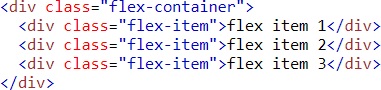
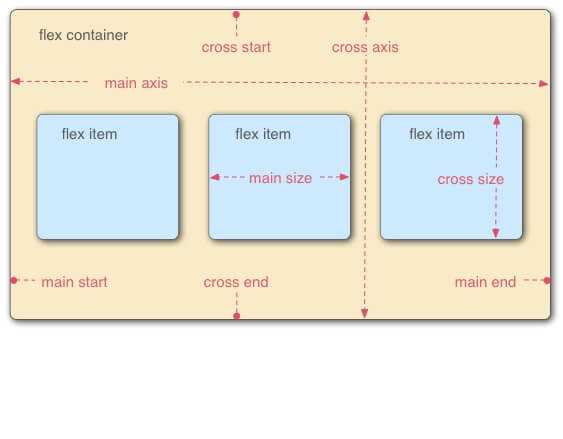
The CSS Flexbox specification describes a layout with items (flex-items) inside a container (flex-container). These items can grow or shrink in width and/or height, according to the available container space. The items “flex” to fit the parent container in the best possible way.

A flex container is declared by setting the display property of an element to either flex (rendered as a block) or inline-flex (rendered as inline). Inside a flex  container  there  is one or more flex items.

Everything outside a flex container and inside a flex items is rendered as usual.

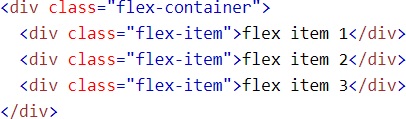
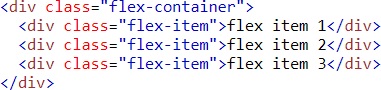
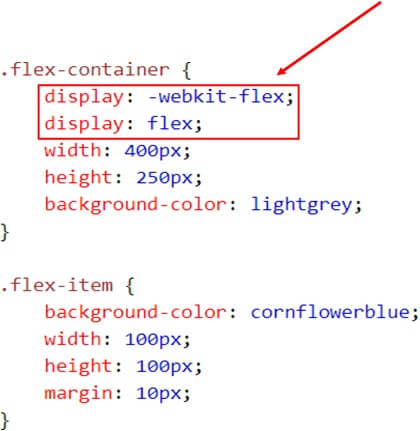
Flex items are positioned inside a flex container along a flex line.Flexbox ComponetTo make an element a flex-container, set its display property to flex.
Display: flex

Example
Example1


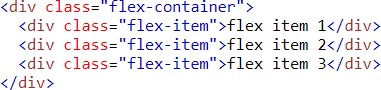
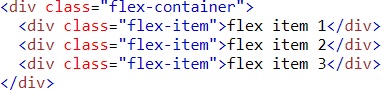
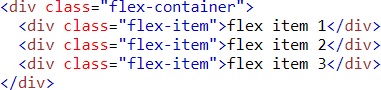
HTML code

HTML

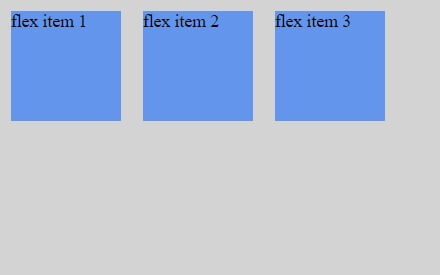
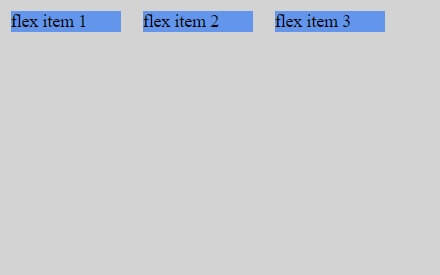
Result

HTML Result

Flex Direction Property

You can control the flow direction of flex items by defining flex-direction. This is done on the container level, not the item level.

  • row (default, horizontal, from left to right)
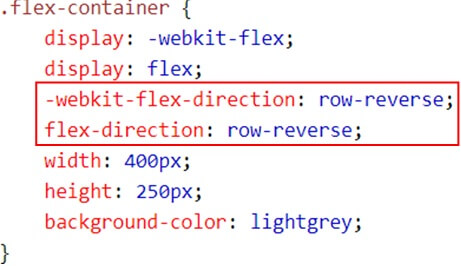
  • row-reverse (horizontal, from right to left)
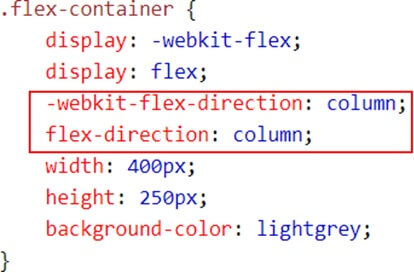
  • column (vertical, from top to bottom)
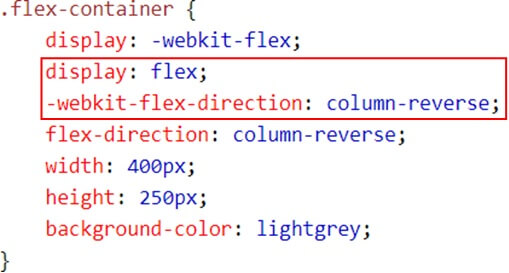
  • column-reverse (vertical, from bottom to up)

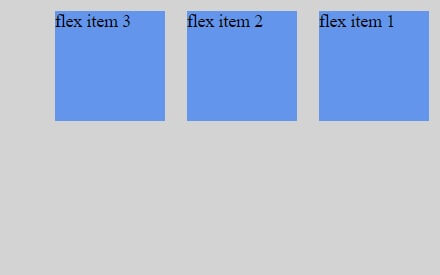
When we did not specify flex-direction, it used the default value, which is row. For horizontal placement, but from the other direction, you can use row-reverse. For vertical, you can use either column or column-reverse.

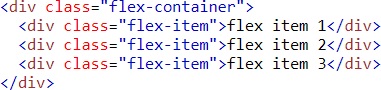
Example (Row-reverse)
Row reverse

Row reverse1


Result


Row reverse Result

Example (Column)

Column

Column code


Result


Column Result

Example (Column-Reverse)

Column Reverse

Column Reverse code


Result


Column Reverse Result

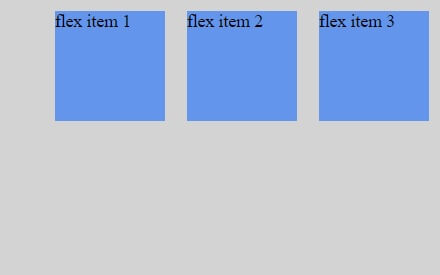
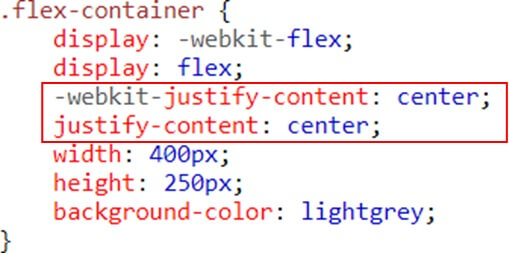
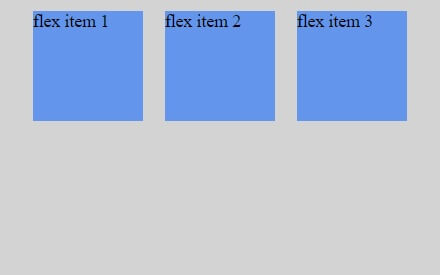
Justify content (Horizontal Alignment property)

The justify-content property can be used not only for aligning items, but also for spreading items evenly across all the available space on the main axis.

The  possible  values  are  as  follows:

Flex-start – Default value. Items are positioned at the beginning of    the container

Flex-end – Items are positioned at the end of the container center – Items are positioned at the center of the container

Space-between – Items are positioned with space between the lines

Space-around – Items are positioned with space before, between, and after the lines

Example (Flex-end)
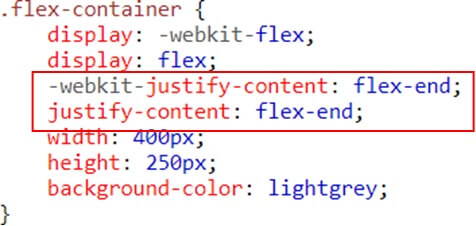
Flex end

Flex end code


Result


Flex end Result

Example (Flex-center)

Flex center

Flex center code


Result


Flex center result

Example (space-between)

Space between

Space between code


Result


Space between Result

Align Items Property (Vertical Alignment)

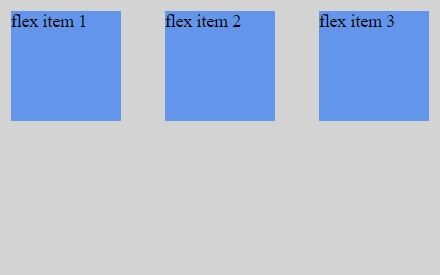
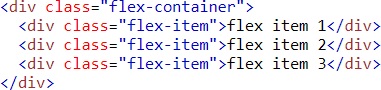
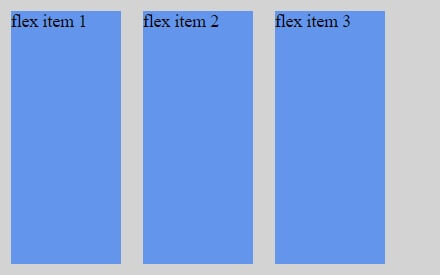
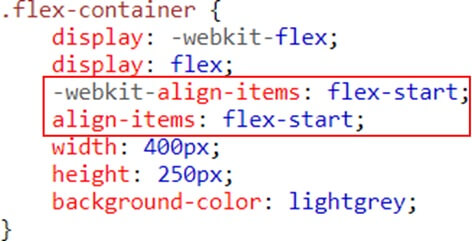
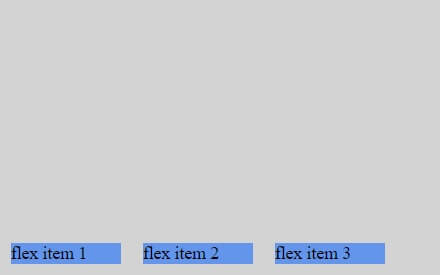
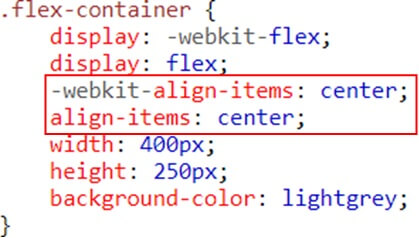
The align-items property vertically aligns the flexible container’s items when the items do not use all available space on the cross-axis

The possible values are as follows:

Stretch – Default value. Items are stretched to fit the container

Flex-start – Items are positioned at the top of  the container

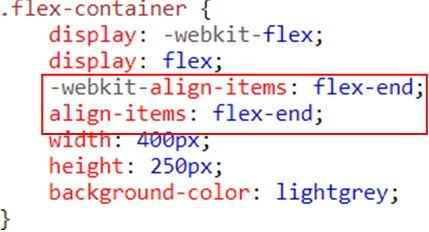
Flex-end – Items are positioned at the bottom of the container

Center – Items are positioned at the center of the container (vertically)

Baseline – Items are positioned at the baseline of the container

Example (stretch)
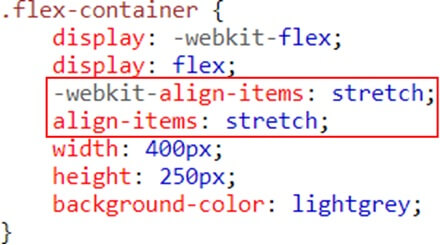
Streach

Streach code


Result


Streach result

Example(Flex-start)

Flex start

Flex start code


Result


Flex start result

Example(Flex-end)

Eng Flex

Eng Flex

Result


Eng Flex Result

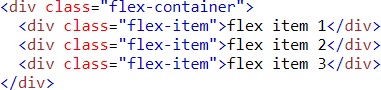
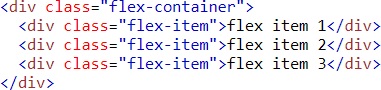
Example (center)

Example center

Example center code


Result


Example center Result

Flex-wrap property

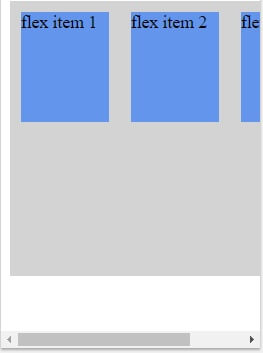
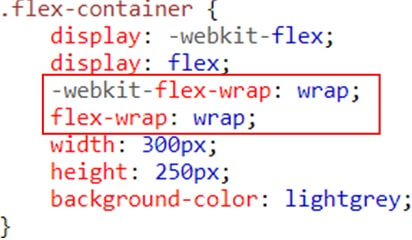
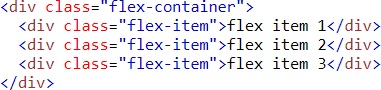
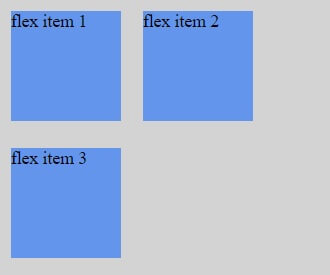
The flex-wrap  property  specifies  whether the  flex  items should  wrap or not, if there is not enough room for them on one flex line

The possible values are as follows:

No wrap – Default value. The flexible items will not wrap wrap – The  flexible  items  will  wrap    if  necessary

Wrap-reverse – The flexible items will wrap, if necessary, in reverse order

Example (no wrap)
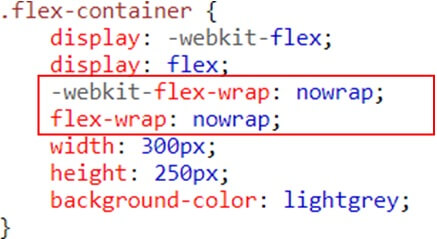
Nowarp

Nowarp code


Result


Nowarp code result

Example (wrap)

Wrap

Wrap code


Result


Wrap result

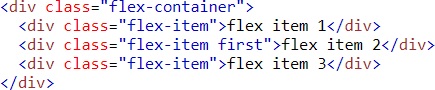
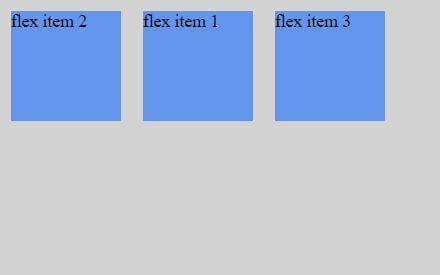
Flex item properties-Ordering

The  order  property  specifies the order of a flexible item relative to the rest of the flexible items inside the same container

Example (ordering)
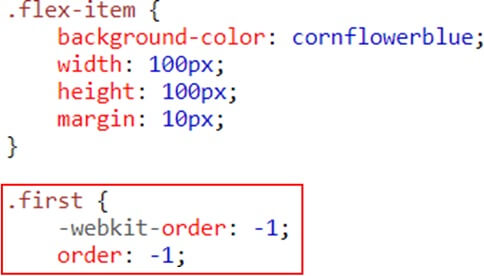
Ordering

Ordering code


Result


Ordering result

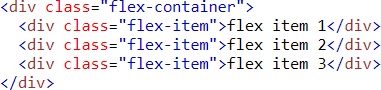
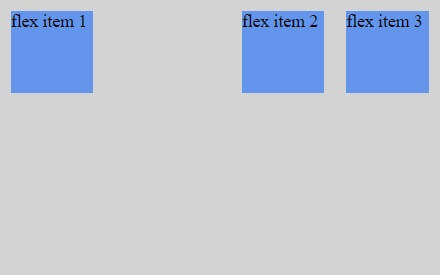
Flex item Properties-Margin

Setting margin: auto; will absorb extra space it can be used to push flex items into different positions.

Example
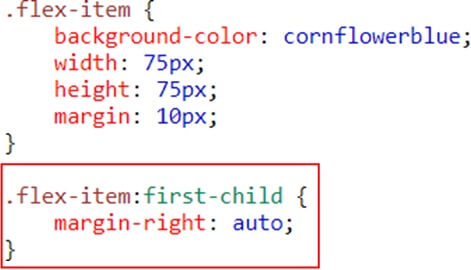
Property Margin

Property Margin Code


Result


Property Margin Result

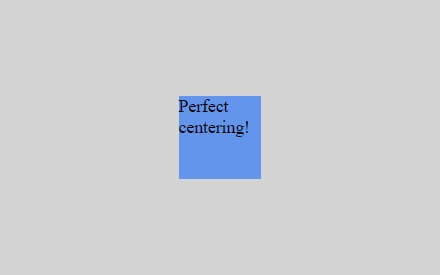
Setting margin: auto;  will  make the  item perfectly centered in both axis
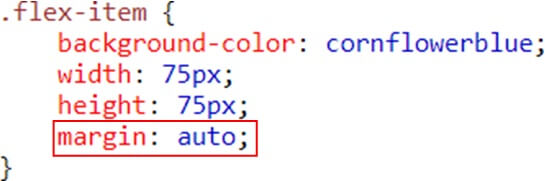
Setting Margine

Setting Margine code


Result


Setting Margine result

Flex item property- Flex

The  flex   property  specifies the   length  of   the  flex  item, relative  to  the   rest     of  the  flex  items   inside the same container
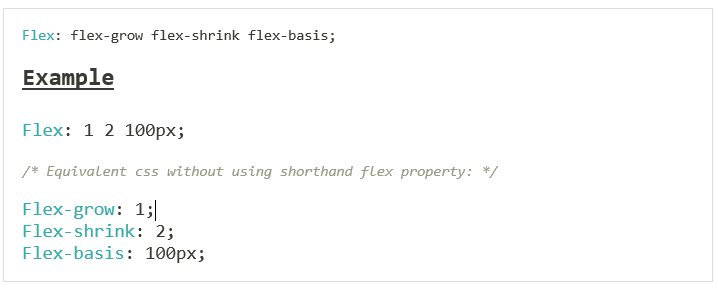
Item Flex

CSS3 Flexbox  Properties (Summary)

  • Display- Specifies the type of box used for an HTML element
  • Flex-direction- Specifies the direction of the flexible items inside a flex container
  • Justify-content- Horizontally aligns the flex items when the items do not use all available space on the main-axis
  • Align-items- Vertically aligns the flex items when the items do not use all available space on the cross-axis
  • Flex-wrap- Specifies whether the flex items should wrap or not, if there is not enough room for them on one flex line
  • Align-content- Modifies the behavior of the flex-wrap property. It is similar to align-items, but instead of aligning flex items, it aligns flex lines
  • Flex-flow- A shorthand property for flex-direction and flex-wrap
  • Order- Specifies the order of a flexible item relative to the rest of the flex items inside the same container
  • Align-self- Used on flex items. Overrides the container’s align-items property
  • Flex- Specifies the length of a flex item, relative to the rest of the flex items inside the same container

Conclusion:

Flexbox is a powerful CSS layout method that makes responsive development easier. It’s easy to understand and use, especially once you’ve used it a few times. It’s perfect for any situation where you need to make elements more flexible, reorder elements, or create a responsive layout.

While working with Flexbox, it’s important to remember that you aren’t creating a layout from scratch. Instead, you are creating a layout from a single element. All the other elements will be resized and reordered around that central element.

If you are looking to create a responsive layout, or you have lots of content on a page, then it’s a good idea to use Flexbox. It will make your layout easier to create and it will resize as the screen size changes. For more information please consult with Andolasoft.

Android Architecture Patterns and Their Differences

Android Architecture Patterns can help you create mobile apps with fewer bugs, better maintainability and testable code. These include Layered Architecture, Model-View-Controller, Data-Table-Fragment, Single-Page Applications, and Microscope. They focus on different areas of an app, from how to structure your app to how you should handle user interactions with it.

What is Architecture?

If you are building an application in an organized manner with some set of rules, describe proper functionalities and implement it with proper protocols, then it is called an Architecture.

Role of Architecture

Let us say if we are not using any architecture and we are writing our code in a class/activity/ fragment in an unorganized manner then the problems we will face are-

  • The number of lines of code will increase that it will become complex to understand.
  • It decreases readability and increases the number of bugs. Thus, it is difficult to test and reduces the quality of the product.

So, to provide clear data flow which will increase robustness, scalability, bug resistant, increase readability, easy to modify and increase productivity and provide a quality app. Thus, we should use proper architecture, suitable to work in a team.

But why does your app need good architecture?

A simple answer is that everything should be organized in a proper way. So does your Android project. If not, the following problems sound familiar to you: All of your codes are not covered by Unit Tests.

  • It is difficult to debug a class because it contains a huge number of functions.
  • You are unable to keep track of the logic inside that huge class.
  • Another developer finds it so difficult to maintain and add new features to your work.

So, if you are going to build a high-quality app, you should care about architecture.

Never miss an update from us. Join 10,000+ marketers and leaders.

What does your app get from a proper architecture?

  • Simplicity: Separate and define a clear single role for each component in your app. A class is not going to be a multi-tasking component. You will find it easy to know what it does and what is inside it. It advocates the Keep It Stupid Simple (KISS).
  • Testability: Before we can apply Unit Tests, we have to write testable codes.
  • Low-cost maintenance: It is easy to add, and remove features. Especially, it helps us to keep track of important logic parts.

The When & How?

Several upcoming questions maybe appear in your head.

  1. So, what is the best architecture pattern for my Android apps?
  2. And how can I apply that pattern in the most effective way?
    • There is no single candidate that suits all of your Android projects because the design pattern is abstract and its implementation depends on specific requirements.
    • Fortunately, the more we understand about it, the more effectively and properly we apply them.
    • You can use different architectures across different apps. Even, in one complex project, each module has its own structure.

Another question?

So, if I have never used any architecture in my Android apps yet. So, what should I do?

Just pick up one of them. Read about it, try to apply it. After that, you will become familiar with it and have your own best practices.

Developers out there are talking about these following popular patterns:

  • MVC ( Model — View — Controller)
  • MVP ( Model — View — Presenter)
  • MVVM (Model — View — View Model)

Some principles for good Architecture in Android

To get good architecture there are some basic concepts we should follow. They are:-

  • Separation of concern: Component should do what it is required. Shown in the diagram.

Architecture Pattern

This we can achieve by Architecture pattern.

  • No Hard dependency: It should be fixed if every component should work on some limited amount of dependency. All dependencies should be provided from outside. Tips: Use Dependency Injections.
  • Manage lifecycle and data persistence: It can be achieved by Architecture Component.

MVC:

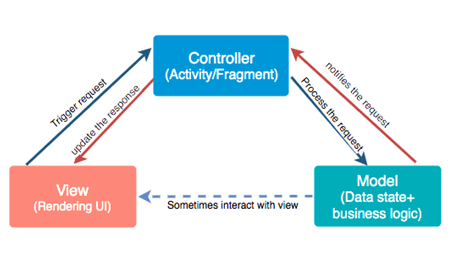
It is a Model-View-Controller. The most commonly used architecture. These are the three components used in MVC.

  • Model– It is business logic and Data State. Getting and manipulating the data, communicates with the controller, interacts with the database, sometimes update the views.
  • View– What we see. User Interface consists of HTML/CSS/XML. It communicates with the controller and sometimes interacts with the model. It passed some dynamic views through the controller.
  • Controller– It is Activity/Fragment. It communicates with view and model. It takes the user input from view/REST services. Process request Get data from the model and passes to the view.

Advantages

  • It keeps business logic separate in the model.
  • Support asynchronous techniques
  • The modification does not affect the entire model
  • Faster development process

Disadvantages

  • Due to large code controller is unmanageable.
  • Hinders the Unit testing
  • Increased Complexity

MVC

MVP:

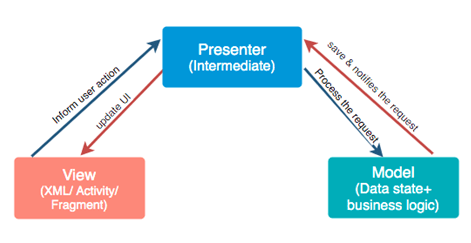
It as Model-View-Presenter. For the phase of developing time or for the phase of developers it is vital to divide the architecture into layers. It breaks the dependency on what we have on view.

  • Model– It is business logic and Data State. Getting and manipulating the data, communicates with the presenter, interacts with the database. It doesn’t interact with the view.
  • View – Consists of UI, activity, and fragment. It interacts with the presenter.
  • Presenter– It presents the data from the model. Control all the behavior that want to display from the app. It drives the view. It tells view what to do. Any interaction between the model and the view is handled by the presenter. Saves the data back to the model.

Advantages

  • It makes view dumb so that you can swap the view easily.
  • Reusable of View and Presenter
  • Code is more readable and maintainable
  • Easy testing as business logic separated from UI

Disadvantages

  • Tight coupling between View and Presenter
  • Huge amount of interfaces for interaction between layers.
  • The code size is quite excessive.

MVP

MVVM:

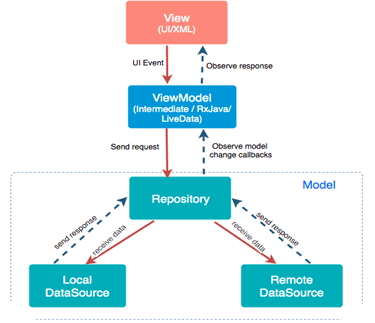
It is a Model-View-View Model. It losses the tight coupling between each component and reduces the glue classes. Works on the concept of observables. Children don’t have reference to the parent, they only have reference by observables.

  • Model– It has business logic, local and remote data source and repository. Repository: communicate with local or remote data sources according to the request from View Model.
  • View– Only user interaction i.e.XML, no business logic. Direct send user action to view model but does not directly get a response. To get a response view observes some data which View Model exposes.
  • View Model– Most of the user interface logic center it here. It is a bridge between a view and a business logic. It does not have any clue which view has to use it. As it does not have a direct reference to the view. Thus, good in testing and has loose coupling. But still, it needs to update the UI this interaction done by observables. When data changes observable notifies.

Advantages

  • No tight coupling between the view and view model
  • No interfaces between view and model.
  • Easy to unit testing and code is event-driven.

Disadvantages

  • You have to create observables for each UI component.
  • The code size is quite excessive.

MVVM

Difference between MVC, MVP & MVVM Design patterns

MVC (Model View Controller)

  • One of the oldest software architecture
  • UI (View) and data-access mechanism (Model) are tightly coupled.
  • Controller and View exist with the one-to-many relationship. One Controller can select a different View based upon required operation.
  • The View has no knowledge about the Controller.
  • Difficult to make changes and modify the app features as the code layers are tightly coupled.
  • User Inputs are handled by the Controller.
  • Ideal for small scale projects only.
  • Limited support to Unit testing.
  • This architecture has a high dependency on Android APIs.
  • It does not follow the modular and single responsibility principle.

MVP (Model View Presenter)

  • Developed as the second iteration of software architecture which is advance from MVC.
  • It resolves the problem of having a dependent View by using Presenter as a communication channel between Model and View.
  • The one-to-one relationship exists between Presenter and View as one Presenter class manages one View at a time.
  • The View has references to the Presenter.
  • Code layers are loosely coupled and thus it is easy to carry out modifications/changes in the application code.
  • The View is the entry point to the Application
  • Ideal for simple and complex applications.
  • Easy to carry out Unit testing but a tight bond of View and Presenter can make it slightly difficult.
  • It has a low dependency on the Android APIs.
  • Follows modular and single responsibility principle

MVVM (Model View View Model)

  • Industry-recognized architecture pattern for applications.
  • This architecture pattern is more event-driven as it uses data binding and thus makes easy separation of core business logic from the View.
  • Multiple View can be mapped with a single View Model and thus, the one-to-many relationship exists between View and View Model.
  • The View has references to the View Model
  • Easy to make changes in the application. However, if data binding logic is too complex, it will be a little harder to debug the application.
  • The View takes the input from the user and acts as the entry point of the application.
  • Not ideal for small scale projects.
  • Unit testability is highest in this architecture.
  • Has low or no dependency on the Android APIs.
  • Follows modular and single responsibility principle.

Never miss an update from us. Join 10,000+ marketers and leaders.

Conclusion

When it comes to Android, both MVP and MVVM offer better modular architecture than MVC. Though, they also tend to add more complexity to your app.

In simpler applications which involves two or more screens, MVC can work fine in Android. Whereas in more complex cases where your application needs to be developed considering to add more features in future, MVVM with data binding will make you write lesser code.

Android architecture describes how a mobile app should be structured internally. By understanding the pros and cons of different patterns, you can make your app more maintainable and scalable.

Although the app market is still in its infancy, the number of successful mobile apps is growing exponentially. It’s no surprise then that the number of new mobile app development patterns are emerging at an equally rapid rate.

So, which architectural design pattern are you going to consider for your mobile application?

How To Promote Your WordPress Website The Actionable Tips

Developing a WordPress website is not enough but to achieve more traffic and more revenue according to your expectation should be the prime objective. In your WordPress development, your WordPress developer has implemented all necessary latest features, use of premium theme and customization to engage with your target audience, and all the necessary plugins for smooth operation.

You get all excited with your, as you are finally fleshing out the long-held dream to run your online business. You are all ready to open your shop.

In simple terms, your WordPress website is completed and you are ready to rock the party. But you get aero customers.

Even after doing hours of hard work you are not getting customers as you except earlier. After some research and analysis you came to know that the main problem is customers are not able to found your website. Nobody know about your website and you’re offered service. In other words you can say there is lack of visibility of your website.

So, what will be the solution for that and what can you do to get your website visibility?

There are so many questions comes to mind if you will deep drive in to this. But there is one solution for all your questions and that is “Marketing”.

Marketing Strategy

Marketing the one medicine for all your pains. A well marketing plan and strategy can help you to grow your online business and get visibility on your target audiences.

Normally it’s very difficult to find your website and business in the comparative market where thousands of website and business are going live daily. In this situation marketing has great role for your services or product.

To get effective results you need to promote your website. Marketing your website is always the best result to create an audience for your brand and product.

With marketing you are conveying your message to a large group of people. But you need to follow an effective marketing strategy.

Before discussing more about marketing let me tell you some basic things which helps your marketing to reach the goal, like choosing a web development technology, user-friendly and engaging web layout and design and SEO friendliness of website.

If we will talk about technology then, I will recommend “WordPress” for all of you. WordPress is the best CMS platform with custom plugins and best for marketing of any type of websites. Let me share in details

Also Read- Reasons Why Choose WordPress for Web Development

Why WordPress is best for Marketing?

WordPress is basically search engine friendly and that helps your website to gets more traffic.

A WordPress site gets an average of 23 billion page views each month. The number grows each passing day.

There are 75 billion websites that run on WordPress.

You can set your entire marketing strategy with the WordPress dashboard using the plugin and integration when needed.

And the best thing is you don’t have to become an expert in coding.

Also Read – How Much Does A WordPress Website Cost?

Let’s come to the main topic,

How to Market your WordPress Website?

Any marketer can develop posts, manage calendars, increase search traffic, and post the content directly into WordPress.

So, here are a few marketing tips you can follow to market your WordPress website.

Never miss an update from us. Join 10,000+ marketers and leaders.

1. Develop Mobile Responsive WordPress Theme:

Now a days all the marketing activities results are completely depends upon the bid daddy Google. Google keeping eye on every websites activities and resulting those websites which has good content, layout and user centric information. Here website contents also play a great role in marketing.

Google loves mobile-friendly websites. So you need to make your WordPress site optimized with your mobile.

Go for the themes that are marked as mobile-friendly. Most of them are optimized to some level but not all of them are completely optimized.

2. Develop Quality content and never forget to Market your Content:

Good content is important for achieving success on your website. By content, it refers to both visual and textual form. If the website is a blog or magazine, then it’s obvious that the main focus will be on text.

If you have a portfolio site, then visual content should be put on the maximum level.

Quality content refers to:

  • Longform
  • Informative
  • Shareable
  • Engaging
  • Relevant to your niche and to the topic content
  • Well written
  • Competent

It is important to keep your content unique and fresh. This will create more traffic to your website.

It is also important to have a captivating image with a catchy headline along with a caption that describes the post and attracts more traffic to your website.

Do you want a WordPress website but don’t know how to create one? We will install and setup WordPress for you, absolutely free of cost!

When you offer your audience something valuable to read or view creates trust and a strong relationship with your audience.

How to get the most from Content Marketing?

Filling up 100 papers or flooding your page with videos and images doesn’t add any value. Content marketing needs to be properly put up and approached as any other marketing collateral strategy.

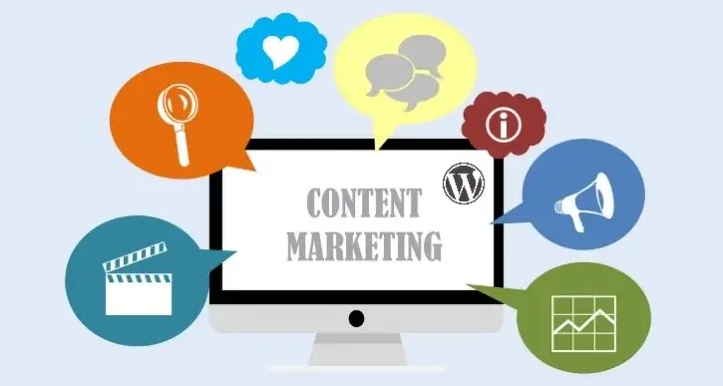
Content Marketing(Source – mekshq.com)

  • Develop a Content Calendar: A content calendar helps you to be on track by publishing daily with content pushed back to any particular goal or theme.To remain on a particular schedule, develop and follow the content calendar. Maximize the content marketing efforts by scheduling posts to share on social media.
  • Make different types of content: Don’t just stick to a particular form of content rather focus on various types of content. Always develop fresh blogs and follow the trend.

3. Develop an XML Sitemap:

Website crawling and indexing is important factor to come in the search results of major search engines. So before coming to search result your website must be crawl and index by search engine like Google. XML sitemap helps the web pages to crawl by search engines.

WordPress automatically develops the sitemap for you, but those are not optimized. One can easily and quickly optimize the sitemap with a plugin like Google XML Sitemap Generator. It is a handy tool that not only helps you to maintain your track on the index pages but it also tells Google about your update.

Whenever you post any new blog or create any changes, it notifies Google to re-crawl your website. This helps to improve the ranking of your site in the search results.

4. Customized Permalinks:

Your content can be optimized by ensuring the URLs of the blog post have relevant keywords. With WordPress you can create more permalink, but before you push it live make sure it is rich in keywords and readable.

You need to optimize these permalink that reflects the content easily to your visitors.

5. SEO

The first page of Google has become a refined and crucial part, in comparison to the second and other pages. From the second page and beyond it is considered as the dark web for some. Hence a strong SEO presence is important in the present day.

Also, you can go for the paid search campaign, but put more focus on the organic SEO.

According to a report by Business2community.com 70%-80% users don’t follow paid advertising.

How to gain more from SEO?

When someone hears about the term “SEO“, it leads them to think about the experts and the obscurities. But the only secret to success is time and consistency. It states you can do it on your own by following some best practices.

Good SEO helps to generate leads. You need to put the information in the marketing database. So you can later push the content.

  • Include image: Whenever you add an image to your content, it helps in visitor engagement and that tend to increases the search engine ranking.
  • Repurpose Content: Rather than developing new content every time, you can create some changes to the old content. Make the most from your old one, all you need to do is update and republish the last blogs. This increases visitor traffic.
  • Email Marketing: For any business, email marketing is an effective way to stay connected with prospects. You also need to address their contact and behavioral information.

To capture this information, you have to gain attention in new ways so you can get more people to website.

Rich snippets are an effective way to increase search traffic. But many times they are ignored by marketers as they require some coding to create.

I’ve worked with the team at Andolasoft on multiple websites. They are professional, responsive, & easy to work with. I’ve had great experiences & would recommend their services to anyone.

Ruthie Miller, Sr. Mktg. Specialist

Salesforce, Houston, Texas

LEARN MORE

FAQ:

What is the importance of a website?

If you want to market your business online you need to have a website and a well-planned online presence strategy. A website is important as it helps to gain credibility as a business.

A website most probably provides a map and directions to your office, shops to your customers, and visitors to reach you easily.

How to market your website?

You need to market your business to gain more customers and traffic to9 your website.

  • Website SEO
  • Email Marketing
  • Quality content and Content Marketing

Why do you need to update your website?

Keeping your website up-to-date helps to gain trust between you and your customers. As many times customers rely on websites for useful information on whatever business you are in. The updated information helps to build domain authority.

Why is website promotion important?

Websites are an important medium for customer communication. A website helps to generate more customers. With the internet, it has become easier to get feedback/opinions from customers on newly updated products and services. Promoting a website helps to get maximum attention from your targeted customers.

Conclusion:

Marketing is a creative job and you can do a lot with your WordPress website if you prepare the right marketing strategy and use the right marketing tools. With the WordPress dashboard you can handle any kind of task that is essential for marketing with the help of plugins within a very less time like SEO, image optimization, Social Media sharing, and many more.

More and more businesses are moving towards digitized mode of business, and you are still following the old method of business. Noting gone away now. This is the right time to start new things.

Let Andolasoft help you in your WordPress website development and online promotion of your business.

Andolasoft is one of the trusted web and mobile app development company has long expertise in all technology like WordPress and digital promotion of product and services. We have helped many businesses on their tech development and business growth. Our case studies will tell more about this.

Contact us have a free consultation about your business ideas or issues and hire our dedicated developers and marketing experts to take your business to next level.

How To Develop Your WordPress Website In 2021?

The Covid-19 Pandemic has led many businesses to switch to digitalization, including websites. With a business website, you can reach more people and keep your business running in the event of any future pandemics.

Few years back it was nice to have stuff but it has become a must have feature for every business.

So, here is the suggestion for every business to build a website to pitch your business on the World Wide Web and just won’t fall behind in the competition.

Why Choose WordPress?

Everyone knows it is open source, easy to customize and simple to maintain. We have published the top reasons for using the WordPress framework previously.

It provides you complete control over your website. WordPress web application provides great advantages like plugins, free tools, and themes with full media support.

However, to make a website live, you need to go through a process.

Developing a website can be daunting, especially when you’re not a programmer. But, this is not a concerning point anymore.

As you can build a website using the WordPress CMS framework by following a few simple steps.

Let’s start;

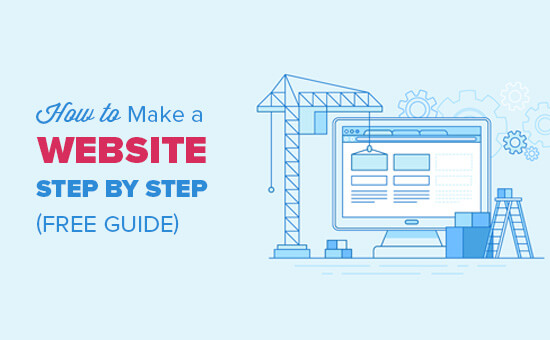
Make Website Guide(Source: WpBeginner)

What are the necessary things to do to develop your website in WordPress?

Here is a list that needs to be included.

  1. Purchase a domain: The price starts from $15 per year
  2. Hosting acquisition: The price begins at a low price of $8 per year
  3. WordPress Theme: It depends on the level of customization and the features you want to include in your website. You can choose a theme that comes free forever. On another note, some enterprises choose some highly engaging themes to build their website. It costs based on the theme and its features.
  4. WordPress Plugin: Most of the plug-ins are free, but if you want to have advanced options. You need to upgrade to a particular plan.

It signifies that a simple website starts on the basic annual plan. If you want any advanced features the price increases accordingly.

Website Construction(Source: Organic themes)

Choose the Domain Name:

The domain name may be the name of your business or product. Names are a powerful element of your business.

You need to choose the name of your website wisely. If you are finding it difficult to choose the name, you can use tools it helps you out.

Tricks and Tips to choose a website name: As you want to give a name to your new website. The name should hold meaning and importance.

The name needs to be unique and easy to remember. It shouldn’t give any weird meaning in English or other popular languages, if you want your business to go international.

List of Relevant Keywords:

You need to list relevant keywords for the product or business. You need to think about the users, how they will feel after they use the services or product.

You can use a tool like Namelix or Novanym, this helps to generate domain name ideas.

Understand the meaning:

As you found your domain name, check out the meaning. Google it and then go for the Google images and understand how it matched.

You might find a singer or some artist related to that name. This will provide you with a brief understanding of the domain name you choose.

  • You can also search for the domain name on Facebook or LinkedIn. Check if there are any business names with it.
  • Check if any website domain name is available for sale. Many websites prefer “.com”. It is a top-level domain, followed by “.org”, “.net”, or “.in”.
  • Purchase your domain name. You can purchase it through a domain registrar like GoDaddy or a hosting provider.

Choose a Web Hosting

Every website is hosted from a server. It states that you need to acquire web hosting from a hosting provider.

As you start creating a WordPress website, you need to choose a hosting plan using WordPress.com. You can also choose from a third-party hosting provider.

But before you proceed, you need to know that there is WordPress.com, which helps you to host and build a website.

The other one is WordPress.org, which helps to acquire plug-ins and themes for your website. You can choose you’re hosting from a third –party.

There are three major hosting services: VPS, managed to host, and shared hosting. In the first situation, the server resources were split with more sites. When the sites grow, you might come across performance issues.

Also, you might realize the need for a VPS service or a managed hosting plan.

You need to understand the business goals while choosing the hosting provider. As you go with VPS hosting, the resources need to be shared, but you will gain some control over it.

Also, you can observe improvement in security and performance.

With a website, things can become more complicated, but proper planning will help you with a successful website for your business.

While you analyse your plan take a look at them:

  • Storage
  • Pricing
  • Performance
  • Support

Also, many hosting providers have extra features provided like domain offering (ex: Namecheap), website builder (ex: Go Daddy), e-commerce options, etc.

Also, you have observed many websites using “HTTP” or “HTTPS”. So what are those?

HTTP is a modern web. This connects the browser and servers. It functions on a request-response basis

However, the extra “s” on the “HTTPS” means the connection with the website is encrypted and the data that is shared in the website remains secure.

In technical terms, we called it SSL certification.

Suppose a user makes any kind of transaction on your website or gets logged in to your account. The information provided by the user will remain private; it is safe from getting hacked.

It takes place through SSL technology. The SSL stands for “Secure Sockets Layer”. Consumers see “HTTPS” as a signal of trust. It helps to protect privacy and data. This means you need to acquire an SSL certificate.

Also, make sure the connection plan has this as well:

This time you get a hosting plan and set up the login details. The only thing missing is WordPress itself.

Many hosting providers allow you to install WordPress through the wizard/dashboard. It’s pretty intuitive.

Logging into the website is also easy. You need to type the website address and add it on the “/WP-admin”.

Choose your WordPress Theme:

Next, you have to decide the theme for your WordPress website. There are many themes available. These themes are available for free and some are paid.

As you select your theme, try to ensure that the theme creates sense with the topic of your website. Also, it engages with the layout and the content you publish.

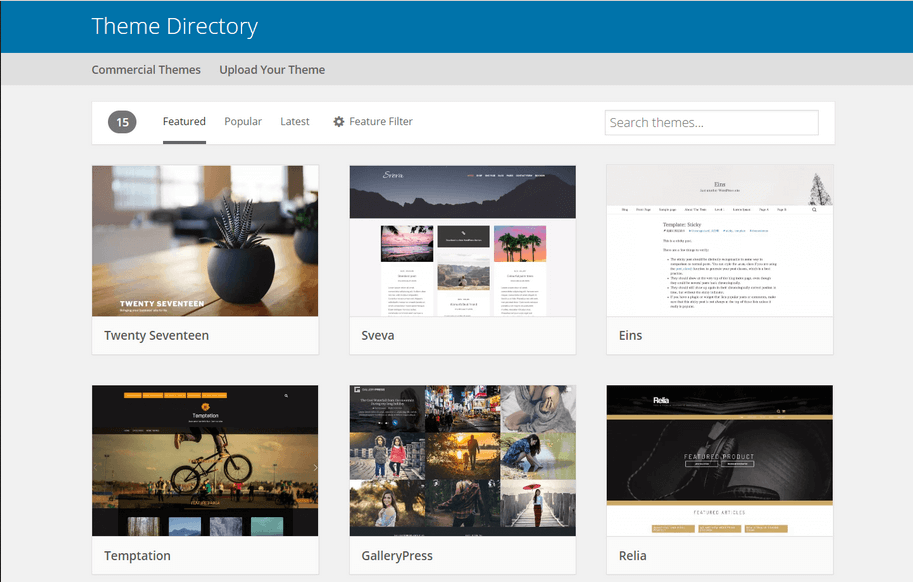
Theme Directory(Source: WP Engine)

The WordPress premium choices provide a set of ready-made options for several topics. It includes services, business, fashion, beauty, photography, education, food, and others.

Each of them will provide an excellent base to your site that you have always dreamed of.

Configure the Plugins:

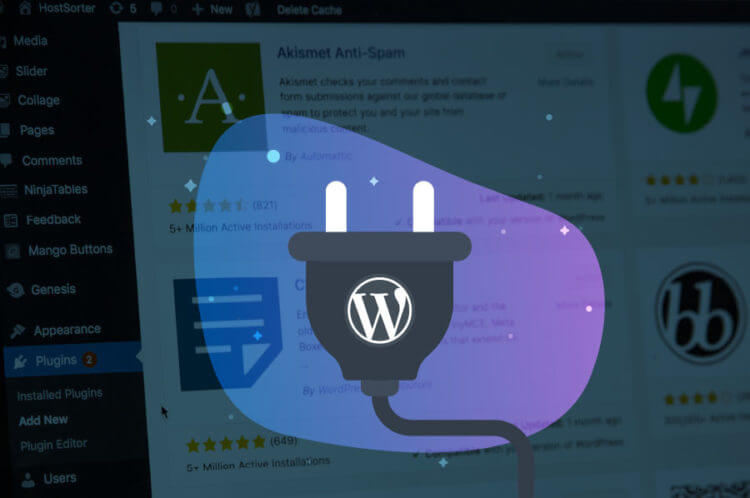
A WordPress Plug-in is defined as a program written in the PHP script language. It adds a specific set of features or services to the WordPress website.

Wordpress Plugin(Source: Dreamhost)

A WordPress plug-in offers a great deal of flexibility and customization to your WordPress site. It adds value and features to your visitors.

At first, you don’t begin with a ton of plug-ins. But as you grow with WordPress applications, you get to use more Plug-in that benefits the site.

Some of the popular Plug-in are Yoast SEO and JetPack.

Complete the Administrative Page:

The important page in your website is the about page, contact page, privacy, and the disclaimer page. You need to focus on it, before adding content to your site.

It is easy to add now and then later. Once you have done the publishing, you can add other exciting stuff. These pages also serve to protect your site visitors and you.

Post Your Content, Rinse and Repeat:

Once you get the important administrative pages published, it’s time to start adding interesting content. Whatever the niche is, you need to make sure it has plenty of quality content for the readers.

It increases the page’s visibility. This gives a rich look to your page. Keep it a priority to add new content daily, monthly, or weekly. Keep a content calendar that helps you to remain on the right track.

Never forget marketing:

Marketing your website is an important step. It helps to get more traffic. There is an availability of SEO optimization but make sure the page has relevant keywords in the description, title, and body.

Promote your sites in every possible way. Also, there are many free options available to use the Social Media sites, emailing a regular newsletter and forums.

You also need to consider guest posting, comment on the blogs, communities, and forums to develop social connection and link popularity.

WordPress Development(Source: PC Mag)

Backup your site:

As content is an important asset, it is important to have a backup of your site. You need to have a backup of your content in case of a crash. So, you don’t have to begin from scratch.

If you don’t back up all the posts, affiliate links, and plug-ins, it will take a while to get back on your feet. So you need to have a regular backup, the web host should offer an alternative.

FAQ:

Is WordPress Free For Websites?

WordPress.org is completely free. You can download and use it in any way you like. It can also be customized, redistributed or extended. You can even sell it until you have the GPL License.

How to create a website on WordPress?

You can create your Website on WordPress by following these steps:

  • Signup to WordPress.com
  • Confirm your Email and activate your Blog
  • Setup the blog
  • Select and customize your WordPress theme
  • Connect with Twitter and Facebook
  • End the process
  • Visit your new website

Does WordPress require Coding?

No, you don’t need to have HTML knowledge or other programming languages for a website.

Many WordPress users don’t have any programming or coding skills and they have been using WordPress for many years.

Can I develop a WordPress Website without hosting?

Yes, you can develop a website with WordPress without hosting. The basic version of WordPress is free and it allows you to create a website without any hosting.

You can also develop a WordPress Website without a domain name.

Conclusion:

So, here is a small view of the ways to prepare your website using WordPress.

A website is a key to your business growth. It follows several steps such as choosing the domain name, Plug-in, WordPress theme, and several other features.

Also, after developing the website, you need to update and maintain it with regular updates.

In case of any difficulty in developing your site, Andolasoft WordPress developers are happy to help you. Contact to Andolasoft.com and develop your successful business website.

If you are enjoying our blog, subscribe to Andolasoft blog to get the latest updates.

How Good Is Python For Web Application Development?

We all are aware about the usage of smartphones in our daily life. According to the journal of accountancy, we check our phones on an average for  86 times a day, at least for the millennial, for the rest of the population it varies. It is only because we are very much addicted to it.

Planning to develop your mobile application or website using python, but don’t have the idea about Which programming language is used to develop the application

Don’t worry we are here to help you.

We will guide you to choose the best language to use in order to develop your application.

App development using Python, will help you to develop an application that is adaptable, ubiquitous and reliable.

Python is a general coding language which implies not like HTML, CSS, and JavaScript but it may be used for different varieties of programming and package development besides web development.

Python is an object oriented, interpreted and high level programming language. It is a candid and easy to learn programming language which emphasizes the readability and reduces the application maintenance price.

With Python

It consists wide selection of modules and packages that permits program modularity and code employ.

Python Language(Source: Zibtek)

  • Python is an object oriented, high-level programming language, which implies it consist of words and phrases intelligible to humans. To translate this application-oriented language into machine code, Python uses an interpreter. The work of an interpreter is to convert the source code into code understood by all computers. As an interpreted language, Python uses memory with efficiency, that is simple to rectify, and permits developers to perform advanced tasks in an exceedingly few steps and edit code quickly.
  • Most up-to-date programming languages, together with Python, are considered object-oriented. The thought behind object-oriented languages is that the program is split into freelance objects that communicate between themselves. This gorgeous a lot of appears like a set of mini-programs.

Never miss an update for us. Join 10,000+ marketers and leaders.

  • Python is a dynamic language. This implies that developers ought not to declare variable sorts. Python verifies sorts and errors at runtime (when the program is launched), however not throughout compilation (when ASCII text file is regenerate to machine code). This ends up in less code, quicker development, and bigger flexibility and resilience.
  • Develop Prototypes:As the Python web programming language is easy to access. This ensures that the program will work properly. You can create prototypes, so you can easily test the code with the use of python.
  • Python is known as an easily readable language. Its info is visually tidy, and it usually uses English keywords wherever different languages use punctuation. Unlike several different languages, it doesn’t use wavy brackets to delimit blocks, and semicolons once statements. Basic ideas of Python Indentation Many of the programming languages use brackets to outline their code block, however Python’s interpreter uses indentation method to outline the code blocks.

Why Python is Popular?

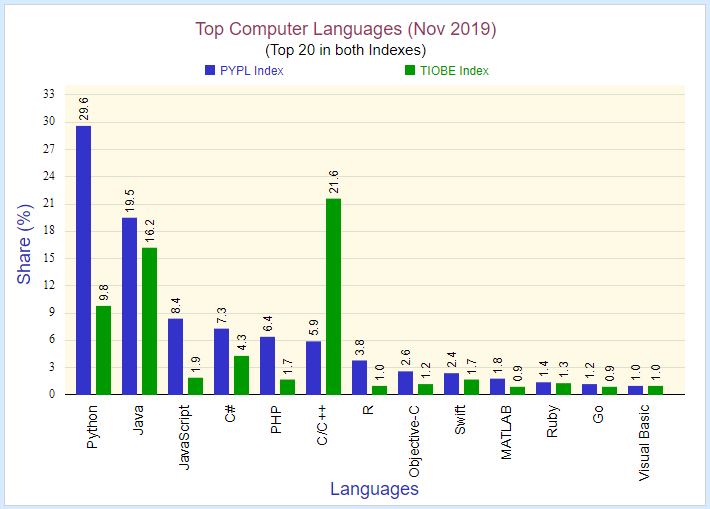
Above all python is one of the most popular programming language from long decades because of its high scalability and productive than other object oriented programming languages like C++ and Java.

Python Popularity(Source: Directlinkdev)

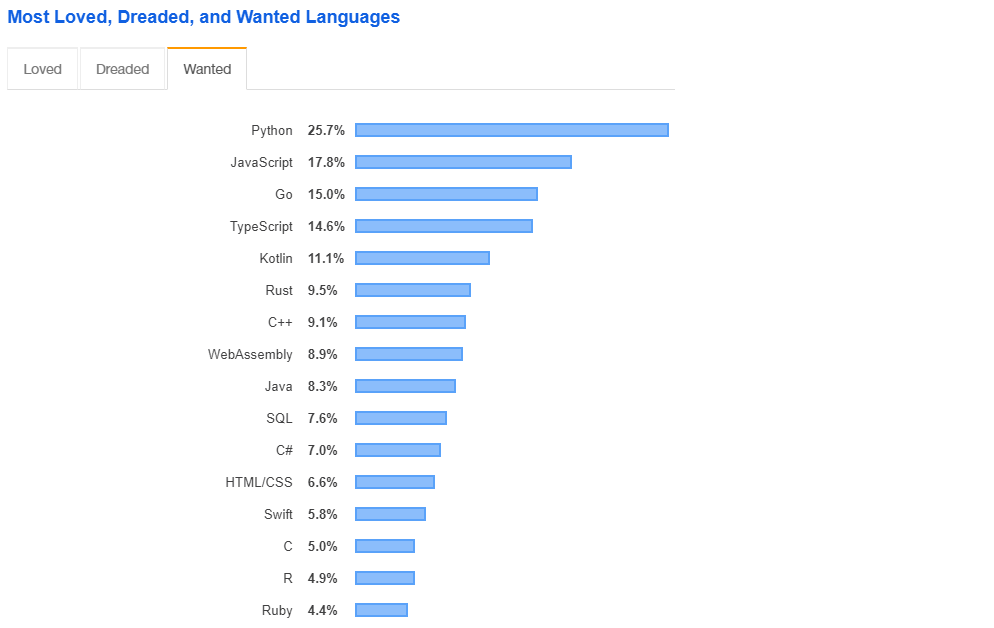
According to a review by stack overflow’s 2018 developer it was discovered that Python is the most adopted framework. More than 122,864 sites online are developed using this android language.

Python Use(Source – directlinedev.com)

The code syntaxes are very simple and easy to learn by the developers. Also it uses English commands that makes it more efficient and easier to understand.

For example, take a look at the code you’d use to print the text “Hello World” on your screen using the programming language Java:

[code language=”css”]

Class hello world {

Public static void main (String [] args) {

System.out.println ("Hello World")

}

}

[/code]

That’s a lot of code for such a simple function.

Now take a look at the same exercise written in Python code:

Print (“Hello World”)

Like other programming languages Python also provides a way to handle the error exception using try, except syntaxes

Try:

[code language=”css”]

a = int (input ("Enter a:"))

b = int (input ("Enter b:"))

c = a/b

[/code]

Print(c)

Except:

Print (“Can’t divide with zero”)

# Example 2

try:

#this will throw an exception if the file doesn’t exist.

Basic Concepts of Python

1. Indentation

Many of the programming languages use brackets to define their code block, but Python’s interpreter uses indentation process to define the code blocks. So the developers have to be very careful with the white spaces in their code base which can break the application.

2. Semicolons

Python programming language is not using semicolon to end the line. A new code line is enough to detect a new code syntax.

3. Variables

Python uses variables to store data such as string, number and other information’s for manipulation work.

4. Operators

Operators are used in values or variables to perform certain logic and mathematical operations

Python Framework:

Also, Python is in extreme demand in diverse industries. Like the database, machine learning, databases, design, data analysis, web page readability/testing, application development using Python language.

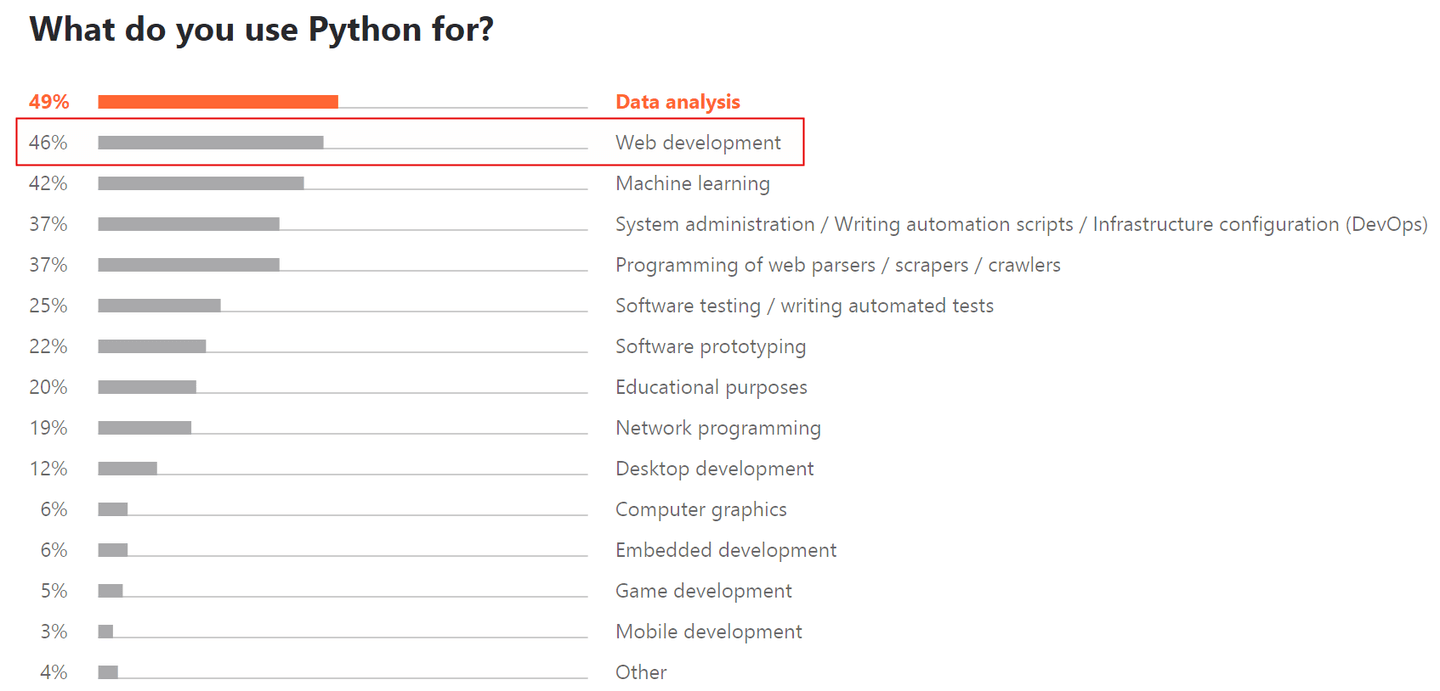
The platform is mostly utilized for data analysis, DevOps tasks and web development.

If you are choosing Python in web development, then you are coming across the variety of Python frameworks that empower the developers to get more with less coding. Some of these frameworks are:

  • Django: It has got it’s first place because of its nature being an open-source Python Platform. This technology is effective to develop complex data driven sites. This platform is advanced and has many matured attributes that includes templates, libraries, and API which support the development of scalable web development in python projects.
  •  Turbo gears:Turbo Gear is a top web application development platform. It comprises web server Gateway interface  elements, includes SQL Alchemy, Webob, Repoze and more. Like Ruby on Rails, TurbpoGears works well with MVC architecture which supports rapid web application development using Python.
  • Numpy: Numpy numeric python is the library which assists to perform logical and scientific activity on arrays. The library is involved with multidimensional arrays of objects. It also consists of several collections of routines used for processing the arrays.
  • Panda: It is a BSZ authorized , Open Source Python library that provides many simple to use data structures along with the data analytics tools to the Python developers. These technologies are mostly used for commercial and academic domains along with analytics, finance, economic and statistics, etc.

Why is Python good for web development?

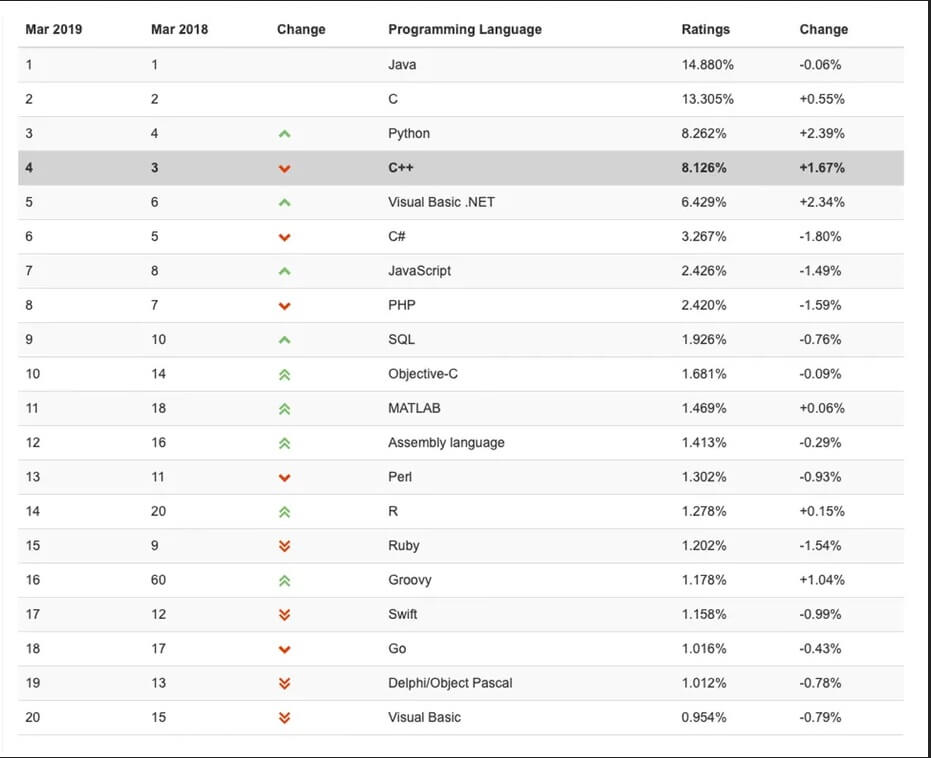
Python continues to be one of the most popular languages from many years. According to TIOBE, Python is ranked among the top programming languages. Built With states that there are almost a million websites that use Python.

Programing Language(Source: tiobe.com)

Python is valued equally among startups such as Finance Strategists, mid-size companies such as EP Wealth, blue chip companies like Google, Quora, Netflix, and Spotify, and government organizations like NASA. Yet few people know why Python is one of the top programming languages for website development. So why has it gained great popularity and interest among startup founders?

Here’s what the Python Software Foundation says:

1. Powerful and quick

Python is powerful, and it may be used for virtually something. Initial and foremost, it may be used for all the world as a result of it offers several options by default, with normal libraries that cowl nearly any programming task.

2. Plays well with others

Python is purposeful enough to interface with code written in different programming languages. You’ll imbed your Python project into frameworks of various languages, and the other way around. This implies that you just will produce comes that blend Python with different programming languages (for example, C++) and acquire the most effective of 2 worlds.

3. Runs everywhere

Python is available for almost any operating system, including UNIX-based operating systems, Windows, mac OS, iOS, and Android. It also runs on various platforms, including IBM, AIX, Solaris, and VMS.

4. Friendly and easy to learn

Python is considered a highly effective way of coding because of its simple syntax and readability. Python is an easy-to-learn language, and thus there’s a large enough talent pool.

5. Open Source

Python is an open-source language administered and supported by an independent nonprofit foundation: the Python Software Foundation. One of the major advantages of open-source software is that it’s free to use, modify, and distribute.

Who uses Python?

Python is a multi-purpose language and can be used to build practically anything. Companies around the world use Python for artificial intelligence and machine learning, website development, scientific and numerical computing, gaming, and many other uses.

As for artificial intelligence, Python stands above other programming languages and is considered the best programming language for AI-powered applications.

Companies like Google, Facebook, and Dropbox tare using Python in one form or another for its flexibility, scalability, performance, and rapid development.

Python(Source- directlinedev.com)

Alternatives to Python

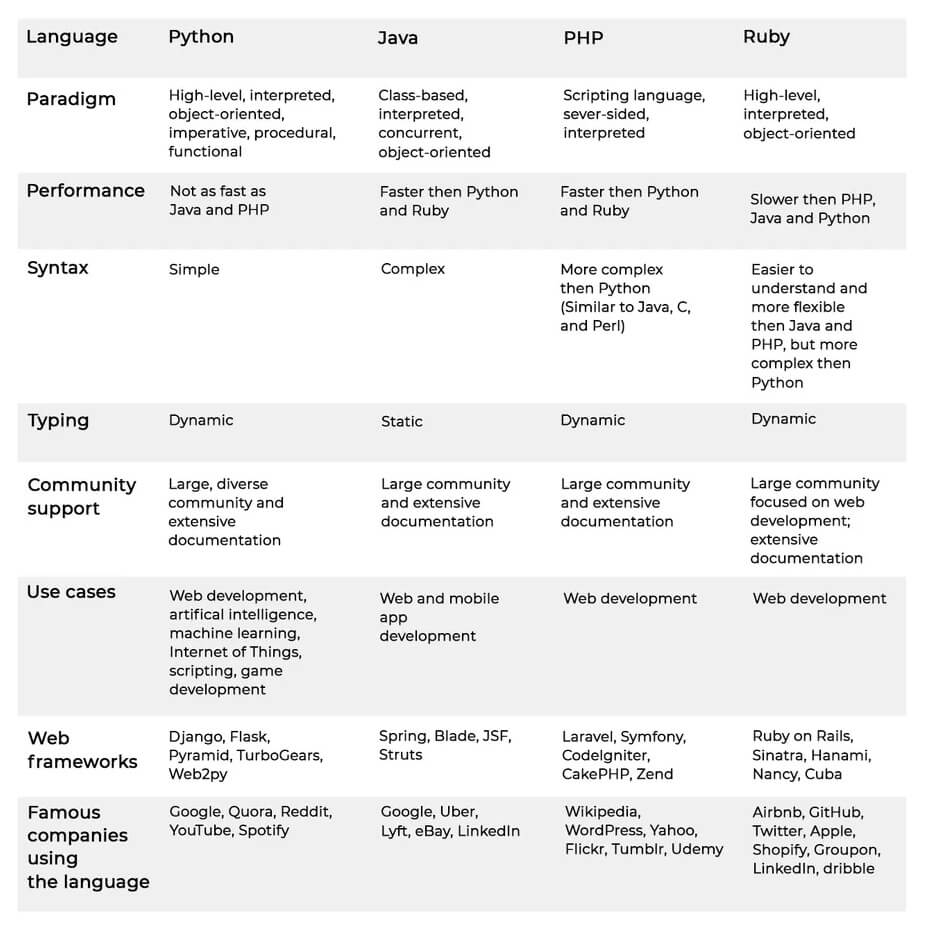
Python is often compared to other programming languages. Below, we briefly compare the most common alternatives to Python: Java, PHP, and Ruby.

Languages

FAQS

What makes python good?

Python is a high level programming language comes with a variety of standard library that covers many areas such as string processing, internet protocols and operating system interfaces.

Should I use Python 2 or Python 3?

Python has many versions but the main comparison is Python 2 and Python 3. Initially Python 3 was released December 2008 in order to rectify some fundamental flaws from Python 2.

The feature of Python 3 was “reduce feature duplication by removing old ways of doing things.”

What are the best Python IDEs?

There are many IDEs available in market but we are looking for an IDE that is dedicated towards Python development work. Some of the popular IDEs names are as below

  • Eclipse + PyDev
  • Sublime Text
  • Atom
  • PyCharm
  • Spyder

I’ve worked with the team at AndolaSoft on multiple websites. They are professional, responsive, & easy to work with. I’ve had great experiences & would recommend their services to anyone.

Ruthie Miller, Sr. Mktg. Specialist

Salesforce, Houston, Texas

LEARN MORE

Conclusion:

Web application development using python is more demanding in the present time because of its simplicity. Python web development has a very low entry threshold, but it is an extremely powerful programming language with numerous capabilities.

You can safely use it for development because of its highly active community and built-in frameworks. With Python, you can reduce the bounce rates of your website and speed up the page loading times. It makes your website loading time faster which helps the visitors to feel they are in a modern website.

Are you looking for Python development services? We have a team of experienced Python web application developer who can help you.

Get in touch with Andolasoft Python developers for free consultation.

Facts You Need To Know Before Developing A Healthcare App

We live in a digital age where an increasing number of consumers rely on mobile apps to buy products and use services. Mobile app development services have expanded so much to enable the growth of the mobile scene.

Practically every industry out there is now looking into the potential of mobile applications for delivering better services.

The healthcare sector is no exception. Today, healthcare providers are building applications that deliver telemedicine services and provide customers with many other functionalities on the go.

If you’re looking to build a healthcare app, you should be aware of the most important trends that will shape this sector in the near future.

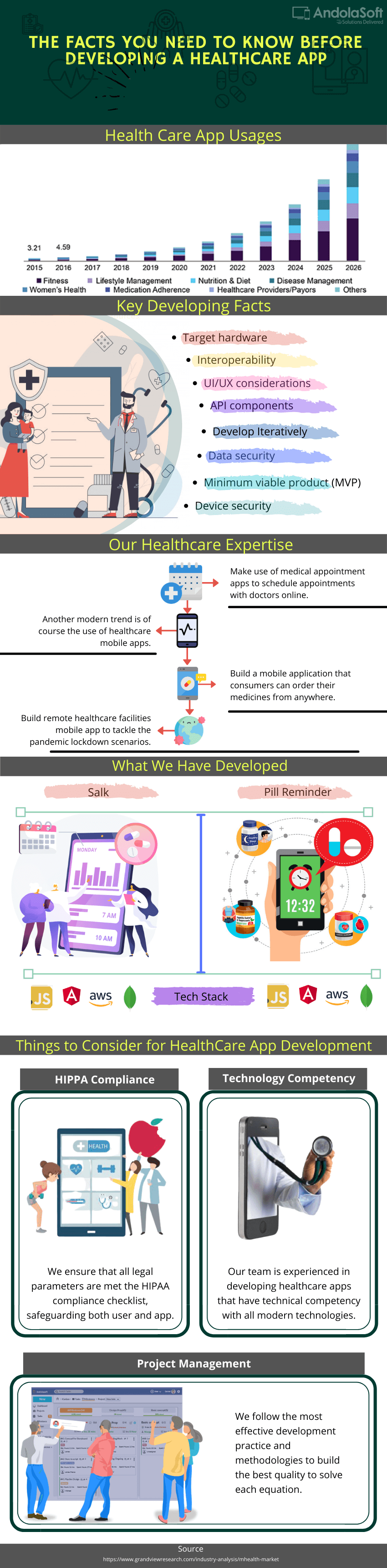
Till now more than 97,000 such apps are listed in various app markets. Most of these are health and fitness apps, which enable the tracking of health parameters by users and provide users with an interesting insight into their fitness level.

Never miss an update for us. Join 10,000+ marketers and leaders.

This is certainly the best time to develop a mobile health app.

App development initiates with a rich understanding of what you want the medical app to do, for whom, and the setting it will be operating in.

As a developer, you must establish flawless and unmistakable requirements early into the project, or even in stages subject to development practice.

Healthcare Mobile App Development

Conclusion

Mobile applications are going to become a fixed point in the technological landscape in the healthcare industry.

And healthcare providers, doctors, and patients embrace the opportunities provided by mobile apps, we’re going to see the sector expand in new, exciting directions.

I’ve worked with the team at AndolaSoft on multiple websites. They are professional, responsive, & easy to work with. I’ve had great experiences & would recommend their services to anyone.

Ruthie Miller, Sr. Mktg. Specialist

Salesforce, Houston, Texas

LEARN MORE

At the end of the day, the driving need, the usability, and user-friendliness will decide the fate of your app.

In this throwaway society, principally with respect to apps, where frequently the usage of an app may well be over a few weeks, the true value of a healthcare app will be established in the period of use.

Want to develop a healthcare app? Let’s discuss!