How To Enhance Image Processing With Core Image In IOS Apps

Core Image is a powerful framework for image processing and analysis technology designed to provide real-time processing for still and video images. This helps you easily apply filters to images, such as modifying the hue, exposure or vibrant. It uses the GPU or CPU rendering path to process the image data very fast.

Core Image can be chained with multiple filters to an Image or video frame at once by creating custom effects. Core Image provides us more than 90 built-in filters on iOS and over 120 on OS X. You can set up filters by supplying key-value pairs for a filter’s input parameters. You can use the output of one filter as the input of another filter, to create amazing effects.

Here is how the Core Image is related to the iOS operating system
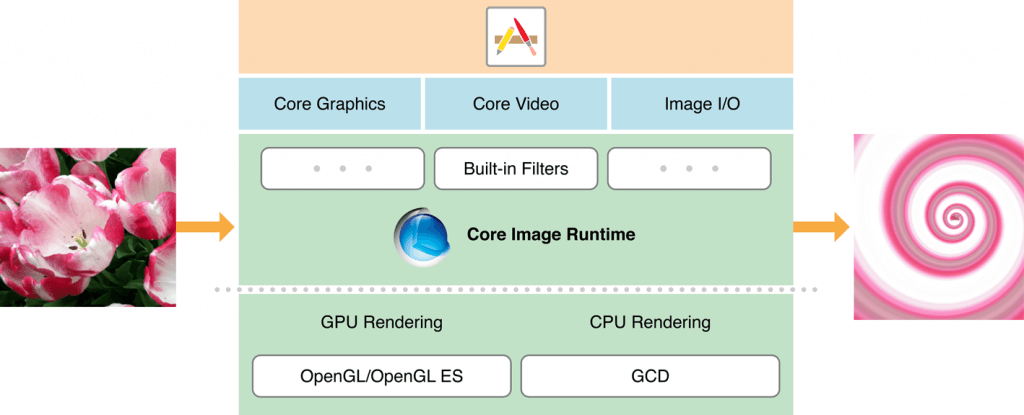
core-image-1024x415

Before going into Core Image, let’s know about the classes used in the Core Image framework:

CIContext:

The CIContext is a class which provides an evaluation context for rendering a CIImage object. CIContext class is used to take advantage of the built-in Core Image filters while processing an image.

CIImage:

The CIImage is a class which represent an image or holds an image data which may be created from a UIImage, from an image file, or from pixel data.

CIFilter:

The CIFilter class produces a CIImage object as output. A filter takes one or more images as input. The filter class has a dictionary that defines the attributes,so the parameters of a CIFilter object are set and retrieved through the use of key-value pairs. This helps us to add some beautiful effect on the input image.

Sample example:

In this example local image path is used in resource file to apply effects.

// 1 Retrieving the localimage.png path from resource bundle

NSString *filePath =
  [[NSBundle mainBundle] pathForResource:@"localimage" ofType:@"png"];
NSURL *fileNameAndPath = [NSURL fileURLWithPath:filePath];

// 2 Converting the normal image to CIImage object by passing the URL of original localimage.png

CIImage *beginImage =
  [CIImage imageWithContentsOfURL:fileNameAndPath];

// 3 Adding the filter SepiaTone effect to the localimage.png

CIFilter *filter = [CIFilter filterWithName:@"CISepiaTone"
                              keysAndValues: kCIInputImageKey, beginImage,
                    @"inputIntensity", @0.8, nil];
CIImage *outputImage = [filter outputImage];

// 4 showing the output image in the UIImageView

IImage *newImage = [UIImage imageWithCIImage:outputImage];
self.imageView.image = newImage;

Note : Here we can change the value of the CIFilter value which is given 0.8 by using a slider which min value is 0 and max value is 1.

Here we have not used the CIContext to perform an CIFilter as said earlier. It helps us to make it easier.

Lets change the above code to include the CIContex:

CIImage *beginImage =
[CIImage imageWithContentsOfURL:fileNameAndPath];
 
// 1
CIContext *context = [CIContext contextWithOptions:nil];
 
CIFilter *filter = [CIFilter filterWithName:@"CISepiaTone"
keysAndValues: kCIInputImageKey, beginImage,
@"inputIntensity", @0.8, nil];
CIImage *outputImage = [filter outputImage];
 
// 2
CGImageRef cgimg =
[context createCGImage:outputImage fromRect:[outputImage extent]];
 
// 3
UIImage *newImage = [UIImage imageWithCGImage:cgimg];
self.imageView.image = newImage;
 
// 4
CGImageRelease(cgimg);

Let’s see what happened here:

Here we set up the CIContext object. The CIContext takes an NSDictionary that specifies options including the color format and whether the context should run on the CPU/GPU. Here the default values are fine and so you passed as nil for that argument.

Here we used an method on the context object to draw a CGImage. Calling this method createCGImage:fromRect: on the context with the supplied CIImage will give us an output as CGImageRef.

Next, we converted the CGImage to UIImage using “imageWithCGImage”.

At last we release the CGImageRef as CGImage. CGImage is a C API which need to free memory even it runs with ARC.

Note: To know about all available filters write the following code and call the method in viewDidLoad / onLaunch. The filters are written on the console log.

-(void)logAllFilters {
NSArray *properties = [CIFilter filterNamesInCategory:
kCICategoryBuiltIn];
NSLog(@"%@", properties);
for (NSString *filterName in properties) {
CIFilter *fltr = [CIFilter filterWithName:filterName];
NSLog(@"%@", [fltr attributes]);
}
}

Like this blog? I’d love to hear about your thoughts on this. Thanks for sharing your comments.

Containable Behavior in CakePHP

When we are going to retrieve records of (user) using User model, we can get the associated model’s record at the same time. That might not require at some point. To avoid this, CakePHP provides the bindModel/unbindModel methods. But this is not be a good practice. You can streamline your operation using the containable behavior. The performance and the speed will increased as well. It will mostly reduce the joining of tables.

Usage & Examples:

class User extends AppModel {
     public $actsAs = array('Containable');
   }

Where “User” is the model for which you are adding the containable behavior.

You can also do the following on the fly:

$this->User->Behaviors->load(‘Containable’);

Operations:

Without the use of Containable

$this->User->find('all');
  Here User model has hasMany relation with the Comment.
  [0] => Array
        (
            [User] => Array
                (
                    [id] => 1
                    [title] => First article1
                    [content] => aaa1
                    [created] => 2008-05-17 00:00:00
                )
            [Comment] => Array
                ( [0] => Array
          (
            [id] => 1
            [User_id] => 1
            [author] => Daniel1
            [email] => dan@example.com1
            [website] => http://example.com1
            [comment] => First comment1
            [created] => 2008-05-17 00:00:00
          )
        [1] => Array
          (
            [id] => 2
            [User_id] => 1
            [author] => Sam1
            [email] => sam@example.net1
            [website] => http://example.net1
            [comment] => Second comment1
            [created] => 2008-05-10 00:00:00
          )
      )
  )
  [1] => Array
  (
    [User] => Array
      (...

Using Containable:

Case 1: If we need only User data.

$this->User->contain();
      $this->User->find('all');
  OR
  $this->User->find('all', array('contain' => false));
  Out Put:
  [0] => Array
        (
            [User] => Array
                (
                    [id] => 1
                    [title] => First article1
                    [content] => aaa1
                    [created] => 2008-05-17 00:00:00
                )
        )
       [1] => Array
        (
            [User] => Array
                (
                    [id] => 2
                    [title] => Second article1
                    [content] => bbb1
                    [created] => 2008-05-10 00:00:00
                )
        )
  Case 2: With complex associations
       $this->User->contain('Comment.author');
           $this->User->find('all');
 
           // or..
 
           $this->User->find('all', array('contain' => 'Comment.author'));
  Out put:
  [0] => Array
        (
            [User] => Array
                (
                    [id] => 1
                    [title] => First article1
                    [content] => aaa1
                    [created] => 2008-05-17 00:00:00
                )
            [Comment] => Array
                (
                    [0] => Array
                        (
                            [author] => Daniel1
                            [User_id] => 1
                        )
                    [1] => Array
                        (
                            [author] => Sam1
                            [User_id] => 1
                        )
                )
        )
 
   $this->User->find('all', array('contain' => 'Comment.author = "Daniel1"'));
 
    Out put:
  [0] => Array
        (
            [User] => Array
                (
                    [id] => 1
                    [title] => First article1
                    [content] => aaa1
                    [created] => 2008-05-17 00:00:00
                )
            [Comment] => Array
                (
                    [0] => Array
                        (
                            [id] => 1
                            [post_id] => 1
                            [author] => Daniel1
                            [email] => dan@example.com1
                            [website] => http://example.com1
                            [comment] => First comment1
                            [created] => 2008-05-11 00:00:00
                        )
                )
        )
  [1] => Array
        (
            [User] => Array
                (
                    [id] => 2
                    [title] => Second article2
                    [content] => bbb2
                    [created] => 2008-05-22 00:00:00
                )
            [Comment] => Array
                (
                )
        )

The gray area showing that the User data always returned irrespective of the “Comment”.

Pagination Using Containable:

Including the ‘contain’ parameter in the $paginate property we can achieve find(‘count’)
and find(‘all’) on the model. This is a most valuable feature of CakePHP.

$this->paginate['User'] = array(
    'contain' => array('Comment', 'Tag'),
    'order' => 'User.name'
  );
  $users = $this->paginate('User');

If you are searching for PHP or CakePHP developers, then we are the ideal and cost savvy option for you.

Like this blog? I’d love to hear about your thoughts on this. Thanks for sharing your comments.

3 Reasons Why future Web Design be Responsive

Responsive Web Design is an approach of laying out a website such that the website provides an optimal viewing experience — ease of reading and navigation with a minimum of resizing, panning, and scrolling — across a wide range of devices and screen sizes(from desktop computer to mobile devices).
The designer creating a Responsive Design should ensure that the website’s navigation elements, screen-layouts, text, images, audio/video players and other UI elements re-adjust themselves on a variety of devices. Thus, one need not spend extra time and money in creating and maintaining one “mobile version” and another “desktop version” of the website.

Now, having understood what is Responsive Web Design, let us understand why Responsive Design is important while creating websites.

  1. Mobile Usage is Exploding like never before
    According to a Morgan Stanley report, Mobile internet usage is expected to cross over desktop usage by 2014.

    • Over 20% of Google searches are being performed on a mobile device.
    • One half of local searches are made on mobile devices
    • 86% of mobile users are using mobile devices while watching tv
    • 61% of people have a better opinion of brands when they offer a good mobile experience
    • In the United States, 27% of internet users only access the internet on a mobile device
  2. Responsive Adapts to Diverse Devices and Screen size
    As smartphone and tablet adoption rapidly increases, so does the importance of mobile-friendly website.

    One of the most appealing aspects of responsive web design is that a responsive website can provide a great user experience across many devices and screen sizes. This is an important characteristic, since it is impossible to anticipate all the devices and screen sizes searchers will use to access your site. A site that works well regardless of these variables will provide a better and more consistent user-experience than a separate mobile site that is designed for a specific device and screen size.

  3. Responsive Design is Preferred for SEO/Digital Marketing
    In June 2012 at SMX Advanced, Google’s Pierre Farr went on record to declare that Google prefers responsive web design over mobile templates. Having one single URL makes it easier for Google bot to crawl site, Google’s external link algorithm and reduces the chance of on-page SEO issues. For all these reasons, responsive sites typically perform better and are easier to maintain than a separate, mobile template site.

    If SEO is part of your digital marketing strategy, having a mobile–friendly website is becoming essential. Also in order to have separate desktop and mobile site requires need to have separate SEO campaigns. Managing one site and one SEO campaign is far easier than managing 2 sites with equal number of campaigns. This is a key advantage a responsive website has over a separate mobile site.

dtl2

Andolasoft has expertise in designing responsive websites. Check out some of our free responsive web templates.

Like this blog? I’d love to hear about your thoughts on this. Thanks for sharing your comments.

 

Benefits of Choosing Cloud Management Service by Startups

Cloud computing is a Internet based computing that relies on sharing computing resources rather than having local servers or personal devices to handle applications.

In cloud management service, we can easily access multiple number of computers via Internet.

Cloud computing phenomenon is well suited for startups, because it will help you to give the  security and performance needs of your organization.

  • Major Benefits of Cloud Service

The main intent of the startups to grow the business. For this reason, startups are looking for strategies from where they can get maximum productivity or output within limited time frame and resources.

Cloud Computing provides powerful and flexible infrastructure, so that your staffs are able to work from anywhere, anytime from any device.

In this way you can give full attention to your business without worrying about IT infrastructure. Some of the benefits of cloud computing are as follows:

  • Reduces Operational Cost

By the help of cloud computing, one user can reduce the operational cost such as cost of data storage, software updates, management, and quality control.

Now you can get the cloud computing service at affordable price.

  • Scalability and Speed

In cloud computing service, the user does not need to install software or hardware for new application.

They can easily scale up or down the services according to the business requirement as there are many data centers are located in multiple location.

  • Innovation

With cloud computing, the user does not need to manage or own the resources.

It provides user the complete benefits like faster prototype development, testing and validation.

  • Optimal Resource Utilization

Cloud computing is environment friendly. With the help of Cloud, we can easily share servers, storage and network resources with multiple users.

  • Device Independence

Cloud computing services can be used and accessed from any device such as Desktop, Notebook, Smartphone, iPhone etc.  

SEE ALSOHow Cloud Computing will affect staffing and recruitment

How To Make Static Framework IOS Device Independent?

In our previous post, we had mentioned the steps to create a Static Library or Framework for iOS. Here, we will illustrate the steps to make it device independent, i.e. the library can be used to develop app for all iOS devices, instead of recreating the code for each device.

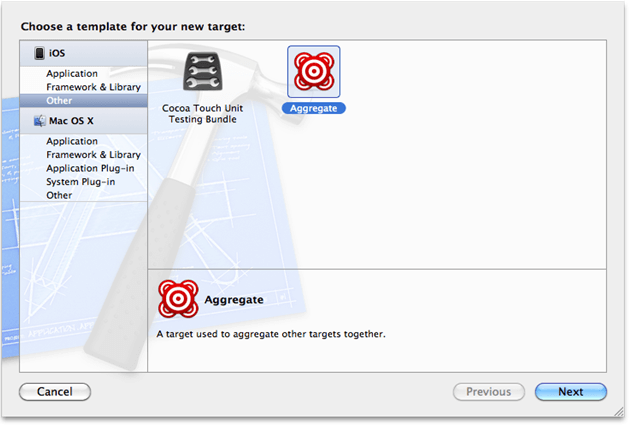
Step 1: Create an Aggregate Target

  • Click File >> New Target and create a new Aggregate target in Other menu.

  • Name your aggregate target – like ‘Framework’

xcode_image

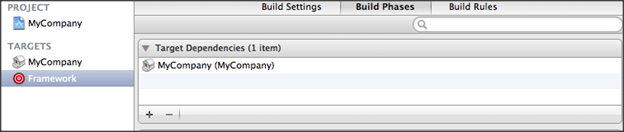
 Step 2: Adding the Static Library as a Dependent Target

  • Add the static library target to the ‘Target Dependencies’.

framework-image

Step 3: Build the ‘Other’ Platform

  • To build the ‘Other’ platform, use a ‘Run Script’ phase.

  • Add a new ‘Run Script’ build phase to your ‘Aggregate’ target and paste the following code.
set -e
 
set -e
 
set +u
 
# Avoid recursively calling this script.
 
if [[ $SF_MASTER_SCRIPT_RUNNING ]]
 
then
 
   exit 0
 
fi
 
set -u
 
export SF_MASTER_SCRIPT_RUNNING=1


SF_TARGET_NAME=${PROJECT_NAME}
 
SF_EXECUTABLE_PATH="lib${SF_TARGET_NAME}.a"
 
SF_WRAPPER_NAME="${SF_TARGET_NAME}.framework"


# The following conditionals come from
 
# https://github.com/kstenerud/iOS-Universal-Framework


if [[ "$SDK_NAME" =~ ([A-Za-z]+) ]]
 
then
 
   SF_SDK_PLATFORM=${BASH_REMATCH[1]}
 
else
 
   echo "Could not find platform name from SDK_NAME: $SDK_NAME"
 
   exit 1
 
fi


if [[ "$SDK_NAME" =~ ([0-9]+.*$) ]] then
 
   SF_SDK_VERSION=${BASH_REMATCH[1]}
 
else
 
   echo "Could not find sdk version from SDK_NAME: $SDK_NAME"
 
   exit 1
 
fi


if [[ "$SF_SDK_PLATFORM" = "iphoneos" ]]
 
then
 
   SF_OTHER_PLATFORM=iphonesimulator
 
else
 
   SF_OTHER_PLATFORM=iphoneos
 
fi


if [[ "$BUILT_PRODUCTS_DIR" =~ (.*)$SF_SDK_PLATFORM$ ]]
 
then
 
   SF_OTHER_BUILT_PRODUCTS_DIR="${BASH_REMATCH[1]}${SF_OTHER_PLATFORM}"
 
else
 
   echo "Could not find platform name from build products directory: $BUILT_PRODUCTS_DIR"
 
   exit 1
 
fi


# Build the other platform.
 
xcodebuild -project "${PROJECT_FILE_PATH}" -target "${TARGET_NAME}" -configuration "${CONFIGURATION}" -sdk ${SF_OTHER_PLATFORM}${SF_SDK_VERSION} BUILD_DIR="${BUILD_DIR}" OBJROOT="${OBJROOT}" BUILD_ROOT="${BUILD_ROOT}" SYMROOT="${SYMROOT}" $ACTION


# Smash the two static libraries into one fat binary and store it in the .framework
 
lipo -create "${BUILT_PRODUCTS_DIR}/${SF_EXECUTABLE_PATH}" "${SF_OTHER_BUILT_PRODUCTS_DIR}/${SF_EXECUTABLE_PATH}" -output "${BUILT_PRODUCTS_DIR}/${SF_WRAPPER_NAME}/Versions/A/${SF_TARGET_NAME}"


# Copy the binary to the other architecture folder to have a complete framework in both.
 
cp -a "${BUILT_PRODUCTS_DIR}/${SF_WRAPPER_NAME}/Versions/A/${SF_TARGET

Step 4: Build to verify

  • Now  you have set up an environment to build a distributable <project_name>.framework

  • Build the ‘Aggregate’ target

  • Expand the Products group in X-Code, right click the static library and click ‘Show in Finder’

Note: If this doesn’t open Finder to show the static library, then try opening

~/Library/Developer/Xcode/DerivedData/<project name>/Build/Products/Debug-iphonesimulator/.

  • In this folder you will find your <project_name>.framework folder.

You can now share the <project_name>.framework among other iOS app developers.

How To Create A Gridview With ‘UICollectionView’ In IOS6 & Above

What Is ‘UICollectionView’?

‘UICollectionView’ is a class introduced in iOS 6 SDK. It helps developers in creating grid view to handle ordered collection of data items using customizable layouts. ‘Collection view’, available in this class is like ‘UItableview’ which supports multiple column layouts.

Getting Started:

Create new ‘.h‘ and ‘.m‘ files to display the images.

In ‘ShowImagesViewController.h

#import <UIKit/UIKit.h>
@interface ShowImagesViewController :UICollectionViewController
{
NSArray *allImages;
}
@property (nonatomic, retain) NSArray *allImages;
@end

In ‘ShowImagesViewController.m

#import "ShowImagesViewController.h"
@implementation ShowImagesViewController
@synthesize allImages;
- (void)viewDidLoad
{
[superviewDidLoad];
allImages = [NSArrayarrayWithObjects:@"pizza.jpeg",
@"sides_img.png", @"sandwich_img.png", @"pizza_img.png",
@"pasta_img.png", @"drinks_img.png", @"pizza.jpeg",
@"sides_img.png", @"sandwich_img.png", @"pizza_img.png",
@"pasta_img.png", @"drinks_img.png", nil];
}
 
- (void)didReceiveMemoryWarning
{
[superdidReceiveMemoryWarning];
// Dispose of any resources that can be recreated.
}
- (BOOL)shouldAutorotateToInterfaceOrientation:
(UIInterfaceOrientation)interfaceOrientation
{
return YES;
}
- (NSInteger)collectionView:(UICollectionView *)collectionViewnumberOfItemsInSection:(NSInteger)section
{
returnrecipeImages.count;
}
- (UICollectionViewCell *)collectionView:(UICollectionView *)collectionViewcellForItemAtIndexPath:(NSIndexPath *)indexPath
{
staticNSString *identifier = @"Cell";
UICollectionViewCell *cell = [collectionView
dequeueReusableCellWithReuseIdentifier:identifier
forIndexPath:indexPath];
 
UIImageView *allImageView = (UIImageView *)[cell viewWithTag:100];
allImageView.image = [UIImageimageNamed:[allImagesobjectAtIndex:indexPath.row]];
return cell;
}
- (void)collectionView:(UICollectionView *)collectionViewdidSelectItemAtIndexPath:(NSIndexPath *)indexPath{
}
@end

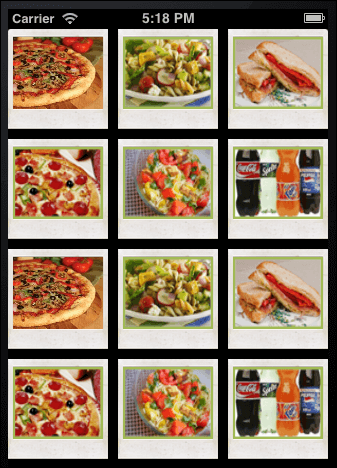
Example of Grid layout using ‘UICollectionViewController

uicollectionview

Conclusion:

‘UICollectionViewController’ creates ‘Grid’/’Tile’ layout much faster and offers intuitive user interface in iOS 6 devices.